 Jam SQL Studio
 Published: 2026-05-15 • Updated: 2026-05-20
Enum Columns: A Dropdown Filter for the status / kind / role Columns Your Schema Forgot to Document
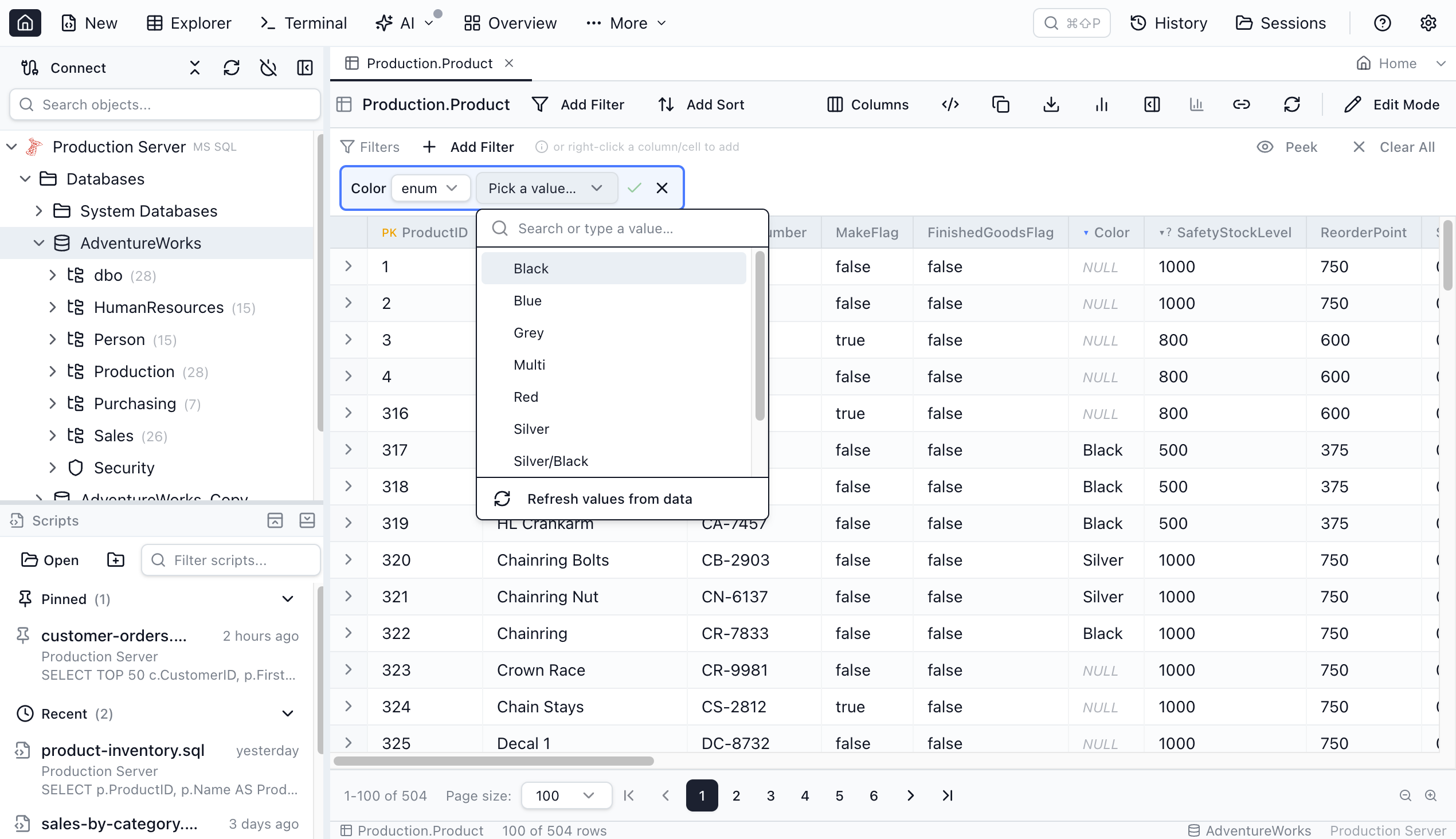
Most real databases store low-cardinality categorical data in plain VARCHAR or INT columns. status, kind, role, priority, tier, country_code. There's no schema-level signal that these columns have a fixed set of values, so every filter is a guessing game — you have to remember (or SELECT DISTINCT first) before you can write WHERE status = '...'. Jam SQL Studio 1.4.10 introduces enum columns: declare a column as an enum once, and its filter chip gains a dedicated enum operator backed by a dropdown of the actual values, sourced from your database (plain = / != stay free-text).
Before and after
Before. You open the orders table. You want to see only rows where status is cancelled. You type cancelled. No results. Was it canceled? CANCELLED? cancel? You write a one-off SELECT DISTINCT status FROM orders in another tab, scroll the result, copy the string, paste it back into the filter. Multiply by every categorical column on every table you've ever filtered.
After. The first time you declare orders.status as an enum, Jam SQL Studio reads the values once and caches them. From then on the filter chip on that column defaults to the enum operator with a values dropdown. You click cancelled from the list. Filter commits. No typing, no spelling variants, no exploratory SELECT DISTINCT.
What "declaring a column as an enum" actually means
An enum column is a user-declared piece of metadata that lives on top of the schema, not in it. The DDL stays untouched. Only Jam SQL Studio knows about the declaration, and it uses that knowledge to:
- Add a dedicated
enumfilter operator whose value input is an EnumValuePicker — a small dropdown with a search input and the cached values (free-text=/!=stay available). - Render a blue header glyph on the column so you know it's been declared and can open the values inspector at a click.
- Expose the same declare / inspect actions on both result grids — the inline glyph plus filter-chip dropdown in Table Explorer, and the column-header right-click menu in the Query Editor.
This is the third metadata layer Jam SQL Studio adds on top of the raw schema, alongside loose foreign keys and JSON column declarations. All three live in the same per-database MetaInfo file, all three are exportable / importable, all three are team-shareable.
Three value sources, tried in priority order
When you declare a column as an enum, Jam SQL Studio doesn't ask you to type the values — it reads them from the database in priority order:
- Native enum types. On MySQL, the
ENUM(...)andSET(...)column types. On PostgreSQL, user-definedpg_enumtypes. Read once frominformation_schema/pg_catalog. No sampling, no scanning — the values are part of the schema definition. - Column-level
CHECKconstraints.CHECK (status IN ('draft','published','archived'))and the PostgresANY(ARRAY[...])variant. Parsed statically fromsys.check_constraints(MSSQL),pg_get_constraintdef(Postgres),INFORMATION_SCHEMA.CHECK_CONSTRAINTS(MySQL 8.0.16+),ALL_CONSTRAINTS(Oracle), orsqlite_master.sql(SQLite). Again, no row-scanning. - Sampled
SELECT DISTINCT. Fallback for plain string and integer columns.SELECT col FROM tbl GROUP BY colwith engine-appropriateLIMIT 201/TOP 201/FETCH FIRST 201 ROWS ONLY. Capped at 200 distinct values, bounded to 100,000 scanned rows, and hard-failed at a 5-second wall-clock timeout.
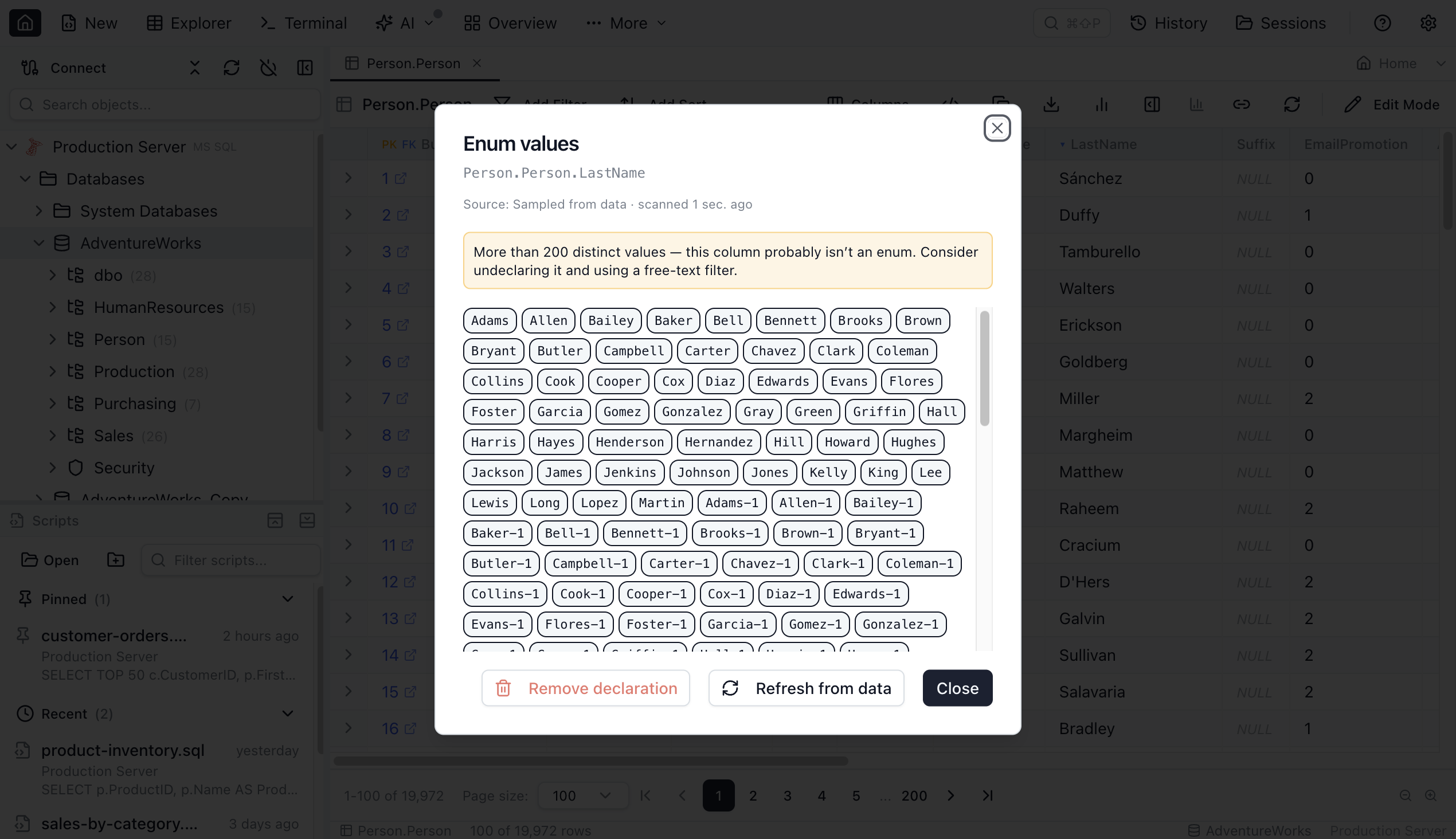
If the sampler hits the 200-value cap, the dropdown shows a truncated banner — "more than 200 distinct values; this column probably isn't an enum." That's a useful signal: a column with hundreds of distinct values isn't categorical, and a dropdown isn't the right UI for it.
Safety rails
The sampler is the only enum operation that touches user data, and it's designed to be safe by default:
- 200 distinct values maximum. Beyond that the dropdown isn't useful UX anyway, and the truncated banner sets expectations.
- 100,000 rows scanned maximum. Bounds the work on huge tables — the engine stops emitting rows once the limit is reached.
- 5-second hard timeout. Wall-clock; the orchestrator aborts the extraction and surfaces a clear message instead of letting the UI freeze.
All three limits are enforced in the EnumExtractor layer, not at the SQL layer, so they hold even if the engine takes time to plan or stream results. If the timeout fires the extraction is aborted and the picker shows a clear error — there's no "keep waiting" prompt, exceeding the budget is a hard failure by design.
Header glyphs that tell you what's possible
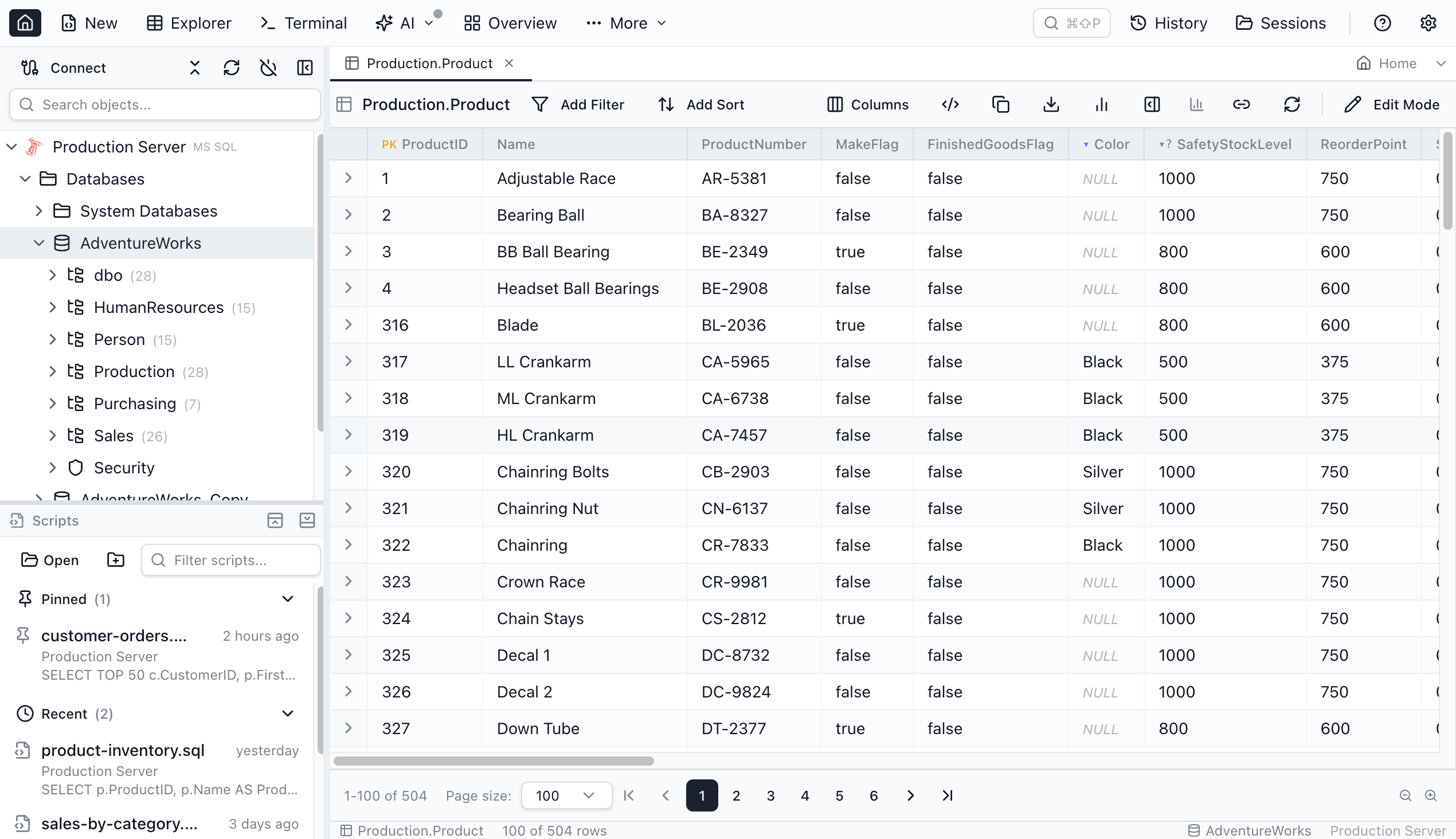
The Table Explorer column header shows a small glyph that communicates enum state at a glance — the Query Editor results grid has no inline glyph, so there the same Declare / Configure / Details actions live in the column-header right-click menu instead. The eligible ▾? glyph only appears when the column name looks categorical (status, type, role, …) — a column that's eligible by type but has an unrelated name stays glyph-free so the marker doesn't become noise; you can still declare it from the header's right-click menu or by picking the enum filter operator.
| Glyph | Meaning | What clicking does |
|---|---|---|
Blue ▾ | Column is declared as an enum. | Opens the values inspector: see all values, see the source (native / check / sampled), refresh the sample, or remove the declaration. |
Gray ▾ | Native enum column, not yet declared. | One-click promotion: declares the column using its native enum values so the filter chip immediately becomes a dropdown. |
Gray ▾? | Eligible and the name looks categorical (status, type, role, …). Columns eligible by type but not by name show no glyph — use the right-click menu or the enum operator. | Opens the "Declare as enum" dialog with a sampled preview — confirm to declare, cancel to leave the column as free text. |
The filter chip after declaration
Once a column is declared, the Table Explorer filter chip on that column behaves differently:
- A dedicated
enumoperator appears in the chip's operator dropdown — selected by default on declared and native enum columns, and listed at the bottom for eligible ones. - Pick
enumand the value input becomes a dropdown trigger; click it and the popover opens with a search input and the list of cached values. - Type to filter the list; click a value to select it. The filter commits immediately — no extra Apply step.
- The list is a hint, not a constraint: type a value that isn't in it and a Use “your value” row appears so you can still filter by it.
- The popover footer shows the source (native / check / sampled) and a Refresh from data action for re-sampling when the underlying data has changed.
=and!=stay free-text — theenumoperator is additive, so you never lose the ability to type an ad-hoc value.
The picker is cache-first: opening it reads the cached values from MetaInfo and renders the list instantly. If the cache is empty (just-declared column), a brief loading spinner runs the extraction in the background, then the dropdown populates.
Cross-engine parity
All five engines support every value source the engine itself supports. The user-facing UX is identical across engines — the same glyphs, the same dialog, the same dropdown.
| Engine | Native enum | CHECK constraint | Sampled distinct |
|---|---|---|---|
| MSSQL | — | sys.check_constraints | SELECT TOP 201… GROUP BY col |
| PostgreSQL | pg_enum.enumlabel | pg_get_constraintdef (parses IN and ANY(ARRAY[...])) | SELECT … GROUP BY col LIMIT 201 |
| MySQL | ENUM(...) / SET(...) from INFORMATION_SCHEMA.COLUMNS | INFORMATION_SCHEMA.CHECK_CONSTRAINTS (8.0.16+) | SELECT … GROUP BY col LIMIT 201 |
| Oracle | — | ALL_CONSTRAINTS | SELECT … FETCH FIRST 201 ROWS ONLY |
| SQLite | — | Regex parse of sqlite_master.sql | SELECT … GROUP BY col LIMIT 201 |
MySQL and PostgreSQL are the only supported engines with first-class native enum types — that's a property of the engines themselves, not a tooling limitation. MSSQL, Oracle, and SQLite users typically express enum-shaped columns through CHECK constraints, which Jam SQL Studio reads from each engine's catalog.
How other SQL tools handle enum-shaped columns
The dropdown-from-known-values pattern shows up in a few places, but rarely as a coherent cross-engine feature backed by a per-database metadata layer.
- SSMS, pgAdmin, MySQL Workbench, Oracle SQL Developer. Filtering on a categorical column is free-text. None offer a per-column "this is an enum" declaration or a sampled-values dropdown.
- Azure Data Studio. Retired February 2026 — never had this kind of metadata layer.
- DBeaver. Honors native MySQL
ENUMand Postgrespg_enumin some grid contexts. Doesn't infer enums fromCHECKconstraints, and doesn't sample distinct values to give you a dropdown on a plainVARCHARcolumn. - DataGrip. Similar story — native enum types are recognised, but there's no first-class declaration UI that promotes a plain string column to enum-with-dropdown behaviour.
- Jam SQL Studio. A single, declarative metadata layer across all five engines. Native enums where the engine has them,
CHECKconstraints where it doesn't, a sampled fallback for the rest. One declaration, one dropdown, every filter chip.
Lifecycle: declare once, share forever
- Discover. Open Table Explorer — a gray
▾?flags eligible columns whose name looks categorical (gray▾for native enum types). For any other eligible column, right-click the header for Declare as enum or pick theenumoperator at the bottom of the filter dropdown. - Declare. The "Declare as enum" dialog opens with a sampled preview. Confirm.
- Filter. The
enumoperator is now the column's default; its value input is a dropdown. Pick a value — filter commits. - Inspect. Click the blue
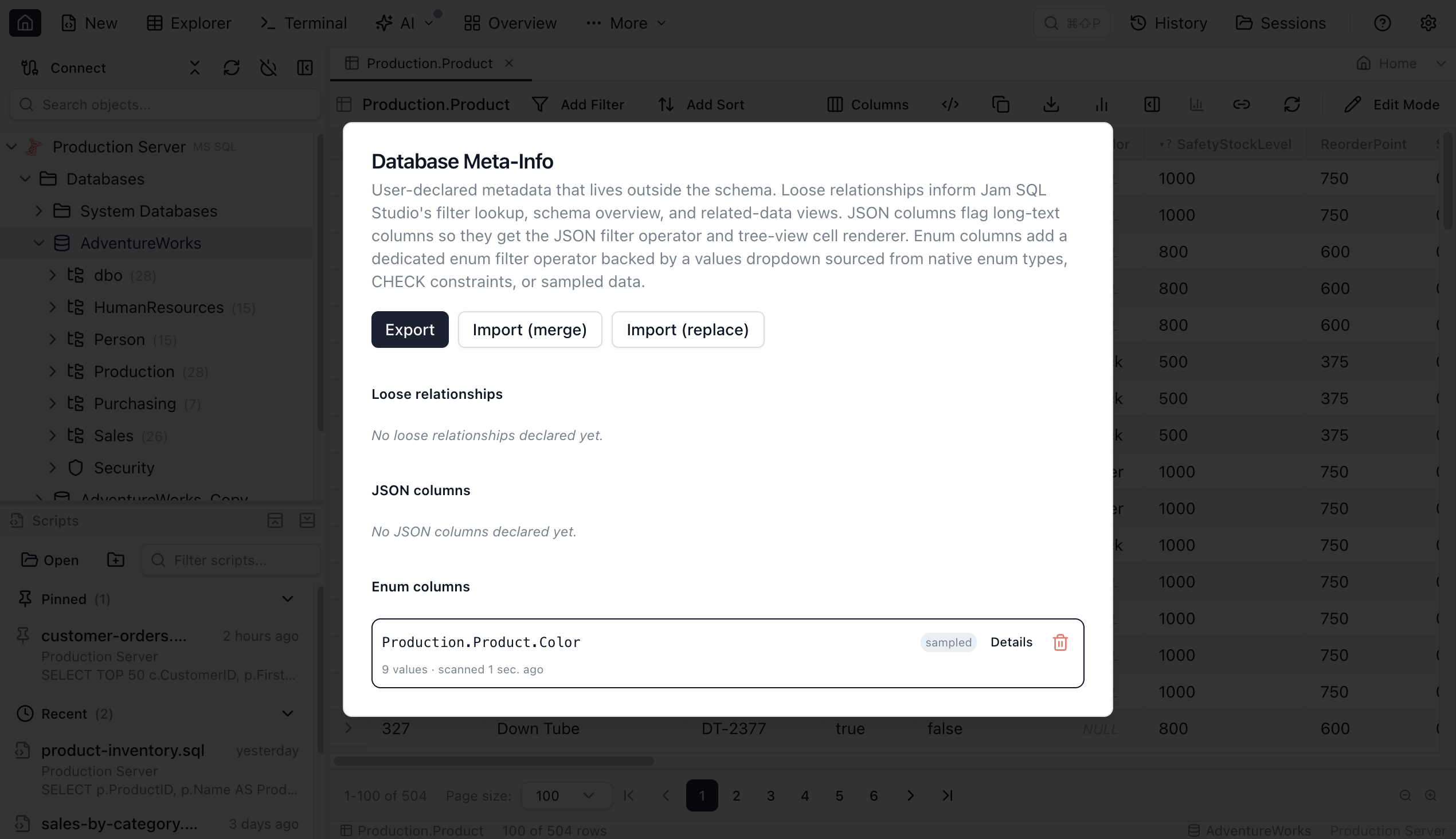
▾glyph (or Details in the MetaInfo manager) to see all cached values, the source, when it was last scanned, and a Refresh from data action. - Share. Export the per-database MetaInfo file. A teammate imports it — the same dropdowns appear on their machine.
- Remove. Trash icon on the row in MetaInfo manager, or Remove declaration in the inspector. The
enumoperator drops back to opt-in (or disappears);=/!=free-text filtering is unaffected.
What's deferred
Today's release ships the filter-chip experience and the metadata plumbing. Three obvious follow-ups are explicitly out of scope for 1.4.10:
- An IN (…) multi-value picker on the filter chip. Today the picker commits a single value; multi-select is a separate slice.
- Enum-aware data-entry forms in the Table Editor — using the same declared values to populate dropdowns on insert / update.
- Schema-suggestion mode that scans an entire database and proposes enum declarations for every eligible column.
The metadata layer is designed so each of these is purely additive — they read the same declarations the filter chip reads today.
Quick Answers
Short answers to common questions about enum columns.
Q: What is an enum column in Jam SQL Studio?
A: An enum column is any column you've declared as having a finite, known set of values — status, kind, role, severity, tier. Once declared, the Table Explorer filter chip for that column gets a dedicated enum operator backed by a dropdown of the known values, while plain equals and not-equals stay free-text. The declaration is stored in the per-database MetaInfo file; it doesn't change the schema.
Q: Where do the dropdown values come from?
A: Three sources, tried in priority order: a native enum type (MySQL ENUM / SET or Postgres pg_enum), a column-level CHECK (col IN ('a','b','c')) constraint, or a sampled SELECT DISTINCT capped at 200 distinct values and 100,000 scanned rows. The first source that returns values wins; sampling only runs as a fallback.
Q: Which database engines support enum columns?
A: All five engines Jam SQL Studio supports: MSSQL, PostgreSQL, MySQL, Oracle, and SQLite. Native enum types are only available on MySQL (ENUM, SET) and PostgreSQL (pg_enum); the CHECK-constraint and sampled-distinct sources work on every engine.
Q: Will sampling distinct values hang on huge tables?
A: No. The sampler is capped at 200 distinct values and 100,000 scanned rows, and the orchestrator hard-fails any extraction that runs longer than 5 seconds. All three limits are enforced in the extractor layer, not at the SQL layer, so they hold even if the engine is slow to plan or execute.
Q: Can enum declarations be shared across a team?
A: Yes. Enum declarations live in the per-database MetaInfo file alongside loose foreign keys and JSON column declarations. The MetaInfo manager exports a JSON document teammates can import; merge mode keeps local declarations on conflict, replace mode overwrites everything. Note that the exported file includes the cached value sets, so strip the enumValueCache array if the values themselves should not be shared.
The takeaway
Low-cardinality categorical columns are everywhere in real schemas, and they're the columns you filter most often. Without a metadata layer, every filter is a typing exercise. With one, the values are right there in a dropdown the first time you ask. Jam SQL Studio 1.4.10 makes that one-time declaration cheap — three sources, three glyphs, one cross-engine UX — and stores it in a file your team can share like any other piece of schema documentation.
Enum Columns, on Every Engine
MSSQL, PostgreSQL, MySQL, Oracle, SQLite. Native enums, CHECK constraints, or sampled values — one declaration, one dropdown. Free for personal use.