 Jam SQL Studio
 Published: 2026-05-23 • Updated: 2026-06-01
Database Blueprint: a Git-versioned folder of .sql files in sync with your database
Database schema lives in a hard-to-version place. The information_schema view is authoritative, but you can't git diff a system catalog. Jam SQL Studio 1.4.10 introduces Database Blueprint: pick a database, pick an empty folder, and Jam materializes every table, view, procedure, function, and schema as a separate .sql file. The folder is then kept in two-way sync with the database — refresh from DB, preview changes, three-way merge against a baseline, or apply your local edits back via the built-in Schema Compare hand-off (which covers tables, views, procedures, functions, and schema definitions; table DDL edits in Tables/*.sql round-trip back across SQL Server, PostgreSQL, MySQL, and Oracle, with SQLite limited to add / drop column). There's a Git panel inside the Database Blueprint tab so you can stage, commit (with an auto-generated message), branch, pull, push, and resolve merge conflicts without leaving Jam. And it's not only schema: opt any table into data capture and Jam writes its rows to a tracked Data/ folder too, so reference and seed data version alongside the DDL — and Sync data folder → DB pushes row changes back to a linked database.
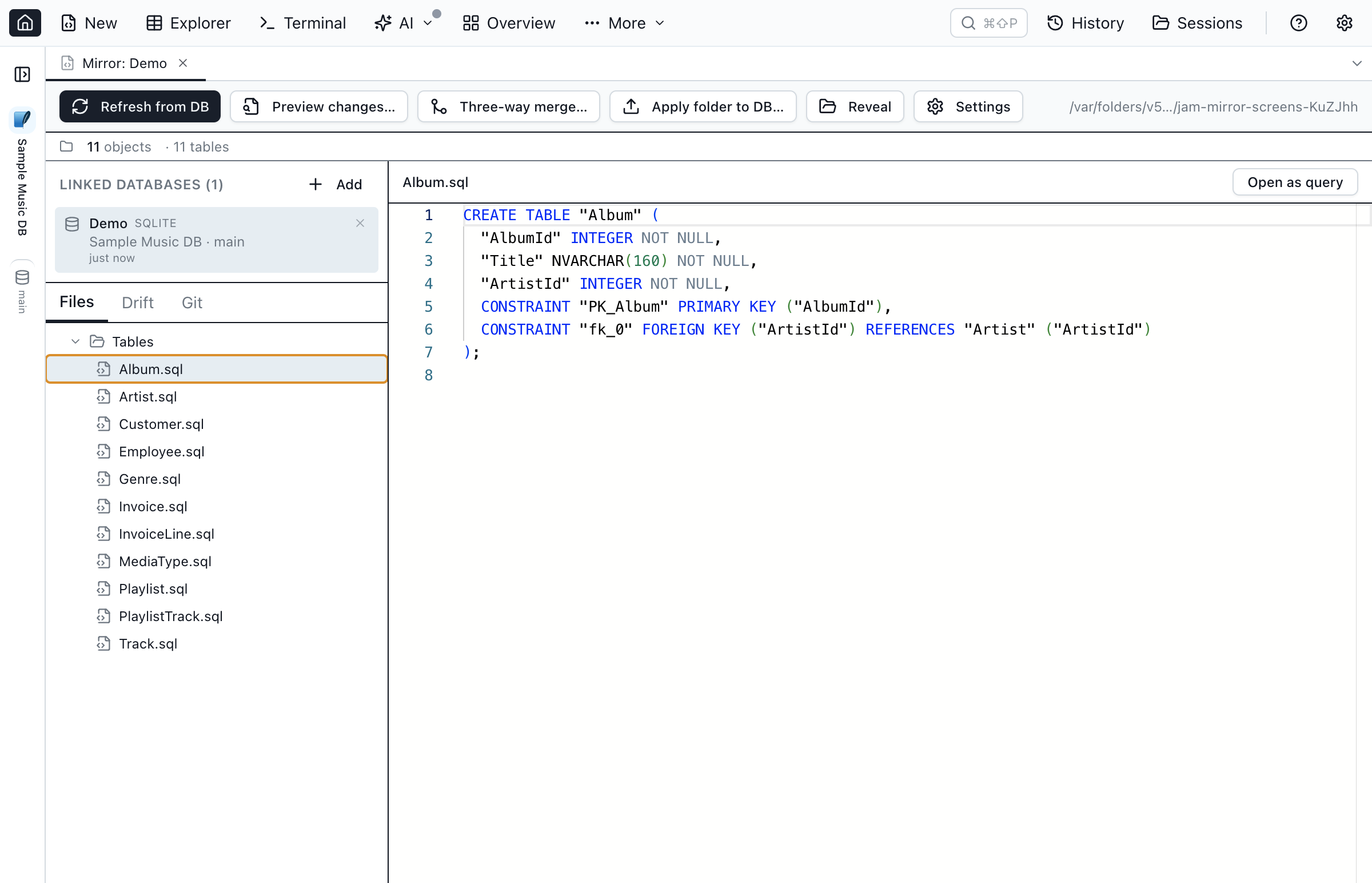
Why a folder of .sql files?
Existing schema-as-code tools tend to fall into one of three buckets:
- Migration frameworks (Flyway, Liquibase, dbmate, sqitch) version change sets, not state. They answer "how did we get here?" but not "what does the schema look like now?" without rebuilding it.
- Schema dump tools (
pg_dump --schema-only,mysqldump --no-data,SqlPackage /Action:Extract) produce a single monolithic file. A 30 MB schema diff is no fun in a code review. - Per-object DDL exports in IDEs (SSMS scripting, DataGrip's "DDL data source") produce nice per-object files, but the export is one-way: there's no diff, no merge, no concept of "apply back."
Database Blueprint sits between dumps and IDEs: per-object files, an explicit baseline, and a Schema-Compare-powered two-way round-trip for tables, views, procedures, functions, and schemas. You get the readability of one-file-per-object (git blame on Tables/dbo.Orders.sql tells you exactly who touched the Orders table) plus the round-trip safety of a baselined merge. Table DDL edits — columns, constraints, indexes, defaults, computed columns — flow back to the database across SQL Server, PostgreSQL, MySQL, and Oracle; SQLite covers add / drop column, since the engine has no in-place ALTER for the rest.
The folder layout
my-blueprint/
├── jamsql-blueprint.json           ← manifest (linked DBs, included object types, schemas)
├── jamsql-meta-Dev.json         ← per-link MetaInfo (loose FKs, JSON, enums) — tracked
├── .jamsql/                     ← internal cache (baseline + sidecar), in .gitignore
├── README.md
├── .gitignore                   ← optional default
├── Schemas/
│   └── dbo.sql                  ← CREATE SCHEMA [dbo];
├── Tables/
│   ├── dbo.Users.sql            ← CREATE TABLE + FK / CHECK / UNIQUE + indexes + triggers
│   └── dbo.Orders.sql
├── Views/
│   └── dbo.OrderSummary.sql     ← engine-native view CREATE
├── Programmability/
│   ├── Stored Procedures/
│   │   └── dbo.usp_UpdateOrder.sql
│   └── Functions/
│       └── dbo.fn_OrderTotal.sql
└── Data/                        ← captured table rows (tracked — shared with teammates)
    ├── dbo.Users.data.sql       ← upsert / replay script
    └── dbo.Users.data.json      ← row sidecar (PK, column types, rows)
The convention is SSMS-style across all five engines (MSSQL, PostgreSQL, MySQL, Oracle, SQLite) — familiar to people coming from SQL Server, and easy enough to pick up otherwise.
Setting up a blueprint
Right-click a database in the Object Explorer (or open the command palette with Cmd/Ctrl+Shift+P and search for "Database Blueprint") and Jam opens the setup dialog. Pick an empty folder, give the link a label (Dev, Stage, Prod — whatever you'll recognize), tick the object types and schemas to include, and click Create Database Blueprint.
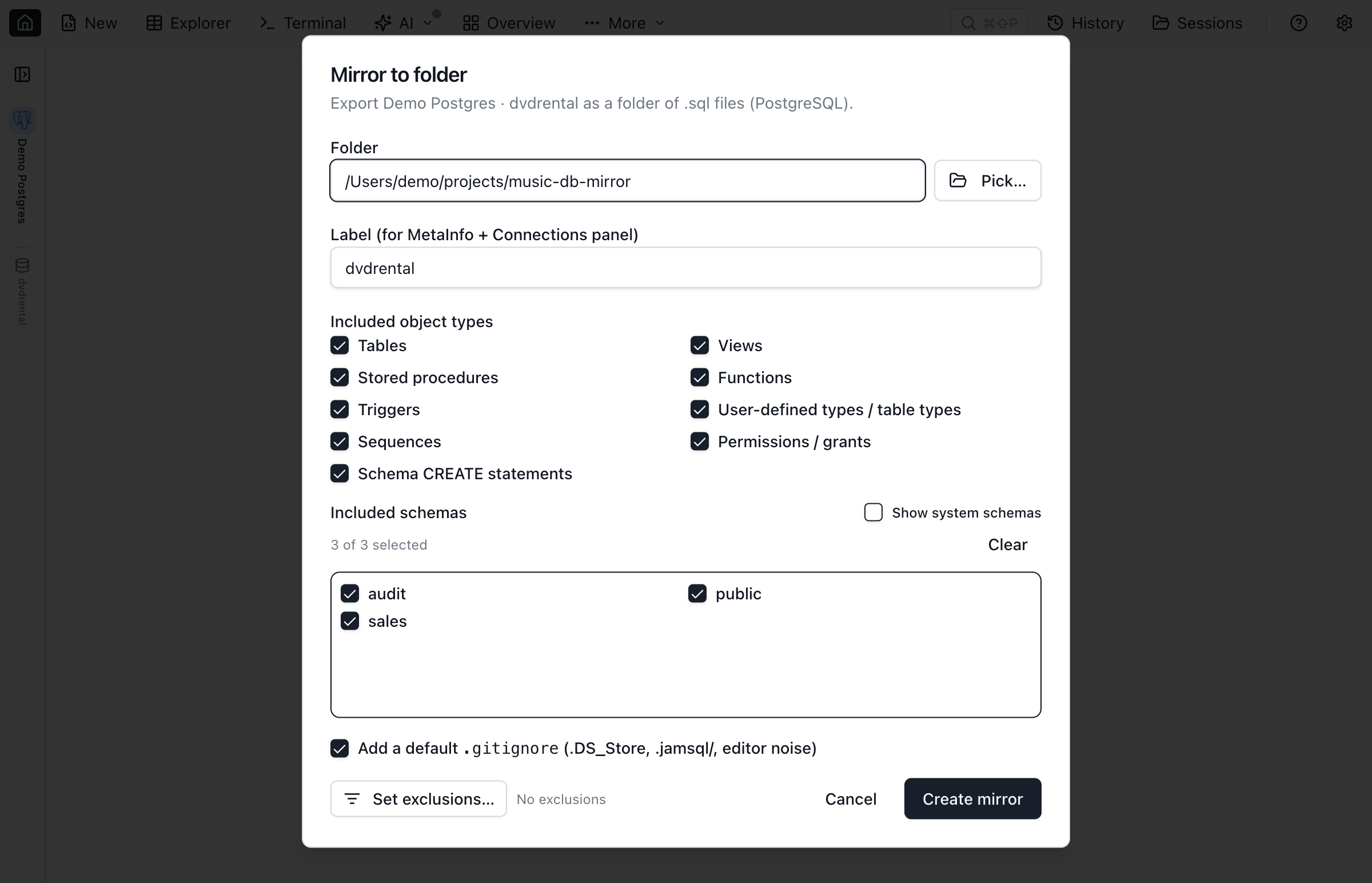
Jam emits the DDL for every selected object, writes a jamsql-blueprint.json manifest, exports a per-link MetaInfo file alongside it (so loose foreign keys, JSON column declarations, and enum declarations travel with the schema), and opens the Database Blueprint workspace tab.
Refresh, preview, three-way merge
Once the folder exists, four toolbar buttons cover the entire sync surface:
- Refresh from DB — re-emit every selected object's DDL from the linked database. Local edits are overwritten; the baseline snapshot is rewritten too, so the next three-way merge starts from a clean slate.
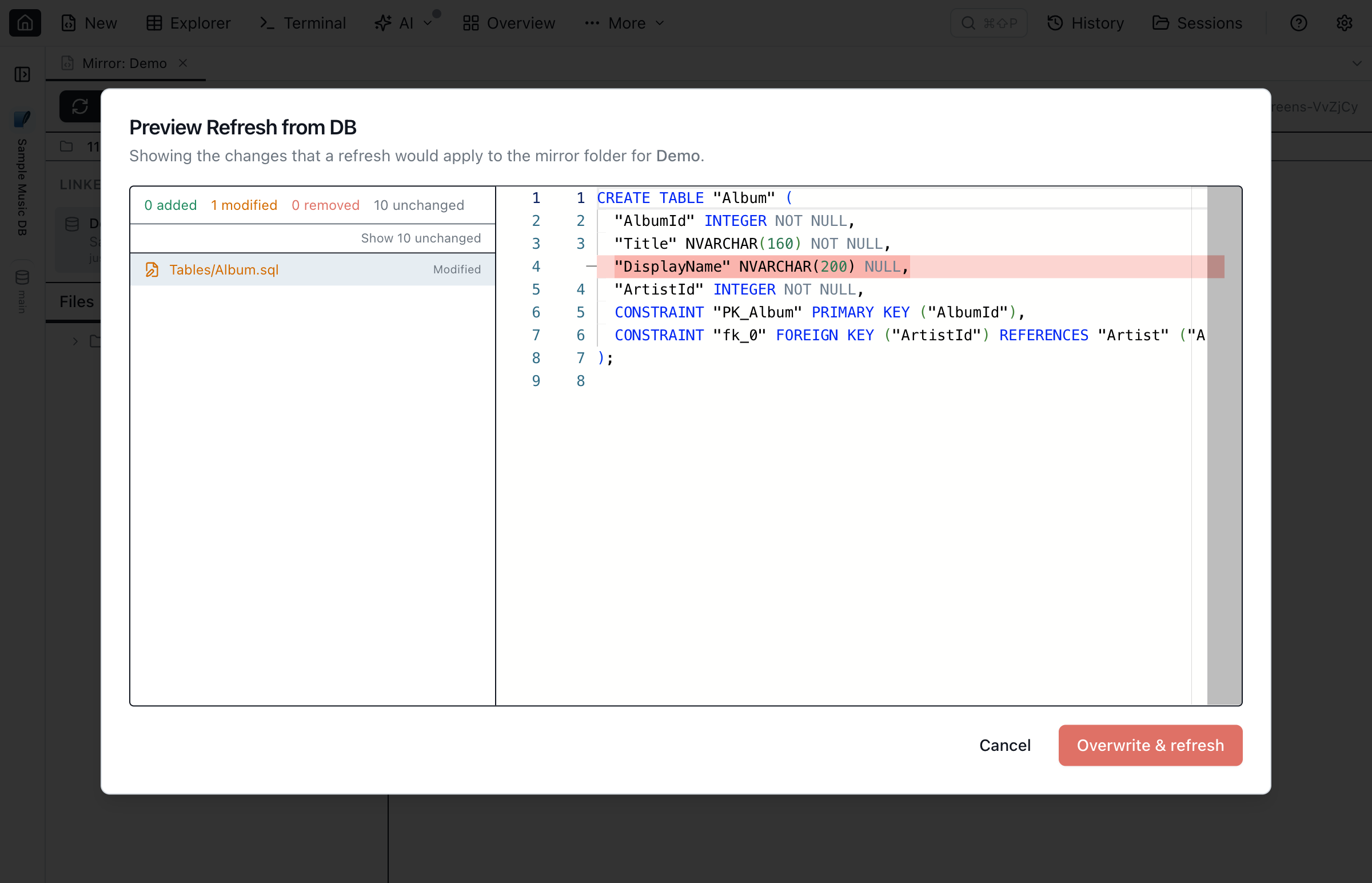
- Preview changes… — diff the database's current DDL against the on-disk files without writing anything. The dialog lists each file as added, modified, unchanged, or removed, with a Monaco side-by-side diff for the selected entry. Run it before Refresh from DB to see what the refresh would clobber.
- Three-way merge… — compare local edits, the baseline (last refresh), and the live database for each file. The dialog flags clean-merge candidates, local-only edits, db-only changes, and true conflicts; conflicts sort first.
- Apply folder to DB… — opens Schema Compare with the folder as the source endpoint and the linked database as the target, so you can review the generated DDL before executing it. This reuses the same Schema Compare you'd use for a DB ↔ DB diff — just with the folder providing one side of the snapshot.
Not just schema — sync table data too
Schema is only half of what teams want under version control. Lookup tables, enum / reference rows, feature-flag defaults, seed data for spinning up a fresh environment — that content drifts too, and a schema-only tool leaves it out of the repo. Database Blueprint covers it. During Refresh from DB, opt any table into data capture and Jam writes its rows into a tracked Data/ folder: a .data.sql upsert / replay script plus a .data.json sidecar that preserves the primary key and column types. Those files commit to Git alongside the DDL, so a teammate who clones the folder gets the data too.
To push row changes back, hit Sync data folder → DB in the toolbar. Jam diffs the folder's captured rows against the live table on the linked database, shows per-table insert / update / delete counts at a review step, then applies the changes FK-ordered, table by table. Schema (DDL) stays the job of Apply folder to DB via Schema Compare — the two are kept deliberately separate, so a data sync never rewrites a table and a schema apply never touches rows. Want a closer look first? Every table also has an Open in Data Compare action that loads the full Data Compare workspace — folder as the source, linked database as the target — so you can inspect row-level diffs in the grid and selectively generate a sync script instead of pushing every change at once.
Multi-environment in one folder
A single blueprint folder can link to several databases of the same engine. Use it to keep Dev, Stage, and Prod copies of the same schema in one repository, each with its own:
- Label — how the link appears in the Connections panel and in commit messages.
- Baseline cache at
.jamsql/snapshots/<label>/— so the three-way merge knows what "last refresh from this link" looked like. - MetaInfo file at
jamsql-meta-<label>.json— loose FKs / JSON / enum declarations per environment.
Switching links in the Connections panel scopes Refresh, Preview, three-way merge, and Apply to that link, so you can pull Dev's schema, compare it to Prod, and apply the diff — or vice versa — without leaving the tab.
Git integration
If the folder is a Git repository, the Git panel inside the Database Blueprint tab gives you the basics without leaving Jam:
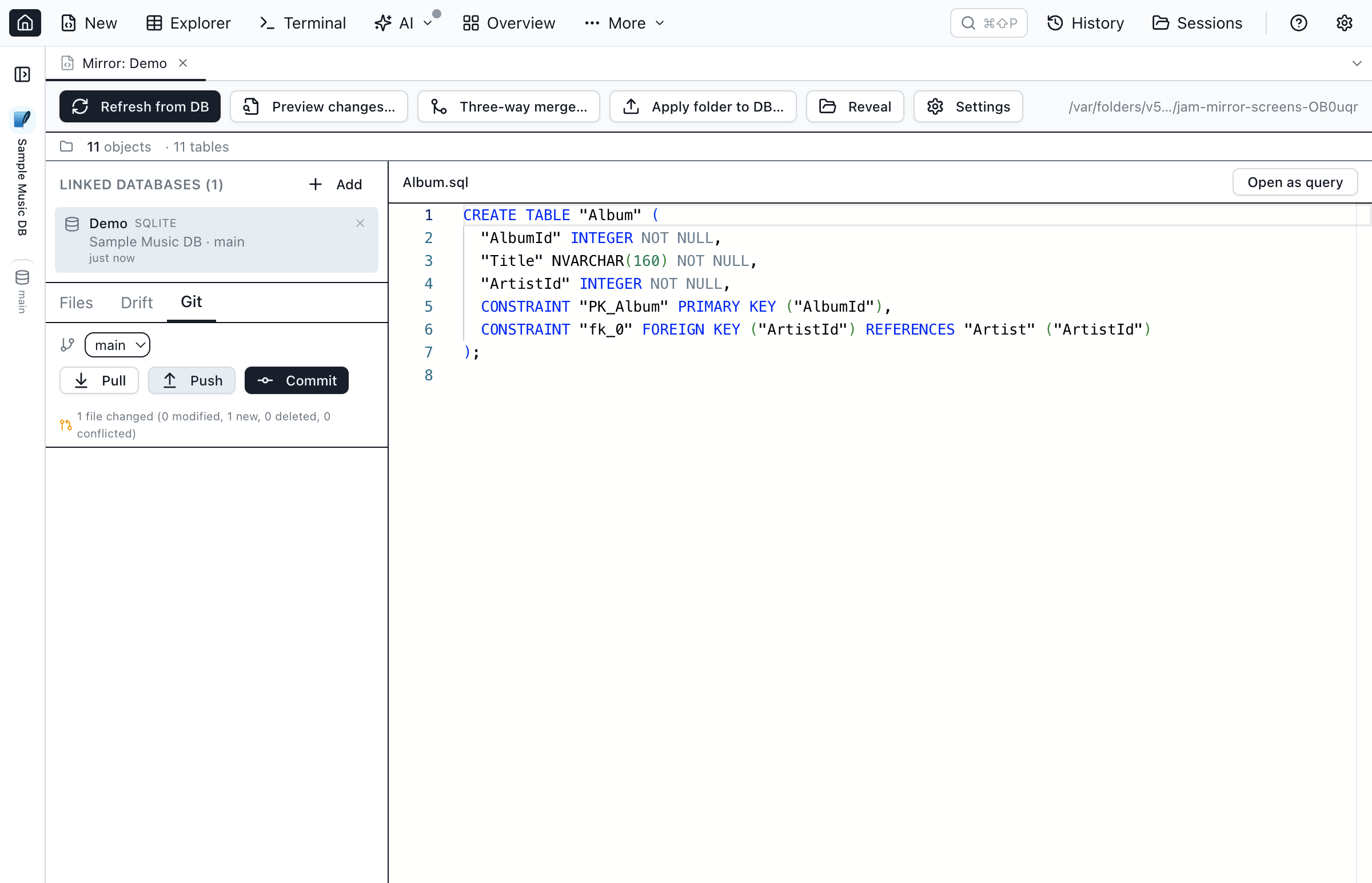
- Status. Current branch, tracking ref, ahead/behind counts, and per-category file counts (modified, new, deleted, conflicted).
- Initialize. If the folder isn't a repo yet, one click runs
git init. - Commit with auto-message. The commit message is keyed off the changed sub-folders — e.g.
Refresh from DB: 2 tables, 1 view, 1 proc (Dev). Deterministic, so re-running the same refresh produces the same message and you don't get a noisy diff in the commit list. - Branch switch, pull, push. No need to drop to the terminal for the everyday rounds.
- Merge-conflict resolution. When a pull leaves conflicted
.sqlfiles, the conflict dialog lists them, shows the raw file with<<<<<<</=======/>>>>>>>markers in a read-only Monaco viewer, and gives you Mark resolved per file (which runsgit add <path>). Resolve the conflict in your editor, mark it resolved in Jam, commit the merge.
DDL source policy: regenerated vs. native
For each object type, Database Blueprint picks the DDL source that's most useful for diffing and merging:
- Tables are regenerated by Jam from the schema snapshot — one canonical CREATE TABLE with column / constraint / index ordering that doesn't drift between connections. Foreign keys, CHECK constraints, UNIQUE constraints, indexes, and triggers are emitted inline so a single file owns the table's full definition.
- Views, procedures, functions, and triggers use the engine's native CREATE text verbatim — whatever was last applied. This is intentional: stored routines often contain hand-formatted code that round-trips poorly through a regenerator, and a verbatim copy means the file you see is exactly what's on the server.
- Schemas are emitted as a one-line CREATE SCHEMA (where the engine has a notion of schemas at all).
Personal-mode limits
Database Blueprint is available in the free Personal mode for databases with up to 200 objects (tables + views + procedures + functions). Larger databases require Pro mode. Pre-existing blueprints keep opening in Personal mode either way — only Create Database Blueprint and Refresh from DB are gated. This is the same threshold used by Schema Compare; the assumption is that anything under 200 objects is a personal-scale schema where you don't need a multi-environment dance.
Quick Answers
Short answers to common questions about Database Blueprint.
Q: What is Database Blueprint?
A: Database Blueprint is a Jam SQL Studio feature that materializes a database's full DDL as a folder of .sql files (one per table, view, procedure, function, schema) kept in two-way sync with one or more linked databases. Track the folder in Git and use Refresh from DB, Preview changes, three-way merge, or Apply folder to DB to keep the on-disk schema and the live database aligned. Apply folder to DB round-trips local edits to tables, views, procedures, functions, and schema definitions; table DDL edits in Tables/*.sql round-trip back across SQL Server, PostgreSQL, MySQL, Oracle, and SQLite (SQLite supports add / drop column only).
Q: Does Database Blueprint version table data, or only schema?
A: Both. Beyond DDL, you can opt any table into data capture during Refresh from DB: Jam writes its rows to a tracked Data/ folder as a .data.sql upsert script plus a .data.json sidecar (primary key + column types + rows), so the data commits to Git alongside the schema. Sync data folder to DB then diffs those captured rows against the live table and pushes row-level inserts, updates, and deletes to a linked database, or you can open any table in the full Data Compare workspace. Schema and data are synced by separate actions so neither overwrites the other.
Q: How does Database Blueprint handle conflicts between local edits and the database?
A: Each refresh writes a baseline snapshot to .jamsql/snapshots/<label>/. The three-way merge dialog compares local edits, that baseline, and the live database for each file, marking entries as clean-merge, local-only, db-only, conflict, added, or removed. Conflicts sort first so you can resolve them before refreshing.
Q: Does Database Blueprint require Git?
A: No. The folder works as a plain directory you can put anywhere on disk. But if it is a Git repo, the Git panel inside the Database Blueprint tab gives you status, init, branch switching, pull, push, commit-with-auto-message, and merge-conflict resolution without leaving Jam.
Q: Can one blueprint folder track several environments?
A: Yes. A single blueprint folder can be linked to multiple databases of the same engine — typically Dev, Stage, and Prod copies of the same schema. Each link gets its own label, baseline cache, and MetaInfo file; switching links in the Connections panel scopes Refresh, Preview, three-way merge, and Apply to that link.
Q: Is Database Blueprint in the free Personal mode?
A: Yes, for databases with up to 200 objects (tables + views + procedures + functions). Larger databases require Pro mode. Pre-existing blueprints keep opening in Personal mode either way — only Create and Refresh are gated.
Try it
Database Blueprint ships in Jam SQL Studio 1.4.10. Right-click a database in the Object Explorer, choose Database Blueprint to Folder…, and watch a per-object folder appear on disk. See the Database Blueprint docs for the full reference.