 Jam SQL Studio
 SQL Server Agent Jobs
on Mac and Linux
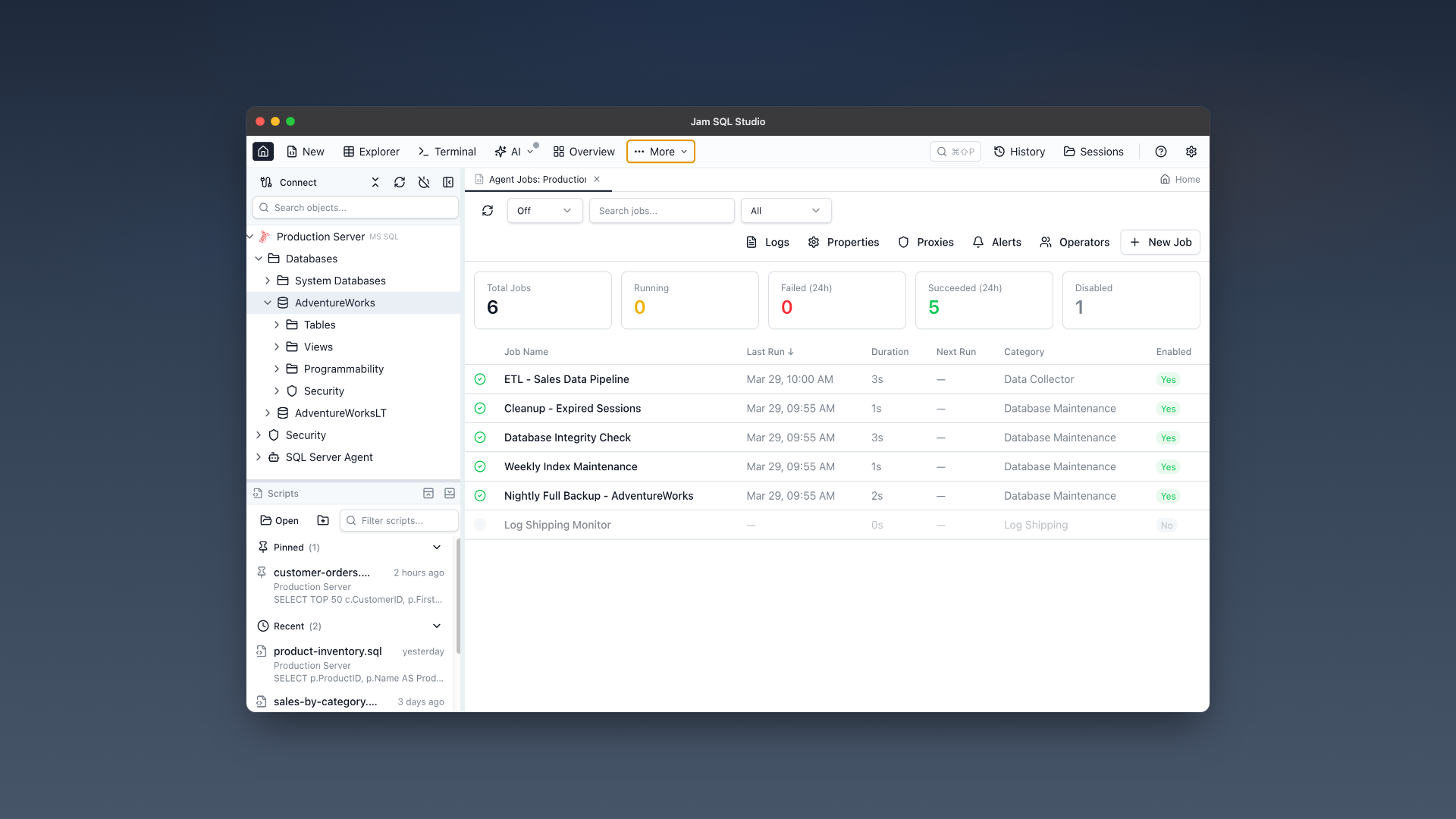
Monitor, create, and manage SQL Server Agent jobs without SSMS or a Windows machine. Jam SQL Studio brings the full Agent Jobs experience to macOS and Linux — jobs, operators, alerts, proxies, and error logs.
The Problem: Agent Jobs Are Locked to Windows
SQL Server Agent is critical infrastructure for thousands of organizations. But every tool for managing it requires Windows.
SSMS is Windows-Only
SQL Server Management Studio remains the only full-featured Agent Jobs GUI — and it only runs on Windows. Mac and Linux DBAs have no native option.
Azure Data Studio Was Retired
Azure Data Studio was retired on February 28, 2026. Its Agent extension only supported viewing and running jobs — no creating, editing, or managing operators, alerts, and proxies. Microsoft's replacement recommendation? "Use SSMS" (Windows-only).
T-SQL Is the Only Cross-Platform Option
Without a GUI, Mac and Linux DBAs resort to raw T-SQL: sp_start_job, sp_add_jobstep, sysjobhistory queries. It works, but it's slow, error-prone, and hostile to quick monitoring.
Complete Agent Jobs Management
Everything SSMS offers for SQL Server Agent — reimagined for a modern, cross-platform experience.
Jobs Dashboard
See all Agent jobs at a glance with status cards, color-coded grid, and real-time running indicators. Filter by status, search by name, sort by any column.
Job History & Timeline
Visual timeline of job executions with success/failure coloring, step-by-step breakdown, duration trends, and success rate statistics. Better than SSMS's flat grid.
Run & Stop Jobs
Start jobs immediately with one click, stop running jobs with confirmation, and get toast notifications on completion. Auto-refresh polling while jobs are running.
Create & Edit Jobs
Full job editor with multi-step support (T-SQL, CmdExec, PowerShell, SSIS), schedule configuration, notifications, and DDL script preview before execution.
Operators
Create and manage notification operators with email, pager, and net send contact info. View which jobs and alerts notify each operator.
Alerts
Configure SQL Server event alerts, performance condition alerts, and WMI event alerts. Set response actions, operator notifications, and delay between responses.
Proxies
Manage proxy accounts for non-sysadmin job step execution. Assign credentials and configure subsystem access for each proxy.
Agent Properties & Error Logs
View Agent service status, configuration properties, and browse Agent error logs with search filtering and log file selection.
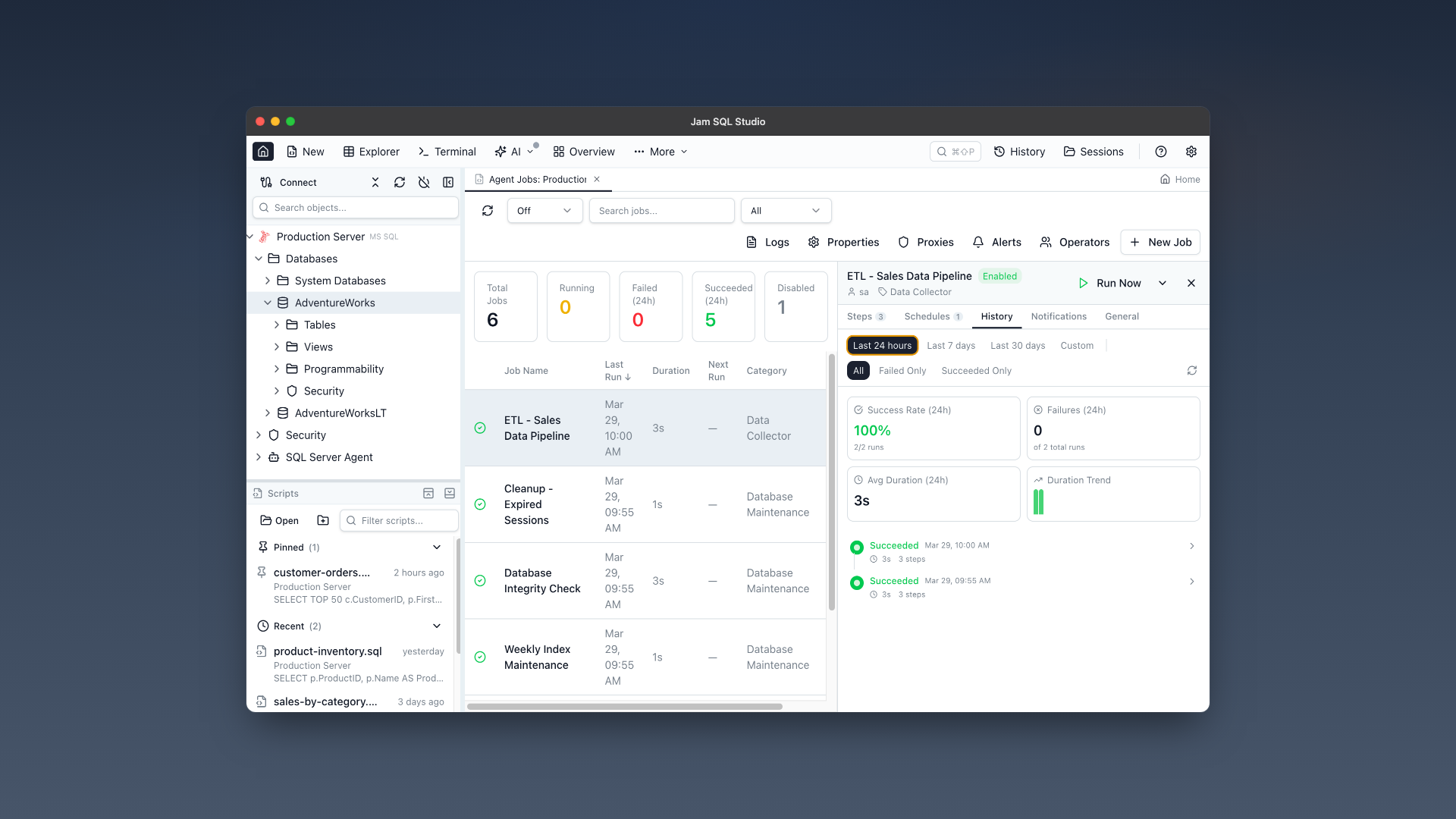
Job history timeline with step-by-step breakdown and success/failure coloring.
Feature Comparison
How Jam SQL Studio's Agent Jobs Manager compares to existing tools.
| Feature | SSMS | Azure Data Studio | Jam SQL Studio |
|---|---|---|---|
| Platform | Windows only | Retired (Feb 2026) | Mac, Linux, Windows |
| View Agent Jobs | Yes | Yes (extension) | Yes (dashboard + grid) |
| Run / Stop Jobs | Yes | Yes (extension) | Yes (with notifications) |
| Create / Edit Jobs | Yes | No | Yes (full editor) |
| Job History | Flat grid | Basic | Visual timeline + stats |
| Operators CRUD | Yes | No | Yes |
| Alerts CRUD | Yes | No | Yes (all 3 types) |
| Proxies CRUD | Yes | No | Yes |
| Agent Properties | Yes | No | Yes (read-only) |
| Error Logs | Yes | No | Yes (with search) |
| DDL Script Preview | Partial | No | Yes (before every action) |
| Dark Mode | No | Yes | Yes |
| Auto-Refresh | No | No | Yes (configurable) |
Get Started in 3 Steps
Connect to SQL Server
Add your SQL Server connection using the same credentials you use in SSMS. Supports SQL Authentication and Microsoft Entra ID.
Open Agent Jobs Manager
Click the toolbar button or expand "SQL Server Agent" in the Object Explorer. Your jobs, operators, alerts, and proxies are all there.
Built for DBAs on Any Platform
Mac & Linux DBAs
Stop RDP-ing into Windows to check a job. Monitor and manage Agent jobs directly from your Mac or Linux workstation.
Azure Data Studio Users
Azure Data Studio is retired. Jam SQL Studio provides full Agent management — not just the limited "view and run" that ADS offered.
DevOps & SRE Teams
Quick job monitoring during incidents without needing SSMS access. View history, check failures, and restart jobs from any platform.
Frequently Asked Questions
Can I manage SQL Server Agent Jobs on Mac?
Yes. Jam SQL Studio provides a full SQL Server Agent Jobs Manager on macOS (both Apple Silicon and Intel). You can monitor jobs, view history, create and edit jobs, manage operators, alerts, and proxies — the same capabilities as SSMS, but native on Mac.
Is there a way to view SQL Server Agent jobs without SSMS?
Yes. Jam SQL Studio is a cross-platform SQL IDE with a full Agent Jobs Manager. It works on Mac, Linux, and Windows. You can view all jobs with status, last run outcome, next scheduled run, and execution history — all without needing SSMS.
How do I run SQL Server Agent jobs from Mac or Linux?
Install Jam SQL Studio, connect to your SQL Server, and open the Agent Jobs Manager from the toolbar. Right-click any job and select "Run Now" to start it. Real-time status updates show when it completes.
Does Azure Data Studio support SQL Server Agent?
Azure Data Studio was retired on February 28, 2026. Its Agent extension only supported viewing and running jobs — not creating, editing, or managing operators, alerts, and proxies. Jam SQL Studio provides complete Agent management.
What SQL Server editions support Agent Jobs?
SQL Server Agent is available in Standard, Enterprise, and Developer editions. Express Edition does not include Agent. Jam SQL Studio detects Express Edition and shows a clear message.
What permissions do I need to manage Agent Jobs?
You need access to the msdb database. sysadmin gets full access. SQLAgentOperatorRole can start/stop all local jobs. SQLAgentReaderRole can view all jobs. SQLAgentUserRole can only see and start their own jobs. The UI adapts based on your permissions.
Stop RDP-ing Into Windows to Check a Job
Download Jam SQL Studio and manage SQL Server Agent jobs natively on your Mac or Linux workstation.