 Jam SQL Studio
 Azure Data Studio Retired Feb 2026 — Here's What to Use Instead
Microsoft retired Azure Data Studio on February 28, 2026. You can still download the final release (1.52.0), but it gets no more updates, security patches, or support. Microsoft's replacement is Visual Studio Code with the MSSQL extension, plus SSMS on Windows for SQL Server Agent. If you want one desktop app instead, Jam SQL Studio keeps the SQL notebooks, execution plans, schema compare and charts, adds data compare, SQL Server Agent jobs on Mac and Linux, and a local MCP server for AI agents, and imports your Azure Data Studio connections in one click. Mac, Windows, Linux; free for personal use, no account required.
Last updated September 26, 2026 • Mac, Windows, Linux • Free for personal use
Where to Download Azure Data Studio (the Final Release)
Looking for the Azure Data Studio download? Yes, you can still get it. Microsoft archived the final build and left the installers online so existing users can keep working while they migrate. The last version is Azure Data Studio 1.52.0, released June 18, 2025 — there will be no newer release.
- Microsoft's archived download page — Windows user/system installers,
.zip, macOS, and Linux (.deb/.rpm/.tar.gz): Download and install Azure Data Studio on Microsoft Learn. - GitHub releases — the final 1.52.0 build plus the extensions Microsoft previously hosted, attached as an archive: microsoft/azuredatastudio releases. The repository itself was archived on February 28, 2026 and is read-only.
- On a Mac — the macOS download is a
.zip. On Apple Silicon, Microsoft's install notes say you need Rosetta 2, because some Azure Data Studio backend services had not been converted to native ARM64. - Retirement details — Microsoft's official notice: aka.ms/ads-retirement.
Before you install it, know what “still downloadable” does not mean. The download works, but Azure Data Studio is retired: the GitHub repository is read-only, and there are no security patches, bug fixes, or support. Microsoft now recommends migrating to Visual Studio Code with the MSSQL extension, and SSMS for SQL Server Agent and full administration (see how a full SQL Server IDE compares to the VS Code MSSQL extension). If you only need to open an old .ipynb notebook or make a one-off connection, the final build still launches. But if this is your day-to-day SQL tool, install a maintained replacement instead so you keep getting security updates — Jam SQL Studio is a cross-platform option, free for personal use, that opens the same notebooks (details below).
“As an abandoned user of Azure Data Studio, I was left looking for a good replacement. I tried multiple options and JamSQL is my new go-to tool for SQL. It has everything I need and the development team at JamSQL has been super responsive to feedback with consistent product improvements!”
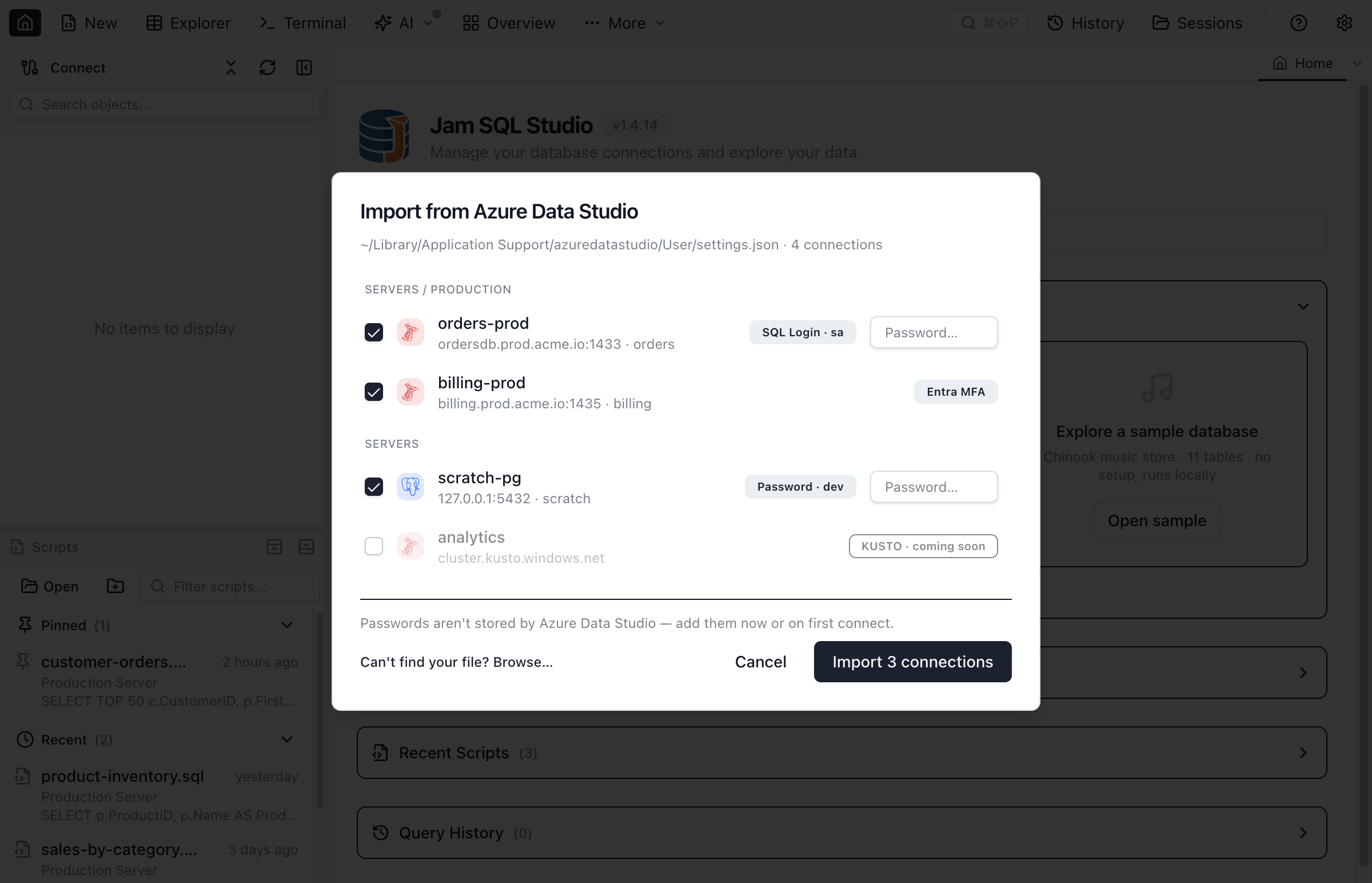
settings.json and imports your saved connections in one click — groups and auth types preserved.At a Glance
- Product
- Azure Data Studio (ADS)
- Status
- Retired / End of Life
- Retirement date
- February 28, 2026
- Announcement date
- February 6, 2025
- Final version
- 1.52.0 (released June 18, 2025 — final build)
- Final installers
- Still downloadable — Microsoft archive & GitHub
- Security updates
- None after February 28, 2026
- GitHub repository
- Archived, read-only since February 28, 2026
- Microsoft recommended successors
- VS Code with the MSSQL extension; SSMS (Windows) for SQL Server Agent and administration; PostgreSQL extension for VS Code
- Free cross-platform replacement
- Jam SQL Studio (Mac, Windows, Linux; free for personal use)
Sources: Microsoft Learn — What's happening with Azure Data Studio, the February 6, 2025 announcement, and GitHub releases. Checked September 26, 2026.
Retirement Timeline
The path from announcement to end of life took just over 12 months. These are the key dates on the Azure Data Studio retirement calendar.
- Feb 6, 2025Retirement announced. Microsoft published the retirement notice on the Azure SQL blog and Microsoft Learn, giving users approximately 12 months of lead time to plan their migration.
- Jun 18, 2025Final release (1.52.0). The last Azure Data Studio build, version 1.52.0, shipped on June 18, 2025. No newer version followed; Microsoft redirected engineering effort to the VS Code MSSQL extension.
- Mid 2025 – early 2026Maintenance-only wind-down. No new releases after 1.52.0. Existing installations kept working while teams planned their migration to a supported tool.
- Feb 28, 2026End of support. Official retirement date. Azure Data Studio is discontinued. No new releases, no security patches, no Microsoft support tickets. The same day, the microsoft/azuredatastudio GitHub repository was archived as read-only.
- Post Feb 28, 2026Current status (September 2026). Existing installations continue to launch and connect to SQL Server, Azure SQL, and PostgreSQL. Microsoft advises migrating to Visual Studio Code with the MSSQL extension; production use is discouraged because newly discovered CVEs will not be patched.
What “Retired” Means in Practice
In Microsoft terminology, a retired product is one that has reached end of life. For Azure Data Studio, the practical effects as of September 2026 are:
- No new features. Development has stopped. The feature set is frozen at the 1.52.0 release.
- No security patches. Newly discovered vulnerabilities in Azure Data Studio, its Electron runtime, or bundled extensions will not be fixed. This is the primary reason Microsoft recommends migrating off.
- No bug fixes. Crashes, query-grid issues, IntelliSense regressions, and connector bugs will remain unfixed.
- No official support. You cannot file a support case with Microsoft for Azure Data Studio, and the GitHub repository, issues included, is archived and read-only.
- Installers remain available. The final builds are still downloadable so existing users can keep working while they migrate, but new production installs are discouraged.
- Extensions are frozen too. The extension gallery survives only as an archive attached to the final GitHub release. Microsoft's replacement table maps them to VS Code: SQL Database Projects to the SQL Database Projects extension, Schema Compare and DACPAC to the MSSQL extension, SQL Server Profiler to its Query Profiler, PostgreSQL to the PostgreSQL extension — while SQL Server Agent goes to SSMS and MySQL is “pending announcement”. The Kusto extension has no listed replacement.
If you are running Azure Data Studio today, it will continue to launch and connect. But for any environment where security or compliance matters — which is most production databases — you should plan a migration.
Azure Data Studio Latest Version (Final)
The last shipped version of Azure Data Studio is 1.52.0, released June 18, 2025 — the final build before the February 28, 2026 retirement. If your installation reports a lower version, it is on an older monthly update; Microsoft released point updates approximately every 4–6 weeks during active development.
On Apple Silicon Macs, 1.52.0 still depends on Rosetta 2 for some backend services, per Microsoft's install notes. To check your own version: open Azure Data Studio and choose Help → About. A version lower than 1.52 means you're on an older build, and because updates have stopped there is no way to upgrade to anything newer.
There will be no Azure Data Studio 1.53 or 2.0. The product line is closed. For context on how Microsoft framed this, see their official Azure Data Studio retirement FAQ on Microsoft Learn.
What To Do Now: Migration Options
With Azure Data Studio retired, every team that relied on it has to pick a replacement. Microsoft split its functionality across Visual Studio Code extensions and SSMS rather than shipping a single successor. These are the realistic options as of September 2026.
1. VS Code + MSSQL extension — Microsoft's official recommendation
Install Visual Studio Code and the MSSQL extension (1.46.0 as of September 28, 2026). It has closed most of the gap: Microsoft lists the query plan visualizer, table designer, schema designer, schema compare, SQL notebooks (.ipynb with an MSSQL kernel), a query profiler, backup and restore, DACPAC/BACPAC and GitHub Copilot integration as generally available, on Windows, macOS and Linux including Arm64. What it doesn't cover: engines other than SQL Server, Azure SQL and Fabric (PostgreSQL is a separate extension, MySQL has no announced replacement), charts from query results, data compare, Kusto, and SQL Server Agent — Microsoft sends Agent work to SSMS. A good fit if you already live in VS Code and work mainly with SQL Server.
2. SQL Server Management Studio (SSMS) 22 — Windows only
The classic Microsoft SQL tool and Microsoft's named home for SQL Server Agent and full administration. SSMS 22.10.2 (September 28, 2026) includes GitHub Copilot, with Agent Mode generally available since that release, and Schema Compare and the Database DevOps workload for SQL projects, both generally available since 22.10.2. The blocker: SSMS 22 runs only on Windows 11 and Windows Server 2019–2025, needs administrator rights to install, and has no notebooks or result charts. If you used Azure Data Studio because you work on a Mac or Linux, SSMS is not a migration path.
3. Jam SQL Studio — one desktop app, Mac, Windows and Linux
A standalone SQL IDE that keeps the Azure Data Studio workflows in one app: IntelliSense, execution plans, schema compare, charts, SQL notebooks that open your ADS .ipynb files, and the Kusto workflow through a native Azure Data Explorer engine — plus data compare, SQL Server Agent jobs (beta) that run on Mac and Linux, PostgreSQL, MySQL, Oracle and SQLite in the same window, and a local MCP server for AI agents. It imports your ADS connections, and since 1.5.1 you can switch to an SSMS / Azure Data Studio keyboard scheme. Free for personal, non-commercial use; Pro ($9.99/month or $99/year) for work. No SQL Server Profiler equivalent.
4. Other third-party IDEs
DBeaver Community (free, open source, cross-platform; schema compare, data compare and charts are in its paid PRO editions) and DataGrip (free for non-commercial use since October 2025, paid for work) both connect to SQL Server and PostgreSQL.
Where Jam SQL Studio Fills the Gaps
Microsoft's successors cover SQL Server well, but split the job between an editor extension and a Windows-only app. These are the parts of the Azure Data Studio workflow they leave open.
Your Notebooks, Charts and Dashboards in One App
Open existing Azure Data Studio .ipynb notebooks without conversion; SQL cells share one session, so temp tables persist between cells. Chart any result set (bar, line, pie, area, scatter) and build SQL dashboards with chart, stat, table and pivot tiles — the pieces of ADS that Microsoft's feature list for the MSSQL extension doesn't include.
SQL Server Agent Off Windows
Microsoft's answer for SQL Server Agent after ADS is SSMS, which runs only on Windows. Jam SQL Studio's Agent Jobs manager (beta) browses jobs and history, runs and stops jobs, and manages operators, alerts and proxies from macOS, Windows or Linux.
Cross-Platform by Default
Desktop builds for macOS (Apple Silicon and Intel, as separate downloads), Windows 10 and 11 (x64), and Linux x64 and ARM64. No JRE and no Rosetta — see how it compares to every other SQL client for Mac.
A Local MCP Server for Any AI Agent
A local Model Context Protocol server lets Claude Code, Claude Desktop, Cursor, GitHub Copilot, Codex CLI and other agents query your databases. It is off by default, and each connection's permission level starts at Block; Read-only or approval-gated writes are opt-in. VS Code MSSQL and SSMS tie their AI features to GitHub Copilot.
Multi-Database in One Tool
SQL Server, Azure SQL Database, Azure SQL Managed Instance, PostgreSQL (including Azure Database for PostgreSQL), MySQL, MariaDB, Oracle, SQLite and Azure Data Explorer — one object explorer and query editor, execution plans on SQL Server, PostgreSQL, MySQL and Oracle, and schema and data compare across the five relational engines.
Bring Your Connections and Your Keys
Jam SQL Studio reads Azure Data Studio's settings.json and imports your saved SQL Server, PostgreSQL and Kusto connections in one click, with their server groups. Pick the SSMS / Azure Data Studio scheme in Settings → Keyboard Shortcuts to keep F5, Alt+Break and Ctrl+R. See how import works →
What's Free and What Isn't
The Personal tier is free for personal, non-commercial use, with unlimited connections, IntelliSense, execution plans, charts, notebooks and the MCP server. Schema compare (200 objects per schema), data compare (10,000 rows per table) and exports (100,000 rows) are capped there. Work use needs Pro at $9.99/month or $99/year, which lifts the caps. See pricing.
Frequently Asked Questions
Common questions about the Azure Data Studio retirement, its end-of-life status, and what to use instead.
Did Azure Data Studio really retire?
Yes. Microsoft officially retired Azure Data Studio on February 28, 2026. The retirement was announced on February 6, 2025, giving users roughly 12 months to migrate. As of September 2026 it receives no new features, bug fixes, or security patches, and its GitHub repository has been archived as read-only since February 28, 2026. This is confirmed in Microsoft's official retirement notice.
When exactly was Azure Data Studio retired?
The Azure Data Studio retirement date was February 28, 2026. Microsoft published the announcement on February 6, 2025, which gave teams approximately one year of lead time before end-of-support. There were no extensions to that date.
Has Azure Data Studio been discontinued or deprecated?
Yes. Microsoft discontinued Azure Data Studio: it was retired on February 28, 2026, after an announcement on February 6, 2025, and its GitHub repository is archived. The final 1.52.0 installers remain downloadable as an archive, but they get no updates, security fixes or support. Microsoft points SQL Server users to Visual Studio Code with the MSSQL extension, and to SSMS on Windows for SQL Server Agent and full administration.
Is Azure Data Studio end of life?
Yes. Azure Data Studio reached end of life on February 28, 2026. The product is no longer supported. Practically, this means no new releases, no CVE patches, and no Microsoft support tickets. Existing installations still launch and connect to SQL Server, Azure SQL, and Postgres, but running an unpatched SQL client against production data is not recommended.
What is the Azure Data Studio latest version in 2026?
The final release line is 1.52.0, shipped June 18, 2025 — the last build before the February 28, 2026 retirement. No newer version has been released and none is planned. If your install reports something lower, it's on an older monthly build; there is no upgrade path because updates have stopped.
What replaces Azure Data Studio?
Microsoft's official guidance is Visual Studio Code with the MSSQL extension for everyday SQL Server work, and SQL Server Management Studio (SSMS) for SQL Server Agent and full administration. PostgreSQL users get a separate PostgreSQL extension for VS Code, and a MySQL replacement is still pending. SSMS runs only on Windows. For one cross-platform desktop app with SQL notebooks, execution plans, schema and data compare, charts, SQL Server Agent jobs and AI agent access across SQL Server, PostgreSQL, MySQL, Oracle and SQLite, Jam SQL Studio is the closest match to the Azure Data Studio experience.
What replaces the Azure Data Studio Kusto extension?
The Azure Data Studio Kusto extension retired along with Azure Data Studio, and Microsoft's migration tables don't name a replacement for it. Jam SQL Studio has a native Azure Data Explorer engine: KQL with IntelliSense from Microsoft's Kusto language service, connections to App Insights and Log Analytics through their query proxies, and one-click import of your saved Azure Data Studio Kusto connections. See the Kusto / KQL docs for the full walkthrough.
Can I still download Azure Data Studio?
Yes. Microsoft archived the final build (version 1.52.0, released June 18, 2025) and kept the installers available so existing users can keep working during migration. You can still download it from Microsoft's archived download page and from the microsoft/azuredatastudio releases on GitHub, where the final release also carries an archive of the extensions Microsoft used to host. On Apple Silicon Macs, Microsoft's install notes say Rosetta 2 is required because some backend services had not been converted to native ARM64. New installs are discouraged, though: the product is retired and receives no security updates, bug fixes, or support, so for day-to-day work you should move to a maintained tool instead.
What does “retired” mean for existing Azure Data Studio users?
Retired means end of active development. Your existing installation will still launch and connect to databases, but Microsoft is no longer fixing bugs, patching vulnerabilities, or taking support cases. Any newly reported Electron, Node, or connector CVE will go unfixed in Azure Data Studio. For compliance-sensitive environments (finance, healthcare, government), this is typically a hard blocker and triggers a migration requirement.
Replace Azure Data Studio with a Supported Tool
Jam SQL Studio is a cross-platform replacement for Azure Data Studio, free for personal use. SQL notebooks, execution plans, schema compare, charts and SQL Server Agent jobs — on Mac, Windows, and Linux.
Further Reading
More context on the Azure Data Studio retirement and how to move forward.
- Azure Data Studio alternatives — replacement options comparedWhich tool to pick: Jam SQL Studio vs the VS Code MSSQL extension vs SSMS 22, feature by feature, plus what replaces each Azure Data Studio workflow.
- Azure Data Studio migration guideStep by step, with screenshots: import connections and server groups, open .ipynb notebooks, and keep your keyboard shortcuts.
- Best Azure SQL client for 2026Survey of current Azure SQL Database clients after the Azure Data Studio retirement.
- Replacing Azure Data Studio dashboardsWhere the ADS server and database dashboard widgets went, and SQL dashboards with chart, stat, table and pivot tiles.
- Azure Data Studio SQL Database Projects after retirementWhere SDK-style SQL projects live now, and a schema-and-data-in-Git alternative across five engines.
- Export Azure Data Studio connectionsPull connection configs out of ADS's settings.json before uninstalling.
- JSON columns — what's new in Jam SQL Studio after the switchFilter native and text-stored JSON by JSONPath, peek the shape inline, declare loose FKs and enums on JSON properties — SQL Server, PostgreSQL, MySQL, Oracle, SQLite.
- Enum columns — dropdown filters for status / kind / roleDeclare any column as an enum — the filter chip becomes a searchable dropdown sourced from native MySQL ENUM, Postgres pg_enum, CHECK constraints, or sampled DISTINCT.
- Loose foreign keys with source / target filtersDeclare logical FK relationships without DDL — scope them with source filters for polymorphic associations or target filters for soft-delete-aware lookups.
- Best SQL client for MacOptions for querying SQL Server, PostgreSQL, MySQL, Oracle, and SQLite from macOS, including Apple Silicon builds.
- Working with SQL Server in Jam SQL StudioConnections, IntelliSense, execution plans, and DBA tooling for SQL Server — independent of which tool you are leaving.
- VS Code MSSQL extension — comparisonMicrosoft's own suggested path off Azure Data Studio, and where a dedicated SQL IDE differs from an editor extension.
- Microsoft Learn — What's happening to Azure Data Studio (primary source)The official Microsoft retirement FAQ with the canonical dates, rationale, and recommended successors.