
Last updated: 2026-09-28
JSON Columns
Filter, inspect, and navigate JSON and JSONB data across all five SQL engines and Azure Data Explorer (Kusto). Jam SQL Studio gives JSON columns a JSONPath-aware filter operator, an inline shape-peek, a collapsible tree / code cell viewer, and the ability to declare long-text columns as JSON or attach loose foreign keys to JSON properties — all without changing your schema.
What counts as a JSON column
Jam SQL Studio sorts every column into one of four buckets, which determines where the json filter operator appears:
- Native JSON — the engine's own JSON type (PostgreSQL
json/jsonb, MySQLjson, SQL Serverjson, Oraclejson, Azure Data Explorerdynamic). Thejsonoperator is the default selection. - Declared JSON — a column (native or long-text) that has a JSON declaration in MetaInfo. This is the metadata anchor for JSON-path descriptions and JSON-path loose FKs. The
jsonoperator is the default. - Eligible long-text — a long-text column you could declare as JSON (per-engine eligibility below). The
jsonoperator is last in the dropdown, or first when the column name ends injson(case-insensitive:payload_json,userJSON). - Not JSON — everything else; the
jsonoperator is hidden.
Declaring a native json / jsonb column does not change SQL emission — it only attaches user metadata (path descriptions, loose-FK targets). The engine already queries the column natively.
Declaring a text column & configuring a native column
When you pick the json operator on an eligible long-text column that hasn't been declared yet, Jam SQL Studio opens the "Declare column as JSON?" dialog. It samples the loaded rows (or, when they don't include the column — a hidden Table Explorer column, or a Visual Query Editor condition whose results don't carry it — up to 20 non-NULL values that match the other filters), shows how many look like JSON and the inferred shape, and — on confirm — writes a JSON declaration into the database's MetaInfo file (the same store that holds loose foreign keys). From then on the column is treated as JSON anywhere Jam SQL Studio renders it.
For a column that is already a native JSON type, the same dialog opens in "Configure JSON column" mode: there is nothing to convert, so it instead lets you persist JSON-path metadata and loose-foreign-key targets for that column. Either way the declaration is per-(connection, database) and roundtrips via MetaInfo import/export.
An AI agent connected over MCP can also propose the declaration for you, with metainfo_declare kind="json" — you approve it in a dialog naming the column, and the entry shows as AI-created in the MetaInfo Manager. It saves the declaration only: the path list still comes from browsing the column or from a scan you run. This is off by default; see Declaring MetaInfo.
JSON Column Operators
PostgreSQL json columns also offer contains and like to search their text representation. Native jsonb and MySQL JSON retain their JSON-specific operators. MySQL filter values preserve literal quotes and backslashes; LIKE wildcards keep their usual meaning.
For native JSON columns (PostgreSQL json/jsonb, MySQL json, SQL Server json, Oracle json, Azure Data Explorer dynamic) and long-text columns you've declared as JSON via the MetaInfo manager, Table Explorer adds a top-level json operator. Selecting it reveals a second dropdown with JSONPath-aware sub-operators that work uniformly across engines (Kusto supports the scalar sub-operators only — see JSON on Azure Data Explorer):
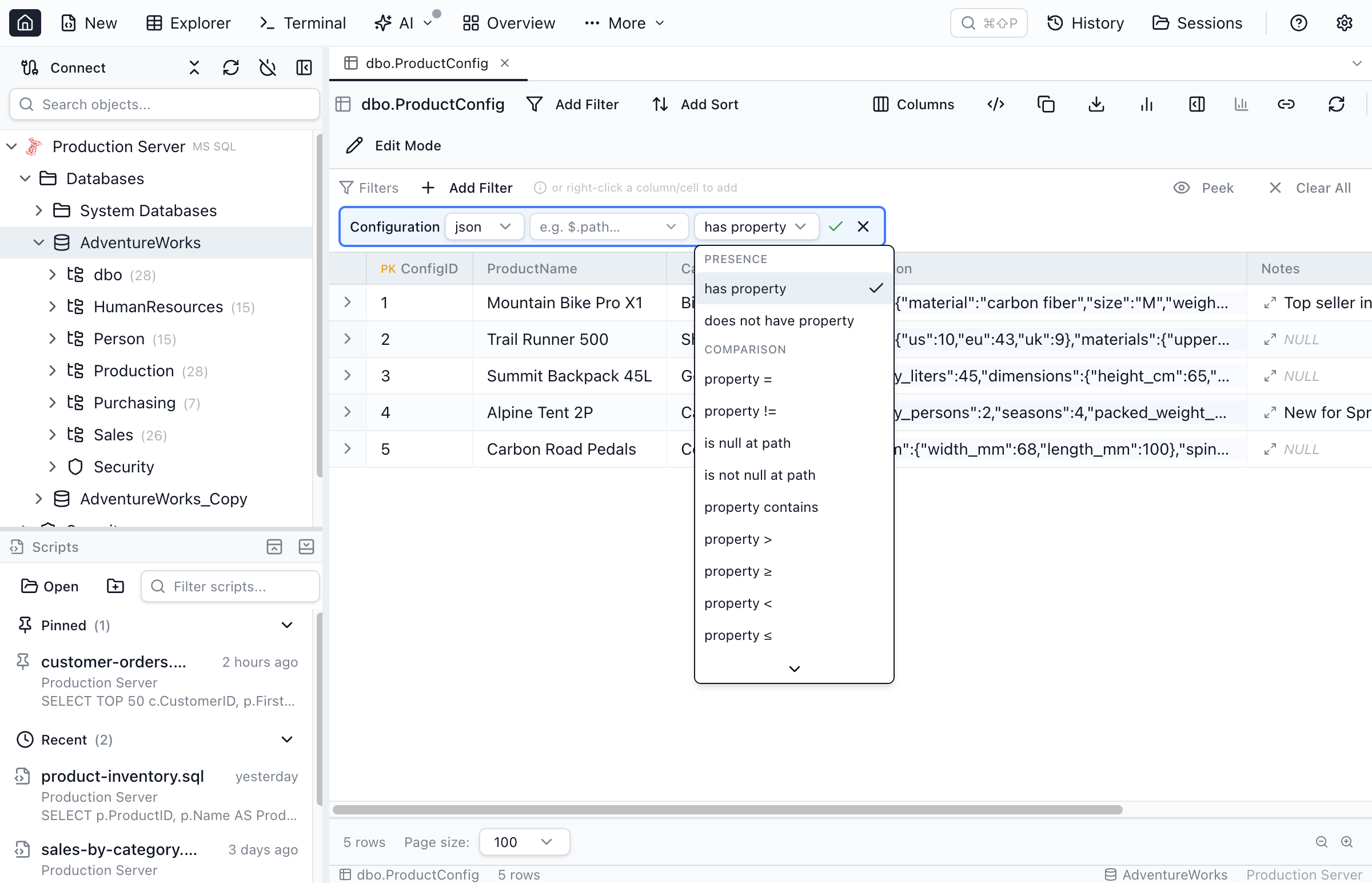
json, then a JSONPath-aware sub-operator — Jam SQL Studio emits engine-correct SQL for each.| Sub-operator | Description | Example |
|---|---|---|
has property / does not have property | Check whether the JSON document has a value at the given path | data has property $.address.city |
property = / != | Compare the value at the given path with a string | data property = $.status 'open' |
property = (ignore case) | PostgreSQL 19 (beta) only. Case-insensitive equality at the given path, via PostgreSQL 19's jsonpath .lower() string method | data property = (ignore case) $.status 'OPEN' |
property contains | Case-insensitive substring match against the value at the given path | data property contains $.notes 'urgent' |
property > / ≥ / < / ≤ | Numeric comparison of the value at the given path | data property > $.qty 10 |
property lookup | Scalar equality at the path, with the comparand picked from a related table (loose FK). The right-hand control is a row-picker button instead of a free-text input — pick a row, the FK target value flows into the filter. | data property lookup $.customer_id → customers.id |
any = / any contains / any > / ≥ / < / ≤ | True when at least one element matched by a wildcard path satisfies the comparison | data any > $.items[*].qty 100 |
any element = (ignore case) | PostgreSQL 19 (beta) only. Wildcard variant of property = (ignore case): true when at least one element matched by a [*] path equals the value, case-insensitively | data any element = (ignore case) $.tags[*] 'URGENT' |
any lookup | Wildcard variant of property lookup: at least one element matched by a [*] path equals the picked FK value | data any lookup $.items[*].sku → skus.sku |
all = / all > / ≥ / < / ≤ | True when at least one element is matched and every match satisfies the comparison | data all ≥ $.items[*].qty 0 |
all lookup | Wildcard variant of property lookup: every element matched by a [*] path equals the picked FK value (and the array has at least one match) | data all lookup $.tags[*] → tags.label |
is empty object/array | Top-level value is {} or [] (whitespace-tolerant) | data is empty |
is not empty object/array | Top-level value is a non-empty object or non-empty array — never NULL, never a scalar | data is not empty |
is valid JSON / is not valid JSON | Validity check (most useful on declared-on-text columns) | payload is valid JSON |
The *_lookup sub-operators combine path selection with a row picker against a related table — they're the discoverable way to declare and reuse a loose foreign key on a JSON property without leaving the json operator. The first time you use property lookup on a (column, path) pair, the picker opens in target-selection mode so you can declare the relationship; on every subsequent use, the picker opens directly in the row grid. The same JSON column can host more than one such loose FK — for example orders.metadata can independently declare $.customer_id → customers.id and $.warehouse_id → warehouses.id, and each filter resolves to the right declaration based on the path you've set. See the Loose Foreign Keys guide for the full lifecycle.
Engine-correct SQL is generated under the hood. Path syntax accepts $.address.city (JSONPath) or shorthand address.city — Jam SQL Studio normalizes either form. Rough engine equivalents for property = on path $.address.city:
| Engine | SQL emitted |
|---|---|
| PostgreSQL | data #>> '{address,city}' = 'Boston' |
| MySQL | JSON_UNQUOTE(JSON_EXTRACT(data, '$.address.city')) = 'Boston' |
| SQL Server | JSON_VALUE(data, '$.address.city') = 'Boston' |
| Oracle | JSON_VALUE(data, '$.address.city') = 'Boston' |
| SQLite | json_extract(data, '$.address.city') = 'Boston' |
| Azure Data Explorer (Kusto) | | where tostring(data.address.city) == "Boston" (KQL dynamic accessor; todouble(...) for numeric comparisons) |
To get the same kind of expression for a query you write yourself, paste a sample document into the browser-based SQL JSON query builder and click a field; it writes the SELECT or WHERE clause for PostgreSQL, MySQL, SQL Server, Oracle and SQLite.
Array wildcards ([*]). JSONPaths can include a single array wildcard — for example $.items[*].name matches against any element of an items array. The wildcard is supported by the existence and string sub-operators (has property, has not property, property =, property !=, property contains) and by the aggregate sub-operators below. Under the hood Jam SQL Studio splits the path at the first [*] and emits a per-row lateral walk: jsonb_path_query on PostgreSQL, JSON_TABLE on MySQL/Oracle, OPENJSON on SQL Server, json_each on SQLite. Filter expressions (?(@...)) are not yet supported.
Aggregate sub-operators (any_* / all_*). Aggregate predicates walk every match of a wildcard path and ask whether any element satisfies a comparison (any =, any contains, any >, any ≥, any <, any ≤) or every element satisfies it (all =, all >, all ≥, all <, all ≤). For example any > 100 on path $.items[*].qty matches rows where at least one item's qty exceeds 100; all ≥ 0 on the same path matches rows whose items all have a non-negative qty. all_* requires at least one matched element — a row whose array is missing or empty does not match. Numeric variants cast each matched value via the engine's numeric cast (::numeric on PostgreSQL, CAST(... AS DECIMAL) on MySQL, TRY_CAST on SQL Server, TO_NUMBER on Oracle, CAST(... AS REAL) on SQLite); on PostgreSQL a non-numeric element will raise invalid input syntax for type numeric — combine with a path filter when your arrays are mixed-type. All five SQL engines support aggregates; they are not available on Azure Data Explorer (Kusto), which has no array-wildcard path support.
PostgreSQL 19 (beta): case-insensitive matching. property = (ignore case) and any element = (ignore case) are PostgreSQL-only sub-operators that use PostgreSQL 19's jsonpath .lower() string method — a plain property = on a mixed-case value like 'Open' won't match a filter of 'open', but the ignore-case variant will. They only appear in the dropdown when the connection is detected as PostgreSQL 19 or newer; on PostgreSQL 16–18 (or when the version can't be detected) they're hidden entirely, because older servers reject the underlying jsonpath syntax with a query-time error rather than a friendly warning. One thing to know: the value you type is lowercased in the app before it's sent to the database, so extremely locale-specific casing rules (for example Turkish dotted İ or German ß) can occasionally disagree with the server's own .lower() and produce a missed match on non-ASCII values.
SQL Server: compatibility level 130+ required for OPENJSON-based filters. Anything that emits OPENJSON — every wildcard ([*]) path, every any_* / all_* aggregate, is empty / is not empty, and has property / has not property on any path below the document root — needs the target database's compatibility level to be at least 130 (SQL Server 2016). On lower levels (e.g. 100 on a legacy database hosted by an otherwise modern SQL Server 2019/2022), SQL Server's binder can't resolve OPENJSON and reports Invalid object name 'OPENJSON'. Jam SQL Studio detects the compatibility level when you open the filter and, once the path contains [*], surfaces an inline warning in the sub-operator dropdown ("Array filters need compat 130+.") with a Recheck link that refreshes the cached level after a DBA bumps it. The sub-operators stay selectable — if you do pick one, the runtime error is rewritten to include an actionable suggestion. Scalar (non-wildcard) operators — property =, property !=, property contains, is valid JSON — work at any compatibility level because they emit JSON_VALUE / ISJSON instead of OPENJSON. has property and has not property are the exception: to tell a key that holds null from a missing key they list the parent object's keys with OPENJSON, so on a path such as $.discount they need level 130 too (only the bare root path $ uses JSON_QUERY / JSON_VALUE). The inline warning does not cover them; the rewritten runtime error does. To unlock wildcard / aggregate filters, a DBA can run ALTER DATABASE [<your-db>] SET COMPATIBILITY_LEVEL = 130; (optionally paired with ALTER DATABASE SCOPED CONFIGURATION SET LEGACY_CARDINALITY_ESTIMATION = ON; to keep the legacy query planner).
Recursive descent (..). JSONPaths can use .. to match a property at any depth — for example $..name matches every name key anywhere in the document. Engine support is uneven, so Jam SQL Studio surfaces an inline hint in the filter chip when the active engine can't lower the path:
| Engine | Recursive descent (..) | Native emit |
|---|---|---|
| PostgreSQL | Supported | jsonb_path_exists / jsonb_path_query with PG's ** any-depth syntax (Jam SQL Studio rewrites .. to **). |
| Oracle | Supported | JSON_EXISTS / JSON_TABLE with .. in the path expression. |
| MySQL | Not supported | — |
| SQL Server | Not supported | — |
| SQLite | Not supported | — |
On engines without native support, the filter chip shows "Recursive descent (..) not supported on this engine" next to the path input as soon as you type ... Like the wildcard, recursive descent is supported only by the existence and string sub-operators (has property, has not property, property =, property !=, property contains).
Operator placement. On native JSON columns, json is the default selection. On long-text columns whose name ends in json (case-insensitive — payload_json, metadataJson, …), json is offered first in the dropdown but isn't auto-selected. On other long-text columns it sits at the bottom of the list — a discoverable opt-in.
Declaring a text column as JSON. When you pick the json operator on a long-text column that hasn't been declared yet, Table Explorer asks "Declare this column as JSON?" Confirming saves a declaration to the database's MetaInfo file (the same store that holds loose foreign keys). From then on, the column is treated as JSON anywhere Jam SQL Studio renders it. On engines that need it, declared-on-text predicates are automatically wrapped with the engine's JSON-validity guard so rows holding non-JSON text are filtered out instead of producing engine errors:
| Engine | Eligible types | Validity guard / safety |
|---|---|---|
| SQL Server | nvarchar(MAX), varchar(MAX), text, ntext, nvarchar(N≥256) | ISJSON(col) = 1 AND ... |
| Oracle | CLOB, NCLOB, VARCHAR2(N≥256), NVARCHAR2(N≥256) | col IS JSON AND ... |
| SQLite | Any TEXT-affinity declared type (TEXT, VARCHAR(N), CLOB, JSON, CHAR(N)) | json_valid(col) = 1 AND ... |
| MySQL | text, mediumtext, longtext, varchar(N≥256) | JSON_VALID(col) = 1 AND ... |
| PostgreSQL | text, varchar, varchar(N≥256) — requires PostgreSQL 16+ | (CASE WHEN col IS JSON THEN (col)::jsonb END) ... — uses the PG 16 IS JSON predicate inside a CASE so the cast can never run on a non-JSON row, regardless of how the planner orders the WHERE clause. Declaring a text column as JSON is blocked on older PG servers; use a native jsonb column instead. |
Peek the JSON shape. Next to the JSONPath input is an eye-icon button that opens a path-discovery popover. The popover lists every property path Jam SQL Studio has observed for that column — sourced first from a cached structure scan (refreshed within the last 7 days) and otherwise from values rendered in the current grid session. Click any path to paste it into the filter chip. If the loaded page didn't surface a path you need, click Scan 1000 from server to run a fresh sample query (with the engine-appropriate validity guard for declared-on-text columns) and feed the results into the cache. The cache is shared with future sessions and the rest of Jam SQL Studio, but only stores skeleton path/type/prevalence — never sample values — so exporting MetaInfo never leaks user data.
Closing the popover. Esc closes the peek popover and keeps the filter you are building, so the column, path and value you have entered so far stay in the chip. Press Esc again, with the popover closed, to discard the filter you are adding — on an already-applied filter, the second Esc only discards the staged path edit instead.
In Table Explorer, when the grid has active filters applied, the popover automatically matches the current filters instead of scanning the whole column — with a one-click Scan whole column instead escape if you want the unfiltered view back. The Visual Query Editor's condition editor does the same with the query's other AND-joined conditions on that table. This is how you get variant-specific suggestions for a polymorphic JSON column (a column whose shape depends on another column's value — for example a payload column shaped differently per event_type): filter by the discriminator column first, then peek, and the popover suggests only that variant's properties. Filtered samples are session-only and are never written to the persisted structure cache.
![The JSON path-discovery peek popover open from a filter chip, showing a tree of observed property paths such as accessories[*], colors[*] and dimensions with per-path prevalence percentages and a Scan 1,000 from server button.](/images/docs/json-peek-popover.png)
JSON path autocomplete in the SQL editor
The same observed JSON paths also surface as SQL-editor autocomplete. When you type a JSON-path string inside a query against a declared (or native) JSON column, Jam SQL Studio suggests the property paths it has seen for that column — drawn from the persisted structure scan, ranked by prevalence so the most common paths come first, and falling back to a live sample of the loaded rows when no scan is cached. It's the peek popover's path list, surfaced inline where you're writing SQL so you don't have to remember the JSON shape by hand.
Reading and editing JSON cells
JSON cells render as syntax-coloured single-line strings with an expand button. Expanding opens a dialog with two modes: an in-house collapsible, keyboard-navigable JSON tree, and a Monaco code editor with JSON syntax highlighting and validation. You can edit JSON in place from either mode; saving minifies the value before writing. A column declared on text whose value fails to parse falls back to plain text with a small warning glyph.
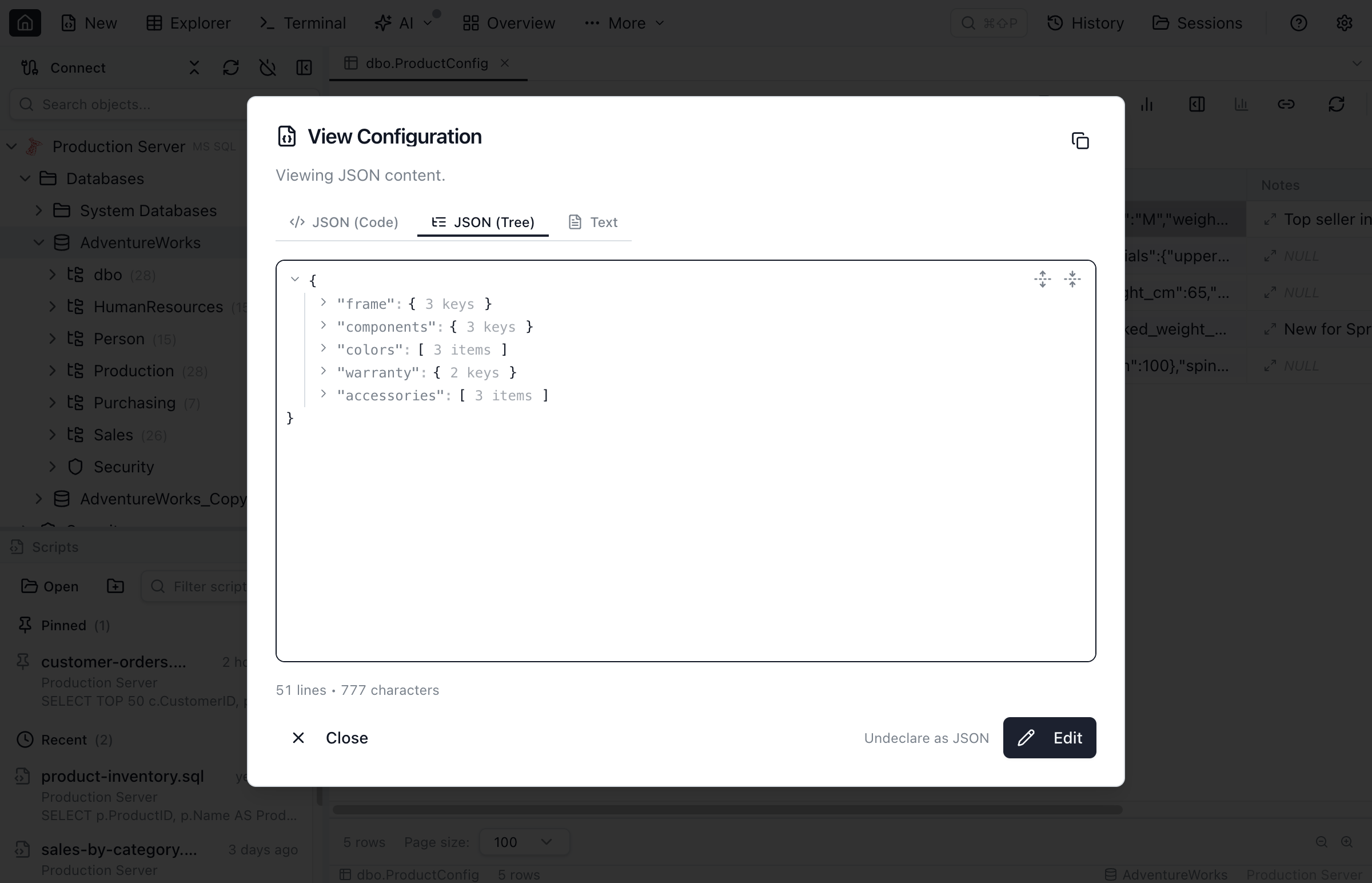
Column header glyphs — three states
Result-grid headers summarise the JSON state of each column with one glyph:
- Blue
{}— declared. The column has a JSON declaration in MetaInfo. Click to open the JSON details inspector (path list, refresh, undeclare). Native columns show an informational note. - Gray
{}— undeclared native. A native JSON type with no declaration row yet. Click to open the "Configure JSON column" dialog and add one. - Gray
{}?— eligible long-text. A long-text column whose sampled rows look like JSON. Click to open the "Declare column as JSON?" dialog.
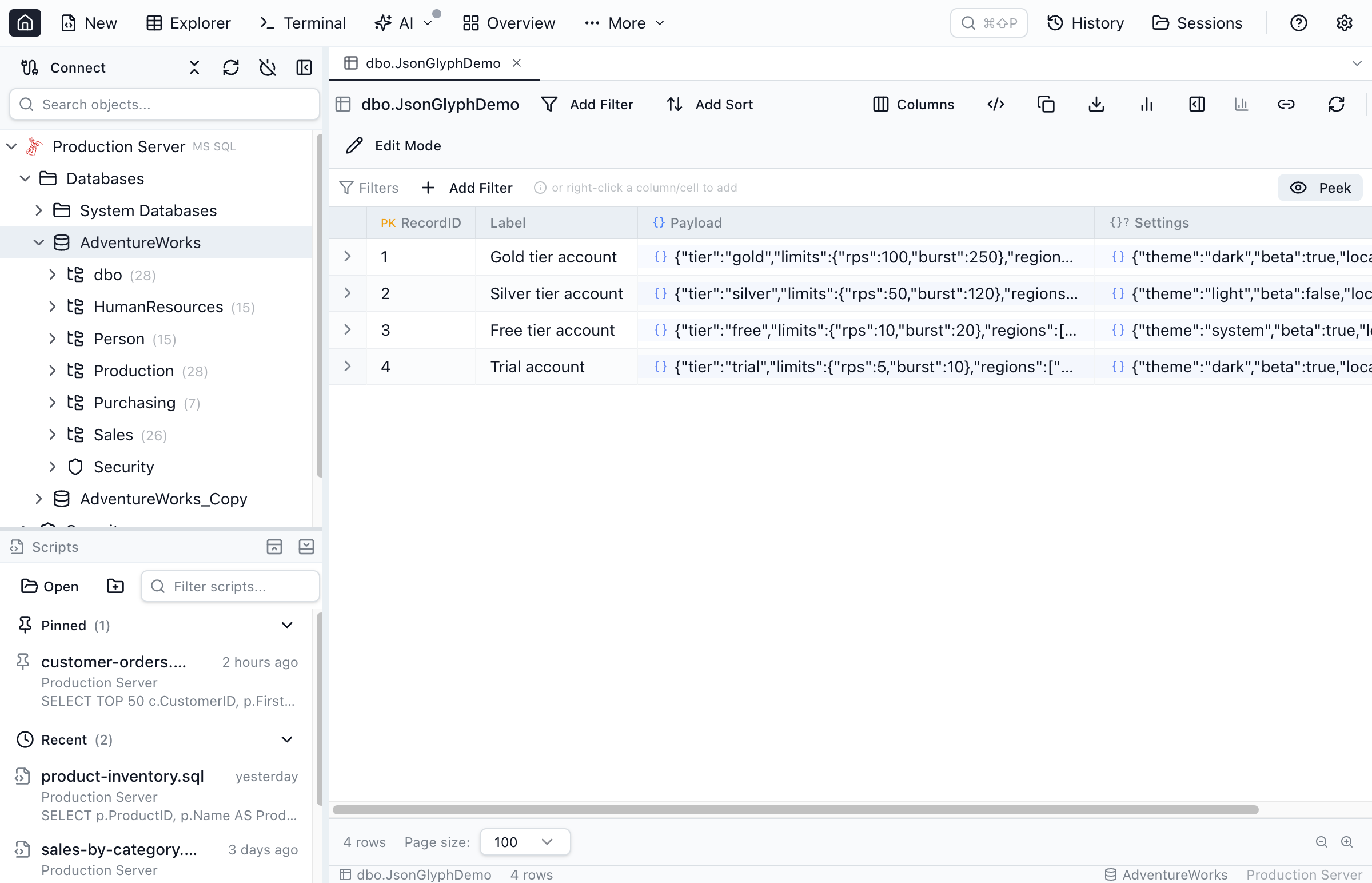
{} marks a column declared as JSON; a gray {}? marks an eligible long-text column you can declare. The gray native-JSON glyph appears only on a true json/jsonb column type.JSON on Azure Data Explorer (Kusto)
Kusto's dynamic type is native JSON, so Azure Data Explorer columns get the same treatment as a native json/jsonb column: peek the shape, browse the collapsible tree / inspector, and filter by path. A path filter emits the matching KQL dynamic accessor instead of SQL — filtering an Azure Monitor customDimensions column on the tenant key commits | where customDimensions.tenant == "acme". Numeric comparisons wrap the accessor in todouble(...) and text comparisons in tostring(...).
The scalar sub-operators all work on Kusto: has property, property = / != / contains / > / ≥ / < / ≤, is empty, and is valid. Not supported on Kusto: recursive descent (..), array wildcards ([*]), and the any_* / all_* aggregate sub-operators. Because dynamic is a real JSON type, there is nothing to declare-on-text — the "declare a long-text column as JSON" flow doesn't apply. Kusto tables are read-only, so JSON cells render and peek but can't be edited in place.
Loose foreign keys on JSON paths
A loose foreign key's source side can be a JSONPath inside a JSON column — for example orders.metadata $.customer_id → customers.id. A single JSON column can host several, one per path. See the Loose Foreign Keys guide for the full lifecycle, the property_lookup / any_lookup / all_lookup sub-operators, and the multi-FK picker.
Enums on JSON properties
If a property inside a JSON column always comes from a known set of values — a status, a kind, a list of tags — you can declare just that path as an enum and get a searchable dropdown in the filter chip. The peek popover and the JSON structure details dialog both surface inline glyphs next to each property name: a blue ▾ for already-declared paths and a muted ▾? on paths whose name hints at an enum. The structure details dialog also has a "Declare property as enum…" link that lets you mark any property as an enum, including ones whose name doesn't hint at one. See the Enum Columns guide for the three sub-operators (property_enum, any_enum, all_enum) and the full declare flow.
Engine-specific JSON guides
Deep dives into how each engine stores and queries JSON, and how Jam SQL Studio works with it:
- PostgreSQL JSON & JSONB — the complete guide to operators, indexing and query patterns
- MySQL JSON columns — the native JSON type, functions and path syntax
- SQL Server JSON support — JSON_VALUE, OPENJSON and compatibility levels
- Oracle JSON support — the 21c JSON type and JSON_VALUE / JSON_TABLE
- SQLite JSON support — the JSON1 functions and TEXT-affinity storage
- JSON in relational databases compared — how the five engines differ
Frequently asked questions
Which engines support JSON columns in Jam SQL Studio?
All five SQL engines plus Azure Data Explorer (Kusto): PostgreSQL (json/jsonb), MySQL (json), SQL Server 2016+ (text/native json), Oracle 21c+ (json plus long-text), SQLite (TEXT-affinity columns via JSON1), and Azure Data Explorer's native dynamic type. The json filter operator emits engine-correct SQL on the SQL engines and engine-correct KQL on Kusto.
Can I treat a text column as JSON?
Yes. When you pick the json operator on an eligible long-text column that isn't declared yet, Jam SQL Studio asks to declare it. Declaring saves a JSON declaration to the per-database MetaInfo file; from then on the column is treated as JSON everywhere, with the engine's JSON-validity guard added automatically so non-JSON rows are skipped instead of erroring.
Where is JSON-column metadata stored?
In the per-(connection, database) MetaInfo file on your machine — the same store that holds loose foreign keys. The structure cache stores only skeleton path/type/prevalence, never sample values, so exporting MetaInfo never leaks data.
How do I filter a JSON column by path in Jam SQL Studio?
Pick the json filter operator in Table Explorer, choose a sub-operator such as property = or has property, and enter a JSONPath like $.address.city (the shorthand address.city also works). Jam SQL Studio emits engine-correct SQL automatically: #>> on PostgreSQL, JSON_VALUE on SQL Server and Oracle, JSON_UNQUOTE(JSON_EXTRACT(...)) on MySQL, and json_extract on SQLite.
Does SQL Server support JSON path filtering?
Yes. Scalar predicates (property =, property !=, property contains, is valid JSON) emit JSON_VALUE or ISJSON and work at any compatibility level. Has property and has not property on a path below the root, wildcard [*] paths, any_/all_ aggregate filters and the is empty / is not empty checks emit OPENJSON and require the database's compatibility level to be at least 130 (SQL Server 2016); Jam SQL Studio shows an inline warning for [*] paths when the level is lower, and a DBA can raise it with ALTER DATABASE ... SET COMPATIBILITY_LEVEL = 130.
What is the property_lookup operator?
property_lookup, any_lookup and all_lookup are JSON sub-operators that turn a JSON property into a loose foreign key. Instead of typing a value you pick a row from a related table, and Jam SQL Studio compares the value at the JSONPath against the target column. The first use at a given column and path declares the relationship; later uses open the row picker directly. any_lookup and all_lookup are the array-wildcard variants.
Can I edit JSON cells inline?
Yes. Expand any JSON cell to open a dialog with two modes: a collapsible, keyboard-navigable JSON tree and a Monaco code editor with syntax highlighting and validation. Edits save back minified. On a column declared as JSON over text, a value that fails to parse falls back to plain text with a small warning glyph.
Related topics
- Table Explorer — the primary surface for filtering and browsing JSON data
- Loose Foreign Keys — including JSON-path FKs and MetaInfo import/export
- Enum Columns — including JSON-path enums (
property_enum/any_enum/all_enum) - Query Editor — JSON cells and header glyphs work the same in query results