 Jam SQL Studio
 Published: 2026-06-13 • Updated: 2026-06-14
How to Migrate SQL Server to PostgreSQL — Tables and Data, Right From the Object Explorer
Most "migrate MSSQL to Postgres" guides hand you a heavyweight conversion project: install an assessment tool, build a config file, run a CLI, debug the output. That's the right call for a full production cut-over. But a huge share of the time you don't need any of that — you have a few SQL Server tables (or a schema of them) and you want the same shape and contents living in PostgreSQL now, so you can build against them. Jam SQL Studio does exactly that, interactively: right-click a table, point it at a Postgres connection, preview the translated CREATE TABLE, and run it. This post walks through it end to end.
What this migration is (and what it isn't)
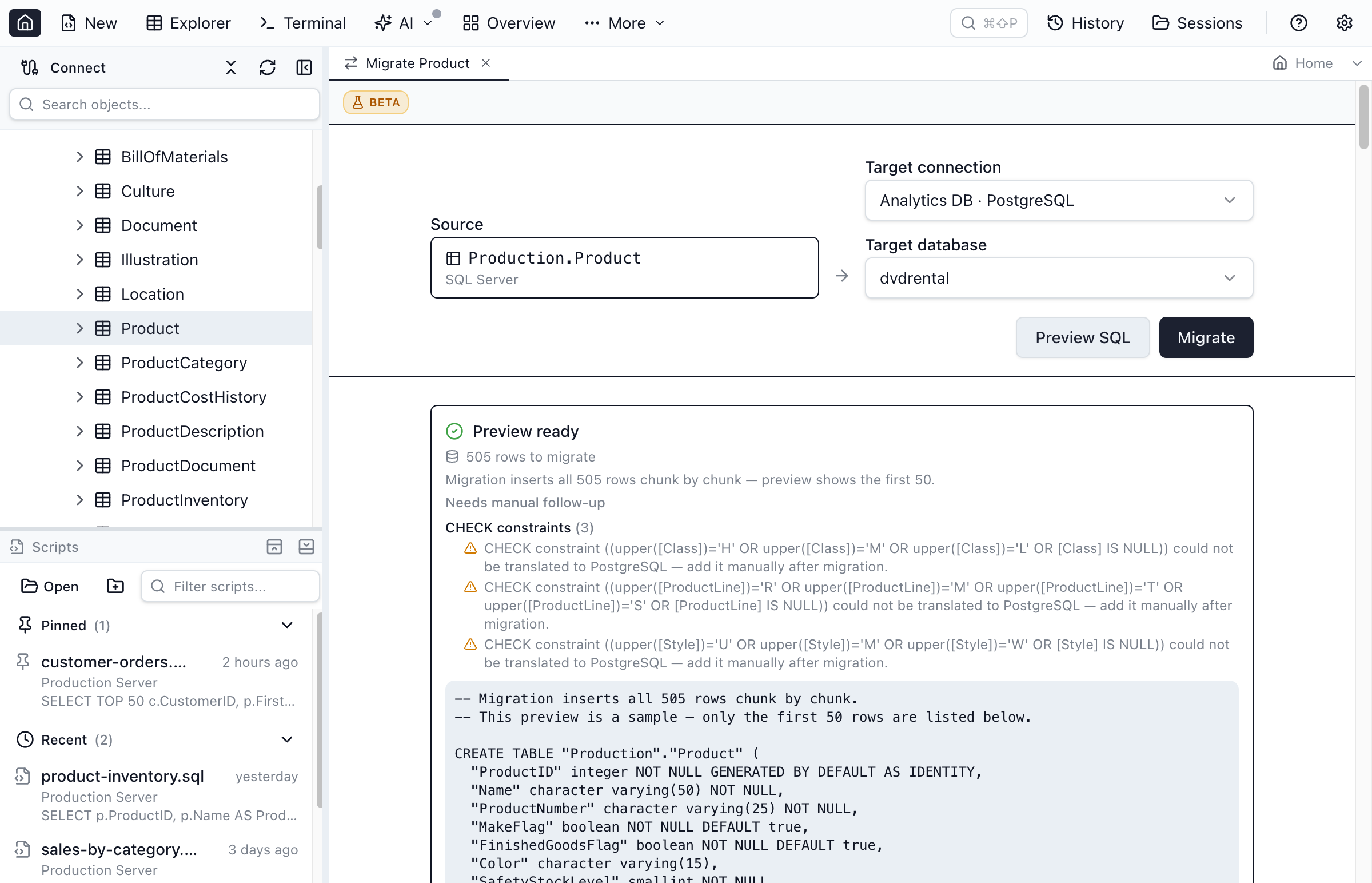
Jam SQL Studio's cross-engine migration carries the full mechanical schema of a table — not just its columns. A migrated table arrives with its columns, types, NULL / NOT NULL, primary key, and rows, plus IDENTITY (as GENERATED … AS IDENTITY, with the backing sequence reset after load), portable DEFAULT expressions, CHECK and UNIQUE constraints, foreign keys with their ON DELETE / ON UPDATE actions, secondary indexes (filtered → partial, covering → INCLUDE), and computed columns (→ GENERATED … STORED) where the expression is portable — all translated into PostgreSQL dialect. That's the part that's tedious to hand-write and easy to get subtly wrong, so it's the part worth automating.
It deliberately does not try to be a whole-database conversion suite. The procedural layer doesn't translate: stored procedures, functions, views, and triggers are T-SQL and don't convert to PL/pgSQL automatically. Neither does the non-portable tail — an engine-specific DEFAULT, CHECK, or computed-column expression, or per-column collation. The philosophy is conservative on purpose: where an expression is engine-specific, Jam emits a warning by name rather than guessing, so you never get DDL that silently changes behavior. For a full lift-and-shift that ports the procedural code too, reach for pgloader or Microsoft's SSMA. For getting tables and their data across cleanly while you're already in the IDE exploring them, this is faster.
Step by step: migrate one table to PostgreSQL
- Connect to both databases. Add your SQL Server source and your PostgreSQL target as connections — both show up in the Object Explorer side by side. (See the Connections guide if you haven't added them yet.)
- Right-click the SQL Server table and choose Migrate Table to Connection….
- Pick the target. Choose your PostgreSQL connection and database. The table lands in Postgres's default schema,
public— SQL Server'sdbois dropped rather than recreated, becausedbo,public, and SQLite'smainare all treated as "the default schema" and mapped to each other. - Preview. Jam SQL Studio runs a dry run and shows the generated PostgreSQL
CREATE TABLE+INSERTscript, the row count it will copy, and any translation warnings — without touching the target. This is the screenshot above: you can read the exact DDL before committing to it. - Migrate. Confirm, and the script executes against PostgreSQL. When it finishes, Jam SQL Studio re-counts both sides with
COUNT(*)and confirms the row counts converged — so "it ran" and "the data actually landed" are two separate, verified facts.
How types and values get translated
Two things change automatically between SQL Server and PostgreSQL, and the preview is honest about both.
Column types are mapped through a canonical type model — SQL Server native type → canonical type → PostgreSQL native type. A few highlights:
| SQL Server | PostgreSQL | Why |
|---|---|---|
bit | boolean | 0/1 values coerced to FALSE/TRUE |
nvarchar(100) | character varying(100) | length preserved; N-prefix byte width converted to char count |
nvarchar(max) | text | unbounded character data |
uniqueidentifier | uuid | native UUID type on both sides |
datetime2(n) | timestamp(n) | fractional-seconds precision preserved, no time zone |
datetimeoffset(n) | timestamp(n) with time zone | tz-aware timestamp on both sides |
varbinary(max) | bytea | Postgres has one unbounded byte type |
money | numeric(19,4) | faithful precision; the money spelling isn't preserved |
The complete MSSQL ↔ PostgreSQL type-mapping reference covers every type in both directions, including the edge cases (tinyint widening to smallint, rowversion landing as bytea, SQL Server 2025's native json).
Values are coerced to fit the target column when the storage shape differs. The headline case is the one above: a SQL Server bit stores 0/1, but a PostgreSQL boolean literal is TRUE/FALSE, so each value is converted as the INSERT is built. Binary columns are written as PostgreSQL bytea hex ('\x…'), dates as ISO-8601 literals, and JSON as a quoted JSON string. Everything else is escaped per the target dialect.
Migrate a whole database at once
To move every table, right-click the SQL Server database and choose Migrate all tables to connection…. Jam SQL Studio enumerates the tables, creates and copies each one to the PostgreSQL target, and reports a per-table result — migrated, skipped, or failed.
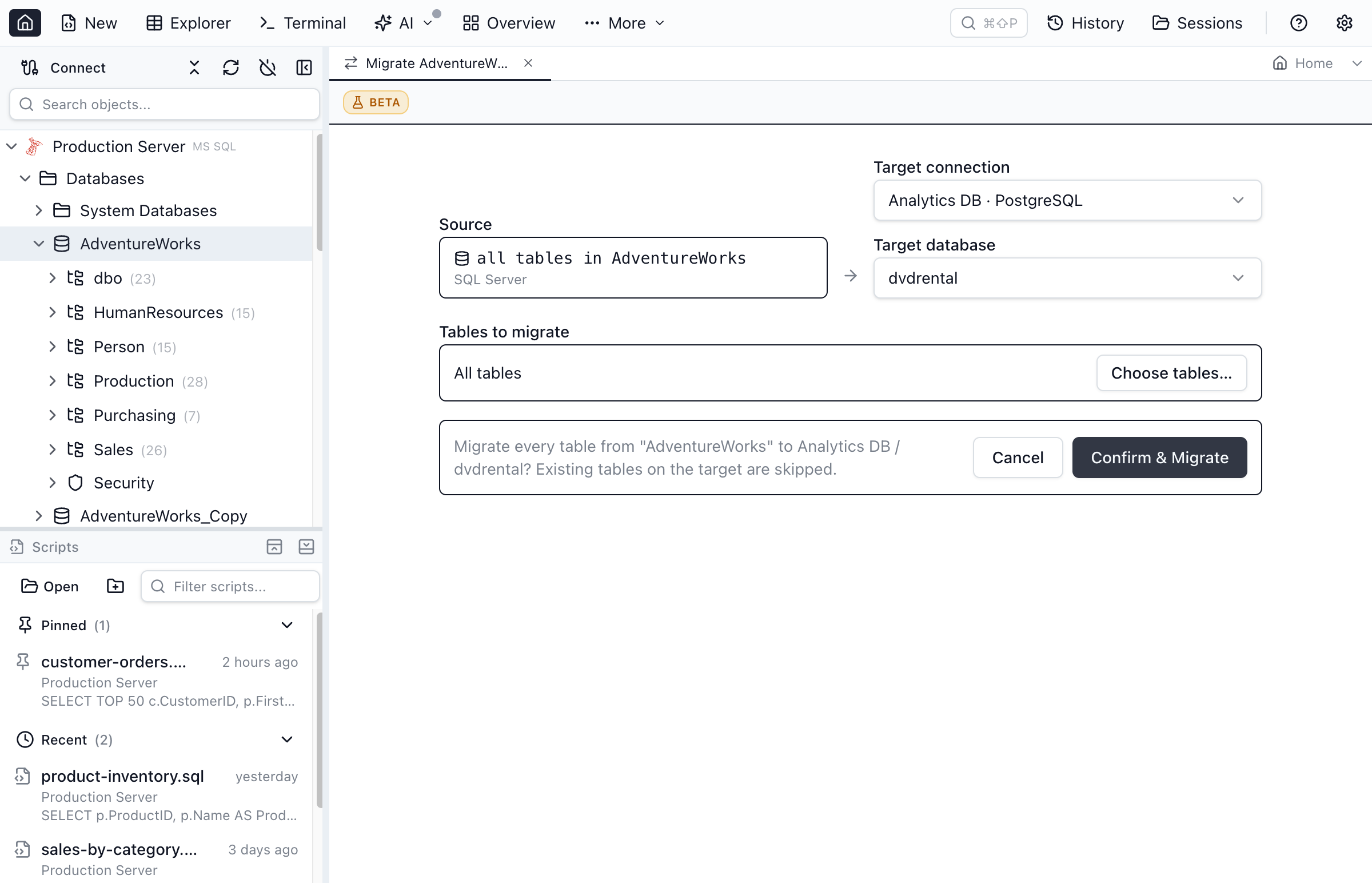
Foreign keys are added in a second pass after every table exists, so table order doesn't matter — there's no dependency graph to topologically sort and get wrong, and the references still land. You can also Preview the whole-database run to get every table plus the foreign-key pass as one reviewable .sql file before anything executes.
Read the warnings — they're your manual checklist
The migration tells you precisely what it couldn't carry cleanly, in two warning shapes you'll see in the preview:
- Unmapped types. A type with no canonical equivalent (
xml,sql_variant,geography,geometry,hierarchyid, CLR/UDT) is "emitted verbatim and may need manual review." The column name is preserved so you can decide what the Postgres equivalent should be. - Non-portable expressions. A DEFAULT, CHECK, computed-column, or filtered-index expression that uses an engine-specific function (a
DATEADD()default, aLEN()check) is flagged by name rather than mistranslated — swap in the PostgreSQL equivalent once the data's in.
Beyond those, the genuinely manual pieces are the procedural layer — trigger, view, stored-procedure, and function bodies, whose T-SQL doesn't translate to PL/pgSQL automatically — and collation (not preserved; the SQL Server case-insensitive default → PostgreSQL case-sensitive default is the flip to watch). Everything mechanical — identity, portable defaults, CHECK/UNIQUE, foreign keys, indexes, computed columns — comes across automatically. The Preview step shows a "Needs manual follow-up" checklist grouped by facet, so your follow-up is an itemised list, not a surprise.
Verify the result with cross-engine Schema Compare
The same canonical type model that drives the migration also powers cross-engine Schema Compare — so the logic that decides "what should this column become on Postgres?" is the exact logic that decides "are these two columns the same?". Point Schema Compare at the SQL Server source and the PostgreSQL target and you get a table-level diff: a green "identical" verdict for columns that translated cleanly, and a clear list of what's still missing on the target (the constraints and indexes you're recreating by hand).
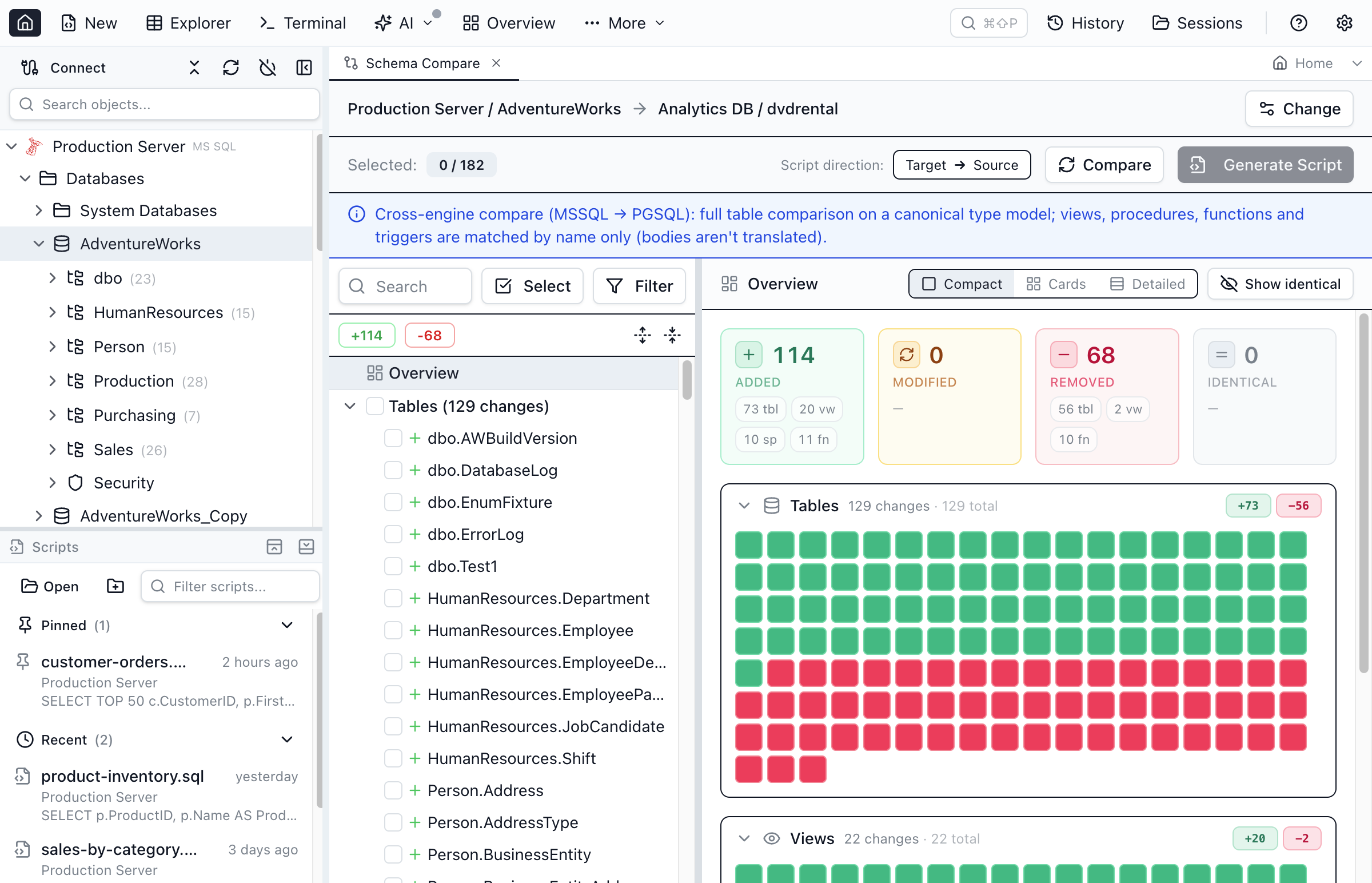
For a row-level check that the data matched, Data Compare diffs the actual rows between the two tables.
How it compares to the alternatives
| Approach | Scope | Type translation | Setup |
|---|---|---|---|
| Jam SQL Studio | Tables + data (cols, types, PK, identity, defaults, CHECK/UNIQUE, FKs, indexes) | Automatic, canonical model | None — built into the IDE |
| Hand-written DDL + ETL | Whatever you script | Manual, per column | High |
| pgloader | Tables + indexes + FKs + data | Automatic (config-driven) | CLI tool + config file |
| SSMA for PostgreSQL | Full (objects + code + assessment) | Automatic + assessment report | Heavy, project-based |
The sweet spot is the interactive, table-at-a-time migration you reach for while you're already exploring the data — preview a single table's translated DDL in two clicks, copy it, move on. For the full production cut-over, a configured pgloader run or an SSMA assessment is the right heavier hammer. Jam SQL Studio gets the tables and their rows across cleanly and shows you the exact remaining gap.
The takeaway
"Migrate SQL Server to PostgreSQL" doesn't always mean a months-long project. When what you actually need is these tables, with their data, in Postgres, the right tool is the one already open in front of you. Connect both databases, right-click, preview the translated DDL, run it, and let cross-engine Schema Compare confirm what landed. The types convert, the values coerce, the row counts are verified, and every gap is a warning you can read — not a silent surprise.
Frequently asked questions
What is the easiest way to migrate SQL Server to PostgreSQL?
If you only need the tables and their rows, the fastest path is an interactive, table-at-a-time migration. In Jam SQL Studio you connect to both the SQL Server source and the PostgreSQL target, right-click a table, choose Migrate Table to Connection, preview the translated CREATE TABLE and INSERT script, and run it. Column types convert automatically and the rows are copied with value coercion. For a full production lift-and-shift including stored procedures and constraints you still want a heavier tool like SSMA or pgloader.
Does Jam SQL Studio convert SQL Server data types to PostgreSQL automatically?
Yes. Each column routes through a canonical type model: bit becomes boolean, nvarchar(n) becomes character varying(n), nvarchar(max) becomes text, datetime2 becomes timestamp, datetimeoffset becomes timestamp with time zone, uniqueidentifier becomes uuid, varbinary(max) becomes bytea, and money becomes numeric(19,4). Types with no canonical equivalent — xml, sql_variant, spatial, CLR — are emitted verbatim with a warning so you can review them.
Will the migration overwrite a table that already exists in PostgreSQL?
No. If the target table already exists the migration refuses it with a clear message rather than dropping or overwriting it. For a whole-database run, existing tables are skipped and reported while the rest continue, so re-running only fills the gaps.
Does it copy the data or just the schema?
Both. It creates the table in PostgreSQL with translated column types, then copies the rows with value coercion (for example SQL Server bit values 0/1 become PostgreSQL TRUE/FALSE, binary becomes bytea hex, dates become ISO-8601 literals). After loading it re-counts both sides and confirms the row counts converged.
What does the SQL Server to PostgreSQL migration not handle?
The procedural layer stays manual: triggers, views, stored procedures, and functions are written in T-SQL and don't translate to PL/pgSQL automatically, and per-column collation isn't carried. Everything mechanical does come across — columns, types, primary key and rows, IDENTITY (as GENERATED AS IDENTITY with a post-load sequence reset), portable DEFAULT expressions, CHECK and UNIQUE constraints, foreign keys with their ON DELETE/UPDATE actions, secondary indexes (including filtered and INCLUDE covering indexes), and computed columns. Any engine-specific expression Jam can't translate is flagged by name rather than guessed.
Migrate MSSQL → Postgres Without a Project Plan
Right-click a table, pick a Postgres target, preview the translated DDL, run it. Built into Jam SQL Studio. Free for personal use on macOS, Windows, and Linux.