 Jam SQL Studio
 Published: 2026-07-09 • Updated: 2026-09-26
PostgreSQL 19: Release Date, New Features, and What Beta 4 Removed
PostgreSQL 19 is not released yet. As of September 26, 2026 the newest build is PostgreSQL 19 Beta 4, released on September 24, 2026. The project plans a release candidate in early October and says general availability may also come in October 2026; its roadmap lists the 19 release as planned for October 2026. Beta 4 also removed several headline features that the earlier betas carried, including SQL/PGQ property graphs and partition MERGE/SPLIT. This post gives the dates, lists what was removed, and walks through the features that remain — REPACK, jsonpath string methods, autovacuum scoring, the new system views, and EXPLAIN IO statistics — with where Jam SQL Studio surfaces each one (added in version 1.4.15; the current release is 1.5.3).
PostgreSQL 19 release date and status
PostgreSQL ships one major version a year, and 19 follows the usual pattern: a string of betas over the summer, a release candidate, then general availability (GA) in the autumn. Here is where each step stands, from the project's own announcements:
| Milestone | Date | Notes |
|---|---|---|
| Beta 1 | June 4, 2026 | First public preview of the full feature set. |
| Beta 2 | July 16, 2026 | Bug fixes. |
| Beta 3 | August 13, 2026 | Reverted GROUP BY ALL. |
| Beta 4 | September 24, 2026 | Reverted SQL/PGQ, FOR PORTION OF, partition MERGE/SPLIT, online checksum changes, and the pg_get_*_ddl functions. |
| Release candidate | Early October 2026 (planned) | The next planned PostgreSQL 19 release after Beta 4. |
| General availability (19.0) | October 2026 (planned) | "May also occur in October", depending on testing. |
Sources: the Beta 1, Beta 2, Beta 3 and Beta 4 announcements and the developer roadmap. The planned dates are the project's plan, not a promise: the GA date follows from how release-candidate testing goes. Until GA, run PostgreSQL 19 on test systems only and read the release notes, which are still being revised (the current copy says "as of 2026-09-14").
What was removed from PostgreSQL 19 during the beta
The Beta 4 announcement explains the removals directly: reliability and a predictable release schedule come first, so the community pulled several features from 19 “so they can potentially be included in a later major release”. If you read about PostgreSQL 19 earlier in the summer (this post included), these are the items to cross off:
- SQL/PGQ property graphs (
CREATE PROPERTY GRAPHandGRAPH_TABLEqueries) — reverted in Beta 4. Oracle Database 23ai and later still ship SQL/PGQ; see SQL/PGQ in Practice for the syntax. - Temporal
UPDATE/DELETE ... FOR PORTION OF— reverted in Beta 4. ALTER TABLE ... MERGE PARTITIONSandSPLIT PARTITION— reverted in Beta 4.pg_get_role_ddl(),pg_get_tablespace_ddl()andpg_get_database_ddl()— removed in Beta 4.- Online enabling and disabling of data checksums — reverted in Beta 4.
GROUP BY ALL(group by every non-aggregated output column) — reverted in Beta 3.
How this plays out in Jam SQL Studio: the Object Explorer's Property Graphs folder reads property graphs from the catalog, so on a Beta 4 or later server it is simply empty. Script as CREATE for roles and databases tried the server's pg_get_role_ddl / pg_get_database_ddl first and falls back to Jam's own generators when the call fails, which is always the case from Beta 4 on. The Partitions folder still lists partitions on PostgreSQL 10 and later. If you used Jam's Script MERGE PARTITIONS / Script SPLIT PARTITION items or its FOR PORTION OF and GROUP BY ALL snippets against a Beta 1–3 server, the same statements fail on Beta 4 and later.
The short version: what's still in PostgreSQL 19
The release notes' own overview leads with REPACK, logical replication of sequence values, parallel autovacuum workers with a new scoring system, the WAIT command, the pg_plan_advice extension, and performance work such as faster foreign-key checks. The features a database developer touches day to day, and where Jam SQL Studio meets them:
| PostgreSQL 19 feature | What it does | In Jam SQL Studio |
|---|---|---|
REPACK | Rewrite a table to reclaim bloat, optionally without an access-exclusive lock. | Table Maintenance menu (script action). |
| jsonpath string methods | .lower(), .upper(), .btrim(), .replace() and more inside a path. | Case-insensitive JSON filter operators. |
| Autovacuum scoring | pg_stat_autovacuum_scores ranks vacuum and analyze urgency. | Autovacuum panel in the Performance Dashboard. |
pg_stat_lock | Cumulative lock-wait statistics per lock type. | Lock Statistics in the Session Browser. |
EXPLAIN (ANALYZE, IO) | Per-node asynchronous I/O and prefetch statistics. | IO properties in the execution-plan viewer. |
ON CONFLICT DO SELECT, WAIT FOR LSN | Return the conflicting row from an upsert; wait on a standby until WAL reaches an LSN. | Built-in snippets. |
Jam SQL Studio is a cross-platform desktop client (Mac, Windows, Linux) for SQL Server, PostgreSQL, MySQL, Oracle, and SQLite. It connects to a PostgreSQL 19 beta server like any other PostgreSQL server. Panels and filter operators check the detected server version; the REPACK script is offered on every PostgreSQL connection with the 19+ requirement noted in the generated SQL. On older servers the PostgreSQL 19 surfaces are hidden or show an informational note, never an error.
New system views in PostgreSQL 19
The release notes add four core system views, and the pg_buffercache extension adds a fifth:
| View | What it reports |
|---|---|
pg_stat_lock | One row per lock type, cluster-wide: waits, wait_time, fastpath_exceeded, stats_reset. Also available through pg_stat_get_lock(). |
pg_stat_recovery | At most one row with statistics about the recovery state. |
pg_stat_autovacuum_scores | One row per table in the current database with the scores autovacuum uses to order its work. |
pg_dsm_registry_allocations | Dynamic shared memory details from the DSM registry. |
pg_buffercache_os_pages (extension) | Shared-memory page mapping from pg_buffercache; the matching pg_buffercache_os_pages() function can add NUMA details. |
Existing views gain columns too. The ones you are most likely to query: stats_reset on pg_stat_all_tables, pg_stat_all_indexes, pg_statio_all_sequences, pg_stat_user_functions and pg_stat_database_conflicts; started_by on pg_stat_progress_vacuum and pg_stat_progress_analyze; backup_type on pg_stat_progress_basebackup; location on pg_available_extensions; mem_exceeded_count on pg_stat_replication_slots; and table OID and attribute number columns on pg_stats. One rename can break monitoring queries: pg_stat_subscription_stats.sync_error_count is now sync_table_error_count. Jam SQL Studio reads two of the new views, pg_stat_lock and pg_stat_autovacuum_scores, as described below.
REPACK: bloat cleanup without the VACUUM FULL lock trade-off
PostgreSQL 19 adds REPACK, a built-in command that rewrites a table to reclaim bloat and replaces VACUUM FULL and CLUSTER (the old commands stay for compatibility). The plain form takes an ACCESS EXCLUSIVE lock like VACUUM FULL; the parenthesized CONCURRENTLY option rebuilds the table while reads and writes continue. Beta 4 fixed several REPACK bugs, including crashes and wrong behavior with invalid indexes and materialized views.
-- PostgreSQL 19
REPACK orders;
REPACK (CONCURRENTLY) orders;
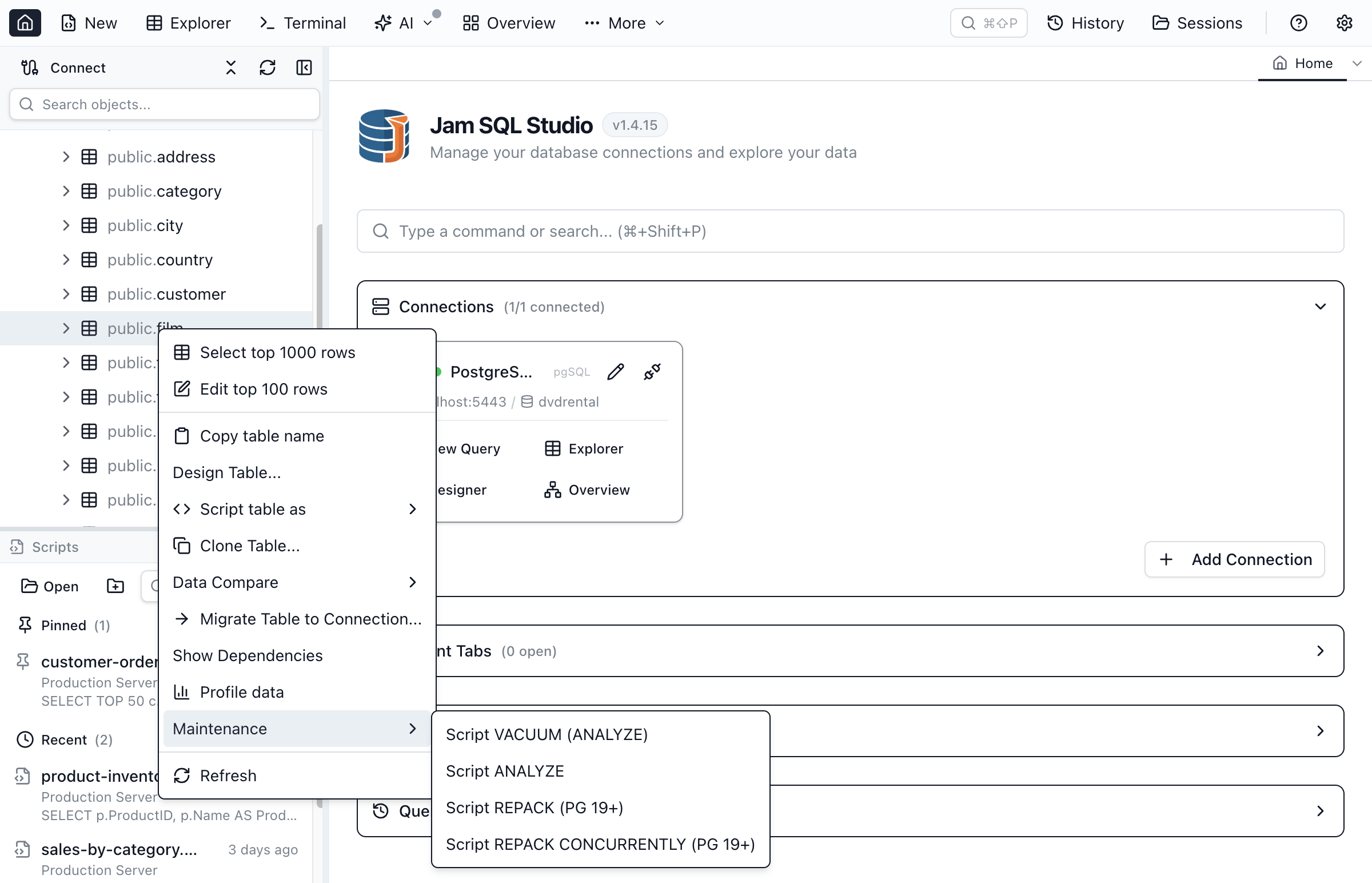
Note the shape: CONCURRENTLY is a parenthesized option, not a bare trailing keyword. Jam SQL Studio surfaces this through the Maintenance submenu on a table's right-click menu in the Object Explorer, next to VACUUM and ANALYZE. The items are always present on PostgreSQL connections; picking one opens the generated script in a query tab so you can review it before running. When your server is older than 19 (or the version can't be determined), the generated REPACK script carries a note that REPACK requires PostgreSQL 19+. See Scripting.
jsonpath string methods: case-insensitive JSON matching
PostgreSQL 19's SQL/JSON path language gains string methods — ltrim(), rtrim(), btrim(), lower(), upper(), initcap(), replace() and split_part() — so you can, for example, compare JSON scalars without caring about case:
-- PostgreSQL 19
SELECT jsonb_path_exists('{"a":"ABC"}'::jsonb, '$.a ? (@.lower() == "abc")');
-- t

SELECT jsonb_path_exists('{"arr":[{"sku":"AbC"}]}'::jsonb,
                         '$.arr[*].sku ? (@.lower() == "abc")');
-- t
Jam SQL Studio's JSON filter chips gain matching case-insensitive operators for equality and array-any matching. Because .lower() is only valid on PostgreSQL 19, these operators appear in the filter dropdown only when the connection's server is 19 or newer — and they fail closed: if the version can't be determined, they stay hidden, even under "show all operators."
One limitation to know about: the value you type is lowercased in the app with JavaScript's toLowerCase() while the server compares with jsonpath .lower(). For ASCII these agree; for locale-special casing (Turkish dotted İ, German ß) they can disagree, which can miss matches on non-ASCII values. The JSON Columns guide documents this and the rest of the JSON filter stack.
Autovacuum scoring: see what vacuum is about to do
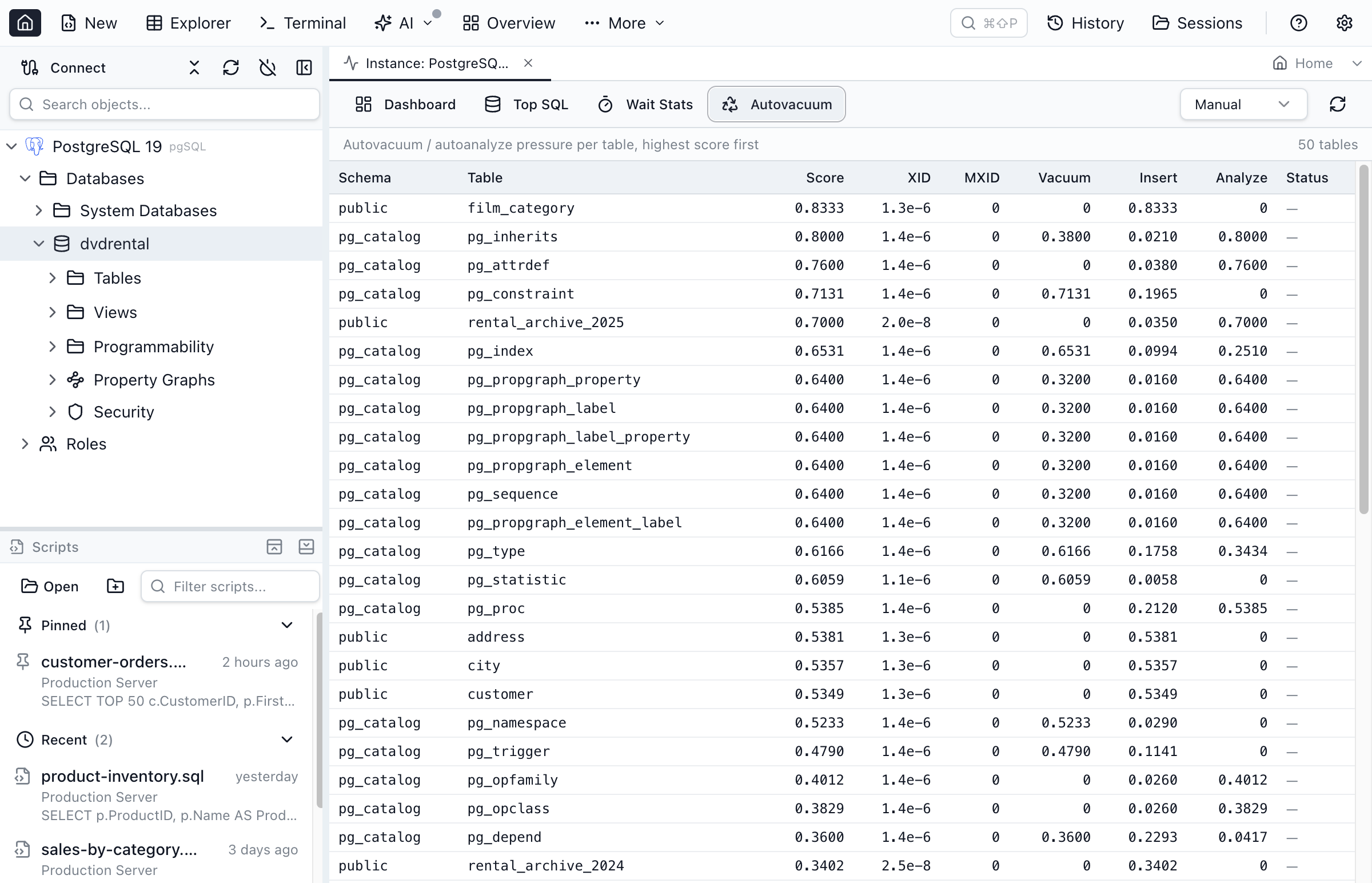
Autovacuum in PostgreSQL 19 can use parallel workers to vacuum a table's indexes, and a new scoring system decides which tables it processes first. The scores are visible in pg_stat_autovacuum_scores: score is the maximum of the component scores (xid_score, mxid_score, vacuum_score, vacuum_insert_score, analyze_score), and do_vacuum, do_analyze and for_wraparound say what autovacuum would do:
-- PostgreSQL 19
SELECT relname, score, vacuum_score, analyze_score, do_vacuum, do_analyze
FROM pg_stat_autovacuum_scores
ORDER BY score DESC;
Jam SQL Studio adds an Autovacuum panel to the Performance Dashboard (Instance Monitor) that reads this view on PostgreSQL 19, so you can see at a glance which tables autovacuum is prioritizing. On servers below 19 the panel shows a "requires PostgreSQL 19+" info card rather than failing — the same graceful-empty pattern the rest of the dashboard uses. See the Performance Dashboard guide.
Observability: lock statistics and EXPLAIN IO
pg_stat_lock is a cumulative view with one row per lock type, tracking how often waits happened and how long they took. A wait is counted when the lock was acquired after waiting longer than deadlock_timeout:
-- PostgreSQL 19
SELECT locktype, waits, wait_time, fastpath_exceeded, stats_reset
FROM pg_stat_lock
ORDER BY waits DESC;
Jam SQL Studio adds a cumulative Lock Statistics section to the Locks tab of the Session Browser that reads this view. On PostgreSQL 18 and earlier the section is simply absent — not an error.
The second is a new IO option for EXPLAIN ANALYZE, which reports asynchronous I/O activity per plan node:
-- PostgreSQL 19
EXPLAIN (ANALYZE, BUFFERS, IO, FORMAT JSON) SELECT count(*) FROM actor;
-- scan nodes gain "I/O Count", "I/O Waits", "Average I/O Size",
-- and prefetch-distance keys
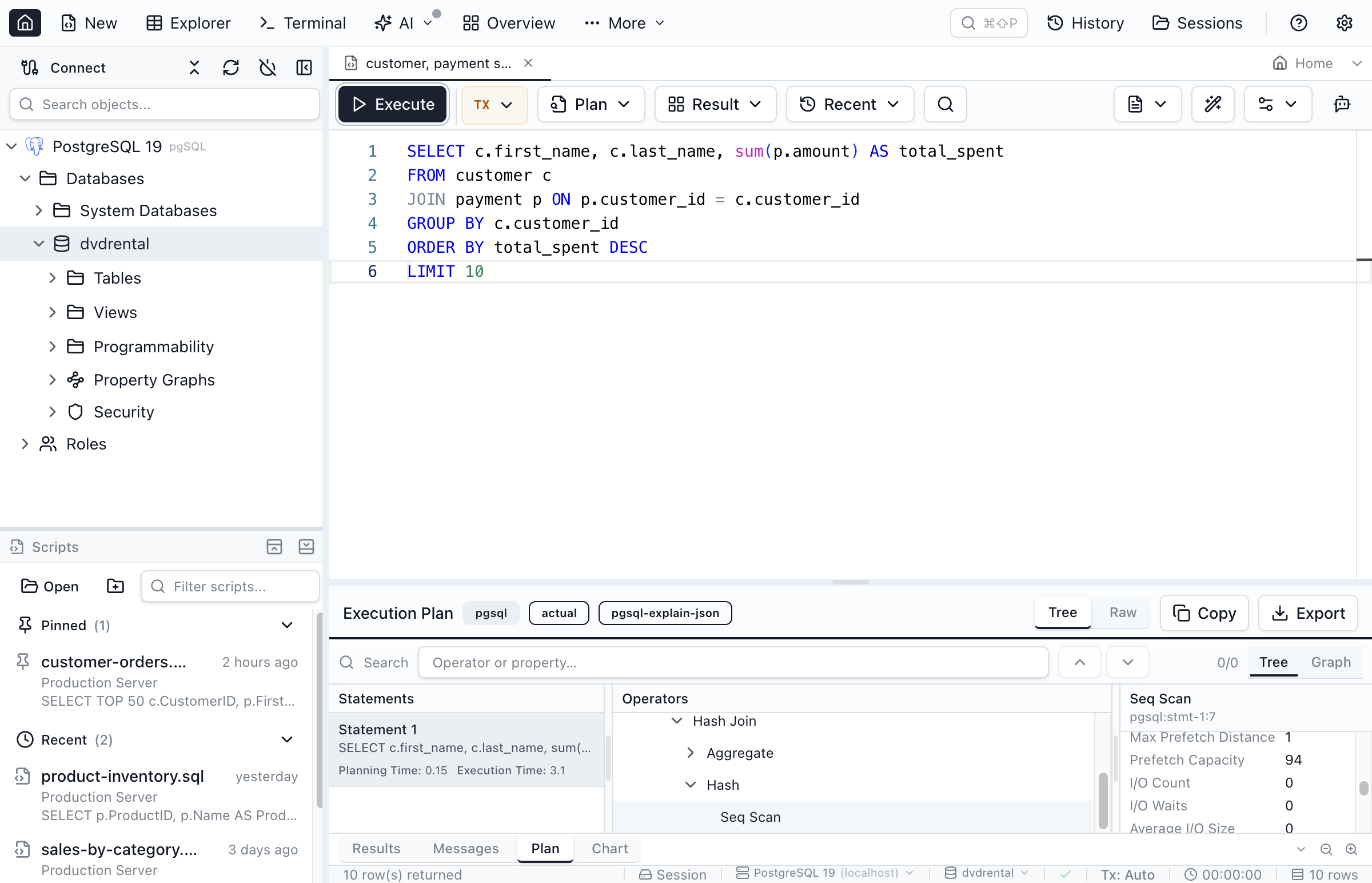
When you capture an actual execution plan on PostgreSQL 19, Jam SQL Studio includes the IO option and the plan viewer surfaces the resulting I/O properties on each node (plus Execution Time in the summary). On PostgreSQL 16 the plan output is unchanged — no IO option is emitted, so nothing breaks.
Partitioned tables in the Object Explorer (PostgreSQL 10+)
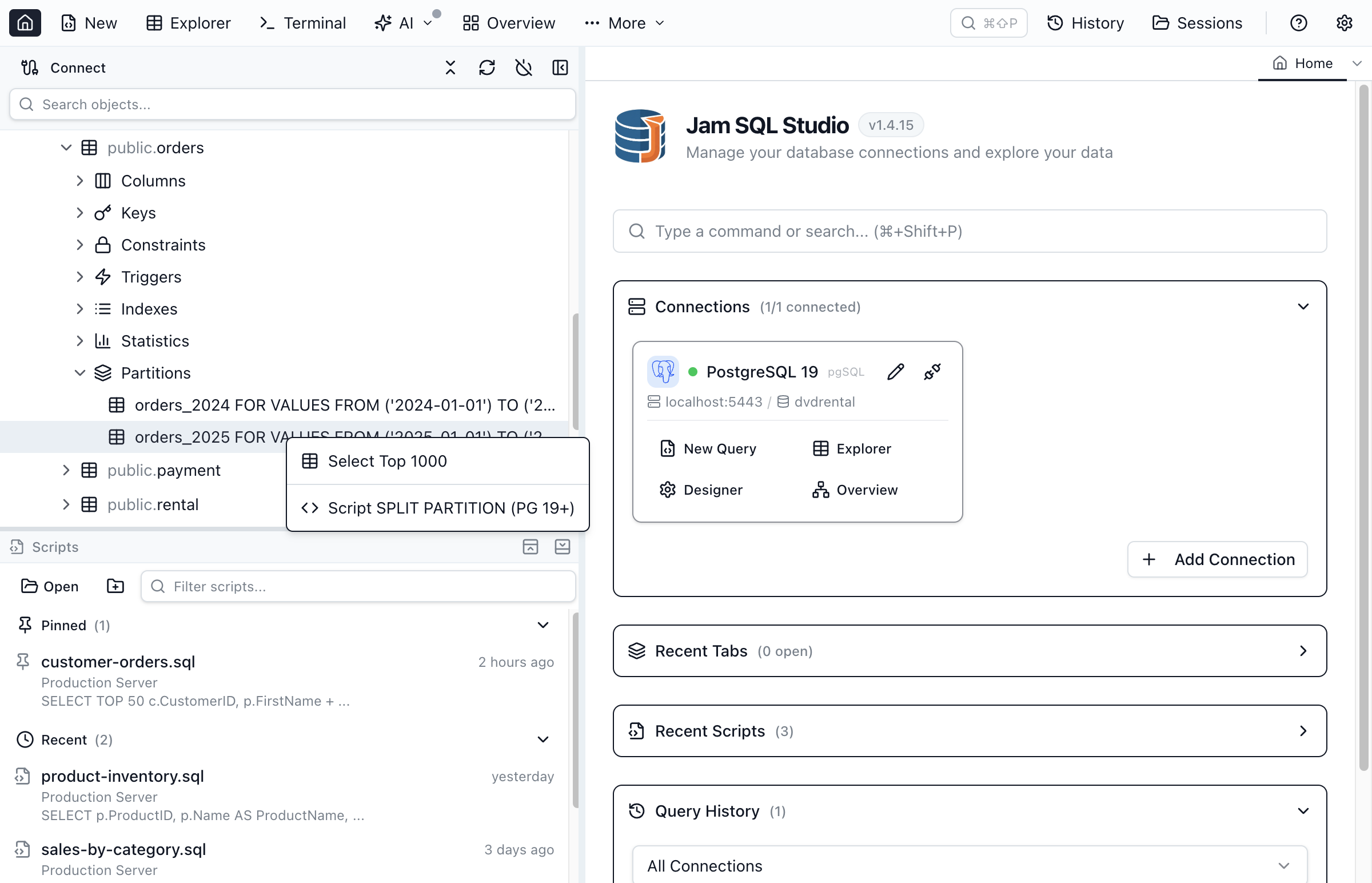
The partition MERGE/SPLIT syntax did not survive to GA, but the Object Explorer work Jam SQL Studio shipped alongside it is not tied to PostgreSQL 19. Declaratively partitioned parents appear in the Tables folder with a Partitions subfolder that lists each child partition with its FOR VALUES bound inline, and partition children no longer clutter the top level as standalone tables. That listing works on PostgreSQL 10 and later, and each partition has a Select Top 1000 item for browsing its rows.
Smaller syntax changes, ready as snippets
Two smaller SQL additions made it through the beta. Jam SQL Studio ships them as built-in snippets:
-- ON CONFLICT DO SELECT: return the conflicting row instead of erroring
INSERT INTO tags VALUES (1, 'b') ON CONFLICT (id) DO SELECT RETURNING *;

-- WAIT FOR: block until WAL reaches a target LSN
WAIT FOR LSN '0/036C6B78' WITH (MODE 'primary_flush', TIMEOUT '1000');
ON CONFLICT DO SELECT can also lock the returned rows with FOR UPDATE or FOR SHARE. WAIT FOR LSN accepts the modes standby_replay, standby_write, standby_flush and primary_flush, and NO_THROW returns a status instead of raising an error on timeout; Beta 4 fixed a deadlock in it. Window functions also gain IGNORE NULLS / RESPECT NULLS for lead(), lag(), first_value(), last_value() and nth_value().
Trying it out
PostgreSQL 19 is beta software: pin it to a scratch server, keep backups, and treat every feature above as subject to change until GA — Beta 4 showed that features can still leave. If you already run Jam SQL Studio, point a connection at a PostgreSQL 19 beta instance and the version-gated surfaces light up automatically; on older servers everything falls back to the behavior you already know. The full list of what shipped in each Jam release is on the changelog.
FAQ
When is PostgreSQL 19 released?
PostgreSQL 19 is not released yet. As of September 26, 2026 the latest build is PostgreSQL 19 Beta 4, released on September 24, 2026. The PostgreSQL Global Development Group plans a release candidate in early October 2026 and says general availability may also come in October; its roadmap page lists the 19 release as planned for October 2026. If testing turns up problems, the date can move.
Is PostgreSQL 19 stable enough for production?
Not yet. Beta releases are for testing, and the feature set can still change before general availability: Beta 4 removed several features that were in the earlier betas. Test PostgreSQL 19 on non-production systems, keep PostgreSQL 18 or earlier in production until GA, and read the official release notes before relying on any new feature.
Which features were removed from PostgreSQL 19 before release?
Beta 4 reverted SQL/PGQ property graph queries (GRAPH_TABLE), the FOR PORTION OF clause for temporal UPDATE and DELETE, ALTER TABLE ... MERGE PARTITIONS and SPLIT PARTITION, online enabling and disabling of data checksums, and removed the pg_get_role_ddl, pg_get_tablespace_ddl and pg_get_database_ddl functions. Beta 3 had already reverted GROUP BY ALL. The project says the removed features can potentially return in a later major release.
What are the new system views in PostgreSQL 19?
The release notes add four core system views: pg_stat_lock (cumulative lock-wait statistics per lock type), pg_stat_recovery (recovery status), pg_stat_autovacuum_scores (per-table autovacuum scores), and pg_dsm_registry_allocations (dynamic shared memory allocations). The pg_buffercache extension adds a pg_buffercache_os_pages view. Many existing views gain columns, for example stats_reset on pg_stat_all_tables and pg_stat_all_indexes, and started_by on pg_stat_progress_vacuum and pg_stat_progress_analyze.
Does Jam SQL Studio work with PostgreSQL 19 beta?
Yes. Jam SQL Studio connects to a PostgreSQL 19 beta server the same way it connects to any PostgreSQL server. On PostgreSQL 19 it adds REPACK maintenance scripts, case-insensitive jsonpath filter operators, an autovacuum-scores panel, cumulative lock statistics, and EXPLAIN IO statistics in the plan viewer. Panels, statistics sections and filter operators are gated on the detected server version; the REPACK script generator is always offered and notes the PostgreSQL 19 requirement in the generated SQL. Everything else behaves as it does on earlier PostgreSQL versions.
Do these PostgreSQL 19 features work on PostgreSQL 16?
The server-side features are PostgreSQL 19-only, so Jam SQL Studio gates each surface on the connection's server version. On PostgreSQL 16 (or any version below 19) the version-only surfaces are hidden or replaced with an informational note rather than an error: the jsonpath case-insensitive operators disappear, the autovacuum panel shows a 'requires PostgreSQL 19+' card, the lock-statistics section is absent, and EXPLAIN runs without the IO option. The Partitions folder in the Object Explorer works on PostgreSQL 10 and later.
Which PostgreSQL 19 features does Jam SQL Studio support today?
REPACK and REPACK (CONCURRENTLY) through the table Maintenance menu, case-insensitive jsonpath filter operators, an autovacuum-scores panel in the Performance Dashboard, cumulative lock statistics from pg_stat_lock in the Session Browser, EXPLAIN IO statistics in the plan viewer, and built-in snippets for REPACK, ON CONFLICT DO SELECT, and WAIT FOR LSN.