
Last updated: 2026-09-26
Scripting Objects
Object scripting in Jam SQL Studio generates DDL from a live database object — a table, view, stored procedure, or function — as a CREATE, ALTER, or DROP statement. Right-click any object in the Object Explorer, pick a script action, and the generated SQL opens in a new query tab ready to review, edit, run, or save. Scripting is engine-aware across SQL Server, PostgreSQL, MySQL/MariaDB, Oracle, and SQLite.
What is object scripting?
Scripting reverse-engineers an object's current definition back into SQL. It's how you capture a table's exact shape for source control, hand a colleague a repeatable CREATE, stage an ALTER to tweak a procedure, or generate a safe DROP before a rebuild. Every script action in Jam SQL Studio ends the same way: the SQL is placed in a new Query Editor tab — never executed silently — so you always see and control what runs. From that tab you can run it, edit it, or save it to a .sql file.
Where scripting lives
Scripting is driven from the Object Explorer context menus. The exact menu depends on the object type:
| Object | Context-menu path | Actions |
|---|---|---|
| Table | Script table as → | CREATE, DROP, SELECT, INSERT, UPDATE, DELETE |
| View | Script view as → | CREATE, ALTER, DROP, SELECT |
| Stored procedure | Script stored procedure as → (plus Execute…, Open definition) | CREATE, ALTER, DROP |
| Function | Script function as → (plus Open definition) | CREATE, ALTER, DROP |
| User-defined type (SQL Server) | Script as CREATE / Script as DROP (plus Open definition) | CREATE, DROP |
| Database | Script Database As → | CREATE, DROP, USE |
| Schema | Script Schema As → / Script New → | CREATE, DROP, Script all objects |
Tables don't offer a direct ALTER because a whole-table alter isn't a single statement — use the Table Designer for in-place column changes, or script DROP + CREATE for a full rebuild.
Script as CREATE
Generate a complete object definition as a CREATE statement — useful for version control, documentation, or recreating an object in another database.
Scripting a Table
- Expand the database in Object Explorer and open Tables
- Right-click your table and open Script table as
- Choose CREATE
- A new query tab opens with the generated
CREATE TABLEscript
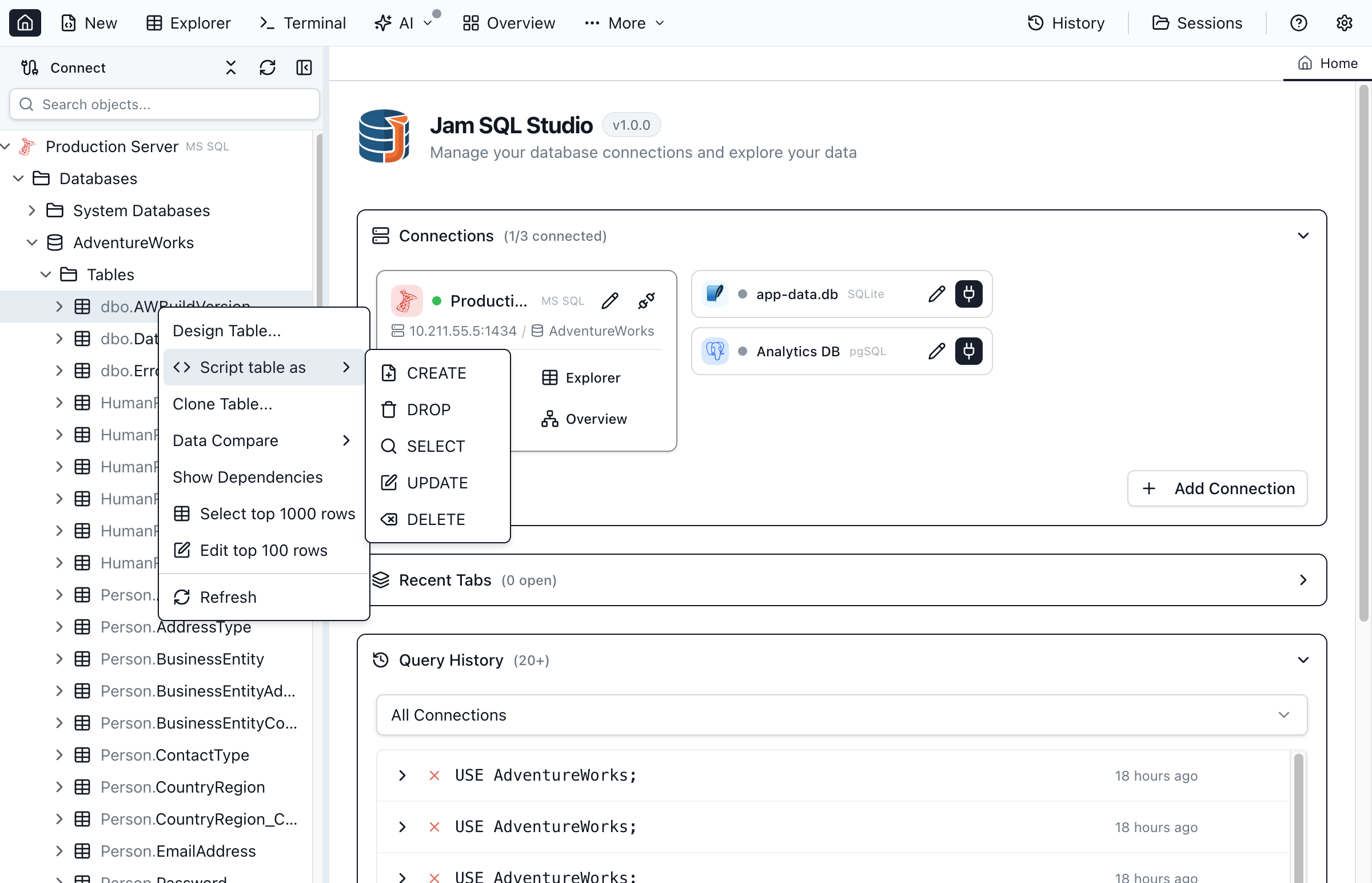
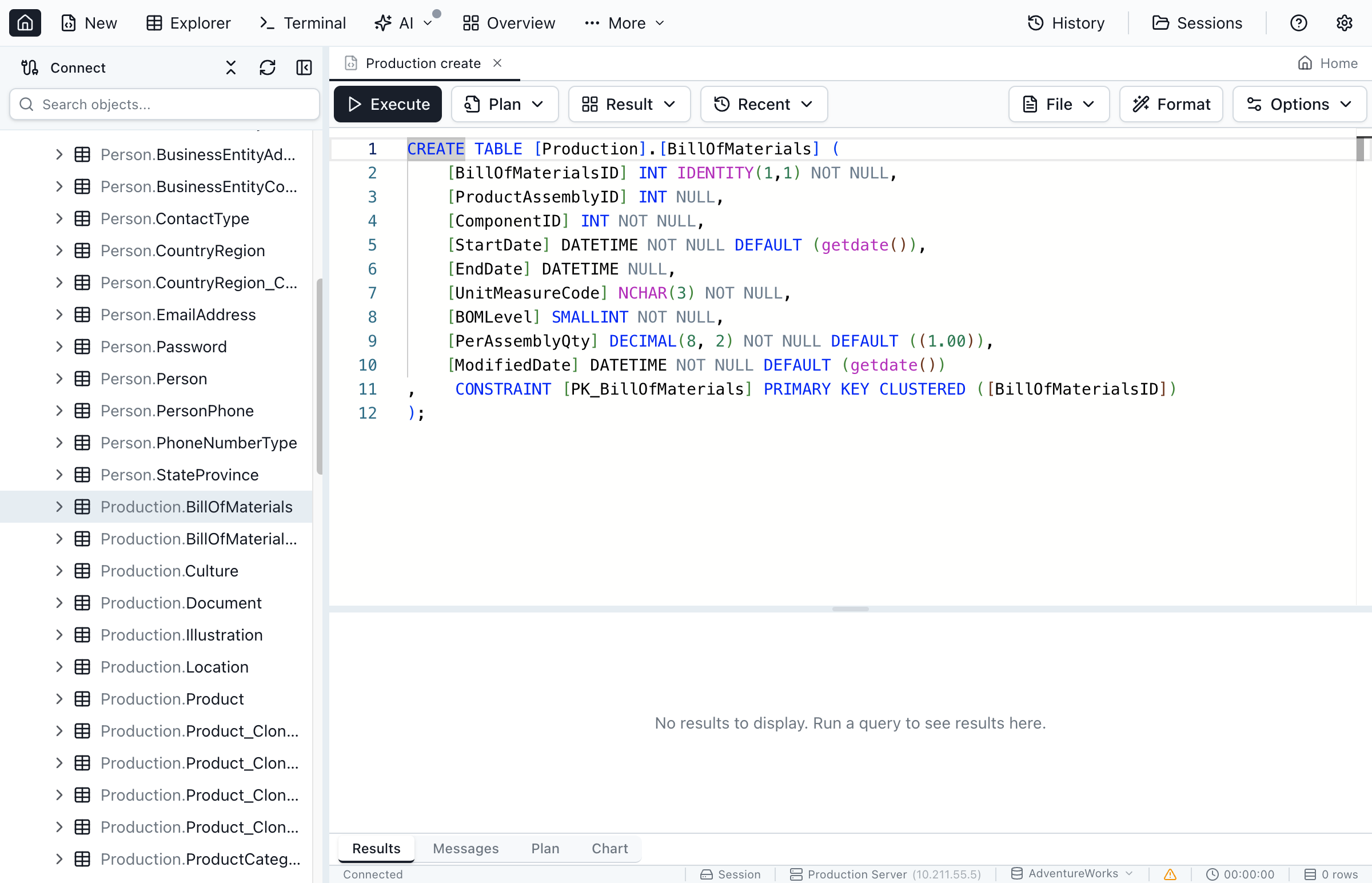
Jam SQL Studio fetches the table's metadata and builds a CREATE TABLE that includes:
- Column definitions - name, data type, nullability, defaults
- Primary key - including clustered/nonclustered where the engine has the concept
- Foreign key constraints - with referenced table and columns
- Unique and check constraints
- Indexes - one
CREATE INDEXstatement per index after the table: unique flag and key columns, plus the clustered/nonclustered kind,INCLUDEcolumns and filter on SQL Server - Identity / auto-increment - seed and increment where applicable
Scripting Views, Procedures, and Functions
For programmable objects, Jam SQL Studio reads the stored module definition (for example from sys.sql_modules on SQL Server or pg_get_functiondef on PostgreSQL) and returns the real source:
- Views — the full
CREATE VIEWwith itsSELECTbody and options such asSCHEMABINDING. Open definition does the same and is handy for a quick read-only look. - Stored procedures — the complete definition with parameters, defaults, and any
WITHoptions. - Functions — scalar, table-valued, and inline table-valued functions, including the
RETURNSclause and body.
Procedural body completion when editing scripted-out routines is covered by the per-engine procedural-grammar layers — see MySQL Stored-Routine Intellisense, T-SQL Procedural Intellisense, PL/SQL Procedural Intellisense, and PL/pgSQL Procedural Intellisense in the Query Editor docs.
Script as INSERT
Generate an INSERT template for a table — a starting point for writing new rows, not a data-migration script. Right-click the table, open Script table as, and choose INSERT; a new query tab opens with an INSERT INTO statement listing every column, ready for you to fill in values.
The template always leaves identity / auto-increment columns out, since the engine assigns those values on insert — there's no option to include them here. If you need scripts that carry actual row data with real key values (including identity values), use Copy INSERT or Export SQL (INSERT) from the Query Editor results grid or the Table Explorer toolbar instead — those are identity-aware and offer a Skip identity columns option.
Script as ALTER
Generate an ALTER statement to modify an existing programmable object without dropping and recreating it. ALTER preserves the object's permissions, whereas DROP+CREATE removes them — so ALTER is the safer edit for anything with grants attached.
ALTER scripting is available for views, stored procedures, and functions. To use it, right-click the object, open Script … as, and choose ALTER. On Oracle, packages, procedures, functions, and views are re-emitted with CREATE OR REPLACE (see below), which serves the same "edit without dropping" purpose.
Script as DROP
Generate a DROP statement to remove an object. Jam SQL Studio emits engine-appropriate, safety-first DROP syntax:
- SQL Server, PostgreSQL, MySQL, SQLite —
DROP <type> IF EXISTS <qualified name>, so re-running a script on a database where the object is already gone doesn't error. - PostgreSQL routines — the DROP includes the argument signature (e.g.
DROP FUNCTION IF EXISTS public.calc(integer, integer)) so overloaded functions are dropped unambiguously. - Oracle — a plain
DROP(Oracle has noIF EXISTSclause). Individual package members can't be dropped on their own, so Jam SQL Studio scripts aDROP PACKAGEwith an explanatory comment instead.
-- SQL Server / PostgreSQL / MySQL / SQLite
DROP TABLE IF EXISTS [dbo].[Customers];

-- Oracle (no IF EXISTS)
DROP TABLE HR.CUSTOMERS;Execute Templates for Stored Procedures
Stored procedures have a dedicated Execute… action (separate from the Script as menu). It reads the procedure's parameters and opens a parameterized call template in a new query tab — it does not auto-run, so you fill in values and execute when ready.
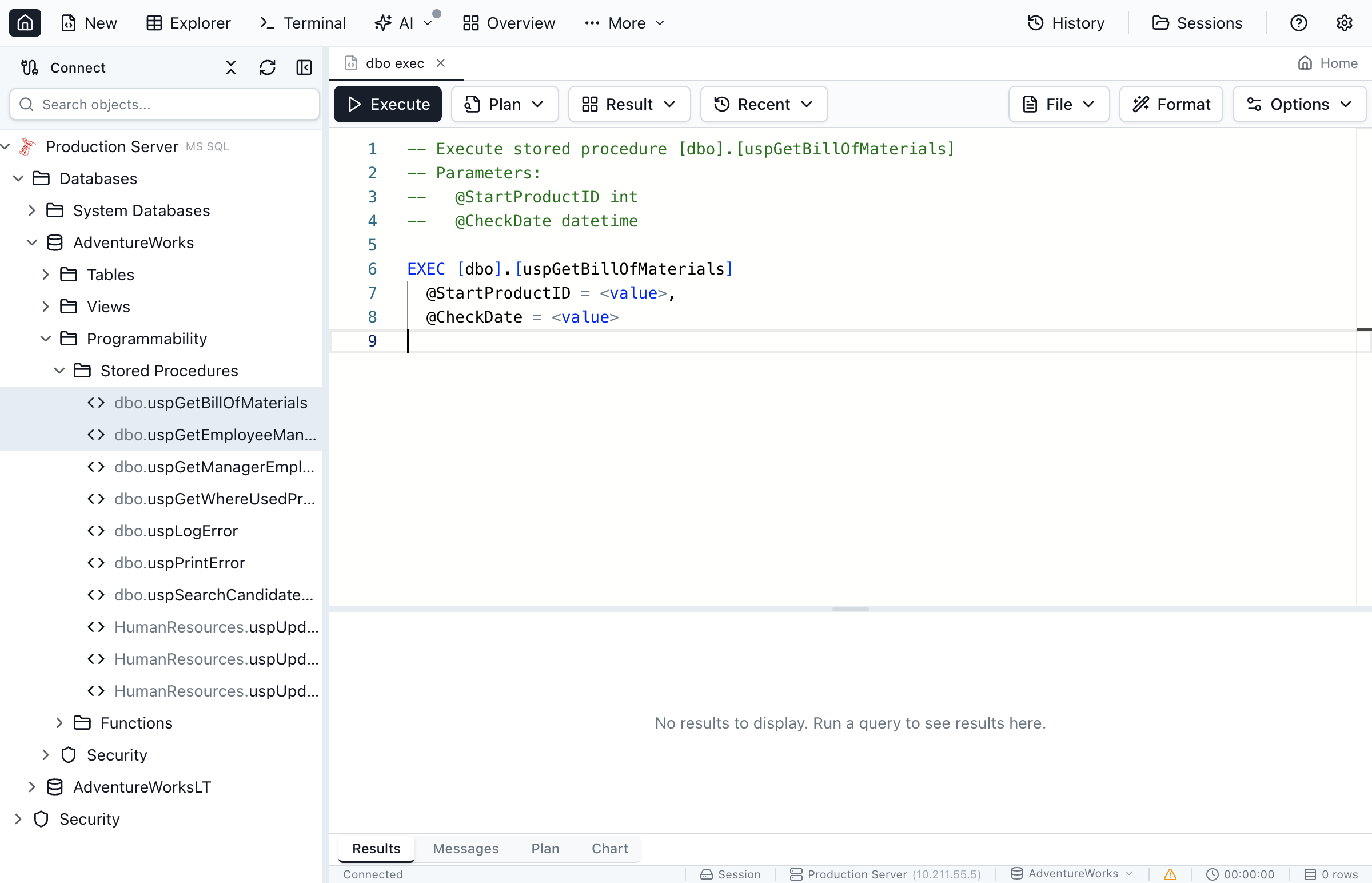
The template is engine-specific. On SQL Server you get an EXEC with each parameter and OUTPUT markers where relevant:
-- Execute stored procedure [dbo].[GetCustomerOrders]
-- Parameters:
--   @CustomerID int
--   @StartDate datetime
--   @EndDate datetime
--   @OrderStatus varchar (OUT)

EXEC [dbo].[GetCustomerOrders]
  @CustomerID = <value>,
  @StartDate = <value>,
  @EndDate = <value>,
  @OrderStatus = <value> OUTPUT
On PostgreSQL the template uses CALL with named arguments; on Oracle it wraps the call in a BEGIN … END; block (and qualifies package members with the package name). Each variant lists the parameters as comments so you can see types and directions at a glance.
Cross-Engine Scripting: SQL Server, PostgreSQL, MySQL, Oracle, SQLite
Scripting isn't a SQL-Server-only feature. Each engine has its own script provider, so the generated SQL always matches the dialect of the connection you're on.
| Engine | Scripting behavior |
|---|---|
| SQL Server | T-SQL with bracket-quoted identifiers, DROP … IF EXISTS, identity seed/increment, and full constraint/index scripting. User-defined types (table, alias, CLR) script as CREATE / DROP (see below). |
| PostgreSQL | Reads real module source via pg_get_viewdef / pg_get_functiondef; routine DROPs carry the argument signature; CREATE OR REPLACE for views and functions. |
| MySQL / MariaDB | Backtick-quoted identifiers and MySQL-dialect DDL for tables, views, procedures, functions, and triggers. |
| Oracle | CREATE OR REPLACE for packages, procedures, functions, views, and types; plain DROP; PL/SQL-aware object handling (see below). |
| SQLite | SQLite-appropriate DDL; database-level scripting is hidden because a SQLite database is a single file. |
Database- and Schema-Level Scripting
Script Database As
Right-click a database in Object Explorer and choose Script Database As, then CREATE, DROP, or USE.
postgres) and run the DROP script from there.pg_get_database_ddl() and uses Jam SQL Studio's hand-built generator when that call fails. A role's Script as → CREATE does the same with pg_get_role_ddl() — see the Security guide. A script that came from the server starts with a -- Generated by PostgreSQL (pg_get_database_ddl) or (pg_get_role_ddl) comment. Only the PostgreSQL 19 beta 1–3 builds had these functions: PostgreSQL 19 Beta 4 removed them on September 24, 2026, so on Beta 4 and later, and on PostgreSQL 18 and earlier, you get the generator's script.Script Schema As
When the Object Explorer groups objects by schema, each schema node has its own scripting actions:
- Script New — opens a new query tab with a CREATE template (Table, View, Stored Procedure, or Function) pre-scoped to that schema, so the template already targets
schema.name. - Script Schema As → CREATE / DROP — generates a
CREATE SCHEMAorDROP SCHEMAstatement. Available on SQL Server and PostgreSQL, where schemas are first-class objects. - Script Schema As → Script all objects — generates CREATE statements for every table, view, procedure, and function in the schema in a single query tab (tables first, then views, then procedures and functions).
SQL Server User-Defined Types
SQL Server user-defined types live under Programmability → Types in the Object Explorer, in the same three folders SSMS and Azure Data Studio show: Memory-optimized table types are not scripted yet — Script as CREATE shows them as unreadable rather than emitting a disk-based copy.
- User-Defined Table Types — the table-valued parameter types your procedures take, e.g.
dbo.IntegerKeyValueList. - User-Defined Data Types — alias types over a system type, e.g.
CREATE TYPE dbo.Clave FROM nvarchar(50) NOT NULL. - User-Defined Types (CLR) — assembly-backed types. The folder shows “No user-defined types (CLR) found” on servers without CLR (Azure SQL, Azure SQL Edge).
Right-click any of them for Open definition, Script as CREATE and Script as DROP. There is no ALTER item, because SQL Server has no ALTER TYPE: changing a type means dropping and re-creating it, and the server refuses while any procedure, function or table still references it.
A table type has no stored module text on the server, so Script as CREATE rebuilds the statement from the catalog — columns in order, with nullability, defaults, computed columns and identity, followed by any PRIMARY KEY, UNIQUE, CHECK and INDEX the type declares:
CREATE TYPE [dbo].[IntegerKeyValueList] AS TABLE (
    [Key] INT NULL,
    [Value] INT NULL
);PK__TT_Integ__07D9BBC3…), so keeping them would make the script fail to re-create the type under a different name and would differ between two servers holding the identical type.Alias types are scripted as CREATE TYPE [dbo].[Clave] FROM NVARCHAR(50) NOT NULL; — lengths are declared in characters, not the bytes the catalog stores. CLR types are scripted as CREATE TYPE … EXTERNAL NAME [assembly].[class].
Oracle-Specific Scripting
Oracle exposes object types you won't find on SQL Server or PostgreSQL, and Jam SQL Studio scripts each in the right form.
| Object Type | Scripting notes |
|---|---|
| Packages | Package specification and body, re-emitted with CREATE OR REPLACE. Individual members can't be dropped alone. |
| Sequences | START WITH, INCREMENT BY, MINVALUE, MAXVALUE, CACHE, CYCLE options. |
| Synonyms | Public and private synonym definitions with the referenced object. |
| Database links | Link definition; the object's context menu also offers a Test Connection action. |
| Materialized views | Query definition and refresh options; a Refresh Materialized View action is available on the node. |
| Types | User-defined type specification and body. |
| Property graphs | Oracle 23ai+. Full CREATE PROPERTY GRAPH DDL via DBMS_METADATA, plus a GRAPH_TABLE starter-query template. |
On Oracle 23ai+, SQL property graphs appear under the Property Graphs node in the Object Explorer. Right-click a graph to Script as CREATE (full CREATE PROPERTY GRAPH DDL via DBMS_METADATA), Script as DROP, or Query with GRAPH_TABLE — which opens a SELECT … FROM GRAPH_TABLE(…) starter query pre-filled with labels and sample properties read from the graph's definition. For the SQL/PGQ syntax itself, see SQL/PGQ in Practice.
PostgreSQL connections show a Property Graphs node too. It reads property graphs from the server's catalog and scripts them with pg_get_propgraphdef, which worked on the PostgreSQL 19 beta 1–3 builds. PostgreSQL 19 Beta 4 reverted SQL/PGQ on September 24, 2026, so PostgreSQL 19 will be released without property graphs; on Beta 4 and later, and on PostgreSQL 18 and earlier, the node is empty.
CREATE OR REPLACE for packages, procedures, functions, views, and types, you can re-run generated scripts without dropping the object first.PostgreSQL-Specific Scripting (PostgreSQL 19, beta)
PostgreSQL tables get two additional script menus. Some of their items generate PostgreSQL 19 syntax; those items are always shown rather than hidden on older servers, so the generated script is what tells you about a version requirement. The partition MERGE/SPLIT items target syntax that PostgreSQL 19 Beta 4 reverted — see below.
Maintenance menu
Right-click a PostgreSQL table and open Maintenance for four ready-to-run scripts, each opened in a new query tab (never executed automatically):
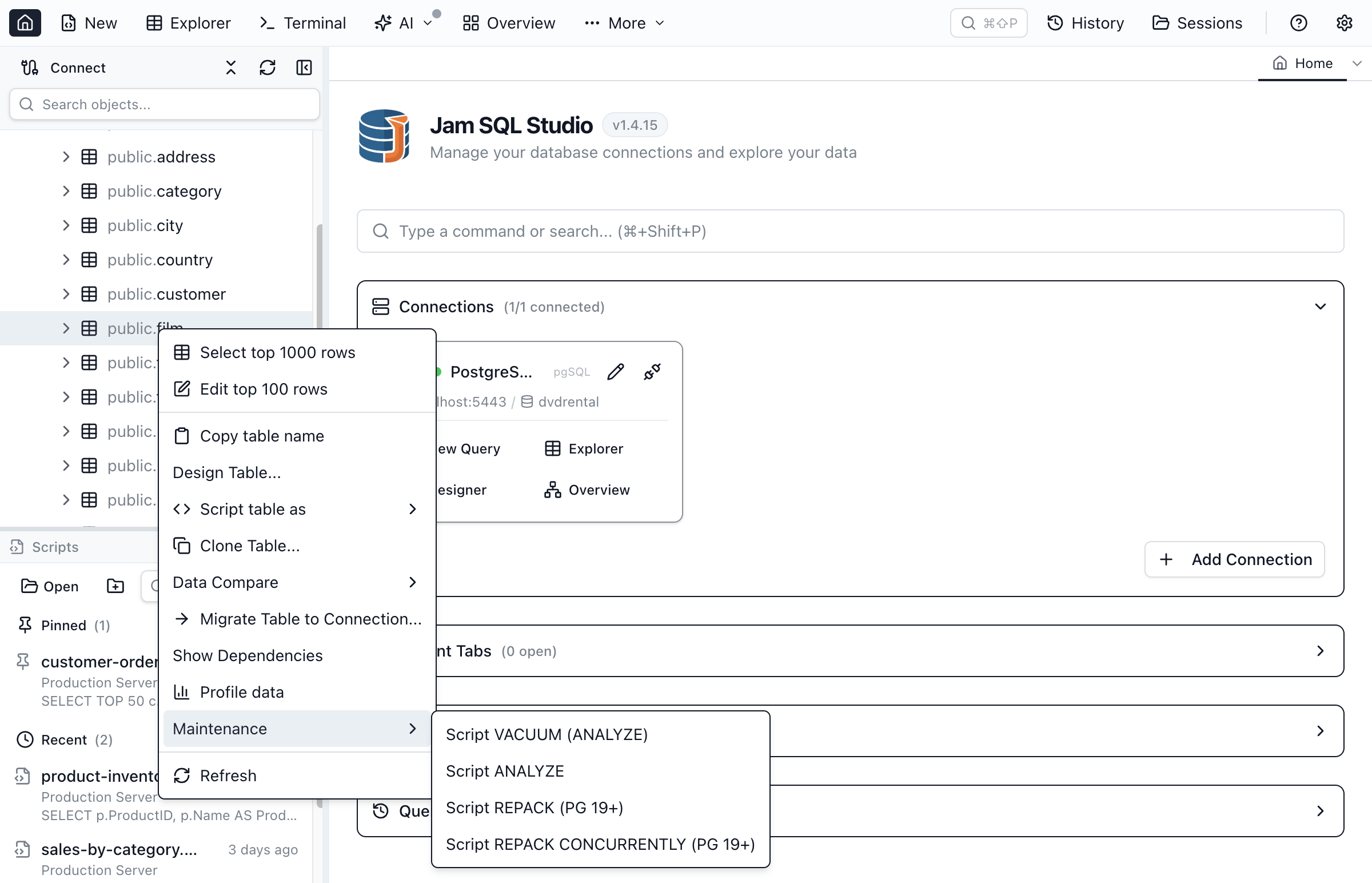
- Script VACUUM (ANALYZE) and Script ANALYZE — work on any PostgreSQL version.
- Script REPACK and Script REPACK CONCURRENTLY — PostgreSQL 19's
REPACKreplaces the oldVACUUM FULL/CLUSTERpattern for reclaiming space without a full table rewrite lock. On a server older than PostgreSQL 19 (or when the version can't be detected), the generated script includes a-- NOTE: REPACK requires PostgreSQL 19+ (this server reports …)comment instead of hiding the menu item.
Partitions: Select Top and MERGE/SPLIT script templates
Declarative-partitioned tables (PARTITION BY RANGE/LIST/HASH) show a Partitions folder in Object Explorer listing each child partition with its FOR VALUES … bound inline in the tree. Right-click a partition for:
- Select Top 1000 — a plain
SELECTagainst that partition, works on any PostgreSQL version. - Script SPLIT PARTITION (labelled PG 19+ in the menu) — opens a query tab prefilled with the partition's current bound as a comment and
TODO-marked placeholder bounds for the two new halves; you fill in the split point before running it.
Right-click the Partitions folder itself for Script MERGE PARTITIONS (labelled PG 19+) — generates an ALTER TABLE … MERGE PARTITIONS (…) INTO … statement that merges every current sibling partition into a new <parent>_merged partition.
These two statements only run on the PostgreSQL 19 beta 1–3 builds. PostgreSQL 19 Beta 4 reverted ALTER TABLE … MERGE PARTITIONS and SPLIT PARTITION on September 24, 2026, so PostgreSQL 19 will be released without them. The menu items are still there. When the server reports a version below 19, the generated script starts with a -- NOTE: MERGE/SPLIT PARTITIONS require PostgreSQL 19+ comment; on a 19 Beta 4 or later server there is no such comment, and the server rejects the statement when you run it.
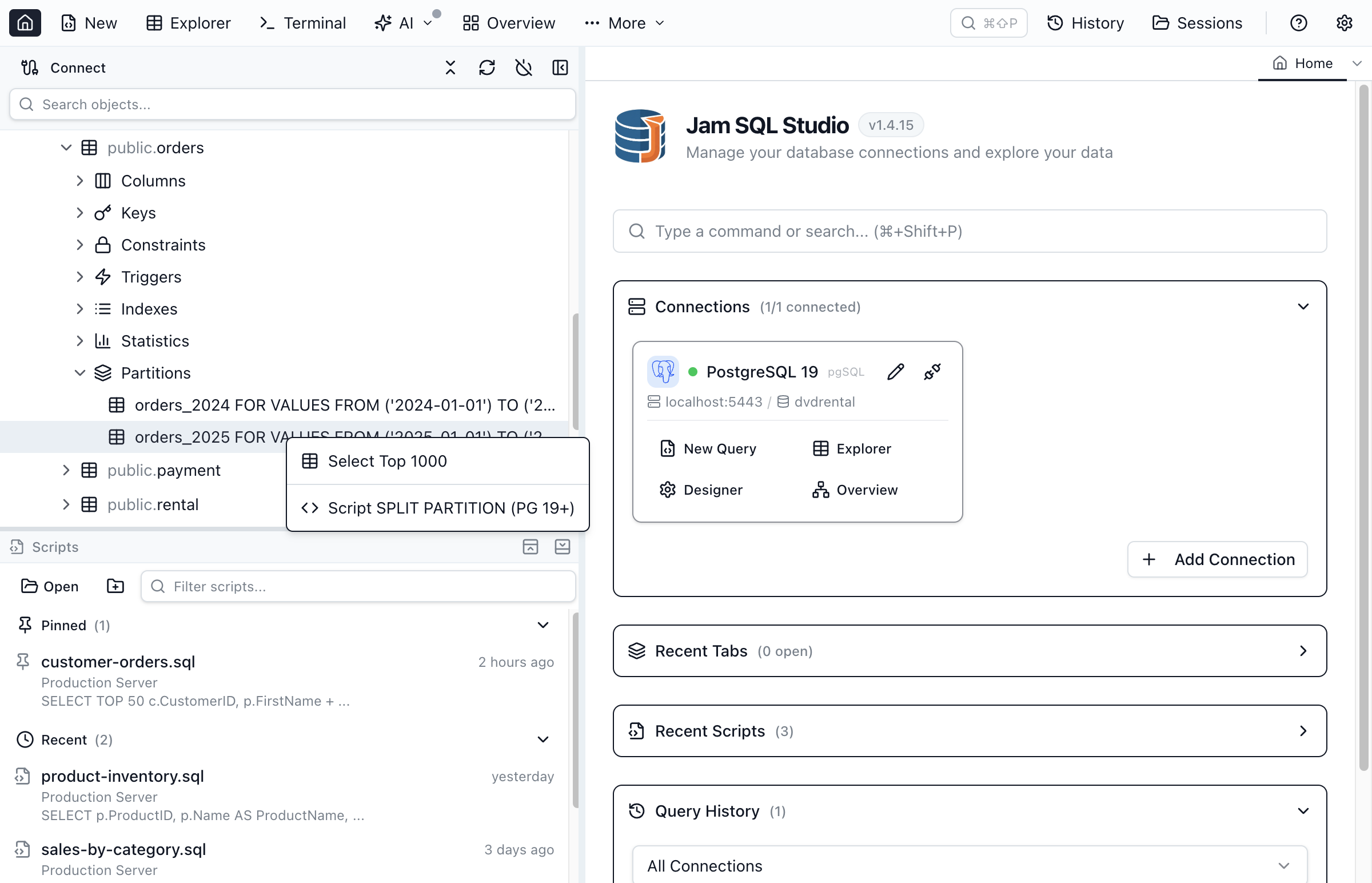
MERGE PARTITIONS and SPLIT PARTITION scripts depend on the reverted syntax.Scripting in Jam SQL Studio vs SSMS's Generate Scripts wizard
SQL Server Management Studio's Generate Scripts… wizard is a multi-page, batch-oriented flow: pick objects, step through advanced options, then produce one big script file or window. Jam SQL Studio takes a lighter, per-object approach that also spans five engines:
- One right-click, one object. Script exactly the object you're looking at as CREATE, ALTER, or DROP — no wizard, no page-through.
- Always lands in an editable query tab. The script opens in the normal Query Editor with syntax highlighting, so you refine and run it in place rather than exporting a file first.
- Cross-engine by design. The same actions work on PostgreSQL, MySQL, Oracle, and SQLite, each with dialect-correct output — where the SSMS wizard is SQL Server only.
- Whole-schema when you need it. For a batch, Script Schema As → Script all objects emits every object in a schema in one pass.
For structural diffs and synchronization scripts across two databases, pair scripting with Schema Compare, which generates the ALTER/CREATE/DROP statements needed to make one schema match another.
Best Practices
Version Control
- Script objects and save the query tab to a
.sqlfile committed to source control - Use consistent naming for script files
- Keep schema prefixes in object names for clarity
- Add a comment header with change history
Deployment Scripts
- Rely on the built-in
IF EXISTSguards on DROP scripts (and addIF NOT EXISTSwhere your engine supports it) - Test scripts in development before production
- Wrap multi-statement deployments in a transaction
- Script in dependency order — check the Dependency Viewer first
Documentation and Backups
- Use scripted objects as living documentation of the database structure
- Generate a CREATE script before a major change as a quick rollback reference
- Combine with Schema Compare for change tracking between environments
Frequently asked questions
How do I generate a CREATE script for a table in Jam SQL Studio?
Right-click the table in Object Explorer, open 'Script table as', and choose 'CREATE'. A new query tab opens with the full CREATE TABLE definition, including columns, constraints, indexes, and keys. From there you can edit it, run it, or save it to a .sql file.
Where are SQL Server user-defined table types in Jam SQL Studio?
Under Programmability → Types on a SQL Server or Azure SQL connection, in the same three folders SSMS and Azure Data Studio use: User-Defined Table Types, User-Defined Data Types, and User-Defined Types (CLR). Right-click a type for Open definition, Script as CREATE, or Script as DROP. There is no ALTER item because SQL Server has no ALTER TYPE — a change means dropping and re-creating the type.
Does Jam SQL Studio script objects for PostgreSQL, MySQL, Oracle, and SQLite too?
Yes. Scripting is engine-aware and works across SQL Server, PostgreSQL, MySQL/MariaDB, Oracle, and SQLite. Each engine has its own script provider, so the generated DDL uses the correct dialect — for example CREATE OR REPLACE on PostgreSQL and Oracle, and the SQLite-appropriate DROP syntax.
What scripting options are available for stored procedures?
For a stored procedure you can Script as CREATE, ALTER, or DROP, and Open definition. There is also a separate 'Execute…' action that builds a parameterized call template — EXEC on SQL Server, CALL on PostgreSQL, or a BEGIN…END block on Oracle — with each parameter listed. Functions can be scripted as CREATE, ALTER, or DROP.
Do generated DROP scripts include IF EXISTS?
Yes on the engines that support it: SQL Server, PostgreSQL, MySQL, and SQLite emit DROP … IF EXISTS. Oracle uses a plain DROP because it has no IF EXISTS clause. For PostgreSQL procedures and functions the DROP includes the argument signature so overloaded routines are dropped unambiguously.
Can I script database-level and schema-level statements?
Yes. Right-click a database and choose 'Script Database As' to generate CREATE, DROP, or USE (hidden for SQLite, which is a single file). When objects are grouped by schema, each schema node offers 'Script Schema As' with CREATE, DROP, and 'Script all objects', which emits CREATE statements for every table, view, procedure, and function in that schema.
Generate DDL Scripts
Download Jam SQL Studio and script your database objects across five engines.