 Jam SQL Studio
 Best SQL Data Compare Tool in 2026
Compare the top tools for diffing database table data. Find rows that were added, modified, or deleted — and generate sync scripts to reconcile differences across environments.
Comparing table structure instead — columns, indexes, views, procedures? See the schema compare tool comparison.
Free for personal, non-commercial use • Full compare up to 10,000 rows/table on Personal • Mac, Windows, Linux
Reproduce it: two tables, three known differences
A comparison tool is only worth trusting if you have watched it find differences you planted yourself. The script below plants exactly three. It creates two tables and inserts rows — run it against a dedicated sample database, never a production one. A drop script is at the end.
1. Seed the two tables
-- Runs as-is on SQL Server, PostgreSQL, MySQL and SQLite.
CREATE TABLE dc_source (
  product_id INT           NOT NULL PRIMARY KEY,
  name       VARCHAR(60)   NOT NULL,
  price      DECIMAL(10,2) NOT NULL,
  in_stock   INT           NOT NULL
);

CREATE TABLE dc_target (
  product_id INT           NOT NULL PRIMARY KEY,
  name       VARCHAR(60)   NOT NULL,
  price      DECIMAL(10,2) NOT NULL,
  in_stock   INT           NOT NULL
);

INSERT INTO dc_source (product_id, name, price, in_stock) VALUES
  (1, 'Keyboard',  49.00, 12),
  (2, 'Mouse',     19.50, 40),
  (3, 'Monitor',  219.00,  3),
  (4, 'Headset',   79.90,  7);

INSERT INTO dc_target (product_id, name, price, in_stock) VALUES
  (1, 'Keyboard',  49.00, 12),
  (2, 'Mouse',     22.50, 40),
  (3, 'Monitor',  219.00,  3),
  (5, 'Webcam',    59.00, 15);
The three planted differences: product 4 exists only in the source, product 2 has a different price (19.50 against 22.50), and product 5 exists only in the target. Everything else matches, which is the part that matters — a tool that reports four differences here is wrong.
On Oracle, use VARCHAR2(60) and NUMBER(10) / NUMBER(10,2), and run the four INSERT statements one at a time — Oracle has no multi-row VALUES clause.
2. Run the comparison
- Open More → Data Compare from the main toolbar (the native Connection menu has the same item).
- Source: your connection, the sample database, table
dc_source. Target: the same connection and database, tabledc_target. Two tables in one database is a valid pair — only pointing both sides at the identical table is refused. - Leave the key mapping alone. Both tables have a primary key on
product_id, and that is what Jam SQL Studio matches rows on by default. - Click Compare.
Expect three rows back, with colour-coded statuses: added (only in source — product 4), modified (product 2, with the changed price cell highlighted), and deleted (only in target — product 5). Everything identical is filtered out of your way. If a comparison genuinely finds nothing, you get an explicit “Source and target data has no differences” message rather than an empty grid you have to interpret.
3. Read the output before you run it
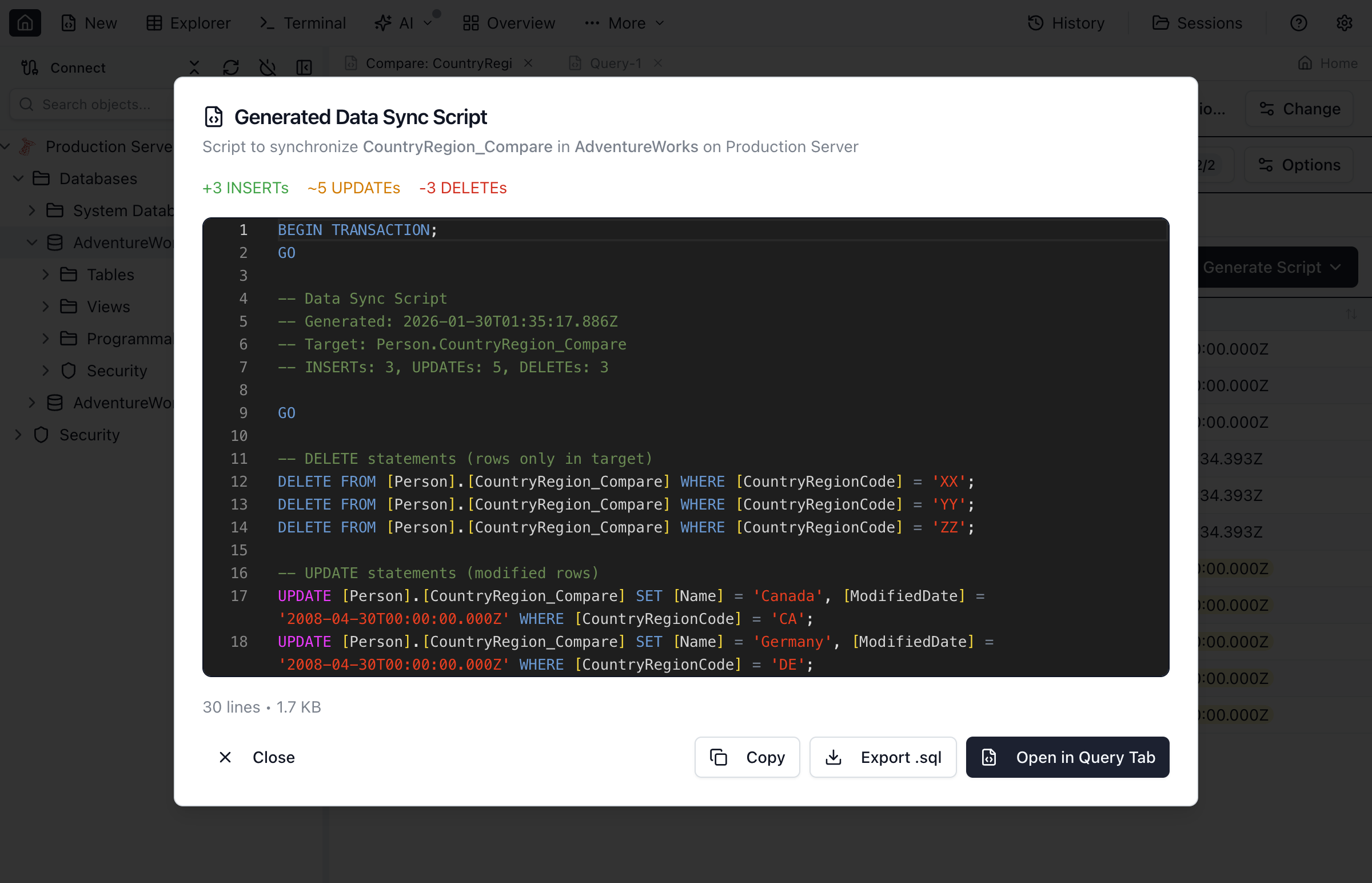
Tick or untick individual rows, then Generate Script. For this seed you get exactly three statements — one INSERT for product 4, one UPDATE for product 2, one DELETE for product 5 — in a preview you read first. From there, Apply executes it or Save writes it to a file you can put in review or a pipeline.
Every generated script is wrapped in a transaction and states in its own header what that wrap actually guarantees on that engine, on the line starting -- Atomicity:. That is not decoration: on SQL Server a mid-script failure rolls the whole thing back; on Oracle, statements applied from the app are committed as they succeed; on MySQL and SQLite the outcome depends on whether the client running the file stops at the first error. A script that quietly implied “all or nothing” everywhere would be lying on three engines out of five.
4. Clean up
DROP TABLE dc_source;
DROP TABLE dc_target;
Two tables, about four minutes
The whole exercise fits in the free Personal tier — these tables are far below the 10,000-row full-compare cap. Personal is licensed for personal, non-commercial use and needs no account.
Which engine pairs can be compared
Not every “multi-database” tool compares across databases. Here is exactly what Jam SQL Studio pairs.
| Pair | Supported | What to know |
|---|---|---|
| Same engine on both sides — SQL Server, PostgreSQL, MySQL/MariaDB, Oracle, SQLite | ✓ Yes | The ordinary case. Sync scripts are generated in that engine’s dialect. |
| Any two different engines among those five | ✓ Yes, tables only | The tab shows an explicit cross-engine notice. Values are reconciled across drivers — a SQL Server bit 0/1 matches a PostgreSQL BOOLEAN, a decimal returned as a string matches the same number returned as a number — and the generated script coerces each value to the target column’s type. Check the column mappings line up before you trust the diff. |
| A Database Blueprint folder as the source, a live database as the target | ✓ Yes | Opened from the blueprint’s Sync Data dialog with key and value mappings pre-filled. Such a comparison cannot be pinned to the Object Explorer — the pin button is disabled and says why: “A comparison from a Database Blueprint folder can’t be pinned — a pin is saved under its source connection.” |
| Azure Data Explorer (Kusto) | ✗ No | Kusto connections work everywhere else in the app, but Data Compare does not resolve them. This is a real gap, not an oversight in this table. |
| The exact same table on both sides | ✗ Refused | The setup dialog tells you the endpoints are identical instead of running a comparison that can only ever return nothing. |
How rows are matched — and where that goes wrong
Row matching decides everything downstream: match the wrong rows and the generated script updates records that had nothing to do with the source.
- The primary key is the default key. You can override it and pick different columns — useful when the two tables have different primary key definitions, or when the target has no primary key constraint at all.
- Value columns are chosen separately from key columns, so you can compare on a business key while ignoring columns that are expected to differ (audit timestamps, surrogate ids).
- Auto-generated keys are the classic trap. When both environments use SQL Server
IDENTITY, PostgreSQLserial/identity, MySQLAUTO_INCREMENTor an Oracle identity column, the same key value often belongs to a different record on each side. Matching on it makes two unrelated rows look like one modified row, and a naiveUPDATEwould overwrite a record that has nothing to do with the source. Jam SQL Studio offers Apply as INSERT on such a row so the source record is inserted as a new row instead — and it offers it only when it can see that the target key is auto-generated, because otherwise the new row would land on the key it just matched. SQLite targets never qualify: SQLite exposes no flag identifying an auto-generated key column. - Per-row choices survive a re-run on the same tables, but are cleared when you point the tab at a different pair or change the key mapping — because a key means a different row then.
- Row selection resets whenever a comparison starts, so Generate Script only ever sees rows you picked in the comparison you are looking at.
What a sampled comparison does and does not prove
Above the Personal-tier cap — and any time you want a fast preview — the Compare menu offers two sample modes, and it is worth knowing exactly what each one checks:
- First N rows compares the first N of each table in key order. It proves those rows match. It says nothing about rows past the window.
- Random N rows draws an independent sample from each side. On a large table the two samples rarely overlap, so rows can be missed or shown as added/removed even when both sides hold them. Treat it as a spot check.
A sampled run that finds nothing never claims the tables match. It reports what was checked and what was not — for example the headline “No differences in the 1,000 sampled rows” over the line “Only the first 1,000 rows (by key order) of each side were compared — 1,015 source rows and 1,015 target rows were not checked. Run a full comparison to verify the whole table.” — with a Run Full Comparison button in the notice, and a toolbar chip naming the strategy so the result cannot be mistaken for a full comparison later. The one exception: when the exact row counts show both tables fit inside the sample, the sample was the whole table, and you get the normal all-clear.
The Personal cap, stated plainly: full comparison runs when both tables hold 10,000 rows or fewer. Above that it asks for Pro, or runs one of the sample modes. Sampled comparisons are never gated. Pro removes the row cap and adds the commercial-use licence — the Personal tier is licensed for personal, non-commercial use.
Data Compare Tool Comparison: 2026 Edition
A side-by-side comparison of the most popular SQL data compare tools.
| Feature | Jam SQL Studio | Redgate SQL Data Compare | DBeaver | DataGrip | SSDT |
|---|---|---|---|---|---|
| Data Compare | ✓ | ✓ | Enterprise+ not in Community (checked 2026-09-05) | ✓ | ✓ |
| Schema Compare (also included) | ✓ | ✗ Separate product | Enterprise+ not in Community (checked 2026-09-05) | ✓ | ✓ |
| Sync Script Generation | ✓ INSERT/UPDATE/DELETE | ✓ | ✓ | ✓ | ✓ |
| Side-by-Side Row Diff | ✓ | ✓ | ✓ | ✓ | Limited |
| Cross-platform | ✓ Mac/Win/Linux | Windows GUI Linux command line in beta | ✓ | ✓ | ✗ Windows only |
| SQL Server Support | ✓ | ✓ | ✓ | ✓ | ✓ |
| PostgreSQL Support | ✓ | ✗ | ✓ | ✓ | ✗ |
| MySQL Support | ✓ | ✗ | ✓ | ✓ | ✗ |
| Oracle Support | ✓ | ✗ | ✓ | ✓ | ✗ |
| AI Agent Support — compare callable via MCP | ✓ MCP Server | Partial MCP for Redgate Monitor data, not compare | Partial MCP for read-only queries, not compare | Limited | ✗ |
| Query Editor Included | ✓ Full IDE | ✗ Compare only | ✓ Full IDE | ✓ Full IDE | Via Visual Studio |
| Command Palette | ✓ + Object Search | ✗ | ✗ | ✓ | ✗ |
| Pricing | Free for non-commercial use; Pro $9.99/mo or $99/yr | From $327/user/yr (compare only, checked July 2026) | from $12/mo | from $99/yr | Free (with VS) |
| Enum Column Dropdowns | ✓ Native + CHECK + Sampled | ✗ | Native only | Native only | ✗ |
Why Teams Choose Jam SQL Studio for Data Compare
Compare table data across databases with sync script generation — included in a full SQL IDE at a fraction of standalone tool prices.
Data + Schema Compare in One Tool
Most tools charge separately for data compare and schema compare. Jam SQL Studio includes both free in the Personal tier (up to 10,000 rows/table and 200 objects), alongside execution plans, charting, and AI support. Pro removes the size caps, adds AI Workspace sync, multiple named sessions and the Schema Overview extras, and covers commercial use — one subscription replaces multiple expensive tools.
Cross-Platform & Multi-Database
Compare data across SQL Server, PostgreSQL, MySQL, Oracle, and SQLite on Mac, Windows, or Linux. Redgate and SSDT are Windows-only and SQL Server-only. Jam SQL Studio works everywhere with every major database.
Affordable for Every Team
Redgate SQL Data Compare is a per-user annual subscription from $327/user/year and only compares data. Jam SQL Studio's free Personal tier already includes a full SQL IDE with data compare built in — Pro is just $9.99/month or $99/year if you need to remove the size caps. That's a fraction of the cost for far more functionality.
Use Cases That Matter
Verify deployments ran correctly. Audit data drift between environments. Compare dev vs staging vs production. Synchronize lookup tables. Investigate report discrepancies. All from one intuitive interface.
Bring Your Connections With You
Already have connections set up elsewhere? Import them into Jam SQL Studio in one click from Azure Data Studio, VS Code, SSMS, DBeaver, DataGrip, TablePlus, MySQL Workbench, Navicat, and pgAdmin — plus standard config files like tnsnames.ora, pg_service.conf, .my.cnf, and ODBC. See how import works →
Data Compare Features
Everything you need for comparing and syncing database data.
Side-by-Side Diff
See added, modified, and deleted rows side-by-side. Color-coded highlighting makes differences obvious at a glance.
Sync Scripts
Generate INSERT, UPDATE, and DELETE scripts to synchronize data. Review before executing. Save for CI/CD pipelines.
Schema Compare Too
Schema compare included in the same tool. Compare both structure and data across environments without switching applications. See how it compares with Redgate SQL Compare and dbForge in the schema compare tool comparison.
Execution Plans
Full SQL IDE with execution plan visualization. Optimize the queries that populate your tables, not just compare the data.
Built-in Charts
Visualize query results as charts. Quickly spot data trends and anomalies before running detailed comparisons.
AI Agent Support
MCP server lets AI coding assistants query your databases safely. Automate data comparison workflows with AI.
Frequently Asked Questions
Common questions about SQL data compare tools.
What is the best SQL data compare tool in 2026?
Jam SQL Studio offers the best value: data compare is free in the Personal tier (up to 10,000 rows/table), included in a full SQL IDE. Pro ($9.99/month) removes that size cap and adds AI Workspace sync, multiple named sessions, and a commercial-use license. Redgate is enterprise-grade but Windows-only, sold as a per-user annual subscription from $327/user/year with volume discounts above four users (checked July 2026). DBeaver and DataGrip include data compare in their paid tiers.
What is SQL data compare?
SQL data compare lets you compare actual row data in two tables side-by-side. It shows added, modified, and deleted rows, and generates INSERT/UPDATE/DELETE scripts to synchronize. Different from schema compare, which compares table structure.
Is Jam SQL Studio cheaper than Redgate?
Yes, significantly. Redgate SQL Data Compare is a per-user annual subscription from $327/user/year, data compare only (checked July 2026). Jam SQL Studio's free Personal tier already includes data compare, schema compare, execution plans, charting, and AI support — a full SQL IDE. Pro ($9.99/month or $99/year) removes those size caps and adds AI Workspace sync, multiple named sessions, and a commercial-use license.
Can I compare data between different database types?
Yes, between any two of SQL Server, PostgreSQL, MySQL/MariaDB, Oracle and SQLite. Cross-engine comparison is tables only: values are reconciled across drivers (a SQL Server bit 0/1 matches a PostgreSQL BOOLEAN, a decimal returned as a string matches the same number returned as a number) and the generated script coerces each value to the target column's type. Azure Data Explorer (Kusto) connections are not supported in Data Compare.
What are common use cases for data compare?
Common use cases: verifying deployments, auditing data drift between environments, comparing dev/staging/production, synchronizing lookup tables, and investigating report discrepancies.
Does data compare generate sync scripts?
Yes. Jam SQL Studio generates INSERT, UPDATE, and DELETE scripts to synchronize data. You can review scripts before executing, select specific rows, and save scripts for CI/CD pipelines.
Is there a free SQL data compare tool?
DBeaver's free Community edition is not one, despite its reputation: DBeaver's own documentation places Data compare in the Enterprise and Ultimate editions only, checked August 2026. Jam SQL Studio's free Personal tier does include data compare at no cost for personal, non-commercial use, up to 10,000 rows per table, and above that cap it still runs on a first-N or random-N sample — much cheaper than standalone tools like Redgate (from $327/user/year, checked July 2026).
Download the Best Data Compare Tool
Compare table data across databases. Full SQL IDE included.
Comparing Other SQL Tools?
See how Jam SQL Studio compares to other popular database tools.