 Jam SQL Studio
 A Toad for Oracle Alternative
That Runs on Mac, Windows and Linux
Jam SQL Studio connects to Oracle in Thin mode — no Oracle Client, no Instant Client — and covers the daily loop: query, execution plan, Session Browser, PL/SQL debugger. Below is that loop as a workflow you can reproduce against a throwaway Oracle container, followed by an honest list of what Toad does that Jam SQL Studio does not.
Free for personal use • No account required • Mac, Windows, Linux
The Oracle connection facts, before anything else
What Jam SQL Studio needs on your machine to reach an Oracle database, and which servers it reaches.
| Driver | node-oracledb in Thin mode by default — pure JavaScript, so there is nothing to install beside it: no Oracle Client, no Instant Client, no ORACLE_HOME, no tnsnames.ora unless you choose to use one. From version 1.5.7, an optional Thick mode loads Oracle Instant Client for servers that require Oracle Native Network Encryption; you switch it in Settings → Oracle Client and it applies after a restart. |
| Oracle versions | Oracle Database 12c Release 2 (12.2) and later — 19c, 21c and 23ai included. Default port 1521. |
| Connection forms | EZConnect (host:port/service_name), a full TNS descriptor, or a TNS alias resolved from a tnsnames.ora in a TNS Admin directory you point at. For a SID instead of a service name, tick Use SID and the app builds the (SID=…) descriptor for you. A Discover button next to Service Name probes the listener for the usual names (FREE, FREEPDB1, XE, XEPDB1, ORCL, ORCLPDB1…) and lists what answered. |
| Autonomous Database | Supported through the Wallet Location field — point it at the directory holding cwallet.sso or ewallet.p12 for mTLS. |
| Authentication | Password authentication only, in Thin and Thick mode. No Kerberos, LDAP or OCI IAM external authentication. |
| Platforms | macOS 11 Big Sur and later (separate signed, notarized Apple Silicon and Intel disk images), Windows, and Linux as .deb, .rpm and Arch packages for x64 and ARM64. |
| CDB / PDB | You connect to a specific PDB by service name. Oracle schemas are users, so the Object Explorer shows Schemas rather than Databases, with SYS, SYSTEM, DBSNMP, CTXSYS and XDB filtered out by default. |
A reproducible Oracle workflow: connect, query, plan, session, debug
Every step below uses the same Oracle Database Free 23ai container, service name and grants that Jam SQL Studio’s own Oracle end-to-end tests run against. The SQL is inline so you can repeat it. The seed script writes to a database — one table, 1,000 generated rows and one procedure — so run it against a throwaway container or a dedicated sample schema, never a production database. A cleanup script is at the end.
1. Start an Oracle you can throw away
Oracle Database Free needs no Oracle account. First start takes two to five minutes while the database initialises.
docker run -d --name oracle-free -p 1521:1521 \
  -e ORACLE_PASSWORD=Oracle123 \
  -e APP_USER=jamsql -e APP_USER_PASSWORD=JamSql123 \
  gvenzl/oracle-free:latest

# watch until the log prints DATABASE IS READY TO USE
docker logs -f oracle-free
That container exposes two service names: FREEPDB1 is the pluggable database your data lives in, and FREE is the container database for admin work. Use FREEPDB1.
2. Grant the privileges each step needs
Oracle gates plans, session monitoring and debugging behind separate privileges, and none of them are implied by CONNECT. Run this as SYSTEM against FREEPDB1. These statements change privileges on the target database.
-- metadata for the Object Explorer and IntelliSense
GRANT SELECT ANY DICTIONARY TO jamsql;

-- execution plans (estimated and actual)
GRANT SELECT ON SYS.V_$SQL                        TO jamsql;
GRANT SELECT ON SYS.V_$SQL_PLAN_STATISTICS_ALL    TO jamsql;
GRANT EXECUTE ON SYS.DBMS_XPLAN                   TO jamsql;

-- Session Browser
GRANT SELECT ON SYS.V_$SESSION                    TO jamsql;

-- PL/SQL debugger
GRANT DEBUG CONNECT SESSION                       TO jamsql;
GRANT DEBUG ANY PROCEDURE                         TO jamsql;
GRANT EXECUTE ON SYS.DBMS_DEBUG                   TO jamsql;
If a debug privilege is missing, Jam SQL Studio checks for it when the debug session starts and puts the exact GRANT statements in the error message rather than failing with an ORA number.
3. Connect
Click New Connection, pick the Oracle tile, and fill in server localhost, port 1521, service name FREEPDB1, login jamsql, password JamSql123. If you are not sure of the service name on a real server, click Discover and pick from the names the listener actually answers to. Already have your databases in a tnsnames.ora? Import every alias in one pass instead of retyping them — connection import also reads DBeaver, DataGrip, SSMS, TablePlus and pgAdmin.
4. Seed a table and read an execution plan
Run this as jamsql. It creates one table and 1,000 rows.
CREATE TABLE demo_orders (
  order_id  NUMBER GENERATED BY DEFAULT AS IDENTITY PRIMARY KEY,
  customer  VARCHAR2(60)  NOT NULL,
  amount    NUMBER(10,2)  NOT NULL,
  placed_at DATE DEFAULT SYSDATE NOT NULL
);

INSERT INTO demo_orders (customer, amount, placed_at)
SELECT 'CUST-' || TO_CHAR(MOD(LEVEL, 50), 'FM000'),
       ROUND(DBMS_RANDOM.VALUE(5, 500), 2),
       SYSDATE - MOD(LEVEL, 90)
FROM   dual
CONNECT BY LEVEL <= 1000;

COMMIT;
Then run the query you actually want to understand:
SELECT customer, COUNT(*) AS orders, SUM(amount) AS total
FROM   demo_orders
WHERE  placed_at >= SYSDATE - 30
GROUP  BY customer
ORDER  BY total DESC
FETCH FIRST 10 ROWS ONLY;
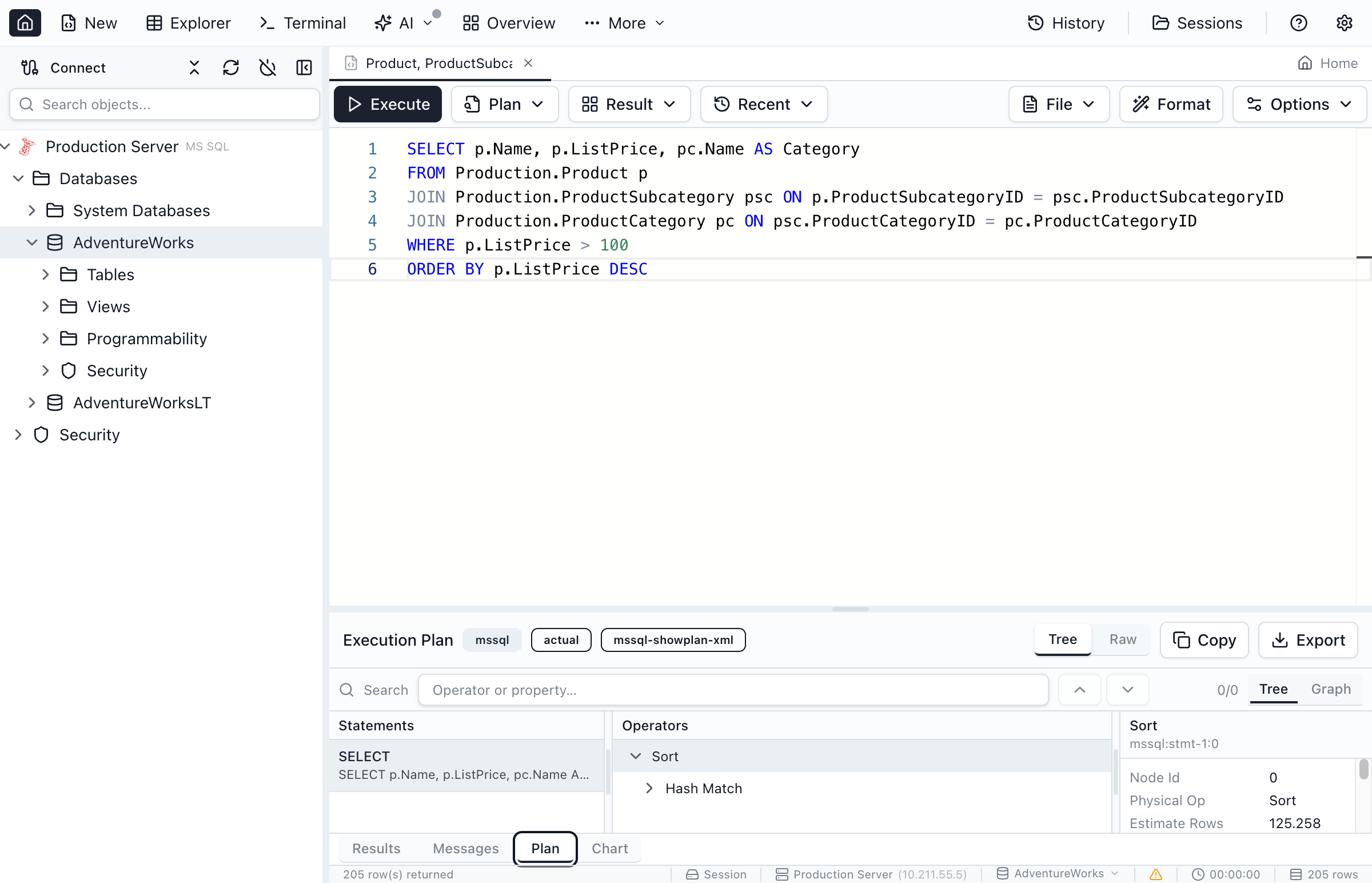
Estimated plan: Plan → Explain plan in the query editor toolbar runs EXPLAIN PLAN FOR, reads the rows back from PLAN_TABLE (operation, options, object, cost, cardinality, bytes, CPU and I/O cost), then deletes its own statement id. Nothing executes.
Actual plan: executing with the actual plan prepends /*+ GATHER_PLAN_STATISTICS */ and reads runtime figures from V$SQL_PLAN_STATISTICS_ALL — Starts, E-Rows against A-Rows, A-Time, Buffers. This is deliberately limited to read-only statements: Jam SQL Studio will not run a DML statement just to collect an actual plan. Both render in the same tree and graph views used for SQL Server, PostgreSQL and MySQL, and both export to a file (.oracle.plan.json / .oracle.plan-actual.json) so you can reopen or compare a plan later.
5. Watch a session while it runs
Open a second query tab and start something slow enough to catch:
BEGIN
  DBMS_SESSION.SLEEP(60);
END;
Now open More → DBA → Session Browser from the main toolbar and pick the connection. On Oracle the grid is built from V$SESSION: one row per session with SID, user, status, CPU, reads and writes, current command and wait event. Click a row for the full SQL text, the locks it holds with the blocked/blocking chain, its wait events, and — Oracle only — its open cursors. Kill Session issues ALTER SYSTEM KILL SESSION behind a confirmation dialog that shows you the session id, user, database and the SQL you are about to stop.

V$SESSION; the same tab works against SQL Server, PostgreSQL and MySQL — see Session Browser.6. Step through PL/SQL
Create something worth stepping into:
CREATE OR REPLACE PROCEDURE demo_month_total (
  p_customer IN  VARCHAR2,
  p_total    OUT NUMBER
) AS
  v_count NUMBER := 0;
BEGIN
  SELECT COUNT(*), NVL(SUM(amount), 0)
  INTO   v_count, p_total
  FROM   demo_orders
  WHERE  customer = p_customer
  AND    placed_at >= SYSDATE - 30;

  IF v_count = 0 THEN
    p_total := 0;
  END IF;
END;
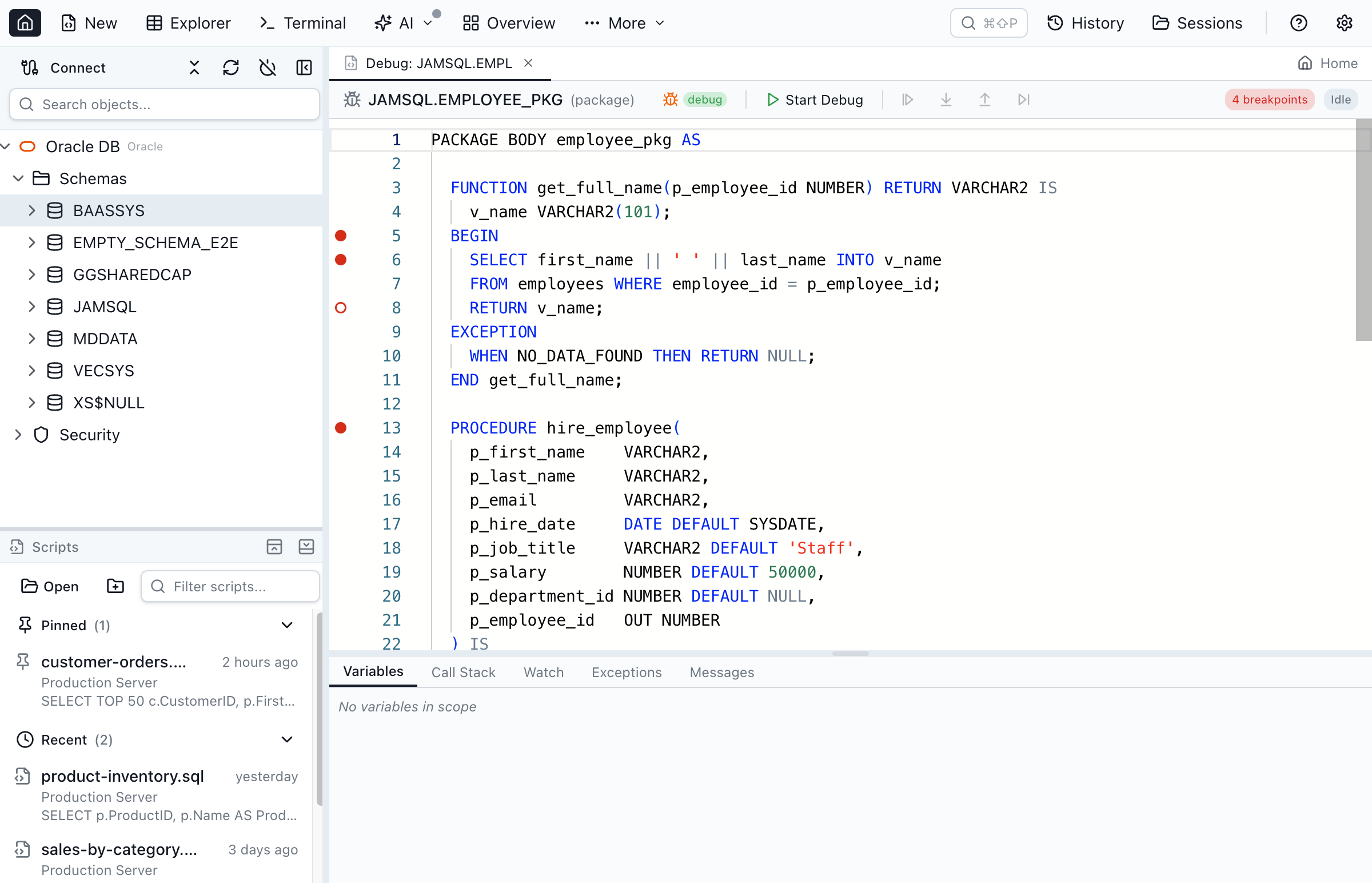
Right-click the procedure in the Object Explorer and choose Compile for Debug (that runs ALTER … COMPILE DEBUG; without it Oracle has no line map and breakpoints never bind). Choose Open to load the source, click the gutter next to the SELECT to set a breakpoint, then click Start Debug. A dialog appears pre-filled with a call block — BEGIN JAMSQL.DEMO_MONTH_TOTAL(); END; — edit the parameters and start.
Execution pauses on the highlighted line. The Variables panel splits into parameters, locals and package variables with their current values and types; Call Stack lists OWNER.PROGRAM line N frames and clicking one loads that frame's source and variables; Watch evaluates arbitrary expressions (v_count * 2, LENGTH(p_customer), record fields, collection elements) and re-evaluates after every step; Exceptions breaks on all exceptions or on named ones such as NO_DATA_FOUND. Anything written with DBMS_OUTPUT.PUT_LINE is captured and shown in Messages when the run ends.
To debug ad-hoc instead, write an anonymous block in the Query Editor and use the bug icon — it appears when Oracle is connected and the text starts with BEGIN or DECLARE. It does not appear for a CREATE… statement, and that is a real Oracle constraint rather than a gap: the debugger runs an anonymous block, and Oracle rejects a CREATE nested inside one. Run the CREATE OR REPLACE first, then step into the compiled routine.
DECLARE
  v_total NUMBER;
BEGIN
  demo_month_total('CUST-007', v_total);
  DBMS_OUTPUT.PUT_LINE('total = ' || v_total);
END;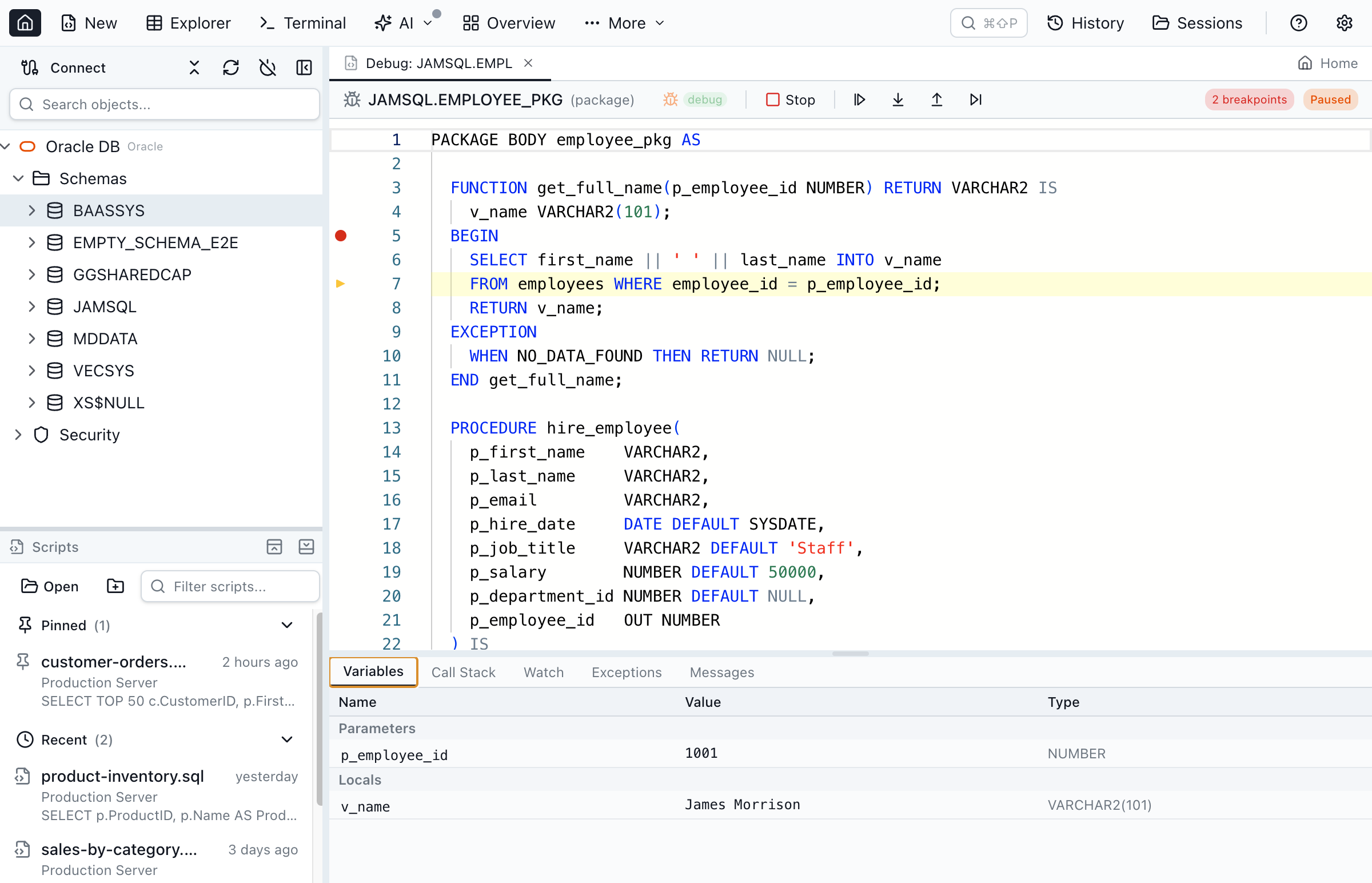
Clean up
DROP PROCEDURE demo_month_total;
DROP TABLE demo_orders PURGE;
docker rm -f oracle-freeRun the same six steps yourself
The workflow above needs the app and a container — nothing else, on any of the three platforms. Personal is free and needs no account.
Jam SQL Studio vs Toad for Oracle: Full Comparison
See how Jam SQL Studio compares to Toad for Oracle development.
| Feature | Jam SQL Studio | Toad for Oracle |
|---|---|---|
| Licence | Free Personal tier (personal, non-commercial, no account). Pro for commercial use: $9.99/month or $99/year | Paid, in several editions. Quest’s product page offers a free trial, Buy Online (Quest Online Store) and Request Pricing, and lists no free edition |
| Platforms | ✓ macOS 11+, Windows, Linux (.deb, .rpm, Arch; x64 and ARM64) | Windows, plus a separate Toad for Oracle on Mac product line whose requirements list Apple Silicon. No Linux build listed |
| Oracle Client / Instant Client | ✓ Not needed in Thin mode, the default. The optional Thick mode (from 1.5.7) uses Instant Client, for servers that require Native Network Encryption | Optional since 15.1 (“Continue without an Oracle client”). Toad still uses an installed client to hand work to SQL*Plus or external tools such as Data Pump, and all connections in a session share one client mode |
| PL/SQL editing and execution | ✓ | ✓ |
| PL/SQL step debugger | ✓ DBMS_DEBUG, on all three platforms | ✓ |
| PL/SQL profiler, unit tests, automated code review | ✗ None of the three | ✓ PL/SQL Profiler and utPLSQL unit testing in every edition; Code Review with 200+ rules |
| Session Browser | ✓ V$SESSION, locks, waits, open cursors, kill | ✓ |
| Execution plans | ✓ Estimated and actual, tree + graph, compare, export | ✓ Plus SQL Optimizer in the Xpert editions |
| Tablespace / storage management | ✓ Usage, datafiles, I/O, undo | ✓ |
| Instance monitoring | ✓ Memory, counters, Top SQL, waits, alert log, AWR snapshots | ✓ |
| Data Pump | ✓ DBMS_DATAPUMP wizard + job monitor (server-side dump files) | ✓ |
| RAC / Data Guard / RMAN / Oracle Scheduler | ✗ None of them | ✓ Edition-dependent |
| Schema compare and data compare | ✓ Both, in the same app | ✓ Edition-dependent |
| Other engines in the same app | ✓ SQL Server, PostgreSQL, MySQL/MariaDB, SQLite, Azure Data Explorer | ✗ Oracle only. Quest offers Toad Data Studio, a separate multi-database tool, free with a current Toad for Oracle commercial licence |
| AI agents via MCP | ✓ Local MCP server for outside agents, token auth, starts at Block; read-only or approval-gated per connection | Toad Chat (2026 R2) with an embedded Toad MCP that uses Toad’s own connection, plus GitHub Copilot in the editor. Quest doesn’t say whether outside agents can connect; AI features depend on the licence |
PL/SQL, sessions, plans, storage and Data Pump — in detail
The five areas an Oracle professional evaluates a Toad replacement on, with the gaps named rather than left out.
| Area | What Jam SQL Studio does | Toad’s equivalent | Not in Jam SQL Studio |
|---|---|---|---|
| PL/SQL editing | PL/SQL editor with syntax highlighting and IntelliSense over tables, columns, schemas, sequences (with .NEXTVAL), packages with member dot-completion, Oracle built-ins and ALL_*/DBA_*/USER_* dictionary views. Inside PL/SQL bodies a PL/SQL grammar adds block-scoped locals, cursors, records and collections, %TYPE / %ROWTYPE, :NEW / :OLD in row-level triggers and cursor attributes, and genuine syntax errors are underlined as you type. A Package Explorer lists every package across every schema in the database and opens its source in an embedded editor. | Toad’s PL/SQL editor is the centre of the product, with Code Review rules and SQL Optimizer alongside it. | No formatting profiles, no automated code review or code-quality rules. |
| PL/SQL debugging | DBMS_DEBUG dual-session debugger: gutter breakpoints (add, disable, remove all), Step Into / Over / Out, Continue, Variables split into parameters, locals and package variables, clickable call-stack frames that reload that frame’s source, watch expressions, break-on-exception (all or named), and DBMS_OUTPUT capture. Anonymous blocks debug without compiling for debug. | Toad Debugger. | PL/SQL profiler. Unit-test framework. A debug session that never reaches a breakpoint times out after 60 seconds. |
| Sessions | Session Browser over V$SESSION: SID, user, status, CPU, reads/writes, command and wait event per row; full SQL text, locks with the blocked/blocking chain, wait events and open cursors per session. Kill runs ALTER SYSTEM KILL SESSION behind a confirmation dialog that shows what you are stopping. | Toad Session Browser. | Trace capture and TKProf. No session-level tracing UI. |
| Execution plans | Estimated plans from EXPLAIN PLAN + PLAN_TABLE; actual plans from /*+ GATHER_PLAN_STATISTICS */ + V$SQL_PLAN_STATISTICS_ALL with Starts, E-Rows vs A-Rows, A-Time and Buffers. Tree and graph views, plan comparison, and export to a file you can reopen later. | Toad’s plan viewer, plus SQL Optimizer in the Xpert editions. | Automatic SQL rewriting or an optimisation advisor. Actual plans are captured for read-only statements only — Jam SQL Studio will not execute DML to collect one. |
| Storage | Tablespace Manager: tablespace usage with colour-coded thresholds, datafile detail, I/O statistics and undo monitoring, with a documented fallback when the connected user has no DBA views. | Toad’s space management. | Reorg and space-reclaim wizards. |
| Instance monitoring | Instance Monitor: instance information, memory statistics, key counters, Top SQL, wait statistics, the alert log, and AWR snapshot reports on Oracle. The same tab works against SQL Server, PostgreSQL and MySQL. | Toad’s database monitoring. | Alerting, and any long-term performance history beyond what AWR itself holds. AWR requires the Oracle licence that covers it. |
| Data Pump | Export and import wizard that builds and runs DBMS_DATAPUMP scripts — full / schemas / tables / tablespaces, content and compression modes, parallel degree, include and exclude filters, remap schema and remap tablespace — plus a job list with state and percent-complete, and prerequisite checks for the directory object. | Toad’s Data Pump wizards. | Client-side expdp / impdp. Dump files are written server-side into an Oracle DIRECTORY the connected user has READ, WRITE on; Jam SQL Studio does not fetch them back to your machine. |
| Backup and HA | — | Toad’s DBA editions cover this ground. | RMAN backup and restore, Data Guard, RAC management, PDB creation, Oracle Scheduler management and ORDS integration are all absent. |
| Compare | Schema compare with dependency-ordered sync scripts, and row-level data compare with INSERT/UPDATE/DELETE sync scripts — the same two tools across Oracle, SQL Server, PostgreSQL, MySQL and SQLite. | Toad’s compare tooling, edition-dependent. | — |
Which tool fits your Oracle work
The two lists below name the kinds of Oracle work each tool handles better.
Choose Jam SQL Studio when…
- You work on a Mac or on Linux, or your team is split across all three platforms.
- You cannot or would rather not install an Oracle Client on every workstation.
- Your day is query → plan → session → PL/SQL step-through, and you want schema and data compare in the same window.
- Oracle is not the only database you touch — SQL Server, PostgreSQL, MySQL, SQLite and Azure Data Explorer are in the same app.
- You want an outside AI agent — Claude Code, Codex CLI, Cursor — to query the database under a per-connection policy.
- You are evaluating on your own machine, for personal use, and want to start without an account or a licence conversation.
Choose Toad for Oracle when…
- You manage RAC, Data Guard, or RMAN backups — none of that exists in Jam SQL Studio.
- You depend on Toad’s PL/SQL profiler, automated code review, or its unit-testing tooling.
- Your shop authenticates to Oracle with Kerberos, LDAP or OCI IAM; Jam SQL Studio supports password authentication only.
- You need Oracle Scheduler management or PDB creation from the tool.
- You rely on SQL Optimizer’s automatic rewriting rather than reading a plan yourself.
- Your team is Windows-only and already has Toad licences, expertise and scripts in place. Replacing a working toolchain is a cost of its own.
Limitations worth knowing before you switch
These are the current Oracle limitations, stated plainly. None of them are on a promised timeline here.
- Thick mode is for network encryption. Thin mode is the default. The optional Thick mode (from version 1.5.7) loads Oracle Instant Client so that servers requiring Oracle Native Network Encryption can connect. It applies to the whole app after a restart, it does not change authentication, and it is available on Windows, Linux and Apple silicon Macs.
- Password authentication only. No Kerberos, LDAP or OCI IAM. Oracle Autonomous Database works through a wallet directory.
- No RAC, Data Guard, RMAN, ORDS, Oracle Scheduler management, or PDB creation. You can connect to a PDB; you cannot create or administer one.
- The PL/SQL debugger is a beta feature. It is on by default; if you never use it, untick it in Settings → Beta Features and the Debug buttons leave the app.
- No PL/SQL profiler, unit-test framework or code review. Toad includes a PL/SQL Profiler and utPLSQL unit testing in every edition.
- Data Pump dump files stay on the server. The wizard drives
DBMS_DATAPUMP, so the file lands in an OracleDIRECTORY, not in your Downloads folder. SDO_GEOMETRYis shown as WKT where it can be, and as[GEOMETRY]where it cannot.- Actual execution plans are read-only. DML statements get an estimated plan; the app will not run an
UPDATEto measure it. - Personal-tier size caps. Eight operations carry a cap: full data compare at 10,000 rows per table, schema compare at 200 objects per schema, Database Blueprint at 200 objects, exporting results at 100,000 rows, importing a file at 100,000 rows, cloning a table with data at 100,000 rows, cloning a database with data at 1 GB, and creating a backup from a 1 GB source database. Below those numbers nothing is withheld; above them the operation asks for Pro or offers a sampled comparison. The full table is on the pricing page.
Free Personal versus Pro, stated plainly
What the free tier includes, where the licence line sits, and what Pro adds.
- Personal is free forever and needs no account — download, install, connect. It includes unlimited connections, the Query Editor with IntelliSense, Table Explorer, charts, execution plans, the PL/SQL debugger, Session Browser, Tablespace Manager, Instance Monitor, Data Pump, SQL notebooks and the local MCP server.
- Personal is licensed for personal, non-commercial use. Using it for work needs Pro. That is a licence line, not a feature lock — we would rather say it here than let you find out later.
- Pro is $9.99/month or $99/year, adds the commercial-use licence, removes the Personal size caps, and adds AI Workspace sync, multiple named sessions, 100-tab closed history and the Schema Overview extras.
- The 14-day Pro trial takes no credit card, but it does require signing in or creating a free account, because the trial is tracked against an account. Personal itself never asks you to sign in.
- Full breakdown on the pricing page.
Why Developers Switch from Toad
Toad for Oracle is a long-established tool with far more Oracle-specific depth. These are the reasons an Oracle developer might pick Jam SQL Studio instead.
One licence, three platforms
Quest ships Toad for Oracle for Windows and as Toad for Oracle on Mac; there is no Linux build, and a Quest developer said in April 2025 that none is planned. Jam SQL Studio is one app on macOS, Windows and Linux — free for personal, non-commercial use, with Pro ($9.99/month or $99/year) for commercial work.
Nothing to install beside the app
Jam SQL Studio talks to Oracle in Thin mode: no Oracle Client, no Instant Client, no ORACLE_HOME. Data Pump runs server-side through DBMS_DATAPUMP, so it needs no client tools either. Toad has had a no-client mode since 15.1, but it still finds and uses an installed client when it hands work to SQL*Plus or external tools such as Data Pump.
AI-Native Development
Jam SQL Studio includes a local MCP server that outside agents such as Claude Code or GitHub Copilot can use to query your Oracle databases, under a permission level you set per connection. Toad 2026 R2’s Toad Chat uses an embedded Toad MCP inside Toad itself.
Modern Interface
Light and dark themes that follow your system setting, one layout on Mac, Windows and Linux, and a command palette (Cmd/Ctrl+Shift+P) that finds commands, database objects, saved connections and settings.
Bring Your Connections With You
Already have your Oracle databases in a tnsnames.ora? Import every alias in one click — no re-typing host, port, and service name. Jam SQL Studio also imports connections from DBeaver, DataGrip, and other tools. See how import works →
Features That Matter
Oracle features included in the free Personal tier (personal, non-commercial use) and in Pro.
AI Agent Support
A local MCP server (Model Context Protocol) lets AI coding assistants like Claude Code safely query your Oracle databases with policy-controlled access.
PL/SQL Support
Write and execute PL/SQL blocks, stored procedures, functions, and packages, with IntelliSense that understands locals, %ROWTYPE and :NEW / :OLD inside PL/SQL bodies.
Execution Plans
Visualize Oracle query execution with tree and graph views. Identify performance bottlenecks and optimize your SQL.
Schema Compare
Compare Oracle schemas across connections. Generate ALTER/CREATE/DROP scripts to sync differences between environments.
Oracle Object Explorer
Browse tables, views, packages, procedures, functions, triggers, sequences, types, and more in an intuitive tree view.
Oracle Admin Tools
Session Browser, Tablespace Manager, Instance Monitor, and Data Pump, included in the free Personal tier for personal, non-commercial use. RAC, Data Guard and RMAN are not covered.
Built-in Charts
Create bar, line, pie, area, and scatter charts from query results. Export as SVG or PNG for reports and dashboards.
Frequently Asked Questions
Common questions about switching from Toad for Oracle to Jam SQL Studio.
Is Jam SQL Studio a good Toad for Oracle alternative?
It covers the daily Oracle loop — connect, query, read an execution plan, inspect a session, step through PL/SQL — on macOS, Windows and Linux, with no Oracle Client install and a free Personal tier. It does not cover Toad's Oracle-specific depth: there is no RAC or Data Guard management, no RMAN integration, no Oracle Scheduler management, no automated code review or unit-test framework, and no PL/SQL profiler.
Is Toad for Oracle free?
No. Toad for Oracle is paid software sold in several editions. Quest's Toad for Oracle product page offers a free trial download, Buy Online through the Quest Online Store, and Request Pricing, and lists no free or freeware edition (Quest product page as of July 2026). Jam SQL Studio's Personal tier is free with no account and no time limit for personal, non-commercial use, on macOS, Windows and Linux; commercial use needs Pro at $9.99 per month or $99 per year.
Is Jam SQL Studio free for commercial Oracle work?
No — the free Personal tier is licensed for personal, non-commercial use, and that is the honest answer. Personal needs no account and has no time limit; it covers unlimited connections, the Query Editor, execution plans, the PL/SQL debugger, Session Browser and Tablespace Manager. Commercial use needs Pro at $9.99/month or $99/year, which also lifts the Personal size caps. The 14-day Pro trial needs no credit card, but it does require signing in with a free account.
Does Jam SQL Studio need Oracle Client or Instant Client?
No. Jam SQL Studio uses node-oracledb in Thin mode by default, which is pure JavaScript, so nothing is installed alongside the app. Enter host, port and service name and connect. From version 1.5.7 an optional Thick mode uses Oracle Instant Client, for servers that require Oracle Native Network Encryption (on Windows, Linux and Apple silicon Macs); you install Instant Client only if you turn it on. Toad for Oracle has been able to connect without an installed Oracle client since version 15.1: its installer still lists the client as a prerequisite, and at start-up you choose 'Continue without an Oracle client' (Quest KB 4330281). A Quest developer noted on the Toad World forum in August 2026 that Toad still finds and uses an installed client when it hands work to SQL*Plus or external tools such as Data Pump, and that all connections in one Toad session must use the same client or all run without one.
Can Jam SQL Studio replace Toad for PL/SQL development?
For editing, running and debugging it can. IntelliSense inside PL/SQL bodies is backed by a PL/SQL grammar: local variables, cursors, records and collections, %TYPE and %ROWTYPE, :NEW and :OLD in row-level triggers, cursor attributes and package members, with genuine syntax errors underlined as you type. The PL/SQL debugger, a beta feature that is on by default, uses Oracle's DBMS_DEBUG dual-session model: breakpoints in the gutter, Step Into/Over/Out, parameters, locals and package variables, call-stack navigation, watch expressions, exception breakpoints and DBMS_OUTPUT capture. It needs DEBUG CONNECT SESSION, DEBUG ANY PROCEDURE and EXECUTE on SYS.DBMS_DEBUG, and stored units must be compiled with ALTER ... COMPILE DEBUG. There is no PL/SQL profiler, no unit-test framework and no automated code review.
Which Oracle versions and connection types does Jam SQL Studio support?
Oracle Database 12c Release 2 (12.2) and later, including 19c, 21c and 23ai, on the default port 1521. Three connection forms are supported: EZConnect (host:port/service_name), a full TNS descriptor, and a TNS alias resolved from a tnsnames.ora in a TNS Admin directory you point at. For a SID instead of a service name, tick Use SID next to the service name field. Oracle Autonomous Database works by pointing the Wallet Location field at the directory holding cwallet.sso or ewallet.p12.
Does Jam SQL Studio run on Linux, and does Toad for Oracle?
Jam SQL Studio ships .deb, .rpm and Arch packages for x64 and ARM64 Linux, signed and notarized Apple Silicon and Intel builds for macOS 11 and later, and a Windows build. Quest publishes Toad for Oracle for Windows and as Toad for Oracle on Mac, whose requirements list Apple Silicon. There is no Linux build: asked on Quest's Toad World forum in April 2025 whether one was planned, a Quest developer answered no.
What does Toad for Oracle do that Jam SQL Studio does not?
Oracle RAC and Data Guard management, RMAN backup and restore, Oracle Scheduler job management, PDB creation, ORDS integration, a PL/SQL profiler, automated code review and a PL/SQL unit-test framework, and external authentication such as Kerberos, LDAP or OCI IAM — Jam SQL Studio's Oracle support is password authentication only, in Thin mode and in the optional Thick mode. Toad also carries a much larger Oracle-specific tool surface built over decades. If your work depends on any of those, Toad is the right tool.
Can I use AI coding assistants with my Oracle database?
Yes. Jam SQL Studio includes a local MCP server (Model Context Protocol) that lets AI coding assistants such as Claude Code, Codex CLI, Cursor and GitHub Copilot query your Oracle databases. It runs on localhost, uses token authentication and runs no queries by default — you can allow read-only queries or turn on Confirm mode for approval-gated writes, per connection. Toad for Oracle 2026 R2 (27 July 2026) added Toad Chat, which Quest describes as powered by an embedded Toad MCP that uses your Toad database connection, alongside AI Code with GitHub Copilot, including Copilot Next Edit Suggestion. Quest's release post does not say whether outside agents can connect to that MCP. Toad's AI features depend on the licence: since 2026 R1, customers can add AI capabilities to existing non-AI licences.
Ready to Switch from Toad?
Download Jam SQL Studio free and experience a modern Oracle IDE built for today's developers.
Comparing Other SQL Tools?
See how Jam SQL Studio compares to other popular database tools, or read our guide to choosing an Oracle SQL client in 2026.