An Oracle SQL client is a desktop tool for connecting to Oracle Database to write and run SQL and PL/SQL, browse schema objects, and edit data. For most developers in 2026, the Oracle SQL client we recommend is Jam SQL Studio — a cross-platform desktop app that runs on Windows, Mac, and Linux, connects to Oracle 12.2 through 23ai in Thin mode (so no Oracle Instant Client is required), and adds a PL/SQL debugger plus AI agent support. It is free for personal, non-commercial use; commercial use needs Pro at $9.99/month or $99/year. The other strong choices are Oracle SQL Developer, Toad for Oracle, DBeaver, DataGrip, PL/SQL Developer, and Aqua Data Studio.
Free for personal use • No account required • Windows, Mac, Linux • Last updated October 2026
Which client fits which Oracle workflow
Start from the work you actually do. Every row names a real winner, and none of them is always Jam SQL Studio.
If your work is…
The client that fits
Why
Writing and running SQL and PL/SQL on a Mac or Linux workstation
Jam SQL Studio
Thin mode means no Oracle Client to install; one app covers macOS, Windows and Linux, and the PL/SQL debugger runs the same on all three.
Oracle DBA administration — RAC, Data Guard, RMAN, Scheduler
Toad for Oracle
None of those exist in Jam SQL Studio, and Oracle SQL Developer covers only part of the ground. See the Toad comparison for the capability-by-capability breakdown.
Day-to-day session monitoring and space checks across several databases
Jam SQL Studio debugs PL/SQL but has no profiler and no unit-test framework. PL/SQL Developer is Windows-only; Quest ships Toad for Oracle as a Windows product plus a separate Toad for Oracle on Mac line, with no Linux build listed (checked 2026-09-05).
Living inside VS Code already
Oracle SQL Developer for VS Code
Oracle’s own extension is where Oracle now puts new SQL Developer work — see the note in the ranked list below.
Migrations and estate work with Oracle’s own wizards (Data Miner, Migration Workbench)
Oracle SQL Developer (desktop)
Vendor-built and free, and no other tool on this page reproduces those wizards.
Oracle plus four other engines in one window, with schema and data compare
Jam SQL Studio
SQL Server, PostgreSQL, MySQL/MariaDB and SQLite sit beside Oracle, and schema compare and data compare work across those five. Azure Data Explorer (Kusto) connects and queries in the same window, but neither compare resolves a Kusto connection.
Letting an AI agent query the database under a policy you control
Jam SQL Studio
A local MCP server with token auth that runs nothing by default; you opt into read-only queries or approval-gated writes per connection.
Forty-plus database platforms in one enterprise-standard tool
DBeaver or Aqua Data Studio
Breadth is their point. Note DBeaver puts schema and data compare in Enterprise and above, not Community (checked 2026-09-05).
Jam SQL Studio rows verified against the shipped product on 2026-09-05; competitor rows from vendor documentation on the same date. Sources are listed on each product’s entry below.
Two of those rows are the free Personal tier
Session Browser, Tablespace Manager, Instance Monitor, execution plans and the PL/SQL debugger are all in the free tier, which needs no account. Personal is licensed for personal, non-commercial use; commercial use needs Pro.
We evaluated each Oracle client against seven criteria that matter to working Oracle developers and DBAs.
Cross-platform support — does it run on macOS (Apple Silicon and Intel), Windows, and Linux?
Oracle version coverage — support for Oracle 12.2, 19c, 21c, and 23ai, plus Oracle Cloud Infrastructure (OCI) Autonomous Database.
PL/SQL tooling — editor quality, IntelliSense for packages/procedures, debugger, and profiler.
Schema compare and data compare — can it diff two Oracle schemas and generate sync scripts?
AI agent support — native integration with AI coding assistants via MCP (Model Context Protocol).
Free tier — is there a usable free version, or is it trial-only?
Installation simplicity — does it require Oracle Instant Client / tnsnames.ora, or does it use Thin mode out of the box?
The Ranked List
Seven Oracle clients, ranked for 2026.
1. Jam SQL Studio — Best overall cross-platform Oracle client
Platforms: macOS, Windows, Linux | Pricing: Free Personal tier; paid Pro subscription | Oracle Client required: No (Thin mode)
Jam SQL Studio is a modern, AI-native SQL IDE built for working with Oracle, SQL Server, PostgreSQL, MySQL, and SQLite in one application. Its Oracle support is built on the Thin mode driver, so it connects directly to Oracle 12.2, 19c, 21c, and 23ai — plus Oracle Cloud Infrastructure (OCI) Autonomous Database via wallet/mTLS — without installing Oracle Instant Client or configuring tnsnames.ora. It ships a built-in MCP server for AI coding assistants like Claude Code, Claude Desktop, and GitHub Copilot, blocked by default and governed per connection.
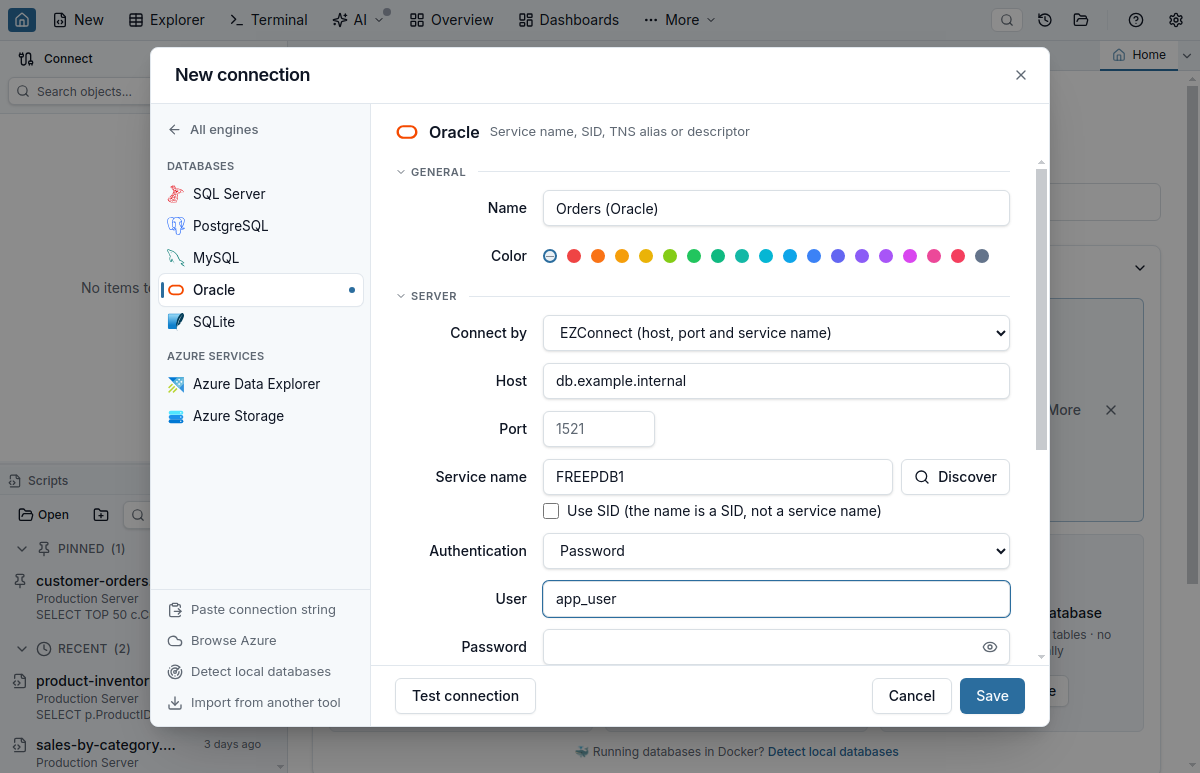
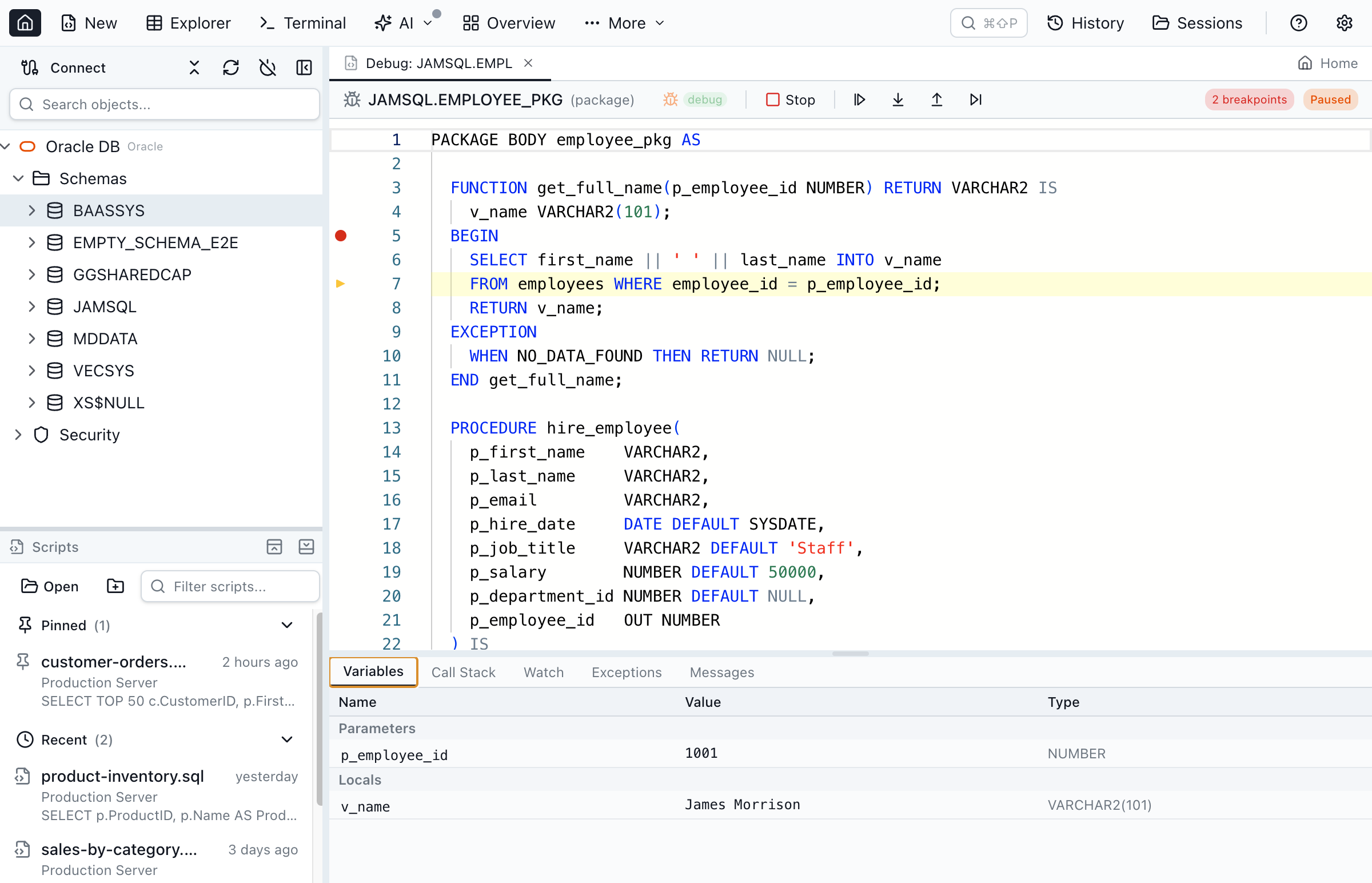
Because it runs in Thin mode, connecting is as simple as entering host:port/service_name — there is no Oracle Instant Client, tnsnames.ora, or LD_LIBRARY_PATH to set up. It also ships a cross-platform PL/SQL debugger built on Oracle's DBMS_DEBUG package, with breakpoints, step-through, variable and watch inspection, and call-stack navigation on macOS, Windows, and Linux. For a side-by-side IDE feature matrix against every major Oracle tool, see our Oracle database GUI comparison.
The New Connection dialog — Oracle connections use Thin mode, so no Oracle Instant Client is required.Step-through PL/SQL debugging on Mac, Windows, and Linux via DBMS_DEBUG.
Pros: Free Personal tier for non-commercial use, with no account and no time limit. Desktop builds for Apple Silicon, Intel Mac, Windows, and Linux (.deb, .rpm, Arch; x64 and ARM64). Thin mode — zero Oracle Client setup. PL/SQL editor with IntelliSense and a DBMS_DEBUG step debugger. Execution plans estimated and actual. Schema compare and data compare. DBA tools in the same window — Session Browser, Tablespace Manager, Instance Monitor with AWR snapshots, and a DBMS_DATAPUMP export/import wizard. AI agents via a local MCP server.
Cons: Newer product with a smaller ecosystem than Toad or SQL Developer. Thin mode only, so a workflow that depends on Thick mode is out of scope. Password authentication only — no Kerberos, LDAP or OCI IAM. No PL/SQL profiler, unit-test framework or automated code review, and no RAC, Data Guard, RMAN, Oracle Scheduler management, PDB creation or ORDS. The free Personal tier is non-commercial, and it caps full data compare at 10,000 rows per table and schema compare at 200 objects per schema. The full list is on the Toad comparison.
Oracle SQL Developer is Oracle's own free, Java-based IDE. It has the deepest native integration with Oracle Database features (Data Pump wizards, RMAN interfaces, Oracle REST Data Services) because it is maintained by the same vendor. It also bundles SQLcl, Oracle's modern command-line client, and includes a built-in Database Diff for comparing schema objects between two connections. The main downsides are the Java runtime dependency and a UI that feels dated compared to modern tools.
One caveat matters if you are choosing today. Oracle has moved new development off the classic desktop application: its SQL Developer product manager states that “no new features are planned for Oracle SQL Developer” and that all new features, enhancements and improvements ship in SQL Developer for VS Code instead. Support for desktop 24.3 was extended to April 2027 (announced 2026-02-24), so the desktop app is supported but is in maintenance. Adopt it for what it does today, not for what it will add.
Pros: Free. Official Oracle tool. Deep Oracle feature coverage (Data Miner, Migration Workbench, Unit Testing). Bundles SQLcl. Strong PL/SQL debugger.
Cons: Requires Java. UI feels dated on macOS and Linux. The desktop app has no MCP integration of its own: Oracle's MCP server ships in SQLcl 25.2 and later, and only SQL Developer for VS Code registers it automatically (as of October 2026). New feature work has moved to SQL Developer for VS Code, so the desktop app is in maintenance with support currently running to April 2027.
3. Toad for Oracle — Best paid client for deep Oracle DBA work
Platforms: Windows, plus a separate Toad for Oracle on Mac product line | Pricing: Paid, per seat, quote-based | Oracle Client required: Optional, with documented feature loss without one
Toad for Oracle from Quest Software is the long-standing choice for Oracle DBAs on Windows, and its administration depth is genuinely hard to match: automation workflows, health checks, SQL Optimizer, the DB Admin Module, and a mature PL/SQL debugger and profiler. Two details are worth correcting because they are widely repeated. Quest now ships a separate Toad for Oracle on Mac product line, which installs the Professional Admin edition and lists Apple Silicon in its requirements — so “Windows-only” is no longer accurate. And an Oracle client is optional: since Toad 15.1 the installer offers “Continue without an Oracle client” (Quest KB 4330281), though a Quest developer notes that Toad still uses an installed client for SQL*Plus and external tools such as Data Pump (Toad World forum, August 2026). Quest’s developers also answer “No” to a Linux build, so a Linux team is still out.
For the capability-by-capability view — PL/SQL debugging, sessions, plans, tablespaces and Data Pump, with the gaps on our side named — see the Toad for Oracle comparison.
Pros: Deep DBA features. Mature PL/SQL tooling. Automation designer. SQL optimizer with rewrites. Strong community and long history.
Cons: No Linux build. Per-seat pricing that Quest does not publish, so budgeting needs a quote. Legacy UI feel. Toad 2026 R2 embeds a Toad MCP server for its own Toad Chat, but Quest's release notes say it cannot be used independently or reached from outside Toad, so external agents cannot query it (as of October 2026).
4. DBeaver — Best open-source multi-database client
Platforms: macOS, Windows, Linux | Pricing: Free Community; paid Pro | Oracle Client required: No (Thin via JDBC)
DBeaver is a free, open-source, Java-based universal database tool. Its Oracle support covers the basics well through the Oracle JDBC driver (Thin mode). DBeaver shines when you need to work with dozens of database types from a single tool. The free Community Edition handles most day-to-day Oracle work; schema compare and advanced features require DBeaver Pro.
Pros: Free Community Edition. Cross-platform. Huge database support list. No Oracle Client needed.
Cons: Eclipse-based UI feels heavy on macOS. Requires a JVM. Schema compare is in the Enterprise and Ultimate editions only. Its AI Assistant can call external MCP servers in the Lite, Enterprise and Ultimate editions, but the desktop app does not run an MCP server for outside agents (as of October 2026).
5. DataGrip — Best Oracle client for JetBrains users
Platforms: macOS, Windows, Linux | Pricing: Free for non-commercial use; paid subscription for commercial use | Oracle Client required: No (Thin via JDBC)
JetBrains DataGrip is a polished IDE with excellent SQL editing, refactoring, and database navigation. It uses the Oracle Thin JDBC driver so there is no Instant Client dependency. DataGrip is the right pick if you already live in the JetBrains ecosystem (IntelliJ, PyCharm, WebStorm) and want the same keybindings for your database work. As of July 2026 DataGrip is free for non-commercial use (learning, hobby, and open-source projects), with a paid subscription still required for commercial use.
Pros: Great code editor and refactoring. Cross-platform. Schema and data compare. No Oracle Client needed. Free for non-commercial use. Consistent UI with other JetBrains IDEs.
Cons: Commercial use requires a paid subscription. Requires a JVM. Oracle-specific DBA features (session browser, tablespace manager) are shallower than Toad or Jam SQL Studio.
6. PL/SQL Developer (Allround Automations) — Best specialized PL/SQL IDE
Platforms: Windows only | Pricing: Paid (perpetual single-user license) | Oracle Client required: Yes
PL/SQL Developer is a Windows-only IDE laser-focused on Oracle PL/SQL. It has an excellent debugger, profiler, and test-runner tuned specifically for PL/SQL packages, procedures, and functions. If PL/SQL development is your entire job and you are on Windows, it is a strong choice. It requires Oracle Instant Client and does not run on Mac or Linux.
Pros: Deep PL/SQL debugger and profiler. Test runner. Relatively affordable perpetual license. Lightweight native Windows app.
Cons: Windows-only. Requires Oracle Client. No multi-database support. No AI agent integration.
7. Aqua Data Studio — Best legacy multi-database client
Platforms: macOS, Windows, Linux | Pricing: Paid subscription | Oracle Client required: No (JDBC Thin)
Aqua Data Studio from Idera is a cross-platform IDE that supports more than 40 database platforms including Oracle, SQL Server, DB2, Snowflake, and several NoSQL stores. It has been around for 20+ years and is a familiar choice in enterprises that standardized on it. The UI is starting to show its age, and pricing is on the higher end compared to DataGrip or Jam SQL Studio Pro.
Pros: Broad database coverage. Cross-platform. ER diagramming and data profiling.
Cons: Paid subscription. Java-based, dated UI. No built-in AI agent support.
Side-by-side feature comparison for the top Oracle clients in 2026.
Feature comparison checked 2026-09-05, from vendor documentation. The Jam SQL Studio column is verified against the shipped product; competitor cells reflect each vendor’s own published material on that date.
Feature
Jam SQL Studio
SQL Developer
Toad
DBeaver
DataGrip
PL/SQL Dev
Cross-Platform (Mac/Win/Linux)
✓ All three
✓ Java
Win + Mac no Linux build listed
✓ Java
✓ Java
✗ Win only
Free Tier
✓ Personal, non-commercial
✓ Fully free
✗ Paid
✓ Community
Non-commercial
✗ Paid
No Oracle Client Needed
✓ Thin mode
✗ Bundled
Optional parts of Toad disabled without one
✓ JDBC
✓ JDBC
✗ Required
PL/SQL IntelliSense
✓
✓
✓
✓
✓
✓
Schema Compare
✓
Database Diff
✓
Pro only
✓
Partial
Execution Plans
✓
✓
✓
✓
✓
✓
AI Agent Support (MCP)
✓ Built-in
Via SQLcl 25.2+ (newer than the bundled copy)
Embedded, Toad-internal only (2026 R2)
MCP client only (Lite, Enterprise, Ultimate)
✓ Built-in server (2025.2+)
✗
Apple Silicon Native
✓
Via Java
✗
✓
✓
✗
Oracle 23ai Support
✓
✓
✓
✓
✓
✓
Enum Column Dropdowns
✓ Native + CHECK + Sampled
✗
✗
Native only
Native only
✗
What to Look For in an Oracle Client
Key evaluation criteria when choosing an Oracle database client in 2026.
Thin mode vs Instant Client. Thin mode (pure Java/JavaScript over Oracle Net) eliminates the need to install and configure Oracle Instant Client. This matters most on macOS and Linux, where Instant Client setup is notoriously fragile. See Oracle Net Services documentation for protocol details.
Oracle version coverage. Confirm support for your target version: Oracle Database 12.2, 18c, 19c, 21c, and 23ai. If you use Oracle Cloud (OCI) Autonomous Database, verify wallet/mTLS support.
PL/SQL editor quality. Look for IntelliSense across packages, procedures, and functions; package spec/body navigation; and the ability to script objects as CREATE / ALTER / DROP.
Execution plan visualization. Plans come from EXPLAIN PLAN and DBMS_XPLAN. A good client renders them as a tree with cost, cardinality, and access path annotations.
Schema and data compare. Essential for environment drift detection and deployment — the client should generate ALTER/CREATE/DROP sync scripts.
DBA tooling. Session browser, tablespace manager, instance monitor, and Data Pump import/export UI if you do any admin work.
AI / MCP support. In 2026 this is increasingly a must-have. An MCP (Model Context Protocol) server lets Claude Code, Claude Desktop, GitHub Copilot, and other AI assistants safely query your Oracle databases under policy control.
License and pricing. Free (e.g., SQL Developer, DBeaver Community, and Jam SQL Studio Personal for non-commercial use) versus paid subscriptions (Toad, DataGrip, PL/SQL Developer, Aqua Data Studio).
Why Developers Choose Jam SQL Studio as Their Oracle Client
A modern, cross-platform Oracle client that skips the Instant Client setup and adds AI agent support.
1
No Oracle Instant Client Required
Jam SQL Studio ships with the Oracle Thin mode driver. It connects to any Oracle Database 12.2+, including 19c, 21c, and 23ai, without installing Oracle Instant Client or configuring tnsnames.ora. On macOS and Linux, where Instant Client setup is the #1 pain point, this saves hours.
2
AI-Native from Day One
A built-in MCP server for Oracle work. Connect Claude Code, Claude Desktop, or GitHub Copilot to your Oracle databases with policy-controlled access — no queries by default; read-only or approval-gated writes are opt-in. See the AI Integrations & MCP guide.
3
Works with All Your Databases
Most teams use Oracle alongside SQL Server, PostgreSQL, or MySQL. Jam SQL Studio supports all of them in one app — one tool instead of switching between SQL Developer, SSMS, and pgAdmin.
4
Dedicated Apple Silicon, Windows, and Linux Builds
PL/SQL Developer is Windows-only, and Quest ships Toad as a Windows product plus a separate Toad for Oracle on Mac line with no Linux build listed (checked 2026-09-05). Jam SQL Studio is one app with arm64 builds for M1/M2/M3/M4 Macs, x64 for Intel Mac and Windows, and .deb / .rpm / Arch packages for Linux on both x64 and ARM64.
5
Bring Your Connections With You
Already have your Oracle connections in a tnsnames.ora, or saved in DBeaver or DataGrip? Import them into Jam SQL Studio in one click. See how import works →
Command-Line Clients (sqlplus, SQLcl)
GUI clients are the right default, but you will hit situations where a CLI is better — shell scripts, CI/CD pipelines, or quick server-side work over SSH.
sqlplus is Oracle's original command-line client. It ships with Oracle Database and Oracle Instant Client. It is ubiquitous on DBA servers but has a minimal feature set, no autocomplete, and no modern ergonomics.
SQLcl (sql) is Oracle's modern command-line replacement for sqlplus. It adds syntax highlighting, command history, inline help, Liquibase integration, and JSON output. SQLcl is distributed by Oracle as a free download and is bundled inside Oracle SQL Developer. For most new Oracle work on the command line, prefer SQLcl over sqlplus.
GUI clients on this page are designed for interactive development, schema exploration, debugging, and data editing — work where seeing tables, columns, plans, and diffs visually is dramatically faster than in a terminal. Most Oracle developers use a GUI client (Jam SQL Studio, SQL Developer, Toad) for day-to-day work and SQLcl for scripting.
Frequently Asked Questions
Common questions about Oracle clients in 2026.
What is the best Oracle client?
For 2026, the best Oracle clients are Jam SQL Studio (cross-platform, free for personal use with Pro for commercial use, Thin mode so no Oracle Instant Client is needed), Oracle SQL Developer (Oracle's official free Java-based client), Toad for Oracle (the deepest Oracle DBA tooling, paid and per-seat), DBeaver (free open-source multi-database), and DataGrip (JetBrains, paid for commercial use). Jam SQL Studio is the best fit for developers who want a modern, AI-native IDE that runs on Mac, Windows, and Linux without installing Oracle Client; it is free for personal, non-commercial use, and commercial use needs Pro.
Is there a free Oracle client for Mac?
Yes. Jam SQL Studio runs on macOS (Apple Silicon and Intel) with full PL/SQL editing, execution plans, schema compare, and an Oracle object explorer; it is free for personal, non-commercial use, and commercial use needs Pro. Oracle SQL Developer is free and also runs on macOS via Java. DBeaver Community Edition is another free open-source option. Jam SQL Studio connects through the Oracle Thin driver, so it needs no Oracle Instant Client on your Mac; DBeaver avoids the client the same way through Oracle's JDBC Thin driver.
Can you use Oracle without installing Oracle Instant Client?
Yes. Jam SQL Studio uses the Oracle Thin mode driver — a pure implementation of the Oracle Net protocol — and connects directly to any Oracle Database 12.2+ (including 19c, 21c, and 23ai) without Oracle Instant Client, tnsnames.ora, or LD_LIBRARY_PATH configuration. DBeaver and DataGrip also support Oracle Thin mode via JDBC. PL/SQL Developer and SQL*Plus need an Oracle Client; Toad can start without one (no-client mode since 15.1), though Quest says SQL*Plus and external tools such as Data Pump still use an installed client (checked September 2026).
What is the best Oracle client for Linux?
The best Oracle clients for Linux are Jam SQL Studio (.deb, .rpm, and Arch builds; Thin mode driver; no Instant Client), Oracle SQL Developer (runs on Linux via Java), DBeaver (free, open-source, cross-platform), and DataGrip (paid, JetBrains). For command-line work on Linux, Oracle's SQLcl is a modern replacement for sqlplus. Jam SQL Studio is recommended for Linux developers who want a modern GUI with AI agent support and no Instant Client setup.
What is the best Oracle client for macOS M1 / Apple Silicon?
Jam SQL Studio provides a native arm64 build for Apple Silicon Macs (M1, M2, M3, M4) with no Rosetta translation. It is the recommended Oracle client for Apple Silicon because it uses the Oracle Thin mode driver and does not depend on the Oracle Instant Client, which has historically had limited macOS arm64 support. DBeaver, DataGrip, and TablePlus also run on Apple Silicon natively.
What is the best PL/SQL IDE?
The best PL/SQL IDEs are Oracle SQL Developer (official, free, deep PL/SQL integration), Toad for Oracle (paid, with a strong PL/SQL profiler and debugger), PL/SQL Developer from Allround Automations (Windows-only, specialized PL/SQL IDE), and Jam SQL Studio (cross-platform, AI-native, full PL/SQL editing with IntelliSense for packages, procedures, functions, and triggers). For cross-platform PL/SQL work with AI agent support, Jam SQL Studio is the strongest option. See the PL/SQL Debugger guide for details.
Do I need Oracle Instant Client to use a SQL client on macOS or Windows?
No. Jam SQL Studio connects to Oracle in Thin mode — a pure JavaScript implementation of the Oracle Net protocol — so it needs no Oracle Instant Client on macOS (Apple Silicon or Intel) or Windows. You point it at host:port/service_name and connect (checked 2026-09-05). PL/SQL Developer and SQL*Plus still need an Oracle Client install; Toad offers a documented 'Continue without an Oracle client' path that disables parts of the product; DBeaver and DataGrip avoid the client through the Oracle Thin JDBC driver.
Is Oracle SQL Developer being discontinued?
Not immediately. As of July 2026 the classic desktop Oracle SQL Developer (the Java application) is still available and supported, but Oracle has stopped adding new features to it and is directing new development to SQL Developer for VS Code (its official extension), SQLcl, and SQL Developer Web. If you want a standalone desktop Oracle client that is actively developed and cross-platform, Jam SQL Studio, DBeaver, and DataGrip are the main options.
Download Jam SQL Studio for Oracle
Free for personal use; commercial use needs Pro. Desktop builds for Windows, Mac, and Linux — no Oracle Instant Client required.
 Jam SQL Studio