 Jam SQL Studio
 A PL/SQL Developer Alternative
for Mac, Windows and Linux
PL/SQL Developer from Allround Automations runs only on Windows and costs USD 243 per user (as of September 2026). Jam SQL Studio is an Oracle IDE with step-through PL/SQL debugging on Mac, Windows and Linux, free for personal use, with no Oracle Client required.
Free for personal use • No account required • Mac, Windows, Linux
Jam SQL Studio vs PL/SQL Developer: Full Comparison
How Jam SQL Studio compares to Allround Automations PL/SQL Developer for Oracle work.
| Feature | Jam SQL Studio | PL/SQL Developer |
|---|---|---|
| Price | ✓ Free for personal use; Pro $9.99/mo or $99/yr for commercial use | USD 243 per user; optional support USD 42/yr |
| Platforms | ✓ Mac, Windows, Linux | ✗ Windows only (the vendor's separate Plyxon IDE runs on macOS and Linux) |
| Apple Silicon (M-series) Native | ✓ | ✗ |
| Oracle Client Required | ✗ No — Thin mode | ✓ Required |
| PL/SQL Debugger (step-through) | ✓ DBMS_DEBUG (beta) | ✓ DBMS_DEBUG or DBMS_DEBUG_JDWP (17.0) |
| Breakpoints, Watch, Call Stack | ✓ | ✓ |
| Package Browser | ✓ | ✓ |
| Schema Compare | ✓ | ✓ Compare User Objects |
| Data Compare | ✓ | ✓ Compare Table Data |
| Execution Plans | ✓ | ✓ |
| Session Browser | ✓ | ✓ |
| Tablespace Manager | ✓ | Tablespaces folder in the Object Browser |
| MCP server for external AI agents | ✓ Built-in, starts blocked | ✗ |
| In-app AI assistant | ✓ AI chat via your Claude Code or Codex CLI | ✓ AI Assistant (your own key; GitHub Copilot since 17.0) |
| Multi-Database | ✓ 6 engines | ✗ Oracle only |
| Dark mode | ✓ | ✓ |
| Line-level PL/SQL profiler | ✗ | ✓ PL/SQL Profiler |
| Unit test sets | ✗ | ✓ Test Manager |
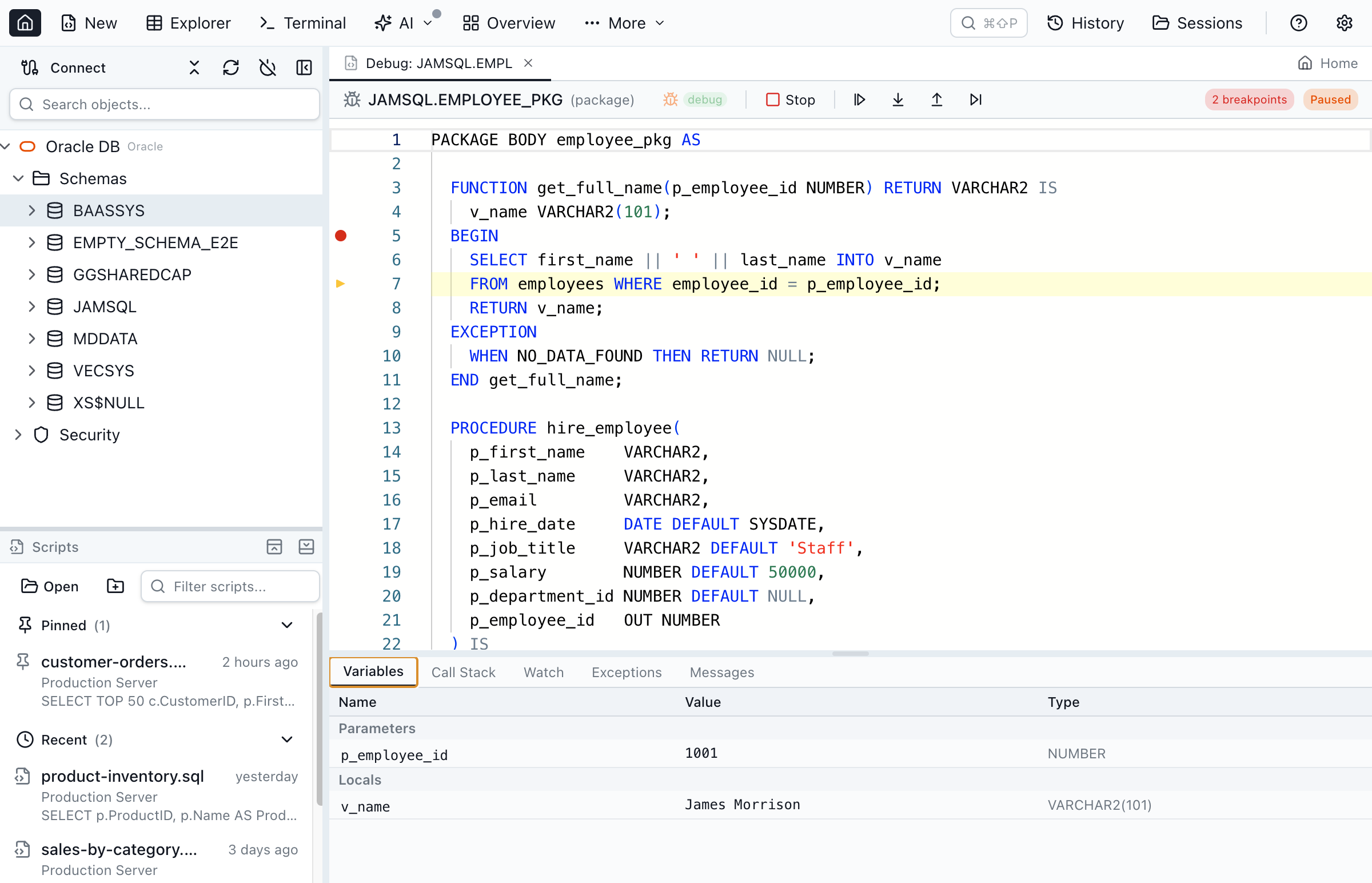
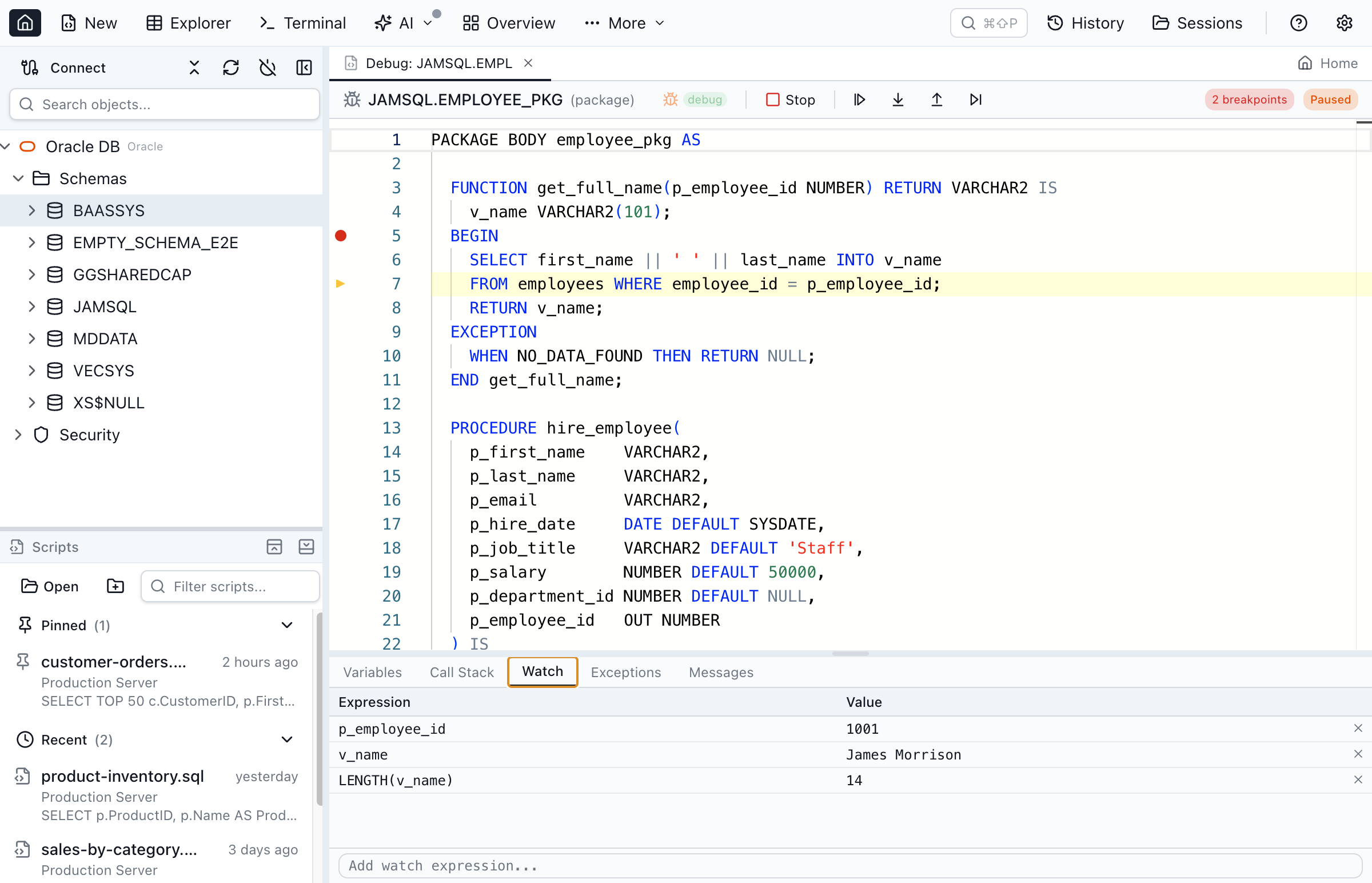
See the PL/SQL Debugger in Action
The same step-through debugging you rely on in PL/SQL Developer — breakpoints, variable watch, and call stack — running on Windows, Mac, and Linux with no Windows VM.
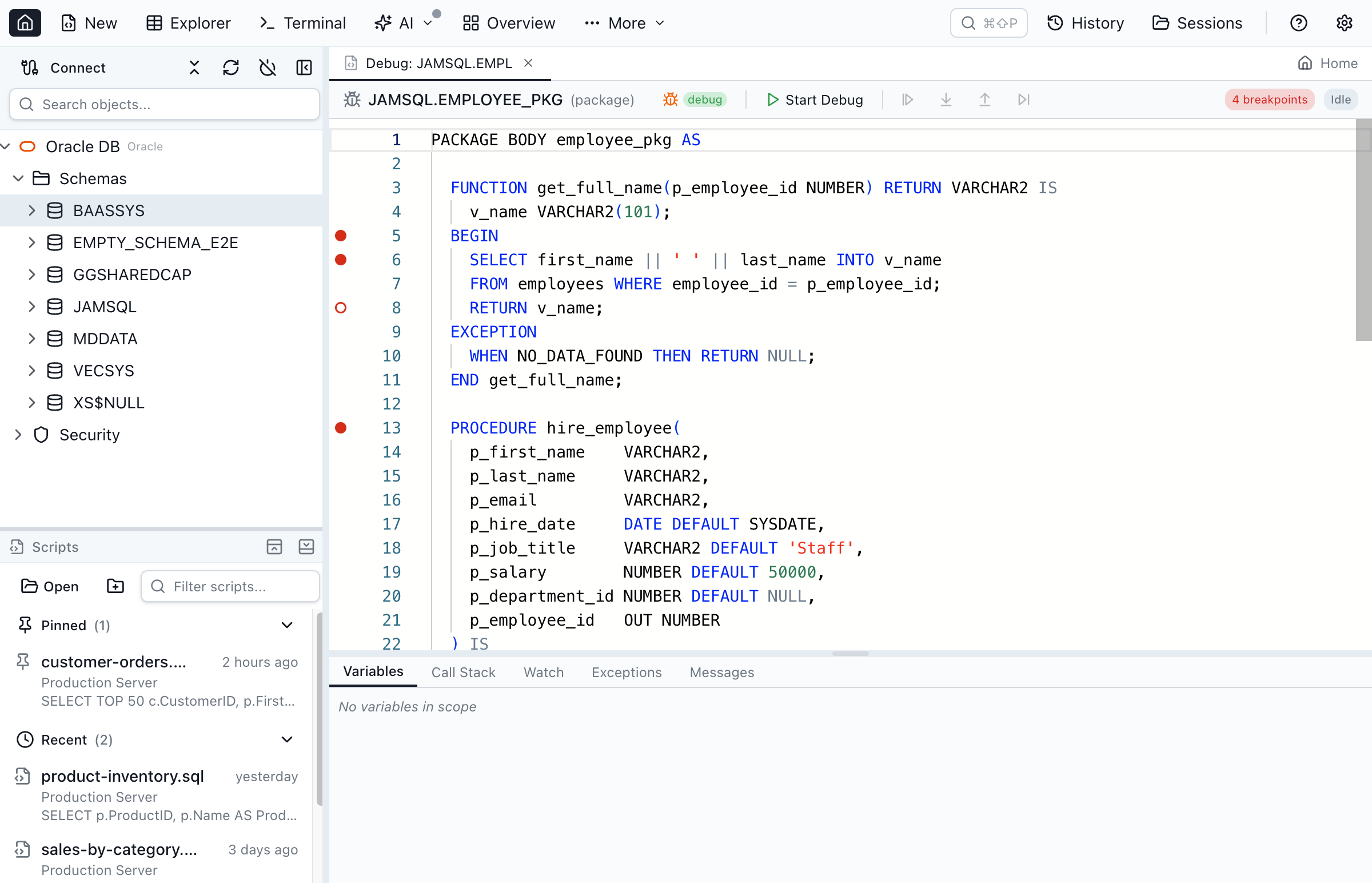
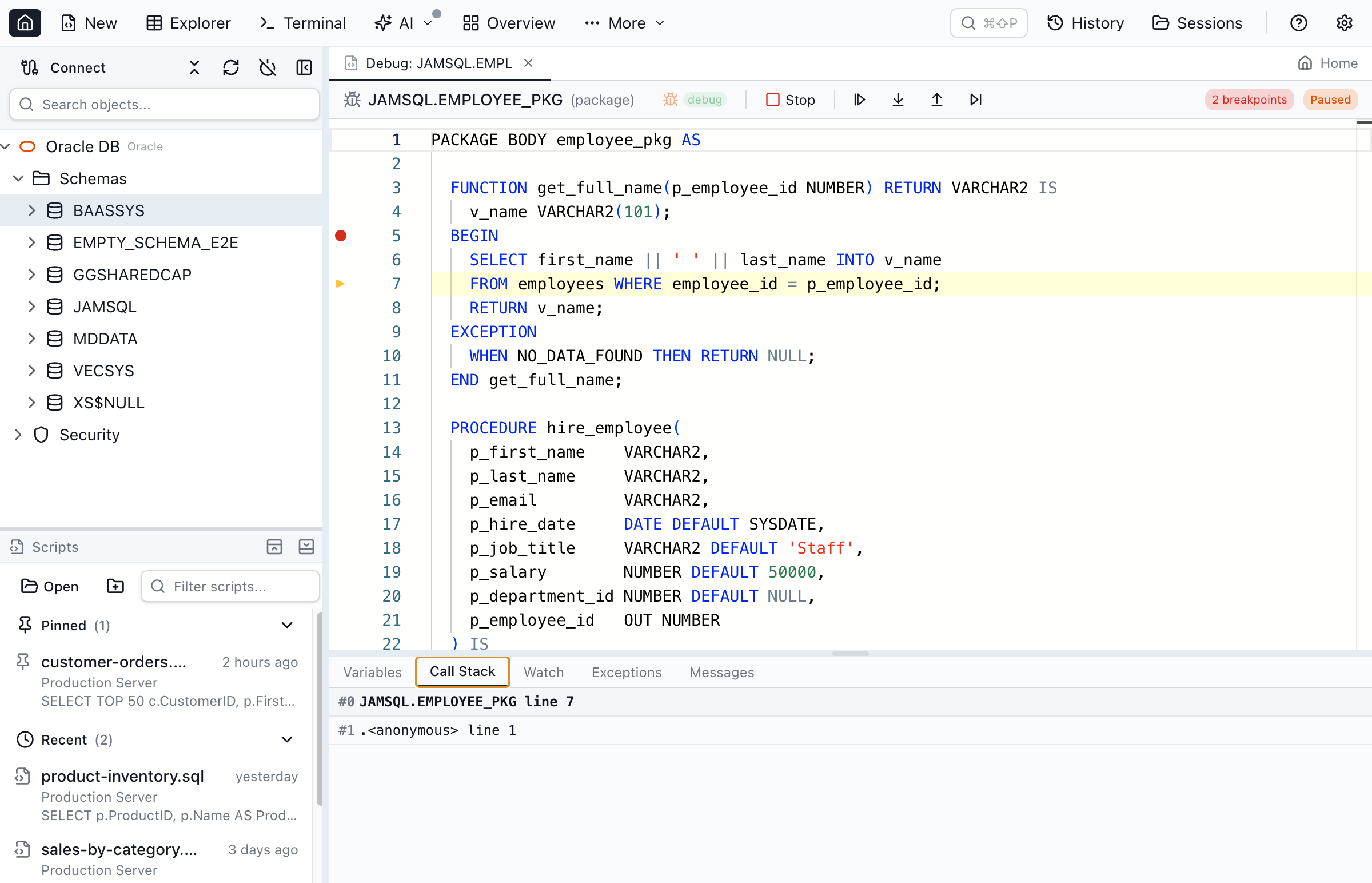
Built on Oracle's DBMS_DEBUG over a standard connection — no JDWP tunnel and no Oracle Client. See the full PL/SQL debugger guide for breakpoints, watch expressions, exception breakpoints, and anonymous-block debugging.
Switching from PL/SQL Developer: What You Keep, What You Lose
An honest look at the trade-offs before you move your PL/SQL workflow.
What you keep
- Step-through PL/SQL debugger — breakpoints, step into/over/out, variable inspection, watch expressions, and call stack (DBMS_DEBUG)
- Package browser for specs and bodies, with script-as CREATE/ALTER
- Estimated and actual execution plans
- Schema compare and data compare between two Oracle schemas
- No license cost for personal use (PL/SQL Developer is USD 243 per user); commercial use needs Pro at $99/year
- No Oracle Client — Thin-mode connection runs on Windows, Mac, and Linux
- Bonus you gain: four more engines (SQL Server, PostgreSQL, MySQL/MariaDB, SQLite) and AI agents via MCP
What you leave behind
- PL/SQL Profiler — PL/SQL Developer's line-by-line DBMS_PROFILER timing view. Jam SQL Studio has execution plans but not a line-level PL/SQL profiler.
- Test Manager — PL/SQL Developer's built-in regression test sets and scripts for stored program units.
- Plug-in ecosystem — Allround Automations and third-party plug-ins such as the Version Control and plsqldoc plug-ins.
Why Developers Switch from PL/SQL Developer
PL/SQL Developer has been a popular Oracle IDE for decades, and it runs only on Windows. Jam SQL Studio brings a PL/SQL-focused workflow to Mac and Linux as well.
Runs on Every OS
PL/SQL Developer is Windows-only, so on a Mac or Linux machine you run it in a VM or through Wine. Allround Automations' own cross-platform IDE, Plyxon, is a separate product that still needs an Oracle Client. Jam SQL Studio is a desktop app on all three platforms, with Apple Silicon and Intel builds for macOS.
No Oracle Client, No tnsnames.ora
PL/SQL Developer requires an Oracle Client to connect. Jam SQL Studio uses the Thin driver, so the only thing between you and your database is a hostname, port, and service name (or an Oracle wallet for OCI Autonomous Database).
Free for Personal Use
PL/SQL Developer is a named-user license (USD 243) with an optional yearly support contract and paid major upgrades. Jam SQL Studio is free for personal use with the debugger, object explorer, schema compare and execution plans included; commercial use needs Pro at $99/year.
AI Agents via MCP
Jam SQL Studio's built-in MCP server lets AI coding assistants like Claude Code and GitHub Copilot query your Oracle schemas to help write, review, and optimize PL/SQL. PL/SQL Developer's AI Assistant works inside its editor; it has no MCP server for external agents.
Bring Your Connections With You
Already have your Oracle databases in a tnsnames.ora? Import every alias in one click — no re-typing host, port, and service name. Jam SQL Studio also imports connections from DBeaver, DataGrip, and other tools. See how import works →
PL/SQL Features That Matter
Everything you need for day-to-day PL/SQL development and debugging.
Step-Through PL/SQL Debugger
Set breakpoints, step into/over/out, inspect locals, watch expressions, and break on Oracle exceptions. Built on DBMS_DEBUG, works over your existing connection with no firewall or JDWP setup.
PL/SQL Editor with IntelliSense
Write PL/SQL blocks, packages, procedures, and functions with Oracle-aware autocomplete, signature help, and syntax highlighting. Anonymous blocks execute with F5.
Package Browser
Navigate package specifications and bodies separately. Jump between procedures and functions from the structure panel. Script as CREATE or ALTER with one click.
Oracle Execution Plans
Estimated plans from EXPLAIN PLAN and actual plans with row counts from V$SQL_PLAN_STATISTICS_ALL, shown as a tree or graph with cost, cardinality and access paths.
Schema Compare
Compare Oracle schemas across connections and generate ALTER/CREATE/DROP sync scripts; compare table rows with Data Compare.
AI Agent Support via MCP
A local Model Context Protocol server lets Claude Code, Claude Desktop, and other AI tools safely query your Oracle database under user-controlled safety policies.
Frequently Asked Questions
Common questions about switching from PL/SQL Developer to Jam SQL Studio.
Is Jam SQL Studio a good PL/SQL Developer alternative?
Yes, especially off Windows. Jam SQL Studio is an Oracle IDE for Mac, Windows and Linux with a step-through PL/SQL debugger (breakpoints, step into/over/out, variable inspection, watch expressions, call stack), execution plans, schema and data compare, and no Oracle Client requirement. PL/SQL Developer from Allround Automations runs only on Windows and costs USD 243 per user as of September 2026; it still has tools Jam SQL Studio lacks, such as a line-level PL/SQL profiler and a Test Manager.
Can I run PL/SQL Developer on Mac or Linux?
No. PL/SQL Developer runs on Windows only (Vista through 11). Mac and Linux users run it in a Windows VM or through Wine. Allround Automations sells a separate cross-platform IDE, Plyxon, for Windows, macOS 11 or later (ARM and Intel) and Linux at USD 90 per user, which also needs an Oracle Client. Jam SQL Studio runs natively on macOS (Apple Silicon and Intel), Windows and Linux without an Oracle Client.
Does Jam SQL Studio have a PL/SQL debugger like PL/SQL Developer?
Yes. Jam SQL Studio ships a step-through PL/SQL debugger built on DBMS_DEBUG, a beta feature that is on by default. You can set breakpoints in package bodies and standalone procedures, step into/over/out, inspect locals and parameters, add watch expressions, view the call stack, and break on specific exceptions like NO_DATA_FOUND or VALUE_ERROR. PL/SQL Developer 17.0 supports both DBMS_DEBUG and DBMS_DEBUG_JDWP. See the PL/SQL debugging deep dive for more.
How much does PL/SQL Developer cost compared to Jam SQL Studio?
As of September 2026 a single-user PL/SQL Developer license is USD 243, with an optional support contract at USD 42 per year and paid major-version upgrades (USD 72.90 from 16.0 to 17.0). Jam SQL Studio's Personal tier is free for personal, non-commercial use and includes PL/SQL debugging, execution plans, schema compare and the Oracle object explorer; commercial use needs Pro at $9.99/month or $99/year.
Does Jam SQL Studio require Oracle Client like PL/SQL Developer?
No. Jam SQL Studio connects to Oracle using the node-oracledb Thin driver — a pure JavaScript implementation that talks directly to the Oracle listener. There is no Oracle Client, no Instant Client, and no tnsnames.ora required. PL/SQL Developer needs an Oracle Client that matches its bitness: 32-bit for the 32-bit build, 64-bit for the 64-bit build.
Does Jam SQL Studio support Oracle packages and the object browser?
Yes. The Oracle object explorer surfaces packages (specs and bodies), procedures, functions, triggers, sequences, synonyms, materialized views, types, DB links, and directories. You can script objects as CREATE, ALTER, or DROP, and jump between package members from the structure view.
Does PL/SQL Developer have AI features?
Yes. PL/SQL Developer has an AI Assistant that uses your own key for popular AI services, and version 17.0 added GitHub Copilot through the Copilot CLI. It has no MCP server, so external agents cannot query your databases through it. Jam SQL Studio has an in-app AI chat that uses your Claude Code or Codex CLI, and a local MCP server that lets Claude Code, Claude Desktop, Codex CLI or GitHub Copilot query your Oracle databases; it runs no queries until you allow read-only access or approval-gated writes.
Does the PL/SQL debugger work on Windows?
Yes. Jam SQL Studio's PL/SQL debugger is fully cross-platform. It uses Oracle's DBMS_DEBUG package over a standard database connection, so breakpoints, step into/over/out, variable inspection, watch expressions, and the call stack all work the same on Windows, macOS, and Linux — with no Oracle Client install required.
Ready to Switch from PL/SQL Developer?
Download Jam SQL Studio free and get a modern, cross-platform Oracle IDE with a built-in PL/SQL debugger.
Comparing Other Oracle Tools?
See how Jam SQL Studio compares to other popular Oracle database tools.