 Jam SQL Studio
 An Oracle SQL Developer Alternative
Without Java
Oracle SQL Developer is free and still supported, but its July 2026 release only updated Java and fixed security bugs, and Oracle's new feature work now goes into SQL Developer for VS Code. Jam SQL Studio is a standalone desktop Oracle IDE for Mac, Windows and Linux with a PL/SQL debugger, execution plans, schema and data compare and an MCP server — and it connects to SQL Server, PostgreSQL, MySQL and SQLite too.
Free for personal use • No account required • Mac, Windows, Linux
Where Oracle SQL Developer Stands in 2026
- Latest release: SQL Developer 26.2, July 2026. Its release notes list a Java update and security fixes; the ORDS feature is deprecated and SQLcl is no longer bundled.
- Java: it requires JDK 17, bundled in the Windows x64 and macOS downloads and installed separately for the no-JRE zip and the Linux RPM.
- Mac: the 26.2 macOS download is Apple Silicon only; 24.3.1 was the last build for Intel Macs.
- Support: Oracle's support policy ends support for 24.3 and 26.2 in April 2027. New features are going into SQL Developer for VS Code, according to Oracle's product manager for SQL Developer.
If you want to stay in Oracle's tools, the VS Code extension is the direction Oracle is taking. If you want a standalone desktop app, or one tool for Oracle and your other databases, compare Jam SQL Studio below.
Jam SQL Studio vs Oracle SQL Developer
Where each tool is stronger. Data Modeler, RMAN and free commercial use go to SQL Developer.
| Feature | Jam SQL Studio | Oracle SQL Developer 26.2 |
|---|---|---|
| Price | ✓ Free for personal use; Pro $9.99/mo or $99/yr for commercial use | ✓ Free, including commercial use |
| Java required | ✓ No | JDK 17 (bundled in the Windows x64 and macOS downloads) |
| Platforms | ✓ macOS (Apple Silicon and Intel), Windows, Linux | Windows, macOS (Apple Silicon only since 26.2), Linux RPM |
| Development status | ✓ Active; 17 releases from July to September 2026 | 26.2 (July 2026) was a Java and security update; new features go to the VS Code extension |
| Databases | ✓ Oracle, SQL Server, PostgreSQL, MySQL/MariaDB, SQLite, Azure Data Explorer | Oracle; third-party JDBC connections mainly for migration to Oracle |
| PL/SQL debugger | ✓ DBMS_DEBUG (beta) | ✓ DBMS_DEBUG_JDWP or DBMS_DEBUG |
| Execution plans | ✓ Estimated and actual, tree and graph | ✓ Explain Plan, Autotrace |
| Schema compare | ✓ | ✓ Database Diff |
| Row-level data compare | ✓ | ✗ Not documented |
| Session browser | ✓ | ✓ Monitor Sessions, Real Time SQL Monitor |
| Instance monitor | ✓ | ✓ Instance Viewer |
| Tablespace management | ✓ Tablespace Manager | ✓ DBA panel |
| Data Pump export/import | ✓ | ✓ |
| RMAN backup and recovery | ✗ | ✓ |
| Data modeling | ✗ | ✓ Data Modeler |
| Charts | ✓ From any query result | User-defined reports |
| MCP server for AI agents | ✓ Built in, starts blocked | Not in the desktop app; in SQLcl and SQL Developer for VS Code |
A Step-Through PL/SQL Debugger
Jam SQL Studio debugs Oracle stored procedures, functions, package bodies and anonymous blocks on Windows, Mac and Linux. The debugger is a beta feature, switched on by default.
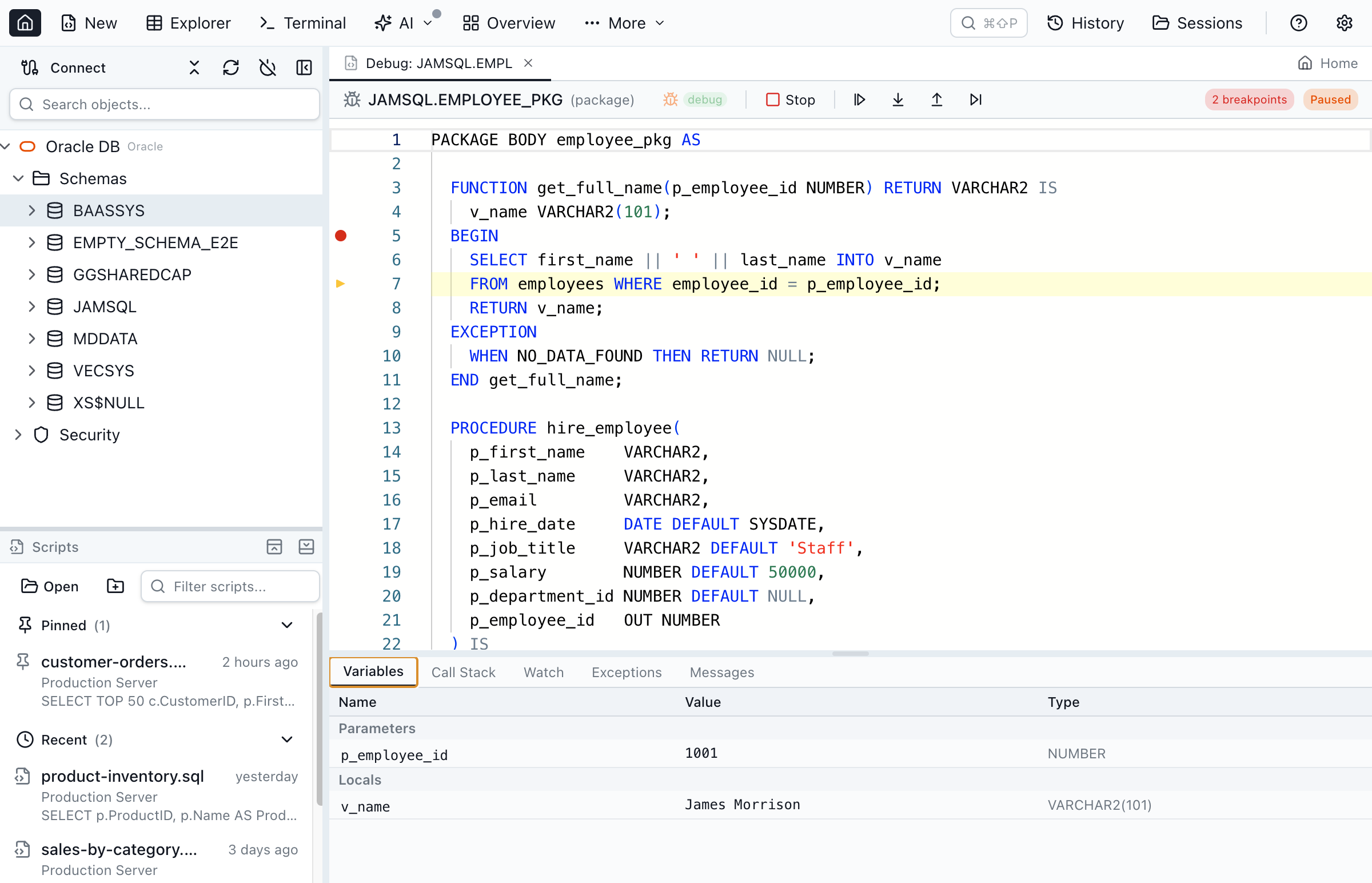
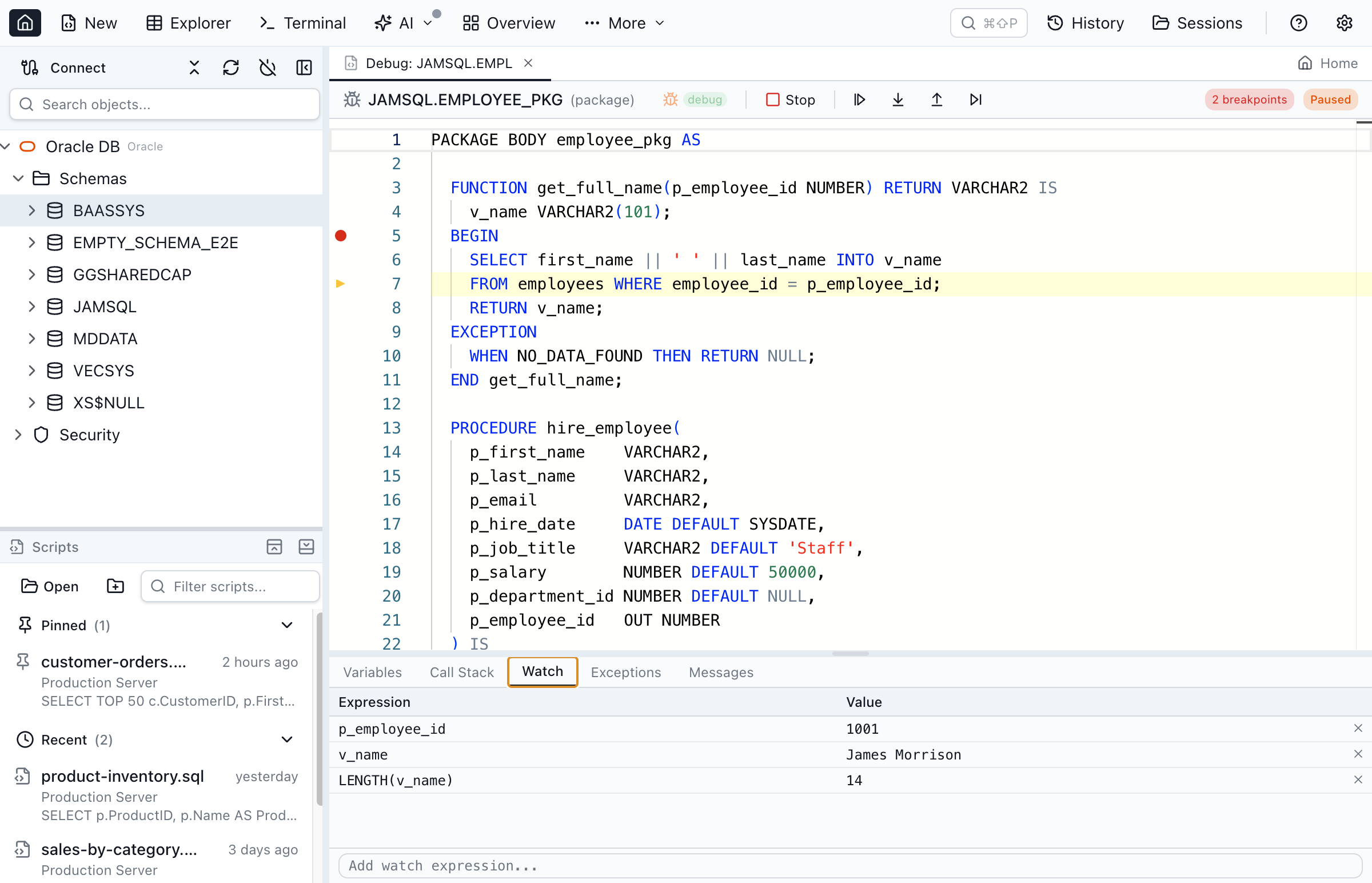
Built on Oracle's DBMS_DEBUG over a standard connection — no Oracle Client required. See the full PL/SQL debugger guide for breakpoints, watch expressions, exception breakpoints, and anonymous-block debugging.
Switching from SQL Developer: What You Keep, What You Lose
The trade-offs before you move your Oracle workflow.
What you keep
- Step-through PL/SQL debugger — breakpoints, step into/over/out, variable inspection, watch expressions and call stack (DBMS_DEBUG)
- PL/SQL editing with IntelliSense and execution
- Execution plans, package and object browser
- Schema compare between two Oracle schemas, with a DDL sync script
- Session browser, instance monitor, tablespaces and a Data Pump GUI
- Windows, Mac and Linux — with no Java runtime
- What you gain: row-level data compare, charts, AI agents via MCP, and five more engines
What you leave behind
- Data Modeler — Oracle's logical, relational and physical data modeling with forward and reverse engineering.
- Oracle APEX integration — browsing and exporting Application Express applications.
- RMAN and AWR/ASH — the backup and recovery interface and performance reports in SQL Developer's DBA panel.
- Free commercial use — SQL Developer is free at work; Jam SQL Studio's free tier is for personal use, and commercial use needs Pro.
Why Developers Switch from SQL Developer
Oracle SQL Developer is a capable Oracle IDE. These are the reasons people give for moving.
No Java Required
SQL Developer 26.2 runs on JDK 17, which you install yourself for the Linux RPM and the no-JRE zip. Jam SQL Studio does not use Java, and its Thin-mode Oracle driver needs no Oracle Client or Instant Client.
AI Agents via MCP
A built-in MCP server lets AI coding assistants query your Oracle schemas. It starts blocked; read-only or approval-gated writes are opt-in. The SQL Developer desktop app has no AI features.
One Tool for Every Database
SQL Developer is built around Oracle. Jam SQL Studio gives you SQL Server, PostgreSQL, MySQL, MariaDB, SQLite and Azure Data Explorer alongside Oracle, with the same editor, results grid and keyboard shortcuts.
Compare Data, Not Just Schemas
SQL Developer's Database Diff compares schemas. Jam SQL Studio's Data Compare also finds changed rows between two Oracle databases and writes the INSERT/UPDATE/DELETE statements to sync them.
Bring Your Connections With You
Jam SQL Studio reads SQL Developer’s own saved connections (connections.json) and imports them in one click — no re-typing host, port, and service name. TNS aliases come across the same way from your tnsnames.ora, and connections from DBeaver, DataGrip, and other tools too. See how import works →
Features That Matter
What Jam SQL Studio covers for day-to-day Oracle development, on Mac, Windows and Linux.
AI Agent Support
Work with AI the way you want: an in-app AI Workspace plus a local MCP server (Model Context Protocol) for safe, policy-controlled agent queries against your Oracle database.
No Java Required
Built on Electron, not Java: no JDK to install or update, and no heap size to tune. The Thin-mode driver needs no Oracle Client either.
Schema Compare
Compare Oracle schemas across connections and generate ALTER/CREATE/DROP sync scripts, then compare table rows with Data Compare — the half SQL Developer's Database Diff does not cover.
PL/SQL Support
Edit and execute PL/SQL with syntax highlighting, IntelliSense and live syntax checks, and read estimated or actual Oracle execution plans as a tree or graph.
Oracle Object Explorer
Browse tables, views, packages, procedures, functions, sequences, and more with an intuitive tree explorer for Oracle databases.
Oracle Admin Tools
Session Browser, Tablespace Manager, Instance Monitor, and Data Pump GUI — no need for separate Oracle Enterprise Manager.
Built-in Charts
Create bar, line, pie, area, and scatter charts from query results. Export as SVG or PNG — no Oracle Reports configuration needed.
Frequently Asked Questions
Common questions about switching from Oracle SQL Developer to Jam SQL Studio.
Is Oracle SQL Developer free?
Yes. Oracle SQL Developer is free under Oracle's Free Use Terms, including for commercial use, and it is covered by Oracle Database support contracts. Jam SQL Studio's Personal tier is free for personal, non-commercial use; commercial use needs Pro at $9.99/month or $99/year.
Is Oracle SQL Developer still being developed?
It is supported, but new work has moved to the VS Code extension. SQL Developer 26.2, released in July 2026, updated Java and fixed security bugs, deprecated the ORDS feature and stopped bundling SQLcl. Oracle's support policy lists April 2027 as the end of support for both 24.3 and 26.2, and Oracle's product manager for SQL Developer has written that new features go into SQL Developer for VS Code.
Is Jam SQL Studio better than Oracle SQL Developer?
It depends on the job. Jam SQL Studio is a standalone desktop app with no Java, a PL/SQL debugger, execution plans, row-level data compare, a local MCP server for AI agents, and support for SQL Server, PostgreSQL, MySQL, SQLite and Azure Data Explorer next to Oracle. SQL Developer is free for commercial use and goes deeper into Oracle administration and design: Data Modeler, RMAN, AWR/ASH reports and APEX.
Does Jam SQL Studio require Java like SQL Developer?
No. Jam SQL Studio is built on Electron and needs no Java runtime or Oracle Client. SQL Developer 26.2 requires JDK 17: it is bundled in the Windows x64 and macOS downloads, and must be installed separately for the no-JRE zip and the Linux RPM.
Can Jam SQL Studio replace SQL Developer for PL/SQL?
For editing, running and debugging PL/SQL, yes. Jam SQL Studio has PL/SQL IntelliSense, live syntax checks, a package explorer and a step-through debugger built on DBMS_DEBUG (a beta feature, on by default). SQL Developer's debugger has been around far longer and supports both DBMS_DEBUG_JDWP and DBMS_DEBUG.
Does Jam SQL Studio support the same Oracle features as SQL Developer?
It covers the daily loop: connections without an Oracle Client, PL/SQL editing and debugging, execution plans, object and package browsing, schema compare, and a Session Browser, Tablespace Manager, Instance Monitor and Data Pump GUI. SQL Developer also has Data Modeler, RMAN backup and recovery, AWR/ASH reports and APEX browsing, which Jam SQL Studio does not. Jam SQL Studio adds row-level data compare, charts and an MCP server.
How does Jam SQL Studio's schema compare differ from SQL Developer's Database Diff?
Both compare two Oracle schemas and generate the DDL to bring one in line with the other; SQL Developer's is under Tools > Database Diff. Jam SQL Studio also compares table data row by row with INSERT/UPDATE/DELETE scripts, which SQL Developer does not document, and compares schemas on SQL Server, PostgreSQL, MySQL and SQLite as well. The free Personal tier compares up to 200 objects per schema.
Can I connect to non-Oracle databases, unlike SQL Developer?
Yes. Jam SQL Studio connects to Oracle, SQL Server, PostgreSQL, MySQL, MariaDB, SQLite and Azure Data Explorer with the same editor and tools. SQL Developer is built around Oracle; it can open third-party JDBC connections to MySQL, SQL Server, Sybase, DB2, Teradata and others, mainly to browse them and migrate them into Oracle.
Can I use AI agents with my Oracle database?
Yes. Jam SQL Studio includes a local MCP server that lets Claude Code, Claude Desktop, Codex CLI, Cursor, OpenCode or GitHub Copilot query your Oracle database. It starts blocked; read-only access or approval-gated writes are opt-in per connection. The SQL Developer desktop app has no AI features; Oracle ships its MCP server in SQLcl and SQL Developer for VS Code.
Does the PL/SQL debugger work on Windows?
Yes. Jam SQL Studio's PL/SQL debugger uses Oracle's DBMS_DEBUG package over a standard database connection, so breakpoints, step into/over/out, variable inspection, watch expressions and the call stack work the same on Windows, macOS and Linux, with no Oracle Client install.
Ready to Switch from SQL Developer?
Download Jam SQL Studio free for personal use: an Oracle IDE for Mac, Windows and Linux that needs no Java and no Oracle Client.
Comparing Other SQL Tools?
See how Jam SQL Studio compares to other popular database tools.