 Jam SQL Studio
 Best Oracle Database GUI Tools in 2026
Oracle's desktop SQL Developer is in maintenance, Toad ships a separate Mac product, and most Oracle GUIs have an AI chat. Seven tools compared on PL/SQL work, DBA features, platforms and price, as of September 2026.
Free for personal use • No account required • Mac, Windows, Linux
An Oracle database GUI (also called an Oracle GUI client or Oracle IDE) is a desktop application for connecting to Oracle, writing SQL and PL/SQL, browsing schema objects and running admin tasks, instead of working in SQL*Plus or SQLcl. The main options in 2026 are Oracle SQL Developer (desktop and VS Code), Toad for Oracle, DBeaver, DataGrip, Navicat and Jam SQL Studio. This page is maintained by the Jam SQL Studio team; competitor facts come from each vendor's own pages, checked on 26 September 2026. If you are comparing command-line and connection tooling (SQL*Plus, SQLcl, wallets), see the best Oracle SQL client guide instead.
Oracle GUI Comparison Table (September 2026)
Seven tools, the questions Oracle developers and DBAs ask first.
| Question | Jam SQL Studio | SQL Developer (desktop) | SQL Developer for VS Code | Toad for Oracle | DBeaver | DataGrip | Navicat |
|---|---|---|---|---|---|---|---|
| Version and status | 1.5.3 (24 Sep 2026) | 24.3.x; fixes only, supported to April 2027 | 26.2; where Oracle's new features ship | 2026 R2 (27 Jul 2026) | Community 26.2.1 (21 Sep 2026) | 2026.2 (Jul 2026) | Navicat 18 (Aug 2026) |
| Price | Free for personal use; Pro $99/year | ✓ Free | ✓ Free | Paid editions, quote-based | Community free; PRO from $113/year | Free non-commercial; $109/year individual | 14-day trial; perpetual or subscription |
| Platforms | macOS (Apple Silicon, Intel), Windows, Linux | Windows, macOS, Linux (Java) | Wherever VS Code runs | Windows; separate Toad for Oracle on Mac product; no Linux | Windows, macOS, Linux | Windows, macOS, Linux | Windows, macOS (Apple Silicon, Intel), Linux |
| Connects without installing Oracle Client | ✓ Thin mode by default (node-oracledb 7); Thick mode with Instant Client optional (not on Intel Macs) | ✓ JDBC thin by default; OCI/thick optional | — | Yes since 15.1, but Data Pump, SQL*Loader, TKProf and other utilities need a client | ✓ JDBC | ✓ JDBC drivers bundled (2026.2) | — |
| PL/SQL step debugger | ✓ DBMS_DEBUG over your connection (beta) | ✓ | Needs a JDWP reverse connection and a network ACL | ✓ | — | — | — |
| Schema compare | ✓ Free to 200 objects | ✓ Database Diff | — | Edition-dependent | Enterprise, Ultimate, Team | ✓ | ✓ Structure synchronization |
| DBA views (sessions, storage, instance) | ✓ Session Browser, Tablespace Manager, Instance Monitor, Data Pump wizard | ✓ DBA navigator | DBA features on Oracle's 2026 roadmap | ✓ Session Browser and more | Session Manager (Community) | — | — |
| AI | Chat sidebar on your Claude Code / Codex CLI; local MCP server, starts blocked | — | Works with Oracle's SQLcl MCP server | Toad Chat and GitHub Copilot edits (2026 R2) | AI Chat; MCP via dbvr and web editions | AI chat with agents; built-in MCP server | AI Assistant: Ask AI, Fill with AI |
| Other engines in the same app | SQL Server, PostgreSQL, MySQL/MariaDB, SQLite, Azure Data Explorer | Oracle-focused | Oracle | Oracle (Quest sells separate Toad products per engine) | 100+ via JDBC | Many | Navicat for Oracle: Oracle; Navicat Premium: many |
On SQL Developer: in February 2026 Oracle's SQL Developer product manager announced that desktop SQL Developer 24.3 is supported until April 2027 with no new features planned, and that new work lands in the Oracle SQL Developer extension for VS Code. If you are weighing that route, see our SQL Developer for VS Code alternative page.
Which Oracle GUI Fits Which Job
Where each tool is the better pick.
Toad for Oracle
The deepest Oracle-only feature set: PL/SQL profiling, code review, RAC and Data Guard tooling, edition by edition. 2026 R2 added Toad Chat, GitHub Copilot next-edit suggestions and Session Browser improvements. Windows first, with a separate Toad for Oracle on Mac product that bundles Instant Client 19c and 23ai. Prices are quote-based.
Oracle SQL Developer
Free and Oracle-made. The desktop app connects over JDBC thin by default and still has Database Diff, a DBA navigator and a PL/SQL debugger, but it gets fixes only. Oracle's new work, including SQLcl MCP server support, goes into the VS Code extension, whose debugger needs a JDWP reverse connection and a network ACL.
DBeaver
Free, open source and multi-engine. For Oracle, Community gives you the Session Manager, execution plans and an AI Chat with your OpenAI key or GitHub Copilot; schema compare and data compare start at Enterprise ($255/year), and the Oracle spatial viewer is PRO-only.
DataGrip
JetBrains' IDE for people who already live in IntelliJ. Strong editor and refactoring, bundled JDBC drivers since 2026.2, an MCP server and AI agents in chat. Free for non-commercial use; $109/year for an individual commercial licence.
Navicat
A polished commercial GUI on all three platforms, with native Apple Silicon builds. Navicat 18 (August 2026) added Ask AI, Fill with AI, data masking and real-time error detection. There is a 14-day trial; Navicat's site does not document an MCP server.
Jam SQL Studio
For developers who use Oracle next to SQL Server, PostgreSQL or MySQL, on any OS, without installing Oracle Client. It covers the daily loop — query, plan, session, PL/SQL debug — but not Toad's Oracle-only depth: no RAC, Data Guard or RMAN tooling, no PL/SQL profiler, and password authentication only.
What Jam SQL Studio Does for Oracle
First-hand details from the shipping app (1.5.3), including the limits.
No Oracle Client, three ways to connect
node-oracledb 6 in Thin mode connects with EZConnect (host:port/service_name), a full TNS descriptor, or an alias from a tnsnames.ora you point at. A Discover button probes the listener for the usual service names (FREE, FREEPDB1, XE, ORCL and similar). Autonomous Database works through a wallet directory. Oracle 12.2 and later are supported.
Errors that offer the fix
An expired password (ORA-28001) can be reset from the error notice, and an unknown service name (ORA-12514) offers to check which common services the listener knows and retry with your pick. A cancelled query no longer leaves its connection failing with ORA-01013, and pressing Stop a second time forces the stop when a statement is waiting on another session's lock.
Autocomplete that knows 23ai and 26ai
Oracle autocomplete covers QUALIFY, VECTOR_DISTANCE and the vector functions, DATEADD / DATEDIFF and CREATE ASSERTION, each hint naming the Oracle version that accepts it. SQL/PGQ property graphs (beta) get GRAPH_TABLE completions on Oracle 23ai and later.
DBA work without a second tool
The Session Browser reads V$SESSION with locks, waits and kill; the Tablespace Manager shows usage, datafiles, I/O and undo, falling back to USER_ views when you lack DBA privileges; the Instance Monitor includes the alert log; and a Data Pump wizard builds and runs DBMS_DATAPUMP export and import jobs, with dump files written server-side.
Bring your connections with you
Import Oracle connections from SQL Developer's saved store or a connections.json export (service name and SID mapping included), from a tnsnames.ora, or from DBeaver and DataGrip. Passwords are never read from another app's keychain; you re-enter them. See how import works →
Step Through PL/SQL With a Built-In Debugger
Set breakpoints, step through packages and procedures, and inspect variables — over your normal Oracle connection.
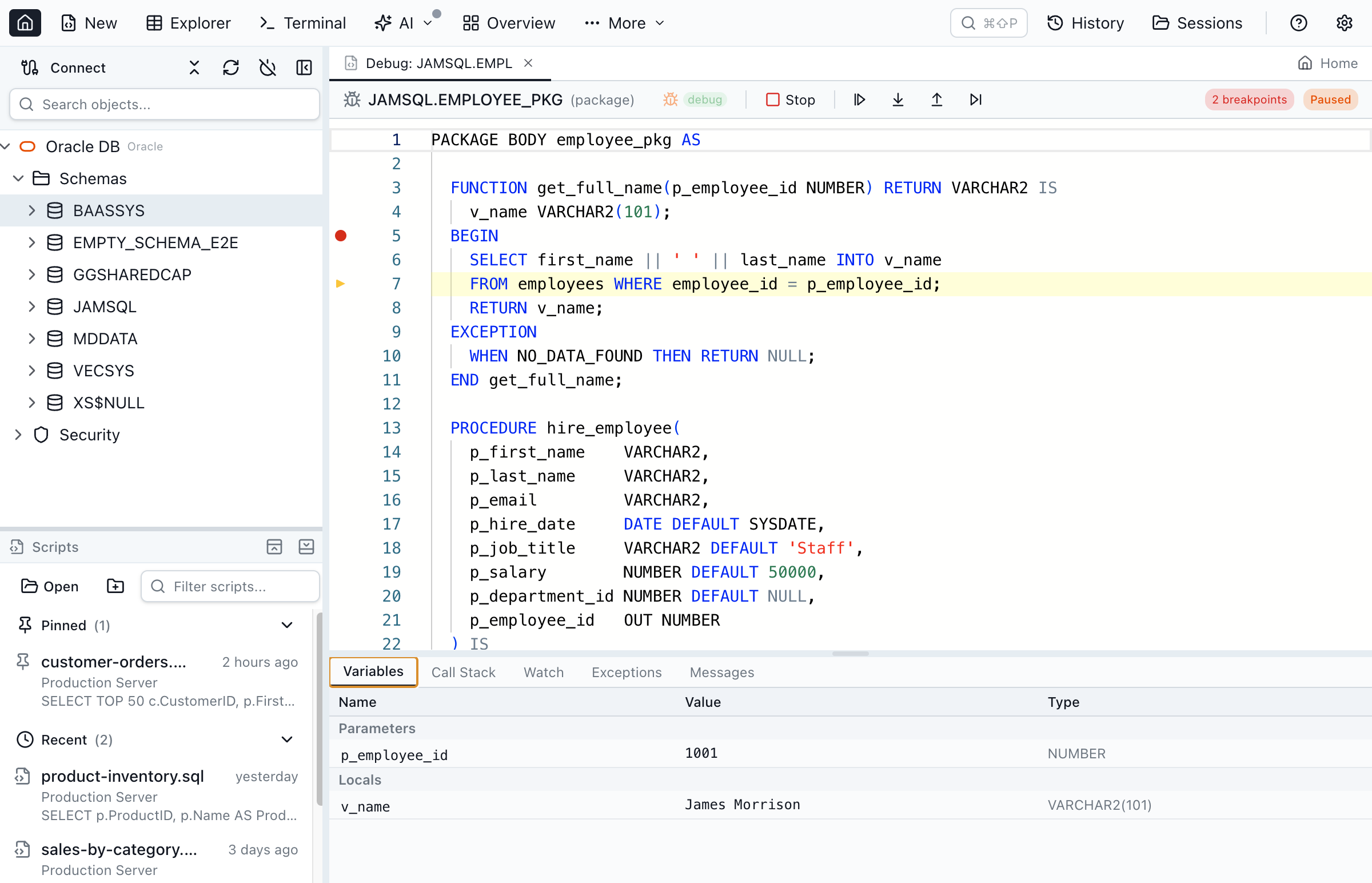
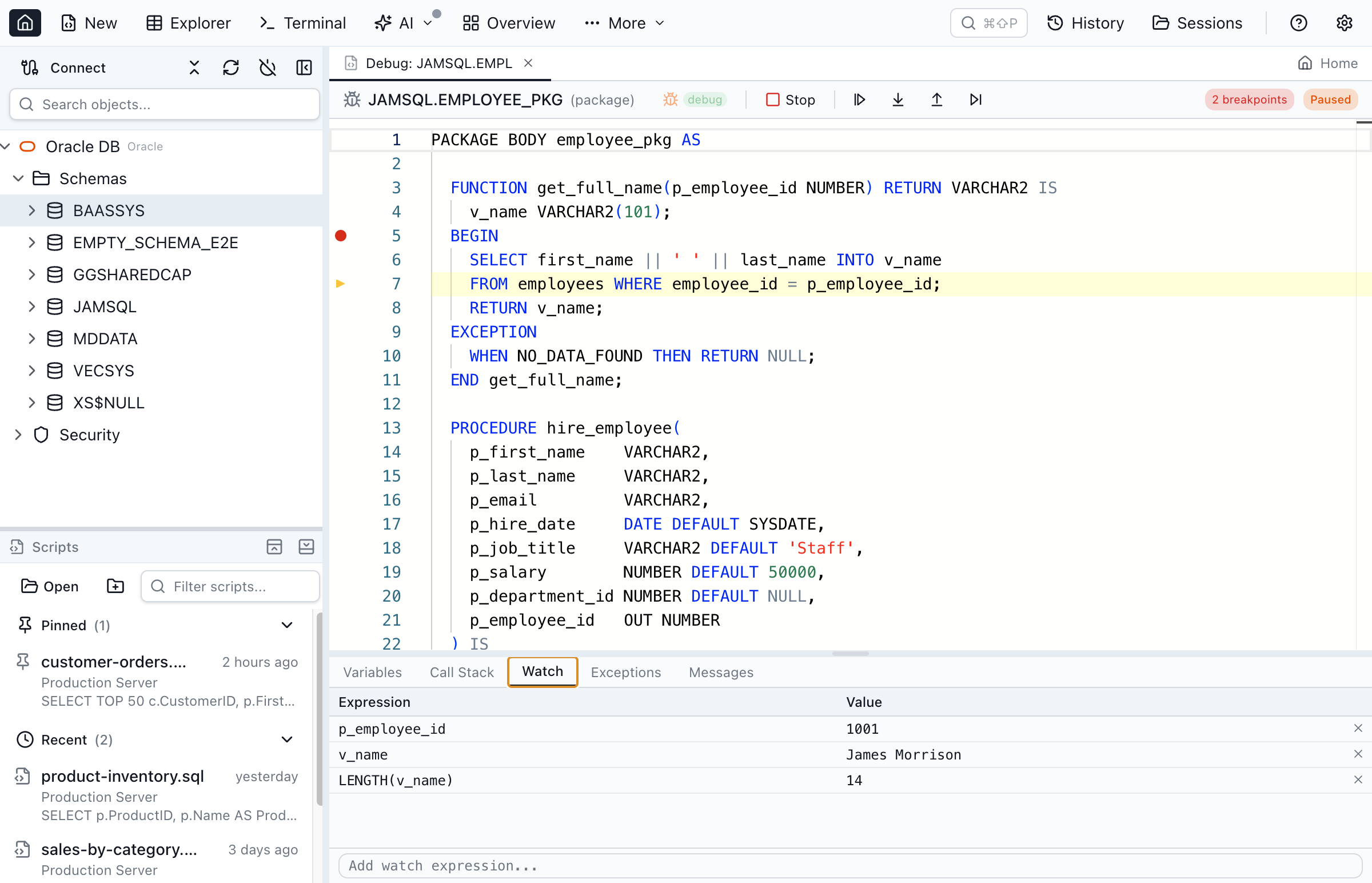
Jam SQL Studio's PL/SQL debugger is built on Oracle's DBMS_DEBUG: gutter breakpoints, step into and over, watched variables and the call stack, the same on macOS, Windows and Linux. It runs over the connection you already opened, so there is no JDWP reverse connection and no DBMS_NETWORK_ACL_ADMIN rule to add, which is the setup the SQL Developer extension for VS Code needs. Your user needs DEBUG CONNECT SESSION and DEBUG ANY PROCEDURE; stored units must be compiled for debug, which the editor's debug badge or Compile for Debug does for you. The debugger is a beta feature, on by default, and can be switched off in Settings → Beta Features.
Oracle Client vs Oracle Database GUI
"Oracle Client" can mean two different things.
Oracle Client (the libraries)
Oracle Client and Instant Client are libraries and utilities that other programs use to reach Oracle: the OCI driver, sqlplus, tnsping and tnsnames.ora handling. Installing and configuring them on macOS or Linux is a common source of friction. Toad can connect without one since 15.1 but then loses Data Pump, SQL*Loader, TKProf and other utility-based features; the Toad for Oracle on Mac product bundles Instant Client. SQL Developer connects over JDBC thin by default.
Oracle database GUI (the application)
"Best Oracle client" searches usually mean the best graphical application for working with Oracle — what this page compares. "Oracle GUI", "Oracle IDE" and "Oracle database client" describe the same category.
Where Jam SQL Studio stands
Jam SQL Studio needs no Oracle Client by default: it uses node-oracledb 7 in Thin mode. From version 1.5.7, an optional Thick mode loads Oracle Instant Client for servers that require Oracle Native Network Encryption, which Thin mode cannot negotiate; it applies to the whole app after a restart and is available on Windows, Linux and Apple silicon Macs. Authentication is by password (including SYSDBA) only in both modes — no Kerberos, LDAP or OCI IAM.
Frequently Asked Questions
Common questions about Oracle database GUI clients.
What is the best Oracle database GUI in 2026?
For deep Oracle administration on Windows, Toad for Oracle (2026 R2) is still the reference, sold through the Quest Online Store or by quote. For free Oracle tooling, Oracle now puts new features into the SQL Developer extension for VS Code; the classic desktop SQL Developer 24.3 gets fixes only. DBeaver and DataGrip suit people who work across many engines. Jam SQL Studio suits developers on Mac, Windows or Linux who want Oracle plus SQL Server, PostgreSQL or MySQL in one desktop app, with a PL/SQL debugger and no Oracle Client install.
Is Oracle SQL Developer being discontinued?
Not discontinued, but the desktop app is in maintenance. Oracle's SQL Developer product manager announced in February 2026 that support for desktop SQL Developer 24.3 is extended to April 2027 with no new features planned; new work goes into the Oracle SQL Developer extension for VS Code, which reached release 26.2 in 2026.
Is there a free Oracle GUI client?
Yes. Oracle SQL Developer (desktop) and the SQL Developer extension for VS Code are free. DBeaver Community is free and open source with Oracle support, including its Session Manager and execution plans. DataGrip is free for non-commercial use. Jam SQL Studio's Personal tier is free for non-commercial use and includes PL/SQL editing, the PL/SQL debugger, execution plans, the Session Browser and schema compare up to 200 objects.
Does Toad for Oracle run on a Mac?
Quest sells Toad for Oracle for Windows and a separate Toad for Oracle on Mac product; version 2026 R2 (July 2026) is available for both. The Mac product bundles Oracle Instant Client 19c and 23ai. Quest does not offer a Linux build.
Do I need Oracle Client to use Jam SQL Studio?
No. Jam SQL Studio connects with node-oracledb 6 in Thin mode, a pure-JavaScript implementation of Oracle's network protocol, so there is no Oracle Client, Instant Client or ORACLE_HOME to install. You can connect with EZConnect, a full TNS descriptor, or an alias from a tnsnames.ora you point it at.
Does Jam SQL Studio support Oracle Thick mode, Kerberos or LDAP?
Thick mode, yes, from version 1.5.7; Kerberos and LDAP, no. Thin mode is the default and needs nothing installed. The optional Thick mode uses Oracle Instant Client, for servers that require Oracle Native Network Encryption, which Thin mode cannot negotiate; it is available on Windows, Linux and Apple silicon Macs. In both modes authentication is by password (including SYSDBA) only: no Kerberos, LDAP or OCI IAM. Oracle Autonomous Database works through a wallet directory for mTLS. For everyday querying, PL/SQL development, execution plans and schema work, Thin mode covers what you need.
Does Jam SQL Studio include a PL/SQL debugger?
Yes. The PL/SQL debugger (a beta feature, on by default) is built on Oracle's DBMS_DEBUG. You can set breakpoints, step into and over procedures, functions, package bodies, triggers and anonymous blocks, and watch variables on macOS, Windows and Linux. It runs over your existing Oracle connection, without the JDWP reverse connection and network ACL that the SQL Developer extension for VS Code needs. Your user needs DEBUG CONNECT SESSION and DEBUG ANY PROCEDURE.
How does Jam SQL Studio show Oracle execution plans?
The estimated plan comes from EXPLAIN PLAN, read back from PLAN_TABLE. The actual plan runs the statement with the GATHER_PLAN_STATISTICS hint and reads V$SQL_PLAN_STATISTICS_ALL; this is offered for SELECT and WITH queries only, since running DML to capture a plan would change data. Both render as a tree or graph, and you can compare two plans side by side.
Can I use AI agents with my Oracle database?
Yes. Oracle's own SQLcl has shipped an MCP server since 25.2, and Toad for Oracle 2026 R2 added Toad Chat. Jam SQL Studio runs a local MCP server that is off by default and starts at Block, so an agent such as Claude Code can read schema but execute nothing until you choose Read-only or Confirm for that connection. PL/SQL debugging and compiling tools are refused at Block and Read-only.
What is the difference between Oracle Client and an Oracle GUI client?
Oracle Client (or Instant Client) is a set of libraries and utilities that other programs use to talk to Oracle: OCI, sqlplus, tnsping and tnsnames.ora support. An Oracle GUI client is a desktop application such as Toad, SQL Developer or Jam SQL Studio for writing SQL and browsing schemas. Some GUIs need Oracle Client for some features; Jam SQL Studio needs none because it uses the Thin driver.
Download Jam SQL Studio for Oracle
No Oracle Client to install. Free for personal use on Mac, Windows, and Linux.
Comparing Other SQL Tools?
See how Jam SQL Studio compares to other popular database tools.