 Jam SQL Studio
 Best Database Schema & Data Compare Tools in 2026
There is no single best schema compare tool — the right one depends on your engines, your operating system, and your budget, so this page names a different winner for each situation. If you work exclusively in SQL Server on Windows and the tooling budget is approved, Redgate's SQL Compare has been the standard for two decades and still is. Jam SQL Studio is the tool to shortlist when you're synchronizing schema and data across development, staging, and production on more than one engine — SQL Server, PostgreSQL, MySQL/MariaDB, Oracle, and SQLite in one app, on macOS, Windows, and Linux, with both compare types free for personal use.
Every claim about Jam SQL Studio on this page was checked against its shipping source code, and every claim about a competitor comes from that vendor's own current pages, checked in August 2026. Where we couldn't verify something — Quest's pricing, for example — we say so instead of guessing. The table below concedes several rows to the competition, because a comparison that wins every row isn't one you should trust.
Free for personal use • No account required • Mac, Windows, Linux
Who this page compares — and who it leaves out
Three dedicated compare/sync product lines and two IDEs earn a column: Redgate SQL Compare and SQL Data Compare, Devart's dbForge Schema Compare and Data Compare, ApexSQL Diff (sold by Quest since its acquisition of ApexSQL), DBeaver, and Jam SQL Studio. We included DBeaver because “can't I just use DBeaver for free?” is the most common question in this category — and the answer is more complicated than most roundups admit: DBeaver's own documentation places both Schema Compare and Data Compare in its Enterprise and Ultimate editions only, not in the free Community edition (as of August 2026).
Two tools you might expect are handled differently. Azure Data Studio's SQL Database Projects doesn't get a column because Azure Data Studio was retired on February 28, 2026; Microsoft's designated successor — Schema Compare inside the MSSQL extension for Visual Studio Code — gets its own section below, because it is genuinely free and for SQL-Server-only shops it's a serious answer. DataGrip is omitted because we could not verify its current US pricing from our location, and we don't publish figures we can't verify; it has its own head-to-head at DataGrip vs Jam SQL Studio.
Schema & Data Compare Tools Compared
Where each tool is stronger. Several rows below go to the competition.
| Capability | Jam SQL Studio | Redgate | dbForge (Devart) | ApexSQL Diff (Quest) | DBeaver Ent./Ult. |
|---|---|---|---|---|---|
| Schema compare — engines | ✓ 5 engines, one app | SQL Server family | 4 engines, separate product each | SQL Server | ✓ 25+ databases |
| Data compare — engines | ✓ Same 5, same app | SQL Server family | Same 4, separate again | SQL Server | ✓ Across DBMS too |
| Schema + data in one product | ✓ Both included | ✗ Two products | ✗ Two products | ✗ Two tools | ✓ Both, Ent./Ult. |
| Runs on | ✓ Mac, Win, Linux | Windows; Linux CLI beta | Windows; Mac/Linux via CrossOver | Could not verify | ✓ Mac, Win, Linux |
| Sync script generation | ✓ DDL + DML, always previewed | ✓ Dependency-ordered | ✓ T-SQL scripts | ✓ Sync scripts | ✓ DDL + DML |
| Compare vs backups / scripts folders | Partial Blueprint folders; no .bak | ✓ Backups, scripts, snapshots | ✓ Backups, scripts folders | ✓ From backups | Live databases |
| Cross-engine schema comparison | ✓ Tables in full; routines by name | ✗ Single-engine | ✗ Per-engine | ✗ Per-engine | Data only, not schema |
| Command-line / CI automation | Partial CLI drives a running app; not headless | ✓ Headless deployments | ✓ CLI sync | ✓ CLI + scheduling | Not checked |
| Compare callable by an AI agent (MCP) | ✓ schema_compare_*, data_compare_*; starts blocked | Partial Monitor data, not compare | Partial Query access, not compare | None found | Partial Queries, not compare |
| Free tier including compare | ✓ Personal: schema ≤ 200 objects, data ≤ 10k rows | ✗ Subscription | ✗ Subscription | ✗ Unverified | ✗ Not in Community |
| Pricing (checked August 2026) | Free personal; Pro $9.99/mo or $99/yr | $327/user/yr each for the two | From $239.95/yr each; bundle $299.95/yr — per engine | Not published | Subscription |
The cells are deliberately terse so the whole table fits on one screen. What sits behind each Partial, each “Could not verify”, and each row that goes to a competitor is spelled out in Methodology and When You Should Use the Other Tools below.
Methodology
This comparison is maintained by the Jam SQL Studio team. It carries no individual byline because it is revised whenever any of these products changes.
- Verified August 2026. Every competitor claim on this page comes from that vendor's own product pages or documentation, linked below, as they read in August 2026. Competitor products change; if a cell has gone stale, tell us and we'll fix it.
- Sources per vendor: Redgate — the SQL Compare product page, the SQL Data Compare product page, and the SQL Compare requirements page. Devart — the dbForge compare-tools catalog, the Schema Compare and Data Compare product pages, and Devart's own macOS and Linux installation docs. Quest/ApexSQL — Quest's ApexSQL Diff introduction and support portal. DBeaver — the Schema compare and Data compare documentation. Microsoft — What's happening with Azure Data Studio.
- “Not documented” means exactly that: the capability has no section in the vendor's product documentation we checked. It is not a claim that we tested the product and found the feature missing.
- On the MCP row specifically. Three of the four competitors do ship an MCP server, and it would be misleading to imply otherwise: Redgate lists one for Redgate Monitor's performance data, marked “coming soon”; Devart sells a whole MCP server product line for query access to 19 data sources plus a universal ODBC server; and CloudBeaver Enterprise and DBeaver Team Edition Web act as MCP servers for read-only queries and metadata. What none of them documents is its schema- or data-compare product being callable through MCP — which is the narrow claim that row makes.
- A verification note on Quest. Quest's web pages rejected our automated checks, so the ApexSQL cells rely on fewer sources than the other columns, and where we could not verify a fact — pricing, operating-system requirements — the cell says so rather than guessing.
- Jam SQL Studio rows are checked against the shipping source code, not against our own marketing pages: the engine lists, the Personal-tier caps, the sync-script transaction behavior, the cross-engine table matching, and the MCP tools were each traced to the implementing module before being claimed here.
- No performance comparison appears on this page. We have not benchmarked these tools against each other, so this page makes no claim about the relative speed or resource use of any of them.
Spot something that has changed? Let us know and we will update this page.
When You Should Use the Other Tools
A comparison page that finds no reason to use the other tools is not worth reading. Here is who each competitor genuinely serves better.
Keep Redgate SQL Compare if you're all-in on SQL Server and Windows
Redgate's compare tools do things Jam SQL Studio does not. SQL Compare can diff a live database against schema snapshots saved for audit and roll-back purposes, and SQL Data Compare reads native, encrypted, and compressed SQL Server backup files as a comparison source — Jam SQL Studio compares live databases and Database Blueprint folders, and cannot open a .bak file at all. Redgate's command line runs deployments headlessly in CI, with dependency checking so objects are scripted in the correct order. If your whole estate is SQL Server, your team is on Windows, and the per-seat budget exists — $327/user/year for each of the two products, as of August 2026 — Redgate is the safe, deep, twenty-year incumbent for a reason. What it will not do is touch PostgreSQL, MySQL, Oracle, or SQLite: the requirements page lists Windows only, with a Linux command line in beta.
Keep dbForge if you live inside SSMS
Devart's compare tools install as an SSMS add-in as well as a standalone app, so a DBA who spends the day in Management Studio never has to leave it. They can compare live databases, native SQL Server backups, or scripts folders, export comparison results to HTML, Excel, and XML — a reporting surface Jam SQL Studio doesn't have — and automate synchronization from the command line. The catch is the packaging: schema compare and data compare are separate products per engine (SQL Server, MySQL, Oracle, PostgreSQL each get their own pair, from $239.95/year per product or bundles from $299.95/year, as of August 2026), and they are Windows applications — Devart's own docs cover macOS and Linux only through CrossOver, a Wine-based compatibility layer.
Keep ApexSQL Diff if you're already a Quest shop
ApexSQL Diff has compared and synchronized SQL Server schemas since long before Quest acquired ApexSQL, and Quest's support portal shows an active 2026 release line. Quest's own description highlights strengths we don't match: recovering lost or damaged objects from backups without a full restore, comparing SSIS packages, and scheduled command-line automation. If your organization already licenses Quest database tooling, it slots in. Quest does not publish pricing in a form we could verify, so check with them directly.
Keep DBeaver if you need engines beyond our five
This is the biggest concession on the page: DBeaver's Schema Compare documentation lists support for 25+ databases — including Snowflake and BigQuery — where Jam SQL Studio compares five. Its Data Compare can even diff datasets across different database systems. If your schema-compare needs run past SQL Server, PostgreSQL, MySQL/MariaDB, Oracle, and SQLite, DBeaver Enterprise or Ultimate covers ground we don't. Know what you're buying, though: per DBeaver's own docs (August 2026), neither compare feature is in the free Community edition — both require the Enterprise or Ultimate tier, and schema sync is built on Liquibase snapshots, which is a different workflow from a direct catalog diff.
The Free Microsoft Path After Azure Data Studio
Azure Data Studio — and with it the SQL Database Projects extension many teams used for schema compare — was retired on February 28, 2026 and no longer receives updates or security fixes. Microsoft's designated replacement is Visual Studio Code with the MSSQL extension, which includes a Schema Compare that can compare and synchronize schemas between databases, DACPACs, or SQL projects. It is genuinely free, including for commercial use, and it runs on macOS, Windows, and Linux.
Its boundary is the same as Redgate's: Microsoft states the extension primarily supports SQL Server, Azure SQL Database, Azure SQL Managed Instance, and SQL database in Fabric. There is no data compare and no other engine. If that's your whole world and your budget is zero, use it — we say the same thing on our SQL Database Projects comparison. The moment a PostgreSQL or MySQL database enters the picture, you're back on this page.
Why Teams Pick Jam SQL Studio
Six differences that hold up when you check them against the code rather than against a feature list.
Five engines, both compare types, one app
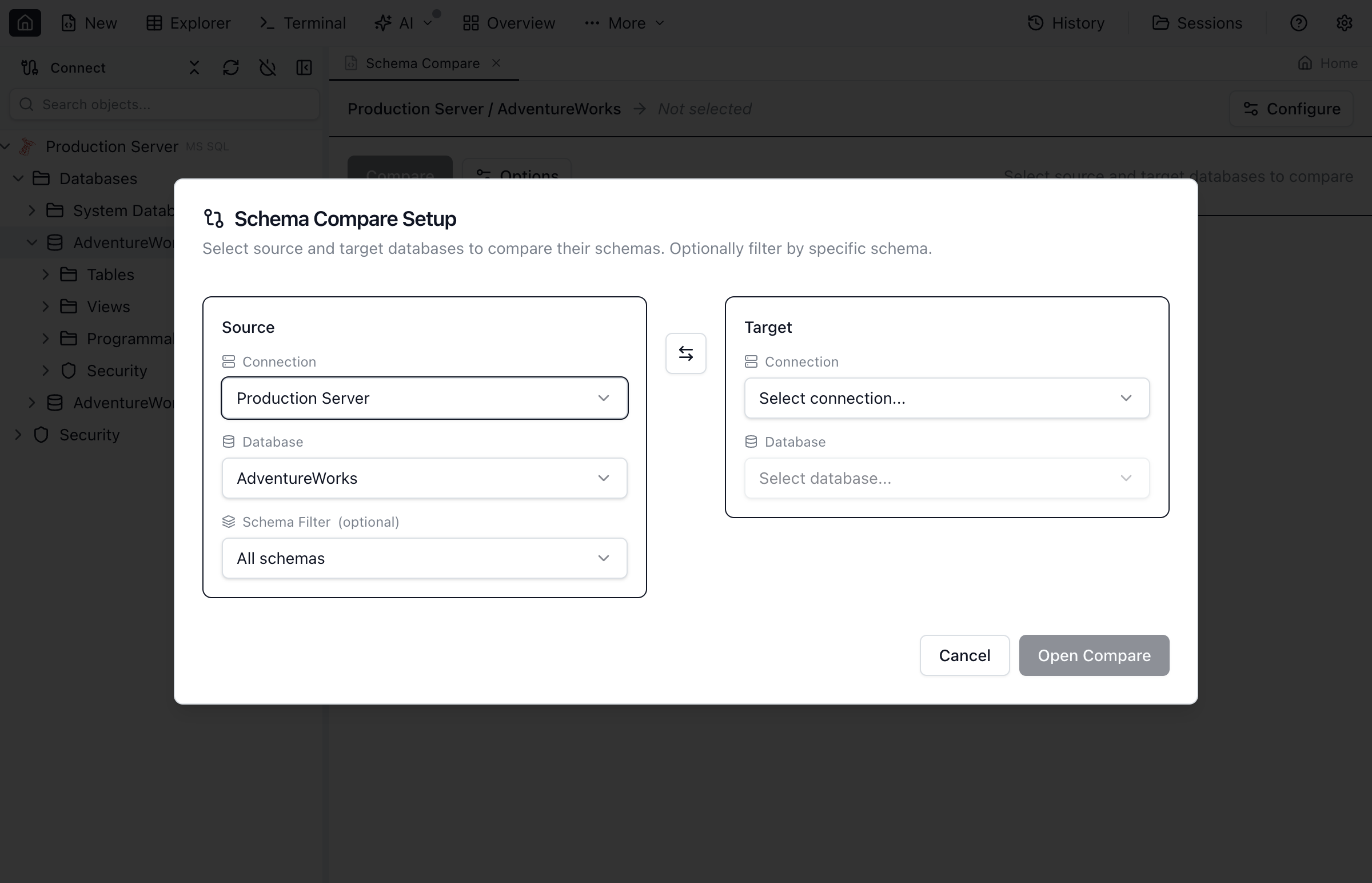
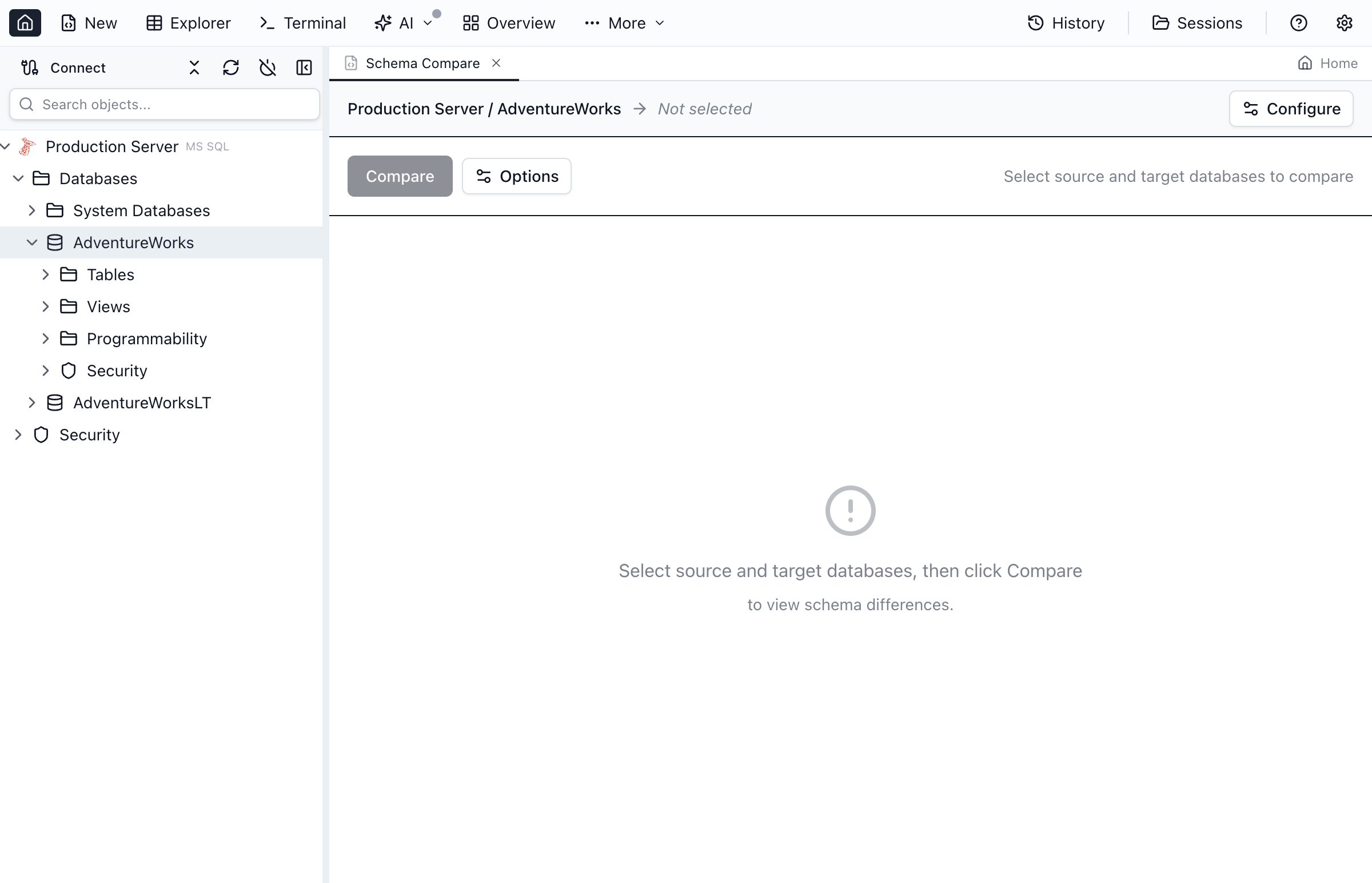
Redgate covers one engine. Devart covers four, but as up to eight separately-licensed Windows products. Jam SQL Studio's Schema Compare and Data Compare both work across SQL Server, PostgreSQL, MySQL/MariaDB, Oracle, and SQLite from the same setup dialog — same-engine compares cover tables, views, procedures, functions, and (on SQL Server, PostgreSQL, and Oracle) sequences. MySQL/MariaDB and SQLite have no sequence concept, so no sequence comparison is offered there — the checkbox simply doesn't appear.
It also compares across engines
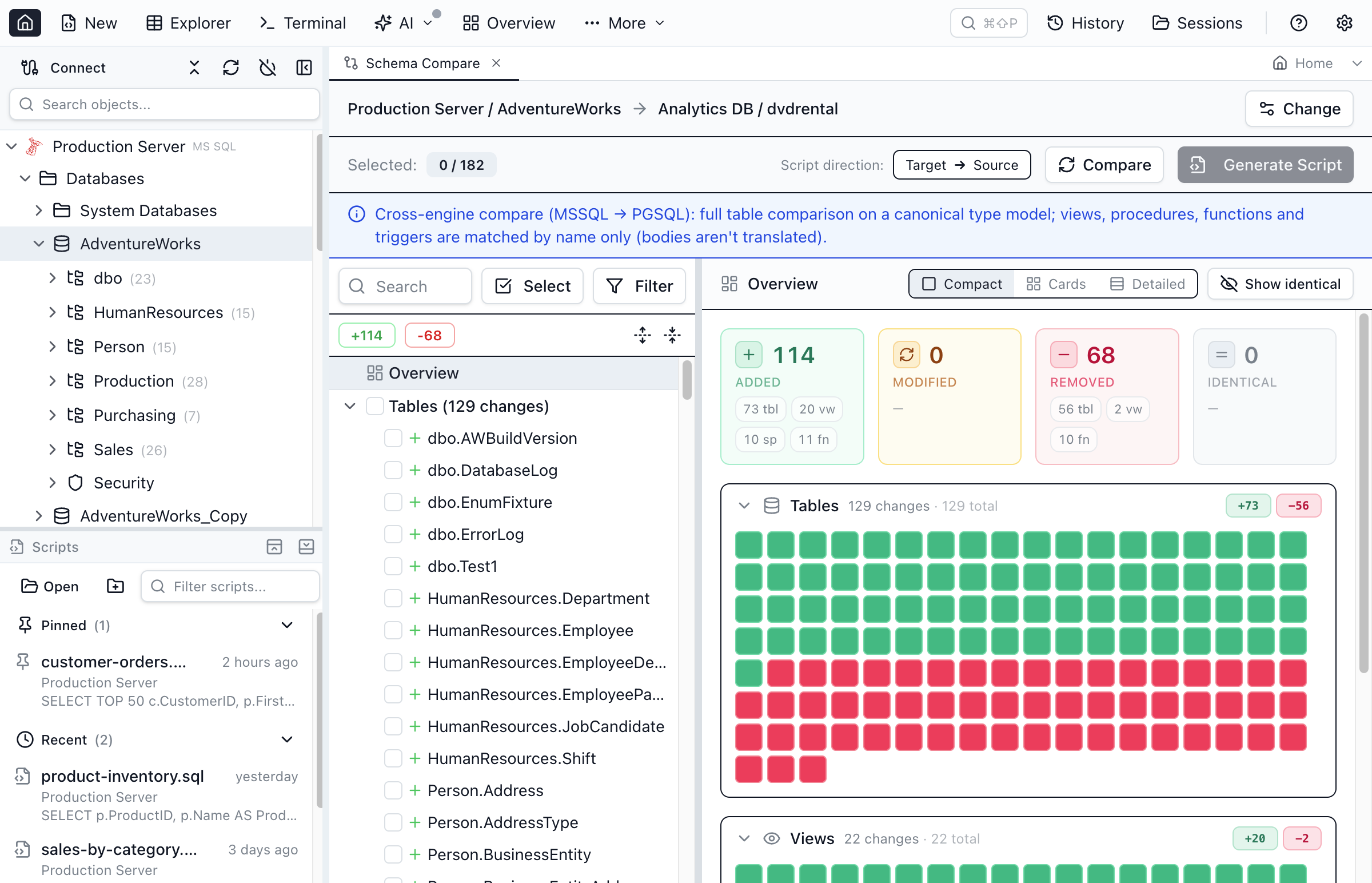
Point the source at SQL Server and the target at PostgreSQL: tables are compared in full on a canonical type model, so nvarchar(100) and character varying(100) read as the same column instead of a false difference, while views, procedures, functions, and triggers are inventoried by name — the exact list you need to hand-port, with no pretence that T-SQL translates to PL/pgSQL automatically. A companion Migrate Table to Connection action copies a table's schema and data to a connection of any engine, with type and value translation and a dry-run preview. None of the four competitor product lines on this page documents a cross-engine schema diff.
Filters that focus the diff on what matters
The setup dialog scopes a comparison to included or excluded schemas, lets you drop whole object types, and exposes an engine-filtered Properties to compare checklist — so volatile storage settings like SQL Server fillfactor, MySQL AUTO_INCREMENT, or Oracle PCTFREE don't drown real drift. You can ignore a single noisy property with one click from the diff itself, a live “Skipping: …” summary always names what's excluded, and a comparison that skipped anything never reports a clean match — it says “No differences in what was compared” instead. Comparison options export to a small versioned JSON file with no connection details in it, so a team can commit its comparison standard to Git.
Sync scripts that state their own failure behavior
On SQL Server and PostgreSQL, the generated schema sync script is wrapped in a single transaction by default — on SQL Server that means SET XACT_ABORT ON plus a per-batch guard that stops every later batch if the transaction has died, a shape we validated by running deliberately failing scripts through sqlcmd against a real server. One hole survives — a compile-time syntax error can't be caught by any batch-level guard — and the script's own header says so instead of claiming otherwise. On MySQL, Oracle, and SQLite, where DDL can't be made atomic, the header tells you that too. Every script is previewed before anything runs; Jam never executes it on its own.
Free means both features, with size caps — not a locked trial
The Personal tier includes full Schema Compare when both sides are 200 objects or fewer, and full Data Compare when both tables are 10,000 rows or fewer — above that, data compare still runs on a first-N or random-N sample. Pro ($9.99/month or $99/year) removes the caps and covers commercial use. The caps are the honest limitation; there is no feature-locked “compare is Pro-only” gate.
Your AI coding agent can run the same compare
Jam SQL Studio's local MCP server exposes schema_compare_start, schema_compare_generate_script, data_compare_start, and their result tools, so a coding agent can diff dev against staging and read back the script — under the same permission model as everything else, which starts fully blocked until you raise it. A bundled jam-sql CLI drives the same operations from a terminal. The honest caveat: both drive a running desktop app — this is not a headless CI binary, and if nightly unattended compare jobs are the requirement, Redgate's and Devart's command-line tools are built for that and ours is not.
Free for personal use • No account required • Mac, Windows, Linux
Frequently Asked Questions
What is the best database schema compare tool?
It depends on your engines and platform, and anyone who names one winner for everybody is selling something. For a SQL-Server-only shop on Windows with budget, Redgate SQL Compare is the long-standing standard. For a SQL-Server-only shop with no budget, Schema Compare in Microsoft's free MSSQL extension for Visual Studio Code is a real answer. For engines beyond the mainstream five, DBeaver Enterprise covers the most databases. Jam SQL Studio is the strongest fit when you work across SQL Server, PostgreSQL, MySQL/MariaDB, Oracle, or SQLite on macOS, Windows, or Linux and want schema and data compare in one app with a free personal tier.
What is the difference between schema compare and data compare?
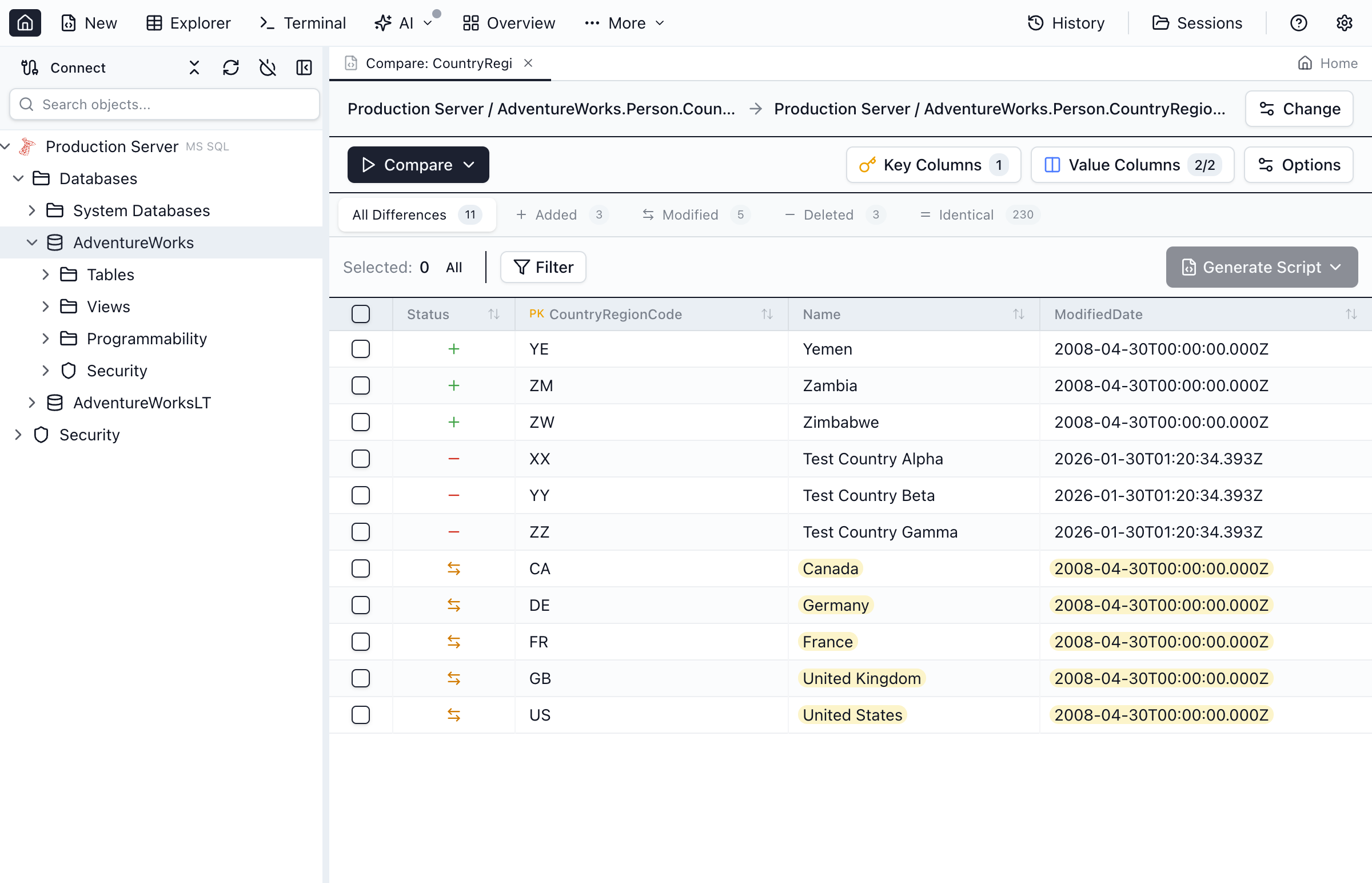
Schema compare diffs database structure — tables, columns, indexes, views, procedures — and produces ALTER, CREATE, and DROP statements to synchronize it. Data compare diffs the rows inside tables and produces INSERT, UPDATE, and DELETE statements keyed on the primary key. Promoting a release usually needs both, in that order: align the structure first, then the reference data. Some vendors sell them as two separate licenses; Jam SQL Studio and DBeaver's paid editions include both in one product.
Is there a free schema compare tool for SQL Server?
Yes, two credible ones. Microsoft's MSSQL extension for Visual Studio Code includes a free Schema Compare for the SQL Server family — its scope is SQL Server, Azure SQL, and Fabric only, with no data compare. Jam SQL Studio's Personal tier includes schema compare free for personal use when both sides have 200 objects or fewer, plus data compare up to 10,000 rows per table, across five engines. DBeaver's free Community edition is not an option here: DBeaver's own documentation places Schema Compare and Data Compare in its Enterprise and Ultimate editions only, as of August 2026.
Can I compare schemas between two different database engines?
Jam SQL Studio can. A cross-engine comparison — say SQL Server against PostgreSQL — compares tables in full on a canonical type model, so nvarchar(100) and character varying(100) match instead of flagging a false difference, and inventories views, procedures, functions, and triggers by name so you can see what's missing on each side. Object bodies are never auto-translated, because T-SQL and PL/pgSQL don't map one-to-one. Redgate, dbForge, and ApexSQL sell per-engine tools that compare within one engine; DBeaver's documentation describes cross-DBMS data compare but not a cross-DBMS schema diff.
Do any of these schema compare tools run on a Mac?
As of August 2026: Jam SQL Studio and DBeaver ship macOS, Windows, and Linux builds, and Visual Studio Code with the MSSQL extension runs on all three too. Redgate's SQL Compare requirements page lists Windows only, with a Linux command line in beta. Devart's dbForge compare tools are Windows applications; Devart's own documentation covers running them on macOS and Linux through CrossOver, a Wine-based compatibility layer, rather than directly.
What replaced Azure Data Studio's schema compare?
Azure Data Studio was retired on February 28, 2026 and no longer receives updates or security fixes. Microsoft moved schema compare into the MSSQL extension for Visual Studio Code, which can compare and synchronize schemas between databases, DACPACs, or SQL projects, and kept SQL Database Projects going in its own VS Code extension. Both are free and cover the SQL Server family only. Jam SQL Studio imports Azure Data Studio connections in one click and adds data compare and four more engines.
Can an AI coding agent run a schema or data compare?
In Jam SQL Studio, yes. Its local MCP server exposes schema compare and data compare as tools — an agent like Claude Code or Cursor can start a comparison, poll the result, and generate the sync script, and a bundled jam-sql CLI does the same from a terminal. Access starts fully blocked until you raise the permission level yourself, and generated scripts are never executed without you. None of the other vendors on this page documents an MCP server for its compare tools as of August 2026.