
Last updated: 2026-09-26
SQL Snippets
SQL snippets in Jam SQL Studio are reusable code templates you trigger from the query editor: type a keyword such as select or insert, pick the snippet from IntelliSense, press Tab, and a full statement expands with placeholders you tab through. The built-in snippets are engine-aware — the same snippet inserts SELECT TOP on SQL Server, LIMIT on PostgreSQL, and FETCH FIRST on Oracle — and you can add your own per engine.
What are SQL snippets?
A SQL snippet is a named template that expands into a full statement inside the Query Editor. Instead of retyping the skeleton of a SELECT … WHERE … ORDER BY, a paginated query, or a stored-procedure definition, you type a keyword, choose the snippet from the completion list, and fill in the highlighted placeholders. Jam SQL Studio draws snippet suggestions from two sources and merges them into the same Monaco completion dropdown alongside schema and keyword completions:
- Built-in snippets — shipped with the app and tailored to the connected engine.
- Custom snippets — your own templates, configured per engine in Settings.
If a custom snippet uses the same label as a built-in one, the custom snippet wins.
Using Built-in Snippets
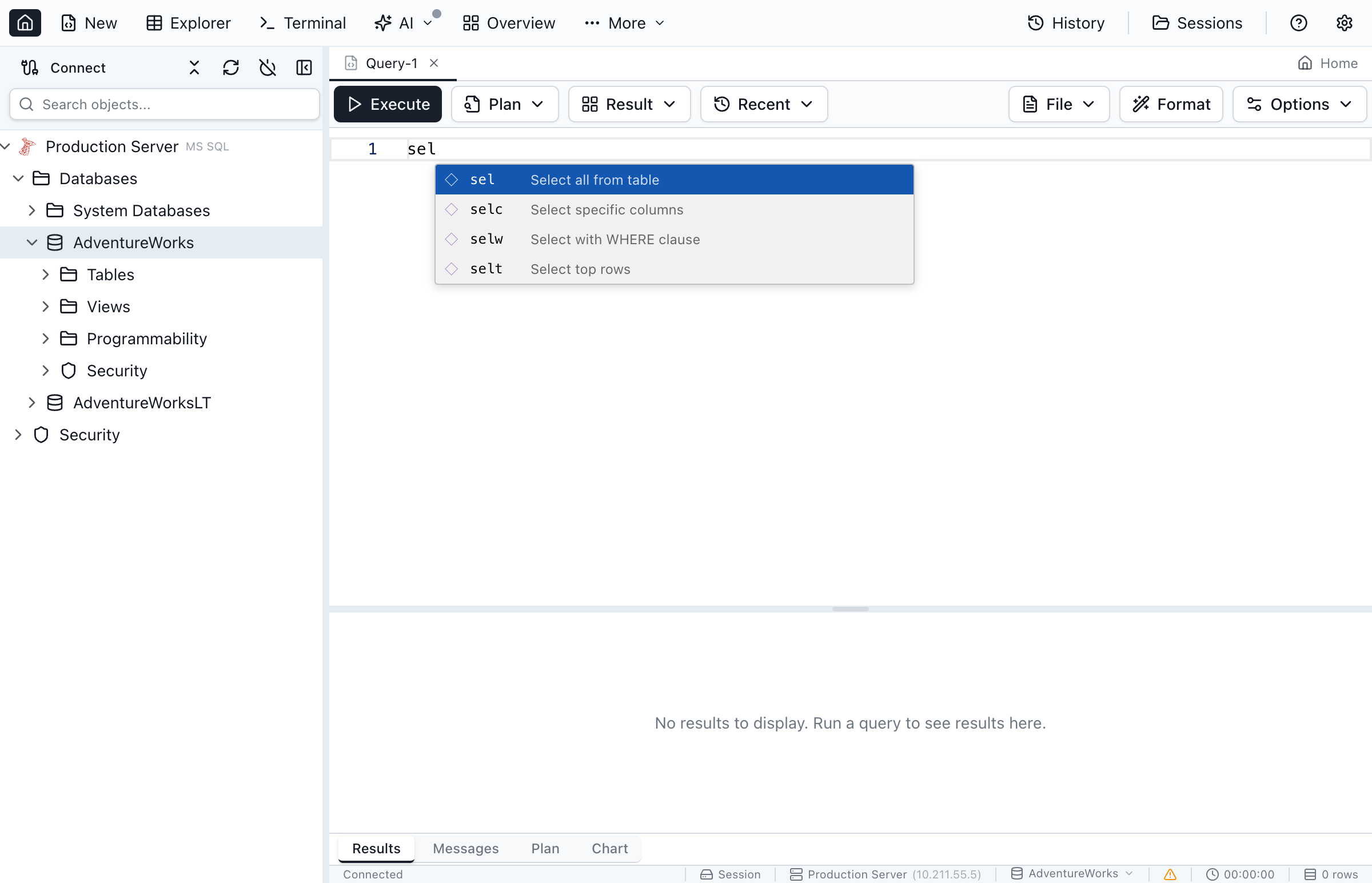
Built-in snippets are matched by the words you type (not a fixed abbreviation), so typing select where surfaces the SELECT … WHERE … ORDER BY … template and typing upsert or merge surfaces the engine's upsert snippet.
Triggering a Snippet
- Place the cursor at the start of a statement in the query editor
- Type a keyword that matches a snippet (for example
insert,cte, orupdate) - The snippet appears in the IntelliSense dropdown labeled with its full form (e.g.
INSERT INTO … VALUES …) - Press Tab or Enter to expand it
- Fill in the first placeholder, then press Tab to move to the next
When Snippets Appear (Noise Control)
Snippets are deliberately gated so they don't crowd out normal IntelliSense while you're writing table and column names:
- They are offered only when the cursor is at the start of a statement (an empty statement or the first token being typed).
- On automatic completion triggers, snippets appear after you've typed at least 2 characters.
- On a manual completion trigger (invoke IntelliSense with Ctrl+Space), snippets can show immediately at statement start.
- They are suppressed after object-name trigger characters like
.,[, and", where you almost certainly want a schema or column name instead.
Working with Placeholders
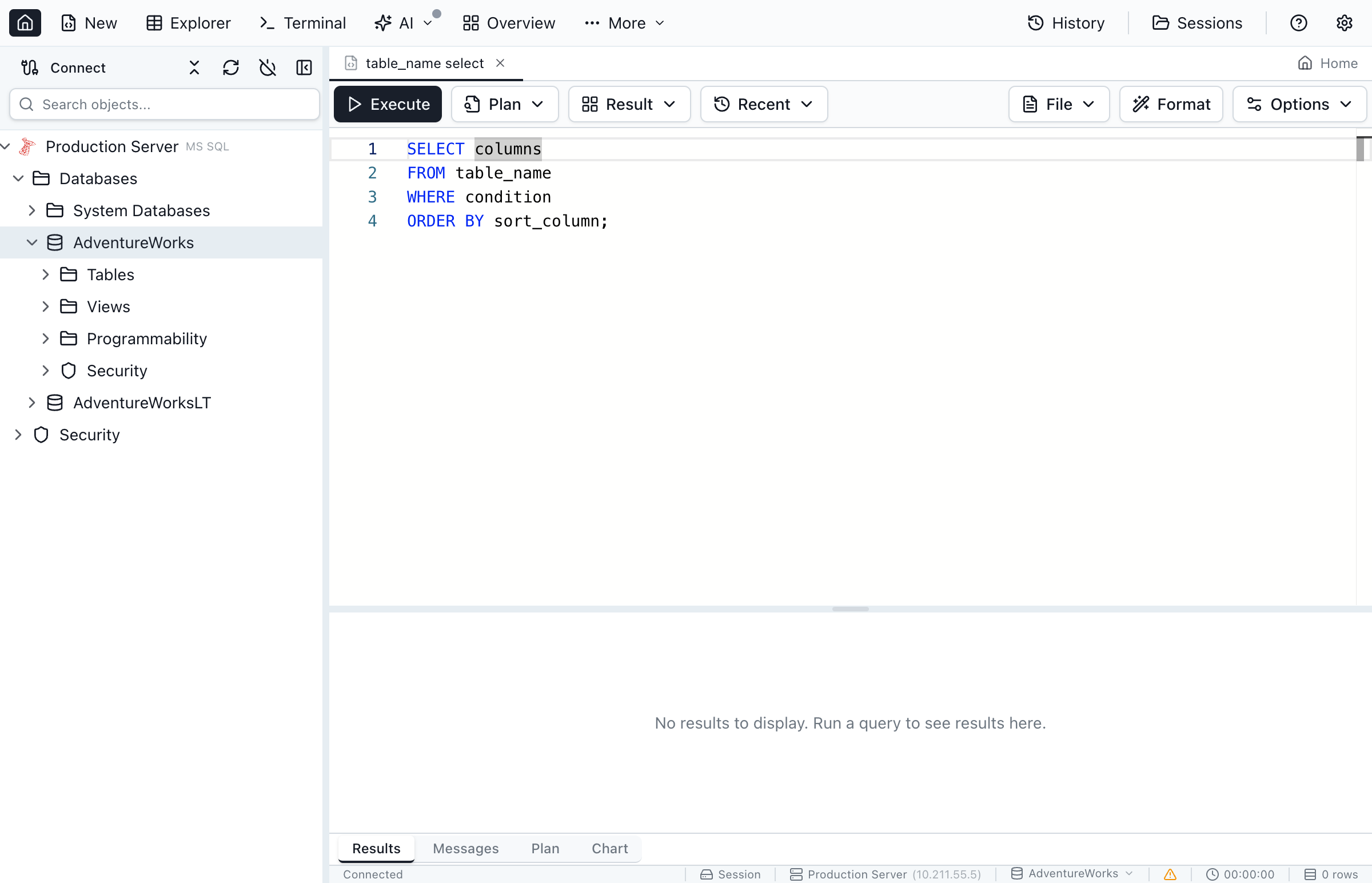
After a snippet expands, use these keys to navigate the tab stops:
- Tab - Move to the next placeholder
- Shift+Tab - Move to the previous placeholder
- Escape - Exit snippet mode and place the cursor at the end
Placeholders that share the same number (for example both instances of ${1:cte} in a CTE snippet) update together as you type, so naming a common table expression once renames every reference to it.
Engine-Aware Snippets
This is where Jam SQL Studio's snippets differ from a generic editor snippet pack: the built-in library adapts each template to the connected engine's dialect. You don't keep separate "SQL Server SELECT" and "Postgres SELECT" snippets — you type one keyword and get the right syntax for the database in front of you.
| Concept | SQL Server | PostgreSQL | MySQL | Oracle | SQLite |
|---|---|---|---|---|---|
| Row limiting | SELECT TOP … | LIMIT … | LIMIT … | FETCH FIRST … ROWS ONLY | LIMIT … |
| Pagination | OFFSET … FETCH NEXT … | LIMIT … OFFSET … | LIMIT … OFFSET … | OFFSET … FETCH NEXT … | LIMIT … OFFSET … |
| Returning affected rows | OUTPUT inserted.* | RETURNING * | — | RETURNING … INTO … | RETURNING * |
| Upsert | MERGE … | INSERT … ON CONFLICT … | ON DUPLICATE KEY UPDATE … | MERGE … | INSERT … ON CONFLICT … |
| View definition | CREATE OR ALTER VIEW … | CREATE OR REPLACE VIEW … | CREATE OR REPLACE VIEW … | CREATE OR REPLACE VIEW … | CREATE VIEW … |
| Execution plan | SET STATISTICS XML ON | EXPLAIN (ANALYZE, BUFFERS) | EXPLAIN FORMAT=JSON | EXPLAIN PLAN FOR … | EXPLAIN QUERY PLAN |
Oracle connections also get a PL/SQL-flavoured set on top of the shared library — a hierarchical CONNECT BY query, V$SESSION and USER_OBJECTS lookups, ALTER SESSION SET …, DBMS_OUTPUT.PUT_LINE, and DBMS_METADATA.GET_DDL. When the query editor runs against the mock engine used in tests, the SQL Server snippet set is used.
Built-in Snippet Library
The library is intentionally practical-first — the statements you write every day. Snippets are labeled by their full form; the keywords below are what you type to surface them.
Query (SELECT) snippets
| Type to find | Snippet |
|---|---|
select top / select limit | Basic SELECT with a row limit |
select where order by | SELECT … WHERE … ORDER BY … |
select distinct | SELECT DISTINCT … |
select pagination | Paginated SELECT (engine-specific) |
select join | SELECT … JOIN … ON … |
select group by | SELECT … GROUP BY … HAVING … |
select where exists | Correlated EXISTS subquery |
with cte | Common table expression (CTE) |
with recursive | Recursive CTE for hierarchy traversal |
connect by (Oracle) | Hierarchical query with CONNECT BY |
Write (INSERT / UPDATE / DELETE) snippets
| Type to find | Snippet |
|---|---|
insert into values | Single-row INSERT |
insert multi row | Multi-row INSERT (Oracle: INSERT ALL) |
insert output / insert returning | INSERT that returns the new row |
insert into select | INSERT … SELECT … |
upsert / merge | Upsert (dialect-specific) |
update set where | UPDATE … SET … WHERE … |
update from join | UPDATE from a joined/related table |
update returning | UPDATE that returns changed rows |
delete from where | DELETE … WHERE … |
delete join / delete using | DELETE against a related table |
delete returning | DELETE that returns removed rows |
DDL and utility snippets
The DDL set covers CREATE SCHEMA, CREATE DATABASE, CREATE TABLE (with an IF NOT EXISTS variant), CREATE INDEX / CREATE UNIQUE INDEX, CREATE SEQUENCE, view / procedure / function / trigger definitions, the common ALTER TABLE … ADD/DROP/ALTER COLUMN and ADD CONSTRAINT forms, and DROP … IF EXISTS for tables, views, indexes, procedures, and functions. Utility snippets include a transaction skeleton (BEGIN/COMMIT with error handling on SQL Server and Oracle), an execution-plan snippet, and a comment header.
PostgreSQL 19 (beta) Snippets
PostgreSQL connections get six additional built-in snippets for syntax added during the PostgreSQL 19 beta cycle (each snippet's label ends in (PG19) and its completion details note the version requirement). Three of them cover syntax that PostgreSQL later pulled from 19: GROUP BY ALL was reverted in Beta 3 (August 13, 2026) and FOR PORTION OF in Beta 4 (September 24, 2026). Those snippets are still in the list, but the statements they insert only run on the beta builds that still had the feature, as noted in the table.
| Type to find | Snippet |
|---|---|
repack concurrently vacuum | REPACK (CONCURRENTLY) … (PG19) — rebuild a table to reclaim space without VACUUM FULL's exclusive lock |
wait for lsn replica | WAIT FOR LSN … (PG19) — block until WAL replay/flush reaches a target LSN, useful for read-after-write consistency against a replica |
insert on conflict do select | INSERT … ON CONFLICT DO SELECT … (PG19) — read-modify-insert that returns the existing row on conflict instead of updating it |
update for portion of temporal | UPDATE … FOR PORTION OF … (PG19) — temporal UPDATE that splits a row at period boundaries and updates only the given portion. Runs only on PostgreSQL 19 beta 1–3; reverted in Beta 4. |
delete for portion of temporal | DELETE … FOR PORTION OF … (PG19) — temporal DELETE that removes only the given portion of a period. Runs only on PostgreSQL 19 beta 1–3; reverted in Beta 4. |
select group by all pg19 | SELECT … GROUP BY ALL (PG19) — group by every non-aggregated column in the SELECT list without repeating them. Runs only on PostgreSQL 19 beta 1 and 2; reverted in Beta 3. |
These snippets always appear on a PostgreSQL connection (they aren't hidden below PostgreSQL 19) — the (PG19) label and completion details are the signal that the statement needs a PostgreSQL 19 server to run. REPACK, WAIT FOR LSN and ON CONFLICT DO SELECT are still in PostgreSQL 19 as of Beta 4; the other three are not. On the beta builds that had it, the temporal FOR PORTION OF syntax required a temporal primary key (PRIMARY KEY (…, period WITHOUT OVERLAPS)), which in turn needs the btree_gist extension for non-range key columns.
Creating Custom Snippets
Define your own snippets for the patterns your team reuses — audited inserts, a standard soft-delete, a house pagination style, or a boilerplate procedure header.
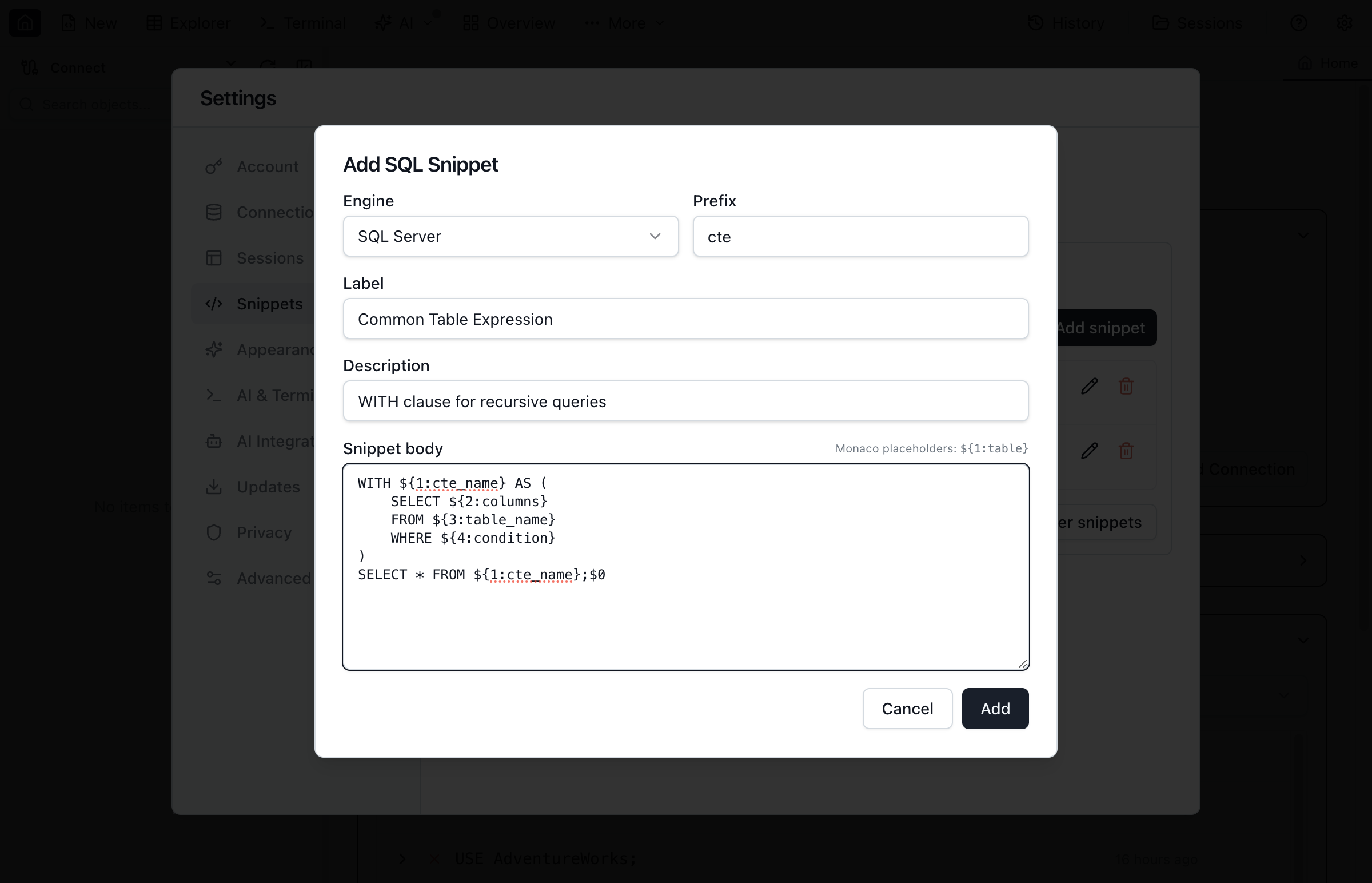
Add a New Snippet
- Open Settings (gear icon in the main toolbar)
- Go to Advanced → SQL Snippets
- Choose the Engine the snippet applies to (SQL Server, PostgreSQL, SQLite, MySQL, or Oracle)
- Click Add snippet
- Fill in the fields below and click Save
| Field | Purpose |
|---|---|
| Engine | Which database dialect the snippet belongs to. It only appears on connections of that engine. |
| Prefix | The keyword you type to find the snippet (e.g. select, update, cte). |
| Label | What shows in the completion list (e.g. UPDATE … WHERE …). |
| Description | Optional text shown in the completion details popup. |
| Snippet body | The inserted text, using Monaco snippet syntax for tab stops. |
Placeholder Syntax
Snippet bodies use standard Monaco snippet syntax:
| Syntax | Description | Example |
|---|---|---|
${1} | Simple tab stop | Cursor stops here, no default text |
${1:text} | Tab stop with default | ${1:table} inserts "table" pre-selected |
${2:text} | Second tab stop | Tab moves here after the first |
$0 | Final cursor position | Where the cursor lands after all tab stops |
Reusing the same number (for example ${1:table} twice) links the placeholders so they update together.
Example Custom Snippet
A snippet for audited INSERT statements (engine set to SQL Server):
-- Prefix: insa
-- Label: INSERT with audit columns

INSERT INTO ${1:table_name} (
    ${2:columns},
    CreatedBy,
    CreatedAt
)
VALUES (
    ${3:values},
    CURRENT_USER,
    GETDATE()
)$0
When expanded, the cursor highlights table_name, then Tab moves to columns, then to values, and finally exits at $0.
Managing Snippets
Edit and delete
In Settings → Advanced → SQL Snippets, pick the engine to see its custom snippets. Click the pencil icon to edit a snippet's prefix, label, description, or body, or the trash icon to delete it (a confirmation dialog appears first).
Clear all snippets for an engine
The Clear [engine] snippets button removes every custom snippet for the selected engine at once, after a confirmation. Built-in snippets are always available and can't be deleted. Custom snippets are stored locally on your machine, so they persist across restarts but aren't synced between computers.
Jam SQL Studio snippets vs generic editor snippets
Editors like VS Code and SSMS support snippets too, but they're dialect-blind — a snippet that inserts SELECT TOP is wrong the moment you open a PostgreSQL connection. Two things make Jam SQL Studio's snippets different:
- One keyword, correct dialect. The built-in library resolves the right syntax for the connected engine, so a single
paginationorupsertsnippet works across SQL Server, PostgreSQL, MySQL, Oracle, and SQLite. - Merged into real IntelliSense. Snippets appear in the same completion list as your live schema — tables, columns, and keyword completions — instead of a separate insert-snippet command, and they're gated to the start of a statement so they never fight column-name completion.
Frequently asked questions
How do I use SQL snippets in Jam SQL Studio?
At the start of a statement in the query editor, type a keyword that matches a snippet — for example 'select', 'insert', 'cte', or 'merge'. The snippet appears in the IntelliSense dropdown; press Tab or Enter to expand it, then tab through the placeholders. On automatic triggers snippets appear after two characters; when you invoke completion manually they appear immediately at the start of a statement.
Are the built-in snippets engine-aware?
Yes. Built-in snippets adapt to the connected engine. SQL Server gets SELECT TOP and OUTPUT inserted.*, PostgreSQL and SQLite get LIMIT and RETURNING *, Oracle gets FETCH FIRST plus a PL/SQL set, and MySQL gets ON DUPLICATE KEY UPDATE. The same UPSERT or pagination snippet inserts the correct dialect for whichever database you are connected to.
Can I create custom SQL snippets?
Yes. Open Settings, go to Advanced, then SQL Snippets. Choose the engine, click Add snippet, and set a Prefix, Label, Description, and Snippet body. The body uses Monaco snippet syntax such as ${1:table} for tab stops. Custom snippets are stored per engine for SQL Server, PostgreSQL, SQLite, MySQL, and Oracle.
What are tab stops in snippets?
Tab stops are placeholders you navigate through with Tab. They are written ${1:text}, ${2:text}, and so on, with $0 marking the final cursor position. When a snippet expands, the cursor lands on each tab stop in order so you can quickly fill in the variable parts.
How do I edit or delete a custom snippet?
In Settings > Advanced > SQL Snippets, use the pencil icon to edit a custom snippet or the trash icon to delete it (a confirmation appears first). The 'Clear [engine] snippets' button removes every custom snippet for the selected engine.
Ready to Speed Up Your SQL Writing?
Download Jam SQL Studio and start using engine-aware snippets today.