
Last updated: 2026-09-04
Clone Database & Table
Quickly duplicate databases and tables for testing, development, or archiving. Clone with or without data, and choose which objects and constraints to include.
Clone Database
Create a copy of a database as a new database on the same or another connection (same engine only).
Clone a Database
- Right-click the database in Object Explorer
- Select Clone Database...
- Enter a name for the new database
- Select clone options
- Click Clone
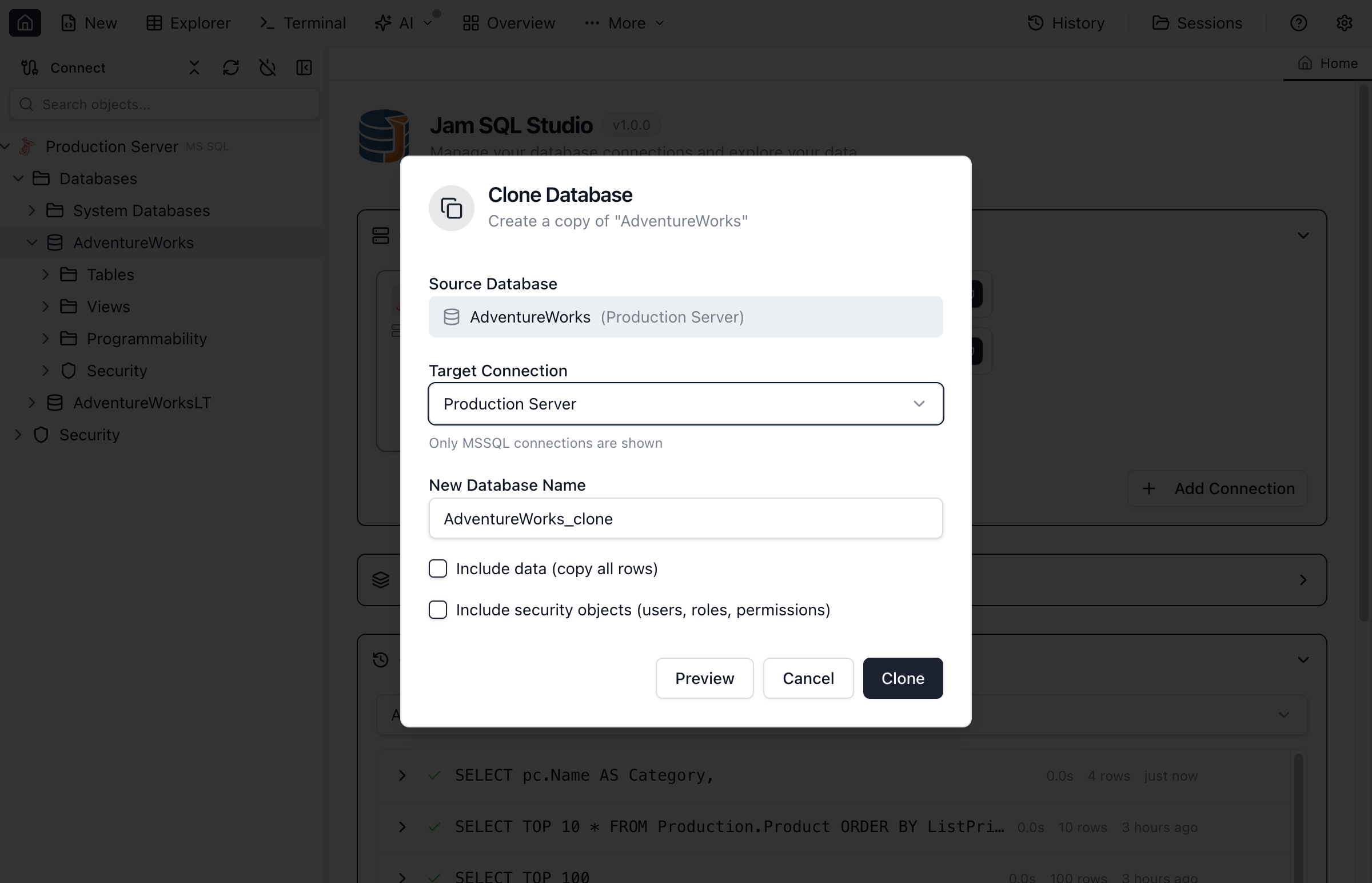
Database Clone Options
| Option | Description |
|---|---|
| Target Connection | Destination connection (only same-engine connections are shown) |
| New Database Name | Name for the cloned database (must be unique on the target) |
| Include Data | Copy all table data along with schema (PostgreSQL/MySQL). SQL Server cloning uses a BACPAC (schema+data) flow, so schema-only clone isn’t available. |
| Include Security Objects | Copy database users, roles, and permissions (SQL Server only) |
Requirements
- PostgreSQL requires
pg_dumpandpg_restoreinstalled on the same machine where Jam SQL Studio is running (your computer). If tools are missing, the clone error dialog includes a How to fix button with install steps. If you installed the tools but Jam SQL Studio still can’t find them, configure the bin directory in Settings → Advanced → PostgreSQL Tools. - MySQL/MariaDB requires
mysqldumpandmysqlinstalled on the same machine where Jam SQL Studio is running (your computer). If tools are missing, the clone error dialog includes a How to fix button with install steps. After installing, make sure the tools are on yourPATHand restart Jam SQL Studio. - SQLite: Clone Database is not shown for SQLite connections. To duplicate a SQLite database, copy the
.db/.sqlitefile.
What Gets Cloned
A database clone includes:
- Tables - All tables with columns and data types
- Views - All view definitions
- Stored Procedures - All procedure code
- Functions - Scalar and table-valued functions
- Indexes - Primary keys, unique constraints, non-clustered indexes
- Foreign Keys - All relationship constraints
- Triggers - Table and database triggers
- Data (optional) - All table rows
Clone Table
Duplicate a single table within the same database or to a different database.
Clone a Table
- Right-click the table in Object Explorer
- Select Clone Table
- Enter a name for the new table
- Select the target database (same or different)
- Choose what to include
- Optionally click Preview Script to read the exact DDL that will run
- Click Clone
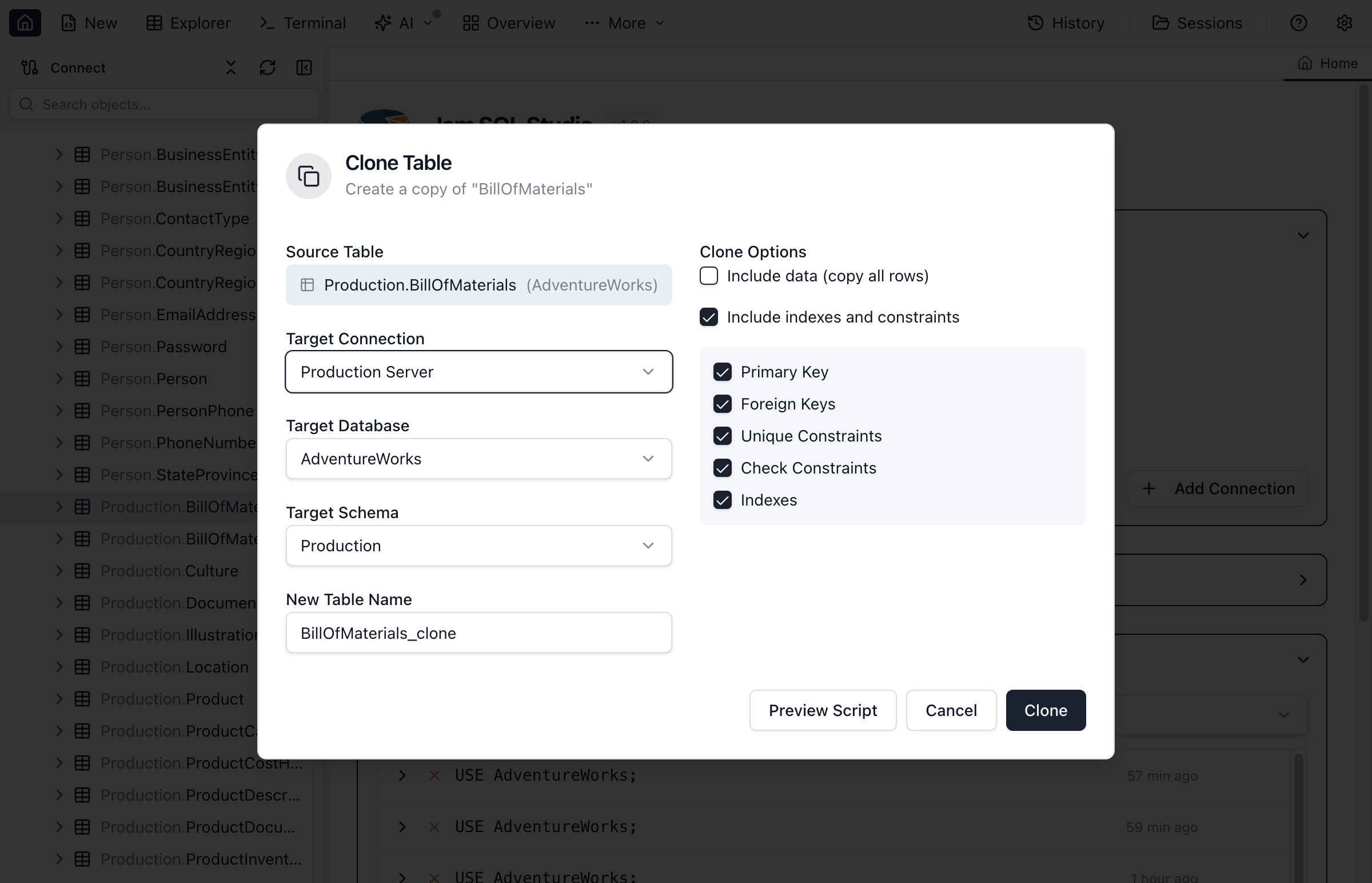
Table Clone Options
| Option | Description |
|---|---|
| Target Name | Name for the cloned table |
| Target Database | Same database or choose a different one |
| Target Schema | Schema for the new table (engines that have schemas) |
| Include data | Copy all rows (can be slow for large tables) |
| Include indexes and constraints | Master switch for the five sub-options below |
| Primary Key | Recreate the primary key. On MySQL this also carries the source table's AUTO_INCREMENT column — the engine only allows an auto-increment column that is part of a key, so unticking the primary key clones that column as a plain one. |
| Foreign Keys | Recreate FK constraints (requires referenced tables to exist) |
| Unique Constraints | Recreate unique constraints |
| Check Constraints | Recreate check constraints |
| Indexes | Recreate non-clustered indexes on the new table |
Preview Script
Preview Script shows the DDL the clone will run — the CREATE TABLE plus every constraint and index statement your chosen options produce, in the order they execute. It reflects the current options, so unticking a box changes what you see. Copy it if you'd rather run or adapt the statements yourself.
Clone Progress
Monitor the clone operation as it runs.
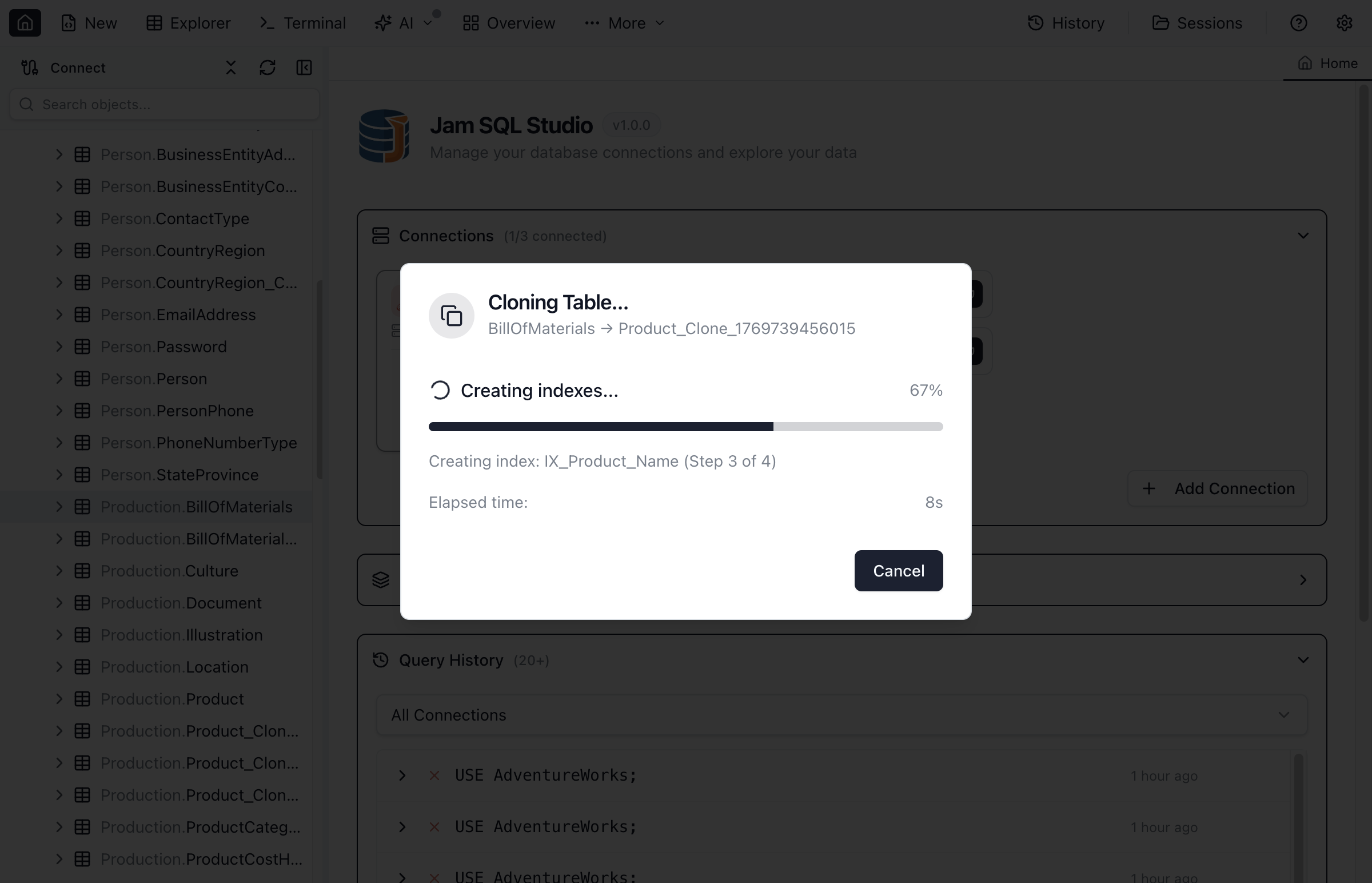
The progress dialog shows:
- Current step - Which object is being copied
- Overall progress - Percentage complete
- Object counts - Tables, views, procedures cloned
- Data progress - Rows copied (when including data)
- Explorer refresh - Object Explorer refreshes once the cloned table exists so it appears without a manual refresh — including after a failed data copy, since the table is still there
If the data copy fails
A table clone creates the table first and copies rows second, and the clone never wraps the DDL in a transaction. So if the data copy fails, the new table is already on the server — on every engine, including the ones with transactional DDL. The progress dialog names it and says whether it is empty or holds partially copied rows, and Object Explorer lists it, so you can drop it before retrying the clone.
The rows are copied in batches, and each batch runs in its own transaction. A batch that the target rejects — a check constraint, a NOT NULL column, a duplicate key — leaves none of its rows behind, so the table holds whole batches only, and the row count in the progress dialog is what actually landed.
On engines with a connection pool (SQL Server, PostgreSQL, MySQL, Oracle) each clone holds its own connection for the duration of a batch, so two clones running at the same time cannot mix their rows and other queries you run during a clone are never caught up in the clone's transaction. SQLite and SQL Server reached through SQL Tools Service have a single session per connection: clones there run one at a time, and while one is running, other statements on that connection are inside its transaction — so they are discarded if the clone's batch is rolled back.
Use Cases
Development Environment
Clone production schema to create development databases:
- Clone database with Schema Only option
- Populate with test data separately
- Developers get matching schema without production data
Testing Before Changes
Clone before making schema modifications:
- Clone the database including data
- Apply changes to the clone
- Test thoroughly before applying to original
Table Archiving
Clone tables before cleanup or migration:
- Clone table with data to create archive copy
- Rename with date suffix (e.g.,
Orders_Archive_2024) - Proceed with original table modifications
Quick Backup
Clone for a fast same-server backup:
- Clone database with full data
- Faster than backup/restore for testing scenarios
- Delete clone when no longer needed
Limitations
- Same engine only - Clone works between connections of the same engine (e.g., PostgreSQL → PostgreSQL). Cross-engine cloning is not supported.
- Server resources - Cloning large databases requires sufficient disk space and may impact server performance.
- Personal mode limits - In Personal mode, cloning with data is limited to databases ≤ 1 GB and tables ≤ 100,000 rows. Schema-only clone availability depends on the engine.
- Linked servers - Objects referencing linked servers may not work in the clone.
- Foreign keys to other databases - Cross-database FKs cannot be cloned.
- Sub-millisecond time precision - Cloning with data copies date/time values at millisecond precision. A column declared with more precision (for example MySQL
DATETIME(6), SQL Serverdatetime2(7), OracleTIMESTAMP(9)) keeps its declared type on the clone, but the copied values are rounded to milliseconds. - Stored time-zone offsets - Values in offset-carrying columns (SQL Server
datetimeoffset, OracleTIMESTAMP WITH TIME ZONE) are copied as the same instant in UTC. The instant is preserved; the original offset that was stored alongside it is not. - MySQL
TIMESTAMPacross two connections - MySQL convertsTIMESTAMPusing each session's time zone. Cloning aTIMESTAMPcolumn into a different connection whose session time zone differs from the source's shifts those values by the difference between the two zones. Cloning within one connection is unaffected.
AUTO_INCREMENT on a cloned MySQL table
MySQL only accepts an AUTO_INCREMENT column when it is the first column of a key, and a table clone can only declare the primary key inline — unique constraints and indexes are added afterwards. So AUTO_INCREMENT is carried over when the column leads the cloned primary key, and the column is otherwise cloned as a plain one of the same type. That covers two cases:
- You cleared Include indexes and constraints, or its Primary key option, so the clone has no primary key to key the column with.
- The source keyed the column with a unique index rather than the primary key, or with a composite primary key that does not start with it.
The clone itself is valid and holds all the copied rows; re-add AUTO_INCREMENT with an ALTER TABLE … MODIFY if you need the clone to keep generating values.
An INVISIBLE column is cloned invisible, so the clone's SELECT * hides the same columns the source does. The row copy names every column explicitly, so the hidden column is still filled.
Frequently asked questions
How do I clone a database in Jam SQL Studio?
Right-click the database in Object Explorer and select 'Clone Database'. Enter a name for the new database, choose whether to include data, and click Clone. The new database is created with the same schema (and optionally data) as the original.
Can I clone just the schema without data?
Yes. For PostgreSQL and MySQL, uncheck 'Include data' to clone schema only. SQL Server cloning currently uses a BACPAC-based flow (schema + data).
How do I clone a single table?
Right-click the table in Object Explorer and select 'Clone Table'. Enter a new table name, choose whether to include data, indexes, and constraints, then click Clone.
Does cloning include foreign keys and indexes?
Yes, you can choose to include indexes, foreign keys, and other constraints when cloning. For database clones, all relationships are preserved by default. For table clones, you can select which constraints to include.
Can I clone to a different server?
Yes. You can clone to another connection of the same engine (e.g., SQL Server → SQL Server). Cross-engine cloning is not supported.
Ready to Clone Your Database?
Download Jam SQL Studio and create database copies for testing.