 Jam SQL Studio
 One free SQL IDE — from SQL Server to SQLite.
The cross-platform Azure Data Studio replacement — PostgreSQL, MySQL, and Oracle included, with built-in MCP and AI-agent integration. Free for personal use on Mac, Windows, and Linux.
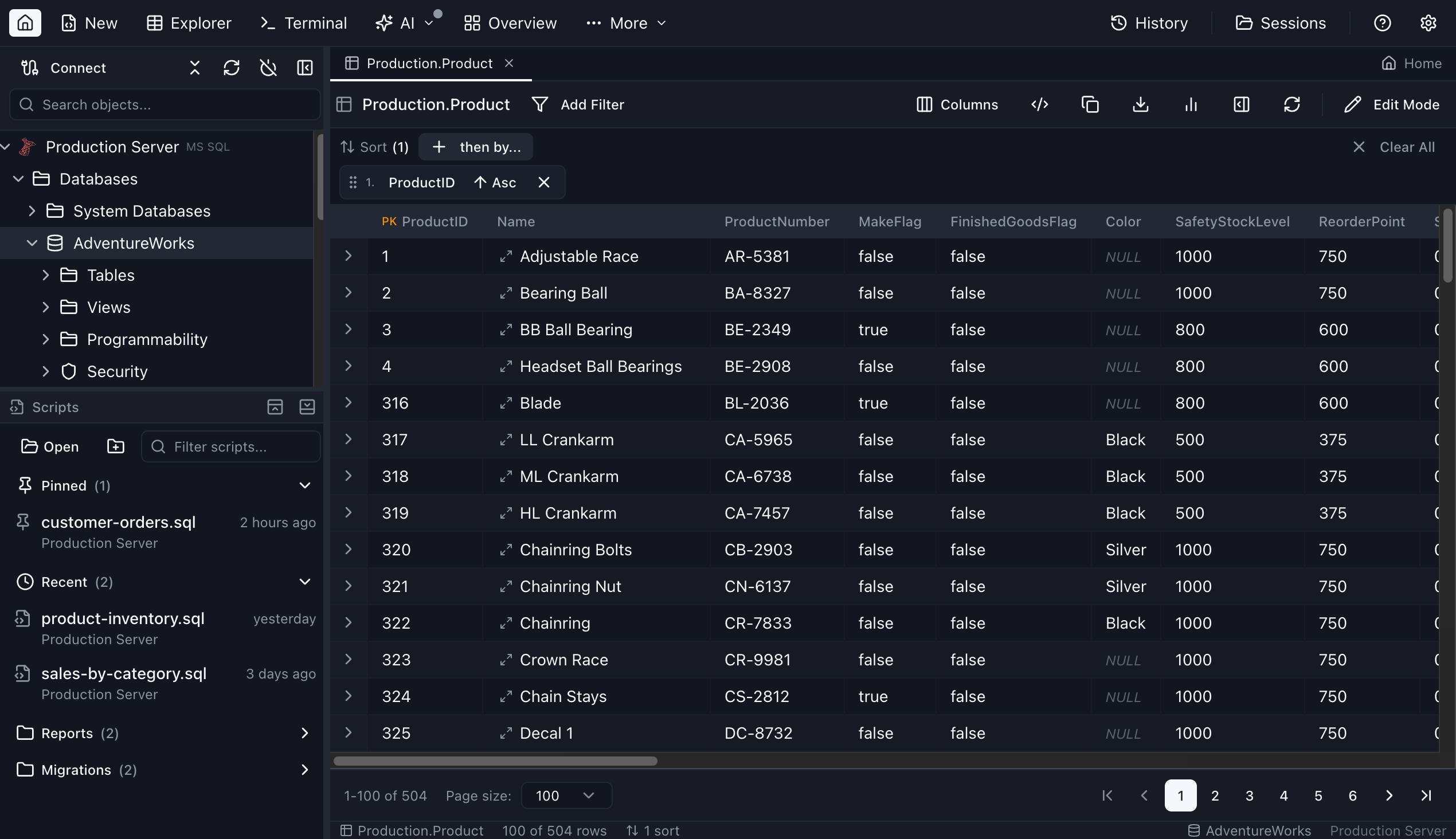
Table Explorer in Jam SQL Studio — see the full tour
“A powerful and intuitive Mac-native SQL tool that makes working with complex, multi-schema databases seamless. The team is highly responsive and committed to continuously enhancing the user experience.”
No account required • Open MCP server
SQL IDE Comparison: How Jam SQL Studio Compares
Choosing the right SQL tool? Here's how Jam SQL Studio stacks up against other popular options. On a Mac? See SSMS for Mac — why it doesn't run there and what to use instead.
| Feature | Jam SQL Studio | Azure Data Studio | VS Code + MSSQL | SSMS | DBeaver | DataGrip |
|---|---|---|---|---|---|---|
| AI-Native (MCP + Workspace) | ✓ | ✗ | Limited | ✗ | ✗ | Limited |
| Claude Code CLI Integrated | ✓ | ✗ | ✗ | ✗ | ✗ | ✗ |
| SQL Notebooks (.ipynb) | ✓ | ✓ | Extension | ✗ | ✗ | ✗ |
| Cross-platform (Mac/Win/Linux) | ✓ | ✓ | ✓ | ✗ | ✓ | ✓ |
| Execution Plan Visualization | ✓ | ✓ | Basic | ✓ | ✓ | ✓ |
| Schema Compare | ✓ | ✓ | ✗ | ✓ | ✓ | ✓ |
| Data Compare | ✓ | ✗ | ✗ | Via tools | ✓ | ✓ |
| Built-in Charting | ✓ | ✓ | ✗ | ✗ | Pro only | ✗ |
| Free Tier Available | ✓ | ✓ | ✓ | ✓ | ✓ | ✓ |
| SQL Server Support | ✓ | ✓ | ✓ | ✓ | ✓ | ✓ |
| PostgreSQL Support | ✓ | ✓ | Extension | ✗ | ✓ | ✓ |
| MySQL / MariaDB Support | ✓ | ✗ | ✗ | ✗ | ✓ | ✓ |
| Oracle Support | ✓ | ✗ | ✗ | ✗ | ✓ | ✓ |
| DBA Tools (Sessions, Performance) | ✓ 4 engines | ✗ | ✗ | ✓ | Plugin | Limited |
| Modern UI | ✓ | ✓ | ✓ | Classic | ✓ | ✓ |
What developers are saying
Real feedback from teams who have switched to Jam SQL Studio.
“As an abandoned user of Azure Data Studio, I was left looking for a good replacement… JamSQL is my new go-to tool for SQL.”
“I recently switched to Linux from Windows. As a full stack dev my only missing piece was a solid SQL client. You guys filled it.”
“JamSQL has been a game-changer on my Mac. It replaced several SQL tools for me, and the support has been outstanding.”
How to Migrate from Azure Data Studio
Moving from Azure Data Studio to Jam SQL Studio takes just a few minutes. Azure Data Studio was retired on February 28, 2026 — here's everything you need to know to make the switch.
Download Jam SQL Studio
Download Jam SQL Studio for your operating system (macOS, Windows, or Linux) and install it. No account required — the app is ready to use immediately.
Import Your Database Connections
Use Import… and Jam SQL Studio reads your Azure Data Studio settings.json directly, bringing over your SQL Server, PostgreSQL, and Kusto connections in one click, with duplicates pre-unchecked so you can review before importing.
Transfer Your SQL Scripts
Copy your .sql query files from your Azure Data Studio workspace to any folder on your computer. Open them directly in Jam SQL Studio — they work exactly the same way, with IntelliSense support.
Explore New Features
Discover capabilities beyond Azure Data Studio: AI workspace sync for coding agents, built-in charting, data compare, and more. Use familiar keyboard shortcuts from SSMS and Azure Data Studio.
What You Can Bring to Jam SQL Studio
Free for personal use — no credit card, no account required.
Everything You Need
Six pillars covering every stage of SQL development — from writing queries to operating production databases.
AI-Native
Built for AI agents. Local MCP server, AI Workspace, and an in-app Claude Code chat — all opt-in and localhost-only.
- Local MCP server with tools and resources for AI agents
- AI Workspace with auto-generated
CLAUDE.md+ schema export - In-app Claude Code chat sidebar
jam-sqlCLI for terminal access- Bearer token auth, audit logs, no queries run by default
Universal Database Support
One IDE for all six engines your team runs — with consistent IntelliSense, schema browsing, and editor UX across the lot.
- SQL Server, Azure SQL, Postgres, MySQL, MariaDB
- Oracle 12.2+ / 19c / 21c / 23ai (Thin mode — no client)
- SQLite for local files and demos
- Microsoft Entra ID auth (device code, MFA-friendly)
- Smart, context-aware IntelliSense everywhere
Analysis & Comparison
Understand your data and your schema. Compare environments, profile queries, and ship visualizations without leaving the editor.
- Visual execution plans (tree + graph, side-by-side compare)
- Schema compare with ALTER/CREATE/DROP sync scripts
- Data compare with INSERT/UPDATE/DELETE diffs
- Database Blueprint — schema as a Git-versioned folder of
.sqlfiles - Built-in charting: bar, line, pie, area, scatter
- SQL Notebooks (Jupyter-compatible
.ipynb) - Dependency viewer + visual schema overview
DBA & Operations
Production-grade tools for the people who keep databases running — across four engines, on every OS.
- Session Browser — monitor and kill active sessions
- Performance Dashboard — counters, top SQL, wait stats
- Tablespace Manager (Oracle) + Filegroup Manager (SQL Server)
- Backup & Restore (
.bak,.bacpac,pg_dump) - One-click clone of databases and tables
Productive Editor
Every shortcut, every drill-down, every workflow you expect from a premium IDE — without the licensing fees.
- Command Palette (Cmd+Shift+P) for everything
- Table Explorer with inline editing and FK lookups
- Script generation (CREATE/ALTER/DROP/SELECT/INSERT)
- Query history, snippets, and script management
- Per-tab transaction control + integrated terminal
- Data export to CSV, JSON, XLSX
- Data Import — load CSV, Excel & JSON into a new or existing table
Cross-Platform & Free
Desktop app for Mac, Windows, and Linux. Free for personal use forever — no account, no surprise paywalls.
- macOS (Apple Silicon + Intel), Windows, Linux (deb/rpm)
- Modern UI with full dark mode and SSMS/ADS shortcuts
- Session persistence — resume exactly where you left off
- Free Personal tier, no account required
- 14-day Pro trial once you sign in — no credit card
Database Support
Connect to your favorite databases with IntelliSense and query execution support.
AI-Native Database Tooling
Designed for AI coding assistants — with a full MCP server exposing tools and resources, and a secure local-first architecture.
AI Workspace Inside the App
Use the integrated terminal with file-backed tabs. AI edits .sql files, your editor updates in real-time.
- Bidirectional file sync
- Auto-generated context
(CLAUDE.md,AGENTS.md) - Schema export to
.schema/ - Results history to
.history/ - Knowledge pack in
.knowledge/
MCP Server Outside the App
Jam SQL Studio runs a local MCP server so external AI tools can safely interact with your databases, query editors, and SQL notebooks.
- MCP tools & resources
- Control query editor & notebook tabs
- Localhost-only (127.0.0.1)
- Bearer token authentication
- No queries by default; read-only or approval-gated writes
AI Chat Claude Code CLI
Chat with Claude directly inside Jam SQL Studio. Uses your local Claude Code CLI installation — your subscription, your settings, your context.
- Claude Code CLI integrated in-app
- Re-uses your local subscription
- Full database context via @-mentions
- Schema-aware conversations
- No extra API keys needed
See What AI Agents See
When you open an AI Workspace, Jam SQL Studio auto-generates context files that give AI agents everything they need to understand your database.
$ cat CLAUDE.md

# Jam SQL Studio - AI Context

## Active Connection
- Name: Production DB
- Engine: PostgreSQL 15.2
- Database: ecommerce_prod

## Database Schema
Tables: 24 | Views: 8 | Functions: 12

users (id, email, name, created_at, subscription_tier)
orders (id, user_id → users.id, total, status, created_at)
products (id, name, price, category_id → categories.id)
order_items (order_id → orders.id, product_id → products.id, qty)

## MCP Tools Available
✓ query_execute - Run read-only SQL (SELECT, EXPLAIN)
✓ connections_list - List saved connections
✓ ui_open_tab - Open query/table tabs
✓ ui_set_editor_text - Write SQL to editor

## Quick Examples
# Get top customers by order count
SELECT u.name, COUNT(o.id) as order_count
FROM users u JOIN orders o ON u.id = o.user_id
GROUP BY u.id ORDER BY order_count DESC LIMIT 10;

# Check index usage
EXPLAIN ANALYZE SELECT * FROM orders WHERE status = 'pending';

## Files in Workspace
.schema/users.sql       # CREATE TABLE DDL
.schema/orders.sql      # CREATE TABLE DDL
.history/2024-01-19.md  # Today's query results
queries/analysis.sql    # Your active query tab
The CLAUDE.md file is auto-generated and stays in sync with your active connection and schema. AI agents read this file to understand your database structure before writing queries.
AI features are disabled by default. Query results history, write operations, and detailed context sharing must be explicitly enabled in Settings → AI Integrations. You control exactly what AI agents can see and do.
MCP Server Capabilities
A complete toolset for AI-driven database workflows
Connection Tools
connections_list— List saved connections (no secrets)query_execute— Execute SQL queries — read-only, or writes/DDL after per-statement approval
UI Control Tools
ui_open_tab— Open query editor or SQL notebook tabsui_focus_tab— Switch to a specific tabui_set_editor_text— Write SQL to query editor or notebook cellsui_close_tab— Close tabsui_lock_tab/ui_unlock_tab— Prevent conflictsui_check_abort— Check for user abort requests
Table Viewer Tools
table_set_filter— Apply column filterstable_set_sort— Sort by columntable_set_pagination— Navigate pagestable_get_snapshot— Get current table state
Context Resources
workspace_snapshot— Active workspace stateconnections_snapshot— Connection statustabs_snapshot— Open tabs and editorseditor_snapshot— Active editor contentresults_snapshot— Query results previewselection_snapshot— Selected explorer item
Knowledge Resources
app_manifest— App version & featuresapp_capabilities— Supported workflowsapp_user_guide— How-to documentation
Works With Your Favorite AI Tools
Secure by Default
MCP server binds to 127.0.0.1 only. Bearer token required. No queries run by default. Configurable policy levels (block, read-only, confirm), with confirm mode requiring your in-app approval before any write or DDL statement runs. Full audit logging of every tool call.
Command-Line Access with jam-sql CLI
Use Jam SQL Studio from any terminal. The Go-based CLI wraps the MCP server for quick database access.
jam-sql doctor — Check installation & MCP statusjam-sql connections — List saved connectionsjam-sql query -c prod "SELECT * FROM users LIMIT 5"jam-sql tools / jam-sql resources — Explore MCP$ jam-sql doctor ✓ Jam SQL Studio installed ✓ MCP server running on :14507 ✓ Authentication configured ✓ Read-only mode enabled $ jam-sql connections ID NAME ENGINE SERVER conn_1 Production PostgreSQL prod-db.company.com conn_2 Staging MSSQL staging.database.windows.net
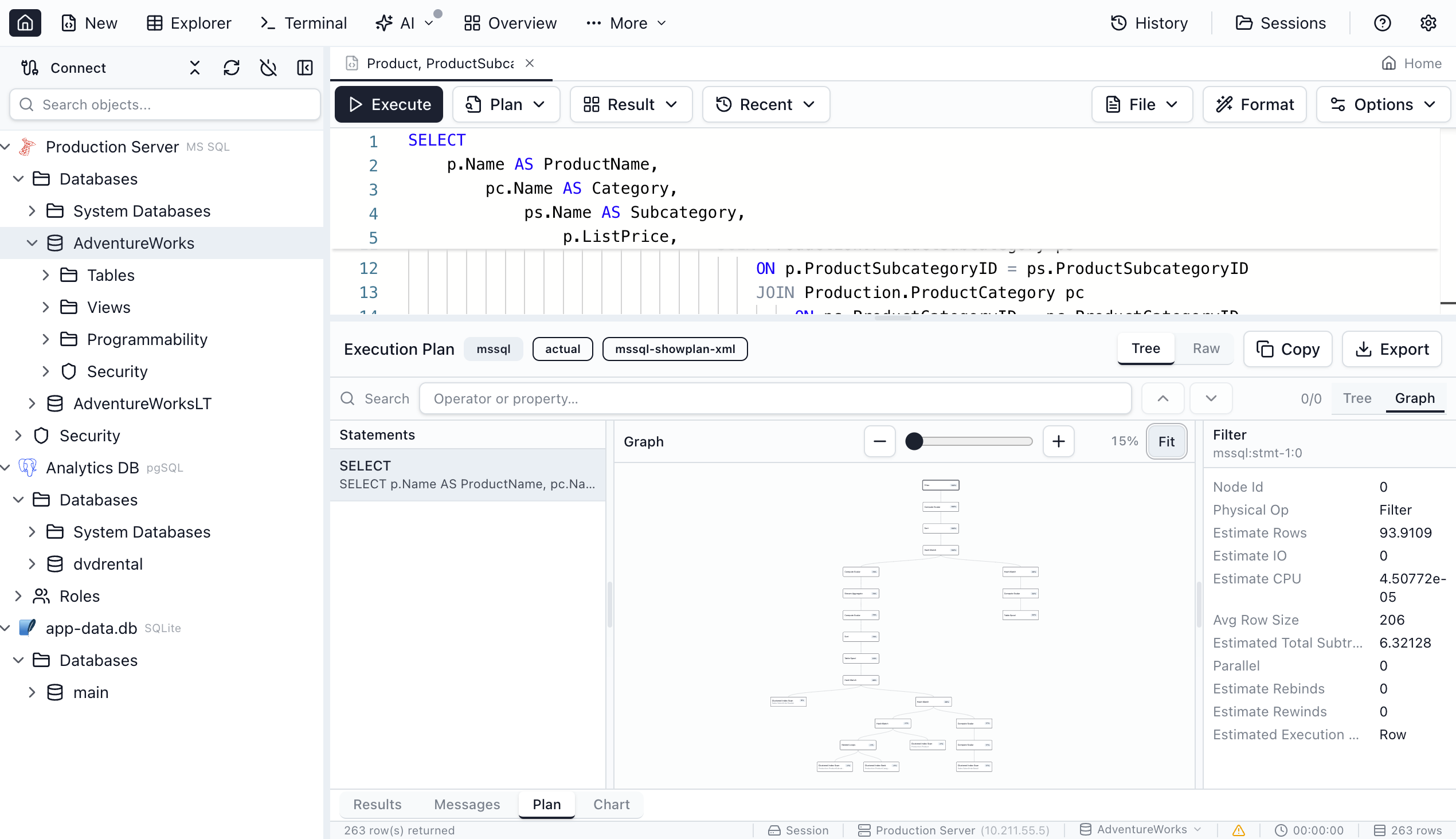
Deep Query Analysis
Understand exactly how your queries execute with detailed execution plan visualization.
- Tree and graph view modes
- Operator cost breakdown
- Plan comparison side-by-side
- Import/export for team sharing
- Search and highlight expensive operations
Powerful Data Exploration
Browse, filter, and edit your data with a spreadsheet-like interface designed for databases.
- Advanced filtering and sorting
- Inline cell editing with validation
- Foreign key lookup popovers
- Row details panel with JSON preview
- Multi-format data export
New in Recent Releases
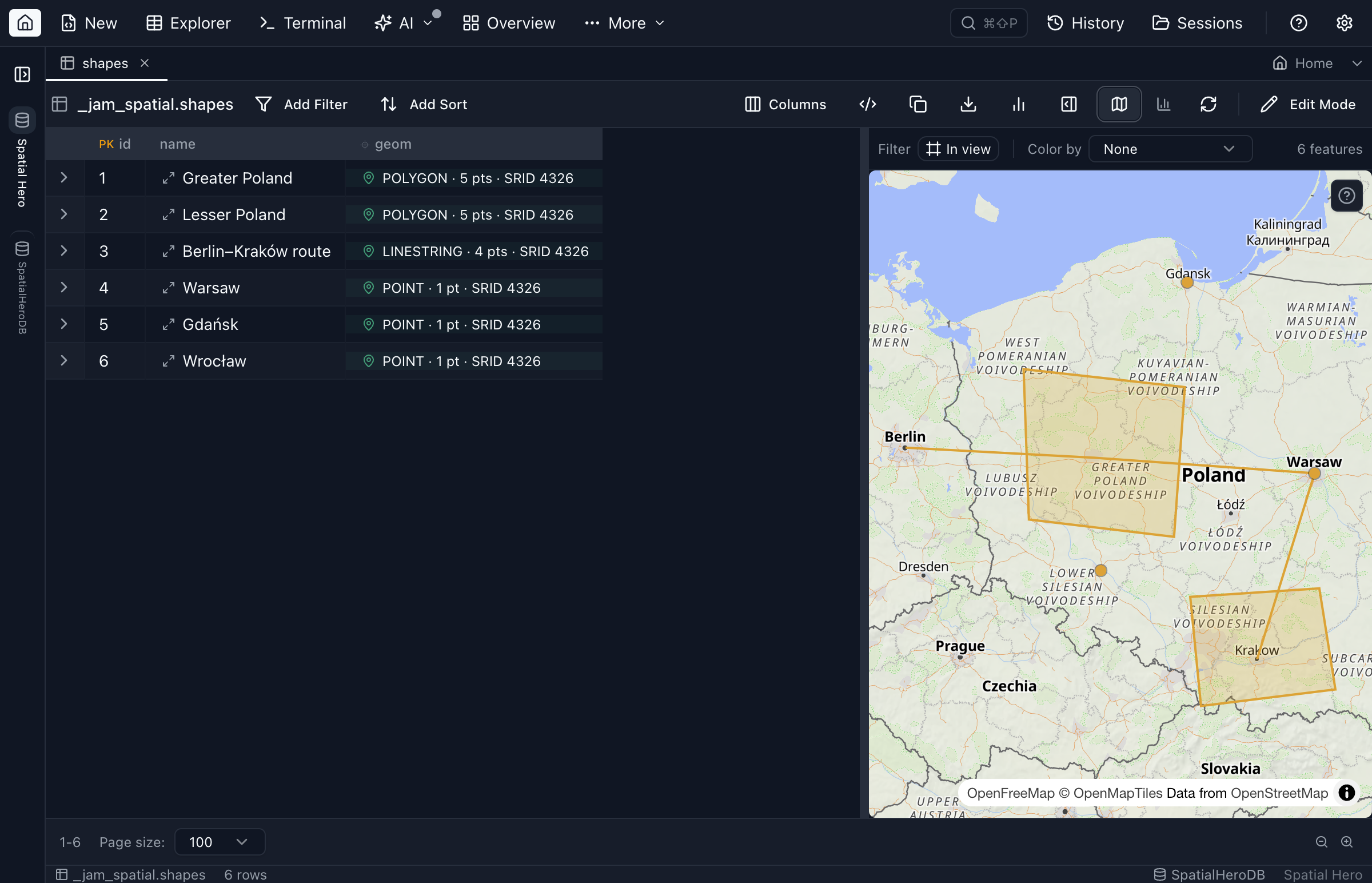
Azure Storage connections, spatial data on maps, a full Azure Data Explorer (Kusto) engine, and one-click Azure resource discovery — the biggest additions from recent releases.
Simple, Transparent Pricing
Personal is free without an account. Sign in inside the app to start a 14-day Pro trial — no card required.
Personal
- Unlimited SQL Server connections
- Unlimited PostgreSQL connections
- Unlimited MySQL & Oracle connections
- IntelliSense & auto-complete
- Charts, execution plans & notebooks
- Table explorer & data editing
- Schema compare up to 200 objects, data compare up to 10,000 rows
- Import and export up to 100,000 rows
- Commercial use: Pro only
- AI Workspace sync: Pro only
- Bulk operations above those caps: Pro only
Pro Monthly
- Everything in Personal
- Commercial-use license
- No size limits (compare, blueprint, import, export, clone, backup)
- AI Workspace sync & auto-context
- Multiple sessions & 100 closed-tab history (vs 5)
- Impact analysis & diagram export
- Priority email support
Download the app, sign in, and start the 14-day trial. No card required.
Pro Yearly
- Everything in Personal
- Commercial-use license
- No size limits (compare, blueprint, import, export, clone, backup)
- AI Workspace sync & auto-context
- Multiple sessions & 100 closed-tab history (vs 5)
- Impact analysis & diagram export
- Priority email support
Download the app, sign in, and start the 14-day trial. No card required.
What you get for paying
- A license for paid work. Personal is licensed for personal, non-commercial use only. Pro is the license to use Jam SQL Studio in a job, for a client, or inside a company.
- No size caps on bulk operations. Pro lifts every Personal cap: full data compare past 10,000 rows per table, schema compare and Database Blueprint past 200 objects, export, import and table clone past 100,000 rows, and backup or database clone past 1 GB.
- Saved sessions and AI context. Multiple named sessions you can switch between and resume, 100 closed tabs of history instead of 5, and AI Workspace sync — schema export, file sync and context files for your AI agent.
Personal is free forever without an account. Sign in inside the app, then start the 14-day Pro trial yourself — no card required. One trial per account, plus a one-time 14-day extension if you answer the app’s feedback question when it expires. Paid plans are bought and cancelled inside the app, under Settings → Account. Download now to get started.
Frequently Asked Questions
Everything you need to know about Jam SQL Studio and migrating from Azure Data Studio.
What is happening to Azure Data Studio?
Microsoft retired Azure Data Studio on February 28, 2026, as announced on February 6, 2025. Microsoft recommends users migrate to the VS Code MSSQL extension or SQL Server Management Studio (SSMS).
However, these alternatives lack many features that made Azure Data Studio popular, such as built-in charting, cross-platform support (for SSMS), and a modern UI. Jam SQL Studio is designed to be a complete replacement with additional features like AI agent support.
Is Jam SQL Studio free?
Yes! Jam SQL Studio has a free Personal tier for personal use — unlimited connections, IntelliSense, the full query editor, execution plans, charts, and schema & data compare — forever free with no account required.
Pro ($9.99/mo or $99/yr) adds a commercial-use license, removes the size limits on bulk operations (compare, blueprint, import, export, clone, backup), and unlocks AI Workspace sync, multiple sessions, extended closed-tab history (100 vs 5), and priority email support. Personal needs no account at all; to try Pro you sign in from inside the app and then start the 14-day trial yourself, no card required. Each account gets one trial, plus a one-time 14-day extension if you answer the app’s feedback question when it expires.
Does Jam SQL Studio work on Mac, Windows, and Linux?
Yes! Jam SQL Studio is a cross-platform desktop application available for macOS, Windows, and Linux. Unlike SSMS which only runs on Windows, you can use Jam SQL Studio on any major operating system with the same features and experience.
We also offer a browser-based demo that runs SQLite directly in your browser — great for trying out the interface before downloading.
What databases does Jam SQL Studio support?
Jam SQL Studio currently supports:
- Microsoft SQL Server — Full support including Azure SQL Database and Managed Instance
- PostgreSQL — Including Azure Database for PostgreSQL and Amazon RDS
- MySQL — MySQL 5.7+ and 8.x, including Amazon RDS and Azure Database for MySQL
- MariaDB — MariaDB 10.x and 11.x
- Oracle Database — Oracle 12.2+, 19c, 21c, and 23ai with Thin mode (no Oracle Client required). Full support for PL/SQL, packages, sequences, synonyms, DB links, and materialized views
- SQLite — Local file-based databases
- Azure Data Explorer (Kusto) — KQL against clusters, Application Insights and Log Analytics, with tables opened read-only
All database engines include IntelliSense, query execution, table explorer, and data export capabilities. Azure Storage connections (blob containers, Data Lake Storage Gen2, file shares, queues and tables, and the Azurite emulator) have no query language: containers and shares open in a storage browser, and Table entities open in the Table Explorer grid.
How does Jam SQL Studio compare to SSMS?
SQL Server Management Studio (SSMS) is a powerful tool but has limitations. Jam SQL Studio offers several advantages:
- Cross-platform SQL client — Works on Mac and Linux, not just Windows
- Modern UI — Clean, responsive interface with dark mode
- AI Agent Support — First-class integration with AI coding assistants
- Built-in Charting — Create visualizations directly from query results
- PostgreSQL Support — Connect to PostgreSQL alongside SQL Server
Jam SQL Studio includes execution plans, schema compare, and data compare features that SSMS users rely on.
Does Jam SQL Studio support AI coding assistants?
Yes. Jam SQL Studio supports AI coding assistants in three complementary ways:
- Claude Code-powered AI Chat Sidebar — A built-in chat panel in the Query Editor and SQL Notebooks powered by your locally installed Claude Code CLI. No extra subscription — reuses your existing Claude Code setup. Ask questions, get SQL suggestions, and let Claude interact with your database.
- AI Workspace (inside the app) — Query tabs sync to
.sqlfiles, plus auto-generated context files (schema, history, results). Iterate with AI agents in the integrated terminal. - MCP Tooling (outside the app) — Jam SQL Studio runs a local MCP server (Model Context Protocol) so external AI apps can safely list connections (no passwords) and execute policy-controlled queries.
Works with Claude Code, Claude Desktop, OpenCode, Codex CLI, GitHub Copilot, and other AI agents.
Does Jam SQL Studio support MCP (Model Context Protocol)?
Yes. Jam SQL Studio can run a local MCP server (Model Context Protocol) so AI agents can list saved connections (no passwords) and query your database. No queries run by default; you can allow read-only queries (SELECT/EXPLAIN), or turn on Confirm mode, where each write or DDL statement runs only after your in-app approval.
The MCP endpoint is localhost-only and protected with a bearer token, so it stays on your machine.
Can I import my Azure Data Studio settings?
Yes — saved connections import automatically:
- Connections — Import… reads your Azure Data Studio
settings.jsonand brings over SQL Server, PostgreSQL, and Kusto connections, with duplicates pre-unchecked - Notebooks —
.ipynbfiles open directly in SQL Notebooks - Queries — Copy your .sql files to any folder and open them
- Keyboard Shortcuts — Jam SQL Studio uses familiar shortcuts from SSMS and Azure Data Studio
See the Azure Data Studio migration guide for the full walkthrough.
How do I get support?
For support, contact us at [email protected].
- Personal Tier — Email support for all users
- Pro Subscribers — Priority email support
- Enterprise — Dedicated account management and custom SLAs available
What happened to Polyglot Notebooks?
Microsoft deprecated Polyglot Notebooks on March 27, 2026, following the Azure Data Studio retirement. Jam SQL Studio supports opening Polyglot .ipynb files directly — SQL and JavaScript cells are preserved, while C# and F# cells are imported as Markdown. Jam SQL Notebooks also add multi-engine support (MSSQL, PostgreSQL, MySQL, SQLite), GUI connection management, and AI/MCP integration.
Does Jam SQL Studio have a Command Palette?
Yes. Press Cmd+Shift+P on macOS or Ctrl+Shift+P on Windows/Linux to open the Command Palette. It gives you fuzzy-searchable access to every workspace command, database object, saved connection, and setting. You can search for tables or views by name and drill down into contextual actions like Select Top, Script CREATE, Design Table, or View Dependencies — all without leaving the keyboard. Each command shows its keyboard shortcut badge, so the palette also works as a shortcut reference.
Does Jam SQL Studio have DBA tools?
Yes. Jam SQL Studio includes a Session Browser for monitoring and killing active sessions, a Performance Dashboard with real-time counters, top SQL, and wait statistics, a Tablespace Manager for Oracle storage, and a Filegroup Manager for SQL Server storage. Coverage is per tool: the Session Browser and Performance Dashboard work on Oracle, SQL Server, PostgreSQL and MySQL; the Tablespace Manager and Data Pump are Oracle-only; the Filegroup Manager is SQL Server-only. All of them run on Mac, Windows, and Linux.
Download Jam SQL Studio
Free for personal use, on every platform — no account needed to install or connect. Sign in inside the app to start a 14-day Pro trial; no credit card required.
Comparing SQL Tools?
See how Jam SQL Studio compares to other popular database IDEs.
vs Azure Data Studio
ADS was retired on Feb 28, 2026. Migrate to Jam SQL Studio today.
Migration Guide →vs DBeaver
A modern alternative with AI agent support, built on Electron instead of the JVM.
See Comparison →vs SSMS
Cross-platform SQL Server IDE for Mac, Windows, and Linux users.
See Comparison →vs DataGrip
Free alternative with AI support and professional-grade features.
Compare →vs HeidiSQL
Cross-platform alternative for HeidiSQL users who need Mac or Linux support.
Compare →vs Navicat
Free alternative with modern UI and AI-powered development.
Compare →vs TablePlus
Execution plans, schema compare, and AI support beyond basic data browsing.
Compare →vs Beekeeper Studio
Pro-grade SQL tools with AI agent support for developers who need more.
Compare →vs Toad for Oracle
Free cross-platform Oracle client for macOS, Windows, and Linux.
Compare →vs Oracle SQL Developer
Modern Oracle alternative with AI, schema compare, and a native Apple Silicon build.
Compare →Best MySQL Client & GUI
See how Jam SQL Studio stacks up against MySQL Workbench, Sequel Ace, TablePlus, DBeaver and DataGrip for MySQL and MariaDB.
See Ranking →Best Oracle Client & GUI
Best Oracle client comparison: see how Jam SQL Studio stacks up against SQL Developer, Toad, and DBeaver for Oracle 12.2+ through 23ai.
See Ranking →Best PostgreSQL GUI
Best PostgreSQL GUI comparison: Jam SQL Studio vs pgAdmin, DBeaver, DataGrip, and TablePlus — visual EXPLAIN ANALYZE, schema compare, and JSONB tooling.
See Ranking →