 Jam SQL Studio
 Published: 2026-05-20 • Updated: 2026-07-20
Filter JSON Columns Across 5 SQL Engines: A Hands-On Tour
PostgreSQL has jsonb with ->> and #>>. SQL Server has JSON_VALUE, OPENJSON, and (from 2025) a native json type. MySQL has JSON_EXTRACT and ->>. Oracle has JSON_VALUE / JSON_TABLE. SQLite has json_extract. Every one of them is good. All five are different — and your SQL client probably treats JSON cells as long strings anyway. Jam SQL Studio gives JSON columns a JSONPath-aware filter operator, an inline shape-peek, a collapsible tree cell viewer, and the ability to declare long-text columns as JSON or attach loose foreign keys and enums to JSON properties — uniformly, across all five engines.
TL;DR — In the Table Explorer filter chip, pick the json operator on a JSON column. A second dropdown reveals 28 JSONPath-aware sub-operators (has property, property =, any > …, property_lookup, property_enum, is valid, …). Type or pick a path (the eye-icon opens a popover listing every observed path with its prevalence). The client emits engine-correct SQL — #>> on PG, JSON_VALUE on SQL Server/Oracle, JSON_EXTRACT on MySQL, json_extract on SQLite. JSON cells render as collapsible trees; declared-on-text columns are automatically wrapped with the engine's validity guard so non-JSON rows are skipped, not errored. See the JSON Columns documentation for the full reference.
The 5-engine problem
JSON-in-SQL is a quietly fragmented space. The same filter — "rows whose data.address.city equals 'Boston'" — looks completely different in each engine:
| Engine | The SQL you have to type |
|---|---|
PostgreSQL (jsonb) | data #>> '{address,city}' = 'Boston' |
| MySQL | JSON_UNQUOTE(JSON_EXTRACT(data, '$.address.city')) = 'Boston' |
| SQL Server | JSON_VALUE(data, '$.address.city') = 'Boston' |
| Oracle | JSON_VALUE(data, '$.address.city') = 'Boston' |
| SQLite | json_extract(data, '$.address.city') = 'Boston' |
For a one-off query, fine — the docs are a tab away. But the workflow most SQL users actually want is exploratory: "show me the rows where this property is X… now where this other property is Y… now where this array contains Z." Re-typing the engine-specific JSON syntax every filter is friction. Most clients give up and treat JSON cells as opaque strings, leaving you to scroll through {}-soup or write raw SELECTs. Jam SQL Studio's answer: a single json filter operator that lowers to engine-correct SQL behind the scenes.
The two-level operator
The Table Explorer's filter chip has a familiar shape: [column] [operator] [value]. For JSON columns, picking the json operator reveals a second dropdown — a sub-operator menu of 28 JSONPath-aware predicates grouped into four families:
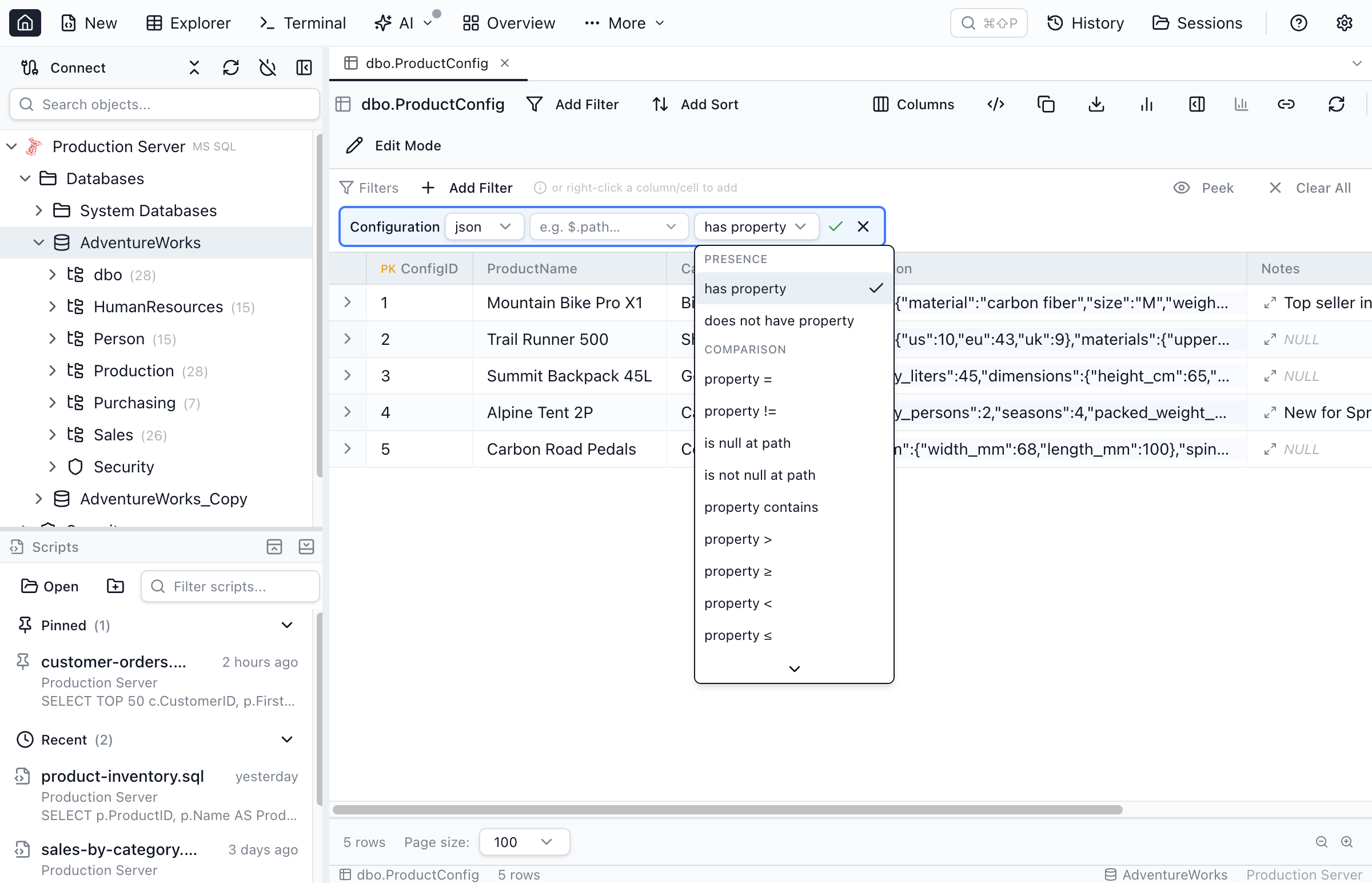
json, pick a sub-operator, type or peek a path, type a value — the SQL is engine-correct per row.- Property predicates —
has property,property =/!=,property contains,property >/≥/</≤,is null,is not null. The path is a JSONPath:$.address.cityor the shorthandaddress.city. - Array aggregates — given a wildcard path like
$.items[*].qty,any > 100matches rows where at least one element exceeds 100;all ≥ 0matches rows whose elements all satisfy the comparison. Empty arrays don't matchall_*, by design. - Document predicates —
is empty(top-level{}or[]),is valid JSON,is not valid JSON. - Loose FK and enum entry points —
property_lookup,any_lookup,all_lookupturn a JSON property into a foreign key against a related table.property_enum,any_enum,all_enumturn it into a values dropdown. More on these below.
Path discovery — the peek popover
The hardest part of filtering JSON isn't writing the path syntax — it's knowing what paths exist. Real-world JSON documents are organic: half the rows have $.shipping.country, the other half stash it under $.address.country, and a few legacy ones spell it $.shippingAddress.country. You can't filter what you can't see.
The eye-icon next to the path input opens a path-discovery popover. It renders a tree of every property path Jam SQL Studio has observed for that column, sorted by prevalence:
![The JSON path-discovery peek popover open from a filter chip, showing a tree of observed property paths such as accessories[*], colors[*] and dimensions with per-path prevalence percentages and a Scan 1,000 from server button.](/images/docs/json-peek-popover.png)
The data behind the popover comes from two passive sources: a cached structure scan kept in MetaInfo (refreshed within the last 7 days) and any JSON cells parsed during the current grid session. When neither covers what you need, Scan 1,000 from server runs a fresh SELECT against the table with the engine-appropriate validity guard. Crucially the cache only stores skeleton path / type / prevalence — never sample values — so exporting your MetaInfo doesn't ship data values out the door.
Declaring a text column as JSON
Plenty of real schemas store JSON as text, varchar, nvarchar(MAX), clob, or a TEXT-affinity column in SQLite — because the schema predates the engine's JSON type, or because a future migration is still on the backlog. Jam SQL Studio treats those columns as JSON-eligible: pick the json operator and the chip offers to declare the column as JSON. Confirming writes a row to the per-database MetaInfo file. From then on, the column behaves like a JSON column everywhere — header glyphs, expanded-cell tree viewer, peek popover, filter operators.
The interesting part is what happens at SQL-emit time. Declared-on-text predicates are automatically wrapped with the engine's validity guard so non-JSON rows are skipped, not errored:
| Engine | Validity guard / safety |
|---|---|
| SQL Server | ISJSON(col) = 1 AND <predicate> |
| Oracle | col IS JSON AND <predicate> |
| SQLite | json_valid(col) = 1 AND <predicate> |
| MySQL | JSON_VALID(col) = 1 AND <predicate> |
| PostgreSQL 16+ | (CASE WHEN col IS JSON THEN (col)::jsonb END) #>> '{path}' — the IS JSON predicate sits inside a CASE, so the cast can never run on a non-JSON row regardless of how the planner orders the WHERE clause |
The PG branch is worth a closer look. The obvious shape — WHERE col IS JSON AND (col)::jsonb #>> '{path}' = 'x' — looks safe but isn't, because the planner is free to evaluate the cast first. Hence the CASE guard, evaluated row-by-row in a defined order. This is the kind of detail you don't want to write by hand in every query.
Header glyphs — three states at a glance
Every result grid (Table Explorer and Query Editor) shows a column-header glyph that summarises a column's JSON state at a glance:
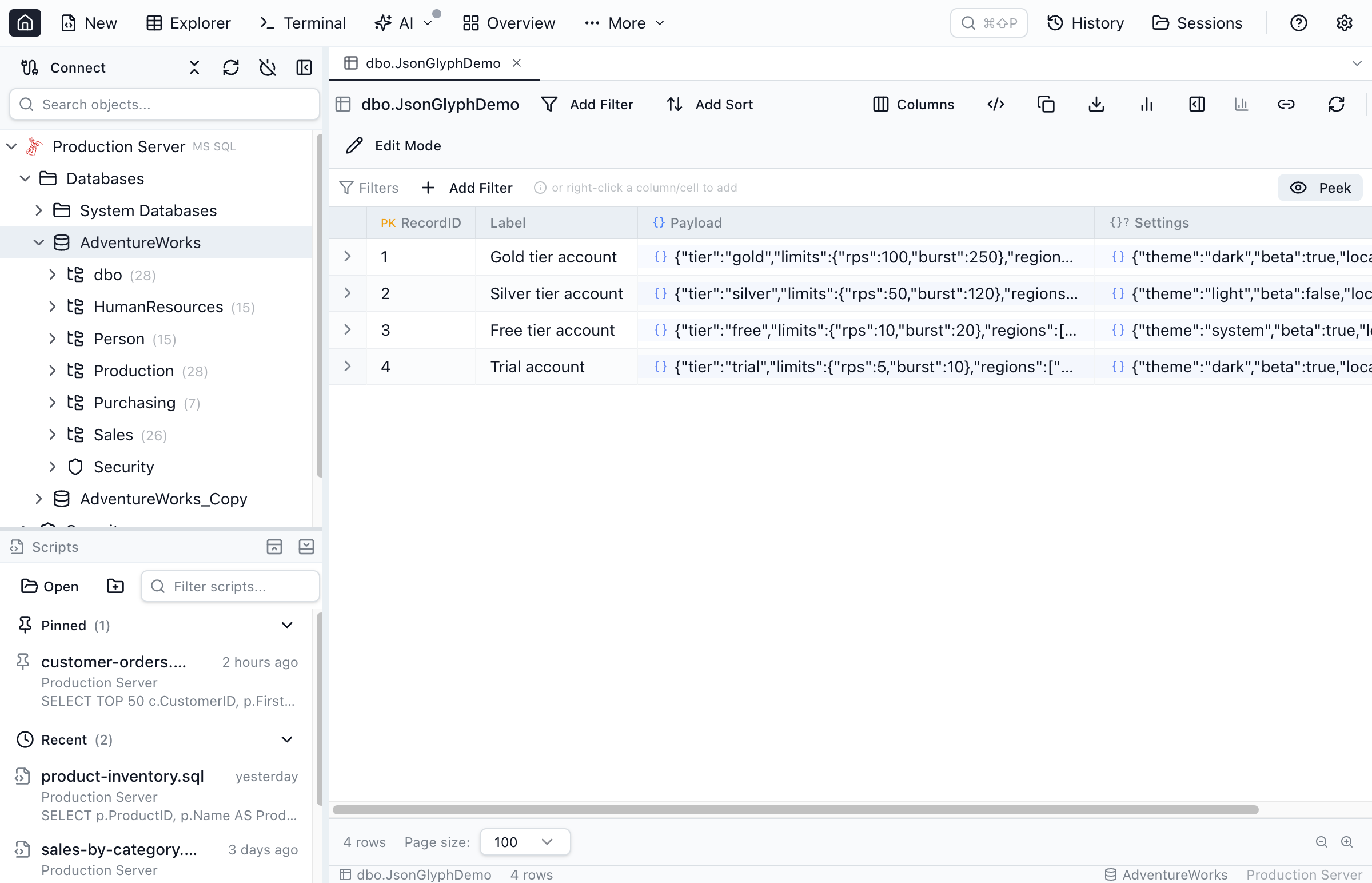
{} = declared. Gray {} = native, no declaration row yet. Gray {}? = eligible long-text that looks like JSON.- Blue
{}— the column has a JSON declaration in MetaInfo. Click to open the JSON details inspector (path list, refresh-from-DB, undeclare). - Gray
{}— a native JSON type with no declaration row yet. Click to add one (this attaches path/loose-FK metadata; the SQL doesn't change). - Gray
{}?— a long-text column whose sampled rows parse as JSON. Click to declare.
Reading and editing JSON cells
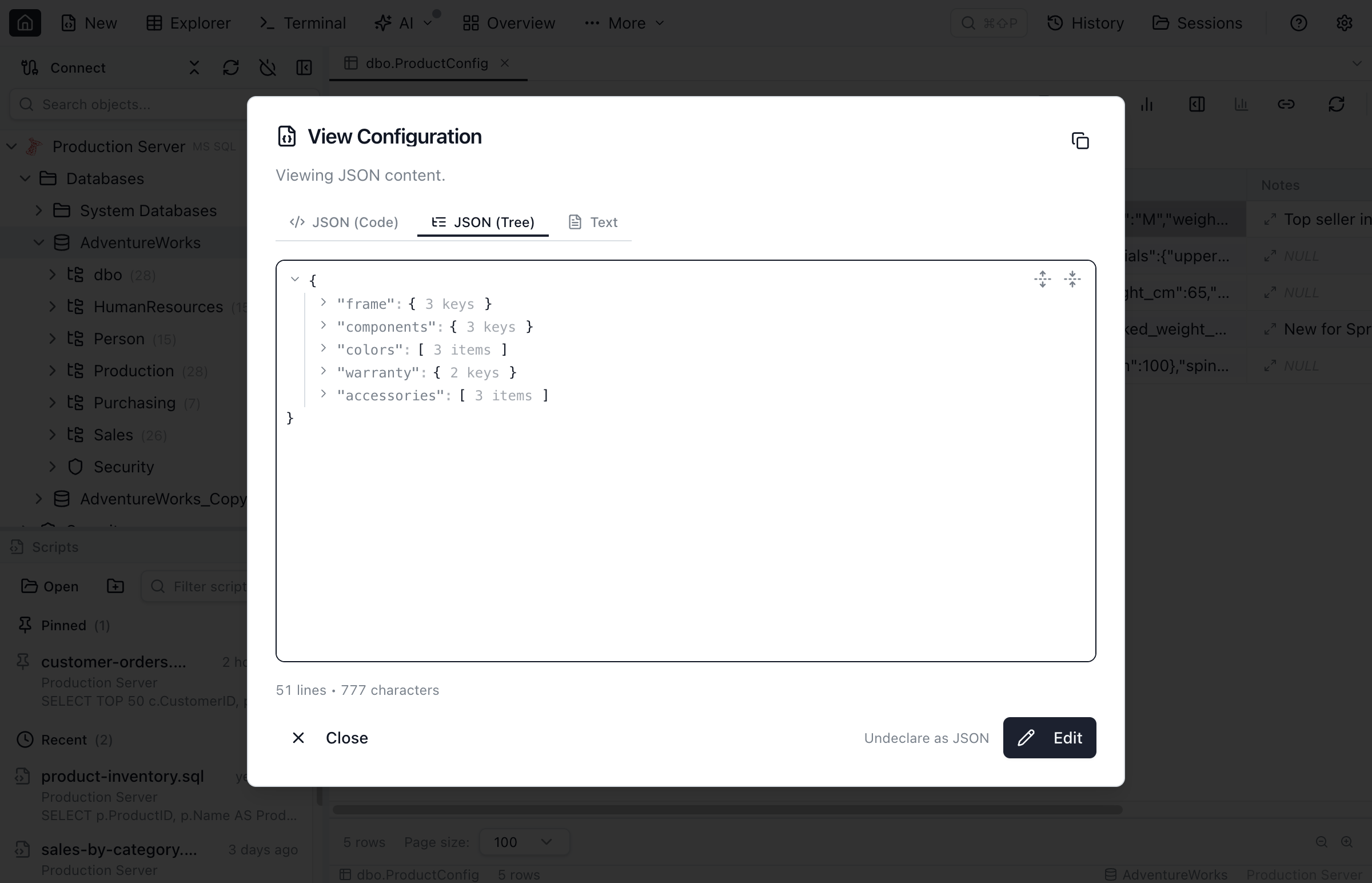
JSON cells render as syntax-coloured one-liners with an expand button. Expanding opens a dialog with two modes: a collapsible, keyboard-navigable tree and a Monaco code editor with JSON syntax highlighting and validation. Both can edit in place; saved values are minified before writing. A column declared on text whose value fails to parse falls back to plain text with a small warning glyph.
Loose foreign keys on JSON paths
JSON columns frequently carry references that aren't real foreign keys — orders.metadata.$.customer_id referring to customers.id, events.payload.$.user_id referring to users.id. The relational model can't put a FOREIGN KEY constraint on a value buried inside a JSON document, but the relationship is there in the data.
Jam SQL Studio's answer: loose foreign keys on JSONPaths. Pick the property_lookup sub-operator on a JSON column, and the value control becomes a row-picker against the related table. The first use at a (column, path) pair declares the relationship; subsequent uses open the row picker directly. A single JSON column can host multiple loose FKs at different paths — orders.metadata can declare $.customer_id → customers.id and $.warehouse_id → warehouses.id independently. any_lookup and all_lookup are the array-wildcard variants for $.items[*].sku-style paths.
Enums on JSON properties
Categorical values inside JSON — $.status, $.priority, $.tags[*] — are even more common than column-level enums. Jam SQL Studio extends the same enum-dropdown UX to JSONPaths through three sub-operators of the json operator:
property_enum— scalar path, single-select dropdown commits as= 'value'.any_enum— array path ([*]), single or multi-select, at least one element matches.all_enum— same array path, every element matches.
Declaration is reachable from three places: the filter chip ("Declare this path as enum"), the peek popover (an inline blue ▾ on declared paths or a muted ▾? on path names that look categorical — status, kind, priority, …), and a "Declare property as enum…" link in the JSON structure details dialog that lets you declare any property, even one whose name doesn't hint. The value source is always a sampled SELECT DISTINCT at the path; the standard 200-value cap and truncated banner apply.
A subtle wrinkle worth flagging: sampling a JSONPath enum on a declared-on-text JSON column has to coerce / guard the host column engine-correctly. The sampler uses the same coerceForDeclaredOnText and validityGuardSql helpers as the filter SQL, so a sampled enum on varchar-stored JSON renders SQL identical in shape to the corresponding filter predicate. (This is the bug that 1.4.10 fixed for PostgreSQL text columns.)
The SQL Server caveat — compatibility level 130+
One engine-specific gotcha to know about up-front: SQL Server's wildcard [*] paths, any_* / all_* aggregates, and is empty / is not empty emit OPENJSON, which requires the target database's COMPATIBILITY_LEVEL to be at least 130 (SQL Server 2016). On a legacy database with a lower level — even hosted by a modern SQL Server 2019/2022 — OPENJSON fails with Invalid object name 'OPENJSON'. Scalar predicates (property =, has property, is valid JSON) emit JSON_VALUE / ISJSON instead and work at any level.
Jam SQL Studio detects the level on filter open and shows an inline warning "Array filters need compat 130+." with a Recheck link. A DBA can raise the level with:
ALTER DATABASE [<your-db>] SET COMPATIBILITY_LEVEL = 130;
-- optional: keep the legacy query planner
ALTER DATABASE SCOPED CONFIGURATION SET LEGACY_CARDINALITY_ESTIMATION = ON;
Engine matrix — what each engine supports
| Engine | Native JSON type | Wildcard paths ([*]) | Recursive descent (..) | Declare text-as-JSON |
|---|---|---|---|---|
| PostgreSQL | json, jsonb | jsonb_path_query | Supported (lowered to **) | PG 16+ (IS JSON guard) |
| MySQL | json | JSON_TABLE | — | text, mediumtext, longtext, varchar(N≥256) |
| SQL Server | json (2025+) plus nvarchar | OPENJSON (compat 130+) | — | nvarchar(MAX), varchar(MAX), text, ntext, nvarchar(N≥256) |
| Oracle | json (21c+) | JSON_TABLE | Supported | CLOB, NCLOB, VARCHAR2(N≥256) |
| SQLite | — (JSON1 always available) | json_each | — | Any TEXT-affinity declared type |
Quick Answers
Short answers to common questions about filtering JSON columns.
Q: Can a SQL client filter JSON columns by path without writing JSON_VALUE / JSON_EXTRACT?
A: Yes. In Jam SQL Studio, the Table Explorer filter chip exposes a json operator with JSONPath-aware sub-operators (has property, property =, property contains, property >, any/all element comparisons, is valid JSON, is empty). The client translates the path and predicate into engine-correct SQL — #>> on PostgreSQL, JSON_VALUE on SQL Server and Oracle, JSON_UNQUOTE(JSON_EXTRACT(...)) on MySQL, json_extract on SQLite — so you click instead of typing per-engine syntax.
Q: What if a long-text column stores JSON but isn't typed as JSON?
A: Declare it as JSON in MetaInfo. Once declared, the column is treated as JSON everywhere in Jam SQL Studio, and predicates are wrapped with the engine's JSON-validity guard — ISJSON(col) = 1 on SQL Server, col IS JSON on Oracle, json_valid(col) = 1 on SQLite, JSON_VALID(col) = 1 on MySQL, and a CASE-IS-JSON coercion on PostgreSQL 16+ — so non-JSON rows are skipped instead of producing engine errors.
Q: How do I find the JSON paths in a column without scrolling through rows?
A: Use the peek popover — the eye-icon next to the path input opens a tree of every property path observed for that column, ranked by prevalence. It samples currently-loaded rows plus a cached structure scan, and a Scan 1,000 from server button runs a fresh server-side scan. The cache is skeleton-only — paths and types, never values — so exporting MetaInfo never leaks data.
Q: Does this work on SQL Server with a lower compatibility level?
A: Scalar predicates (property =, property contains, has property, is valid JSON) emit JSON_VALUE / ISJSON and work at any compatibility level. Wildcard [*] paths, any_*/all_* aggregates, and is empty / is not empty emit OPENJSON and require COMPATIBILITY_LEVEL ≥ 130 (SQL Server 2016). Jam SQL Studio detects the level on filter open and shows an inline warning if it's lower; a DBA can raise it with ALTER DATABASE [<db>] SET COMPATIBILITY_LEVEL = 130.
Q: Can a value inside a JSON document behave like a foreign key?
A: Yes — declare a loose foreign key whose source side is a JSONPath inside a JSON column. A single JSON column can host several, distinguished by path: orders.metadata can hold $.customer_id → customers.id and $.warehouse_id → warehouses.id at the same time. The property_lookup / any_lookup / all_lookup sub-operators of the json operator are the discoverable entry point — pick a row from the related table instead of typing a value.
Q: Which JSON engines does Jam SQL Studio support?
A: All five: PostgreSQL (json/jsonb), MySQL (json), SQL Server (text + native json on 2025+), Oracle 21c+ (native json plus long-text), and SQLite (TEXT-affinity columns via JSON1). The same filter operator, peek popover, JSON tree cell viewer, header glyphs, and JSON-path loose FKs and enums work the same on every engine — only the emitted SQL differs.
What this unlocks
The point isn't that Jam SQL Studio replaces JSON_VALUE. The engine helpers are great; they're just per-engine and verbose. The point is that JSON columns should feel like first-class columns in your SQL client — clickable, peekable, filterable by path, with values flowing into the same enum dropdowns and FK row-pickers you already use for plain columns. That's the bar, and it's the same bar on every engine, even the ones (SQLite, MySQL) where the engine itself is comparatively spartan.
Jam SQL Studio is free for personal use and runs on macOS (Apple Silicon and Intel), Windows, and Linux.
Further reading
- JSON Columns documentation — the full reference for sub-operators, paths, header glyphs, peek popover, structure cache, and declared-on-text guards.
- Enums on JSON properties — the
property_enum/any_enum/all_enumsub-operators in detail. - Loose foreign keys on JSON paths — including multi-FK per JSON column for polymorphic shapes.
- JSON in Relational Databases: 5 Engines Compared — pillar reference for the JSON-in-SQL landscape.
- PostgreSQL JSON & JSONB · MySQL JSON · SQL Server JSON · Oracle JSON · SQLite JSON — engine-by-engine deep dives.