 Jam SQL Studio
 Kusto Explorer Alternative for Mac, Windows & Linux
Kusto.Explorer is Microsoft's free desktop tool for Azure Data Explorer — but it only runs on Windows, and the ADX web UI lives in a browser tab and queries Kusto only. Jam SQL Studio is a cross-platform desktop alternative: run KQL against ADX clusters, Application Insights, and Azure Monitor / Log Analytics on Mac, Windows, and Linux — in the same app you already use for SQL Server, PostgreSQL, MySQL, Oracle, and SQLite.
Free for personal use • No account required • Mac, Windows, Linux • Last updated September 2026
Kusto.Explorer, the ADX web UI, and where they fall short
Kusto.Explorer is a mature, feature-rich Windows desktop client for Azure Data Explorer. If your whole team is on Windows and lives in ADX all day, it is excellent. Two things make people look for an alternative: it is Windows-only (no macOS or Linux build), and it is an ADX-only tool — it does not touch your relational databases.
The Azure Data Explorer web UI at dataexplorer.azure.com solves the platform problem — it runs in any browser, and each connection can use a different account or directory — but it is one more browser tab, and it only queries Kusto: your SQL Server or PostgreSQL work stays in another tool.
And with Azure Data Studio retired in February 2026, its Kusto extension is no longer a going-forward option either.
Microsoft also ships a Kusto Explorer extension for VS Code: version 1.0 arrived in June 2026 and 1.0.1 in July, with KQL IntelliSense, a connections explorer, charts and Copilot integration on Windows, macOS and Linux. If VS Code is your home it is worth a look. It is an editor extension rather than a standalone desktop app, though, and as of September 2026 its documentation doesn't cover the App Insights / Log Analytics query proxies or Azure Data Studio connection import (it imports connections from desktop Kusto.Explorer instead), and it has no read-only table browser — the workflows this page is about.
That still leaves a gap for people who want a standalone, cross-platform desktop app that treats Kusto as a first-class engine alongside everything else they query.
Downloading Kusto.Explorer itself
If you are on Windows and want Microsoft's tool, install it from aka.ms/ke, or open https://<your_cluster>/?web=0. It is a ClickOnce application: Microsoft Edge runs it directly, and Chrome needs Microsoft's ClickOnce extension. Microsoft still ships updates and, as of September 2026, has announced no retirement for it.
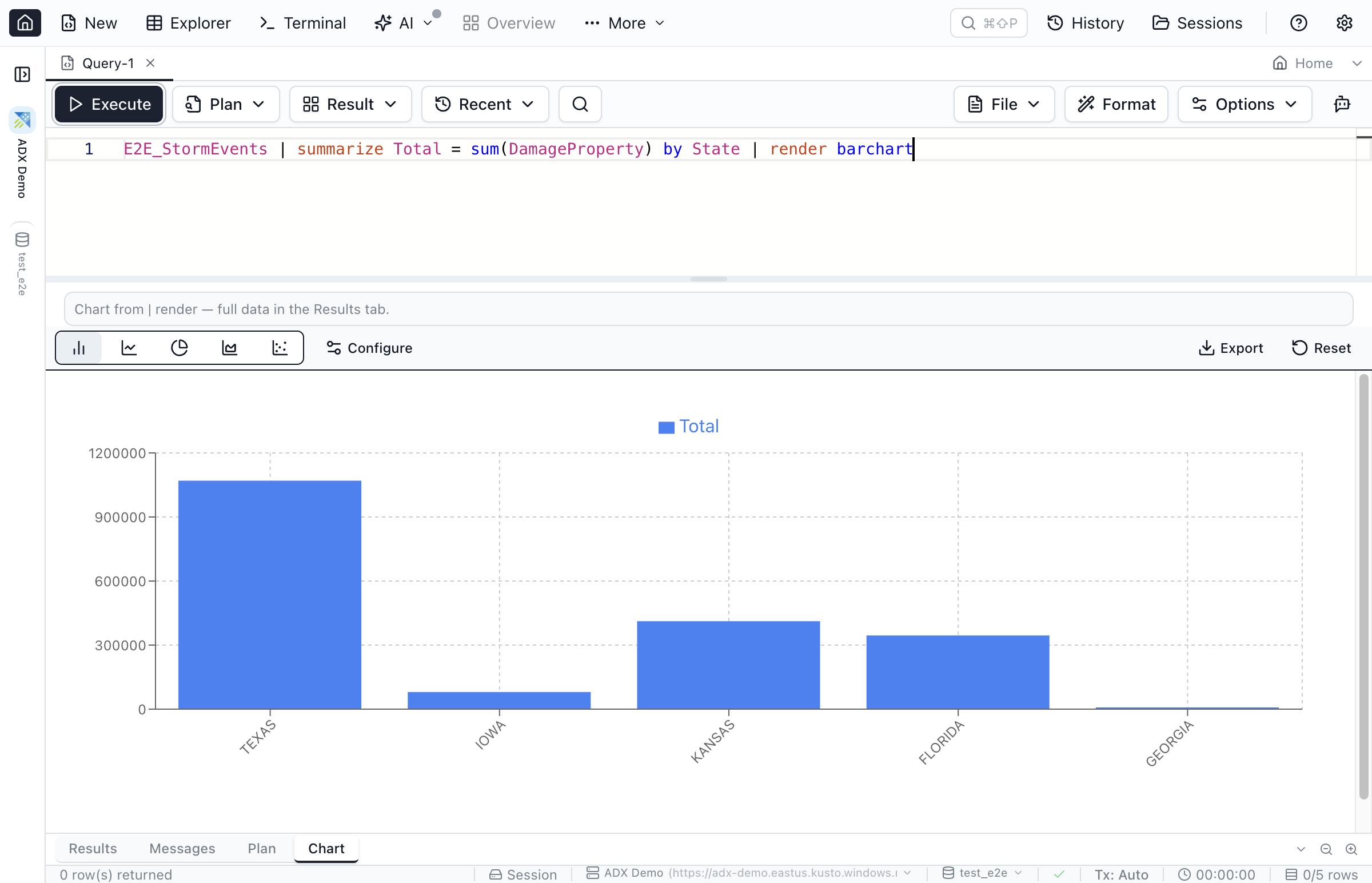
| render barchart query auto-opens the Chart tab.Jam SQL Studio vs Kusto.Explorer vs ADX Web UI
How the three stack up for day-to-day KQL work, as of September 2026.
| Feature | Jam SQL Studio | Kusto.Explorer | ADX Web UI |
|---|---|---|---|
| Runs on macOS & Linux | ✓ Desktop app | ✗ Windows only | Browser only |
| Standalone desktop app (not an editor extension) | ✓ | ✓ | ✗ In-browser |
| KQL IntelliSense (Microsoft language service) | ✓ | ✓ | ✓ |
| App Insights & Azure Monitor via query proxy | ✓ Paste URL or Browse Azure picker | ✓ Manual proxy URL (per Microsoft docs) | ✓ |
Charts from | render | ✓ Auto | ✓ | ✓ |
| Read-only table browser (filter / sort / page) | ✓ | Results grid with column-value exploration; no table browser documented | Data profile per table; results grid with sort, filter and group |
| Enum / JSON-path / loose-FK filter chips | ✓ | ✗ | ✗ |
| Query SQL Server, Postgres, MySQL, Oracle too | ✓ One app | ✗ ADX only | ✗ ADX only |
| AI agents via local MCP server | ✓ Built-in | ✗ | ✗ |
| Import saved connections from Azure Data Studio | ✓ | ✗ | ✗ |
| Free | ✓ Personal tier | ✓ | ✓ |
Why teams pick Jam SQL Studio as their Kusto client
Cross-platform, multi-engine, and built for read-only analytics.
One app for Kusto and your SQL databases
Most teams that run Azure Data Explorer also run SQL Server, PostgreSQL, or MySQL. Instead of switching between Kusto.Explorer and a separate SQL client, query them all in one window — with the same tabs, the same charts, and the same object explorer. KQL cells also run in SQL notebooks, next to Markdown notes, with | render charts inline. See the Kusto / KQL guide.
Runs on Mac, Windows, and Linux
Apple Silicon and Intel Mac builds, Windows, and Linux (.deb / .rpm / Arch). No Windows VM to run Kusto.Explorer, and no browser tab to keep alive.
Filter huge telemetry tables in seconds
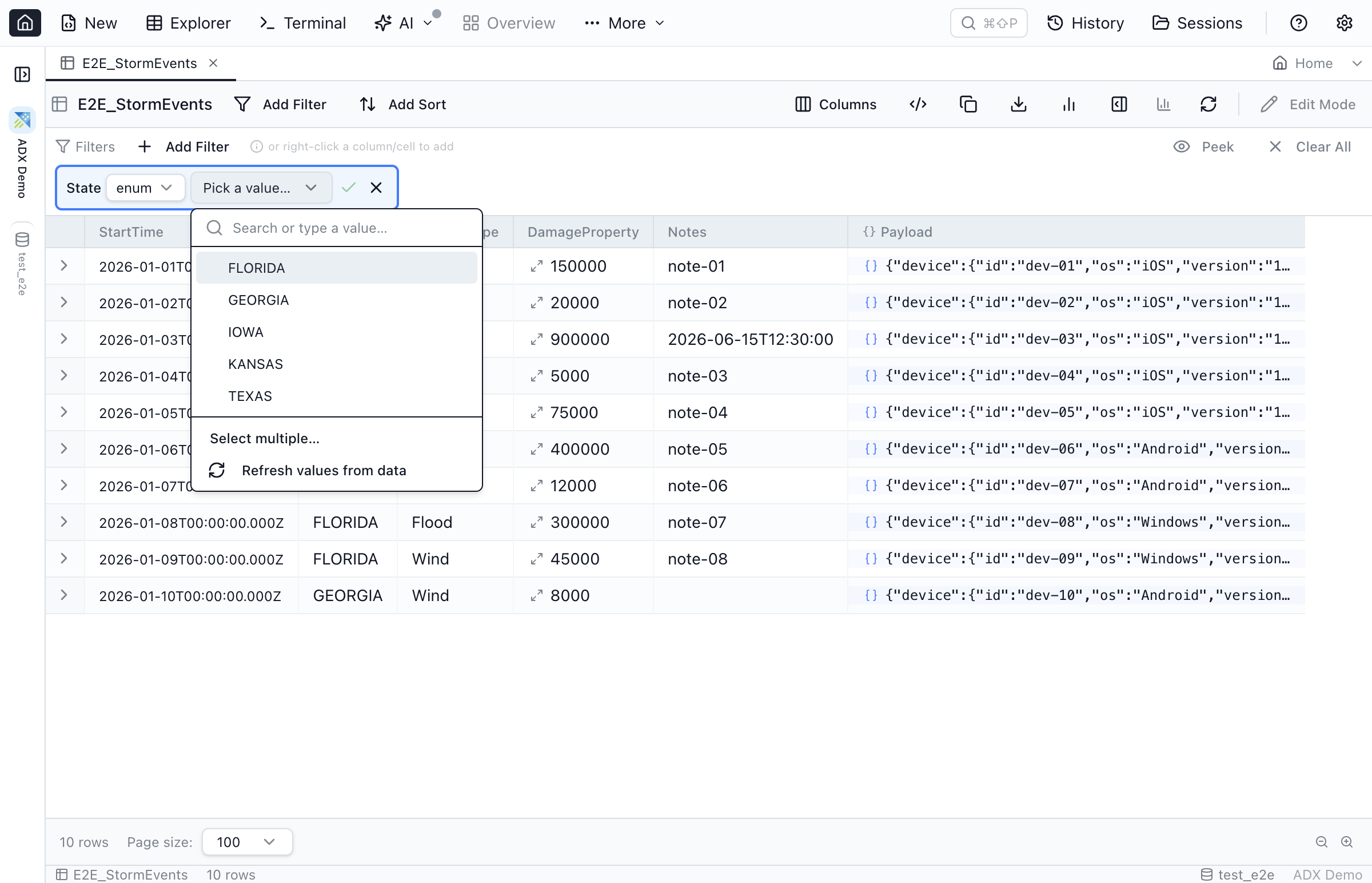
Read-only doesn't mean typing raw KQL for every filter. Declare low-cardinality columns as enums for a value-picker chip, treat dynamic columns as JSON and filter by path, and add loose foreign keys to jump from an id to its related rows — no join to hand-write. The chips emit the KQL for you.
Let AI agents query your clusters safely
Jam SQL Studio ships a local MCP server, so Claude Code, Claude Desktop, or GitHub Copilot can run KQL and .show commands against your ADX connections under read-only policy control. Microsoft's separate Azure MCP Server also has Azure Data Explorer tools; Jam SQL Studio's server is built into the desktop app and applies the same permission levels to your SQL connections. See AI Integrations & MCP.
Frequently Asked Questions
How do I download Kusto.Explorer?
Install it from aka.ms/ke. Kusto.Explorer is a ClickOnce application for Windows: Microsoft Edge runs the installer directly, and Chrome needs Microsoft's ClickOnce extension. You can also open https://<your_cluster>/?web=0 in a ClickOnce-enabled browser. There is no macOS or Linux download; on those systems use the web UI, the VS Code extension, or a cross-platform client such as Jam SQL Studio.
Is there a Kusto.Explorer for Mac?
No. Microsoft's Kusto.Explorer is a free, Windows-only desktop application installed from aka.ms/ke. On a Mac your options are the Azure Data Explorer web UI, Microsoft's Kusto Explorer extension for VS Code, or a desktop client such as Jam SQL Studio, which runs on macOS (Apple Silicon and Intel), Windows and Linux, connects to Azure Data Explorer clusters and to App Insights / Log Analytics through their query proxies with Microsoft Entra ID sign-in, and runs KQL with schema-aware IntelliSense and | render charts.
What is the difference between Kusto.Explorer and the Azure Data Explorer web UI?
Kusto.Explorer is a Windows desktop app. The Azure Data Explorer web UI (dataexplorer.azure.com) runs in any browser, and each connection in it can use a different account or directory. Both query Kusto only. Jam SQL Studio is a desktop app for Mac, Windows and Linux that queries Kusto and your SQL Server, PostgreSQL, MySQL, Oracle and SQLite databases in the same window.
Can I query Application Insights and Azure Monitor with a Kusto.Explorer alternative?
Yes. Application Insights and Azure Monitor / Log Analytics expose an Azure Data Explorer query proxy, so Jam SQL Studio connects to them the same way it connects to an ADX cluster. Paste the proxy URL (or pick the resource with Browse Azure) and run KQL against your telemetry. See the Application Insights query tool page for details.
Is there a Kusto Explorer extension for VS Code?
Yes. Microsoft's Kusto Explorer extension for Visual Studio Code reached version 1.0 in June 2026 (1.0.1 followed in July) and runs on Windows, macOS and Linux, with KQL IntelliSense, a connections explorer, charts and Copilot integration. As of September 2026 its documentation does not cover the App Insights / Log Analytics query proxies or Azure Data Studio connection import. Jam SQL Studio is a standalone desktop app that treats Kusto as one engine among your SQL databases, with a read-only Table Explorer and enum, JSON-path and loose-FK filter chips.
Can Jam SQL Studio edit or ingest data in Azure Data Explorer?
No. Jam SQL Studio opens Kusto tables read-only: there is no row editing, and only queries and .show commands run. Management commands such as .create, .drop, .ingest and .delete are not supported. Azure Data Explorer itself supports soft deletes, purges and .update commands; run those from Kusto.Explorer or the web UI.
Download a cross-platform Kusto client
Run KQL against Azure Data Explorer, App Insights, and Azure Monitor on Mac, Windows, and Linux — free for personal use.