 Jam SQL Studio
 A Standalone Alternative to the VS Code MSSQL Extension
After Azure Data Studio's retirement, Microsoft points SQL Server users to the VS Code MSSQL extension. As of September 2026 (version 1.45.1) it covers most SQL Server development work: schema compare, a schema designer, SQL notebooks, a Query Profiler, backup and restore, and GitHub Copilot. Jam SQL Studio is a different kind of tool — a standalone desktop app that doesn't need VS Code, connects to PostgreSQL, MySQL, Oracle, SQLite, and Azure Data Explorer as well as SQL Server, and adds what the extension doesn't have: table data compare, charts and dashboards from query results, SQL Server Agent jobs on macOS and Linux, and a local MCP server any AI agent can use.
The extension has its own advantages — a live Extended Events profiler, .dacpac projects, local SQL Server containers, and free commercial use. See what it does that Jam SQL Studio doesn't.
Free for personal use • No account required • Mac, Windows, Linux
“As an abandoned user of Azure Data Studio, I was left looking for a good replacement. I tried multiple options and JamSQL is my new go-to tool for SQL. It has everything I need and the development team at JamSQL has been super responsive to feedback with consistent product improvements!”
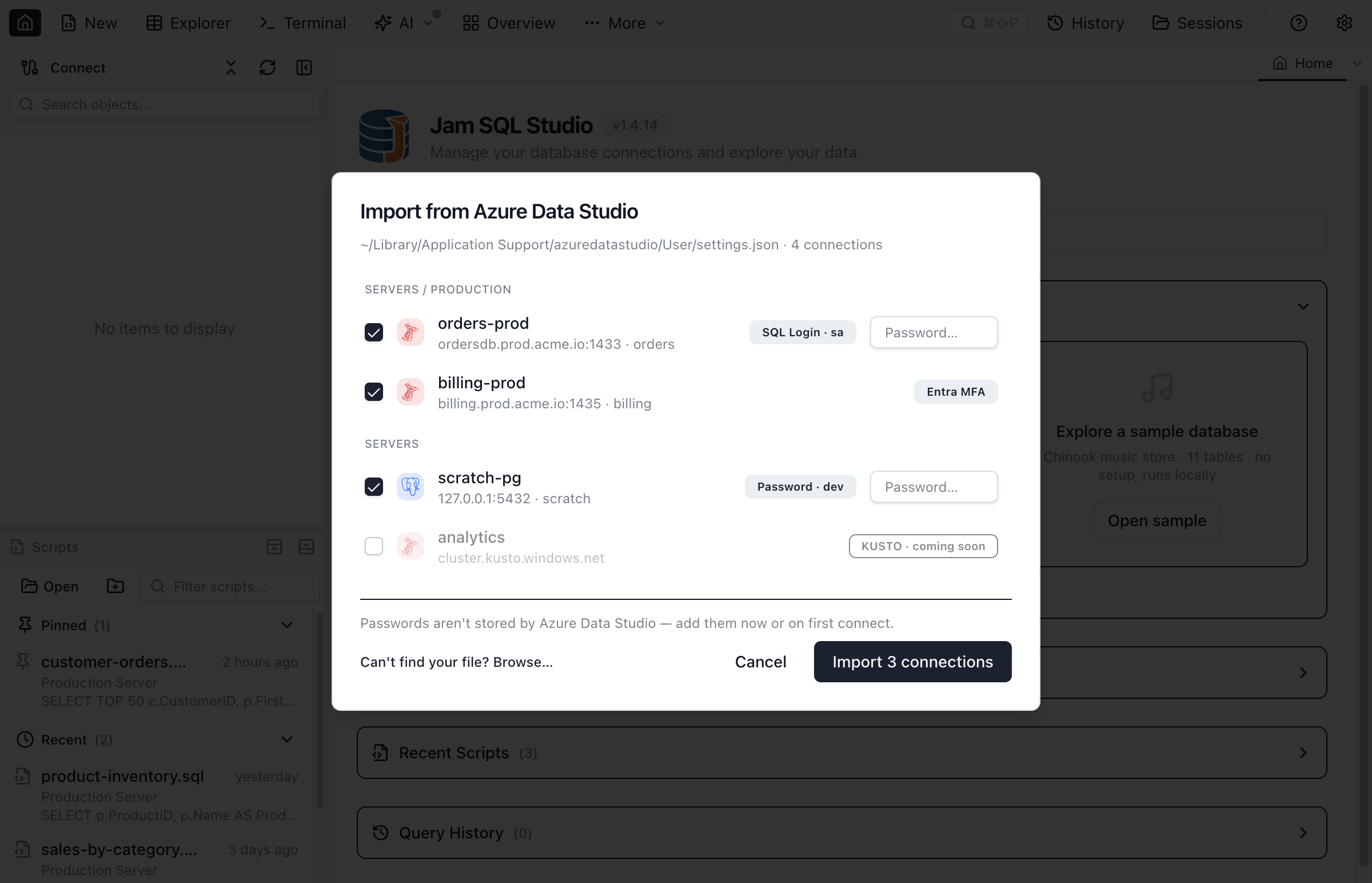
Coming from Azure Data Studio? Import in One Click
Switching tools usually means re-typing every server, database, and login. Jam SQL Studio skips that. It reads Azure Data Studio's settings.json directly and lists your saved SQL Server, PostgreSQL, and Azure Data Explorer (Kusto) connections for one-click import — from the start page, the command palette, or Manage Connections.
- Your connection groups come across as folders, so the layout you built in ADS is preserved.
- Auth types are mapped for you — SQL login, Windows auth, and Microsoft Entra ID (interactive browser).
- Because Azure Data Studio never stored passwords, you re-enter them inline during import or on first connect — nothing is read from ADS's credential store.
The MSSQL extension has an importer too: its Azure Data Studio Migration Toolkit (added in version 1.39.0) brings over SQL Server connections, connection groups, and settings, and offers an ADS-style keymap. It skips PostgreSQL connections, which Jam SQL Studio imports alongside SQL Server. See the full walkthrough in the migrate from Azure Data Studio guide.
Jam SQL Studio vs the VS Code MSSQL Extension
How a standalone desktop SQL IDE compares to Microsoft's official VS Code extension, as of September 2026.
| Feature | Jam SQL Studio | VS Code + MSSQL extension |
|---|---|---|
| Product type | Standalone desktop app | VS Code extension |
| Price | Free for personal, non-commercial use; Pro $9.99/mo or $99/yr for work | ✓ Free for any use (MIT-licensed) |
| Requires VS Code | ✗ No | ✓ Yes |
| Platforms | ✓ Mac/Win/Linux | ✓ Mac/Win/Linux (x64 and Arm64) |
| Database engines | ✓ SQL Server and Azure SQL, PostgreSQL, MySQL/MariaDB, Oracle, SQLite, Azure Data Explorer | SQL Server, Azure SQL, SQL database in Fabric |
| Azure Data Studio connection import | ✓ SQL Server, PostgreSQL, and Kusto; groups become folders | ✓ SQL Server connections, groups, and settings |
| Microsoft Entra ID (Azure AD) | ✓ | ✓ |
| Object explorer | ✓ | ✓ |
| IntelliSense / T-SQL editor | ✓ | ✓ |
| Table designer | ✓ | ✓ |
| Execution plans | ✓ Tree + graph, plan compare | ✓ Plan visualizer with missing-index hints |
| Browse and edit table data | ✓ Table Explorer | ✓ Edit Data, with DML script preview |
| Schema compare | ✓ Databases on five SQL engines, or a Database Blueprint folder (Personal: 200 objects) | ✓ Databases, .dacpac files, SQL projects |
| Data compare (row diff + sync script) | ✓ | ✗ |
| Charts from query results | ✓ Bar, line, pie, area, scatter | ✗ Not built in |
| Dashboards over live queries | ✓ 2 on Personal, unlimited on Pro | ✗ |
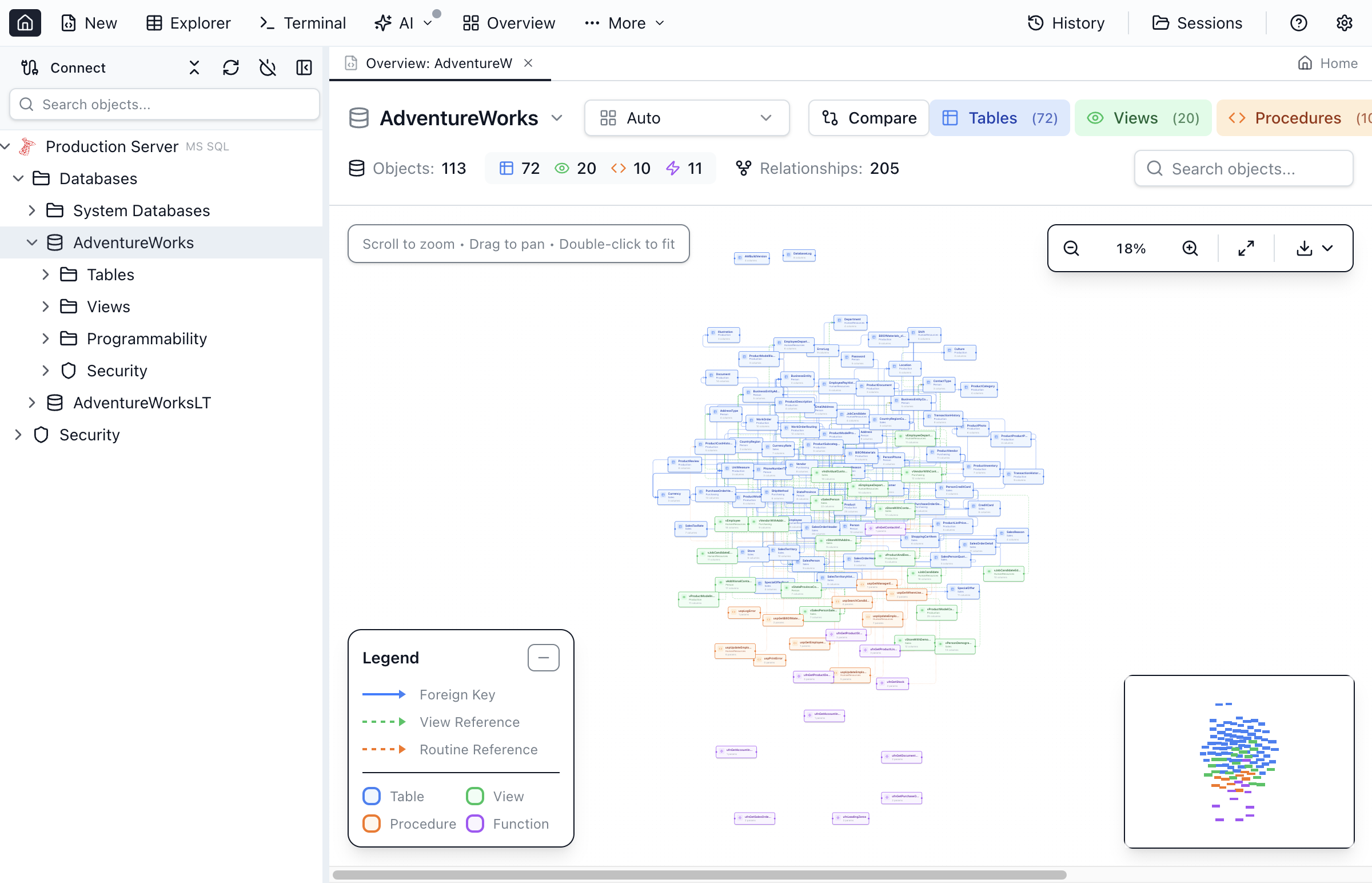
| Schema diagram | ✓ Schema Overview: tables, views, procedures, functions | ✓ Schema Designer: edit tables and foreign keys, then publish |
| SQL notebooks (.ipynb) | ✓ SQL and JavaScript cells | ✓ T-SQL kernel, plus other Jupyter kernels |
| Import a flat file | ✓ CSV, Excel, JSON into a new or existing table (beta) | ✓ .csv and .txt into a new table |
| Backup and restore | ✓ .bak, plus pg_dump for PostgreSQL (Personal: backups up to 1 GB) | ✓ .bak to disk or URL |
| DACPAC / BACPAC | BACPAC export and import only | ✓ Deploy, extract, import, export |
| Query Profiler (Extended Events) | ✗ Session Browser and Query Store instead | ✓ |
| Local SQL Server containers | Detects running Docker containers; doesn't create them | ✓ Create and manage |
| SQL Server Agent jobs | ✓ Agent Jobs Manager (beta) | ✗ Request closed as not planned |
| AI chat in the app | ✓ AI Chat Sidebar using your Claude Code or Codex CLI | ✓ GitHub Copilot chat and agent mode |
| MCP server for AI agents | ✓ Local server for any MCP client; runs SQL behind Block / Read-only / Confirm | Data API builder MCP endpoint (preview): CRUD tools for selected tables |
| Enum column dropdowns | ✓ Native + CHECK + Sampled | ✗ |
Where Jam SQL Studio Differs
The MSSQL extension is a strong SQL Server tool for people who already work in VS Code. These are the places where a standalone, multi-engine database app gives you something it doesn't.
No VS Code Required
Jam SQL Studio is a desktop app built only for database work: install it and connect, with no editor, extension, or workspace to set up. If you do spend your day in VS Code, keeping SQL next to your application code is a real advantage of the extension. Coming from it, pick the VS Code mssql extension shortcut scheme so Ctrl+Shift+E (Cmd+Shift+E on macOS) still runs your query.
Six Engines in One Window
SQL Server and Azure SQL, PostgreSQL, MySQL and MariaDB, Oracle, SQLite, and Azure Data Explorer (Kusto) share one object explorer, editor, and results grid. In VS Code, PostgreSQL needs Microsoft's separate PostgreSQL extension, and Microsoft still lists its MySQL replacement as pending announcement.
Data Compare, Charts, and Dashboards
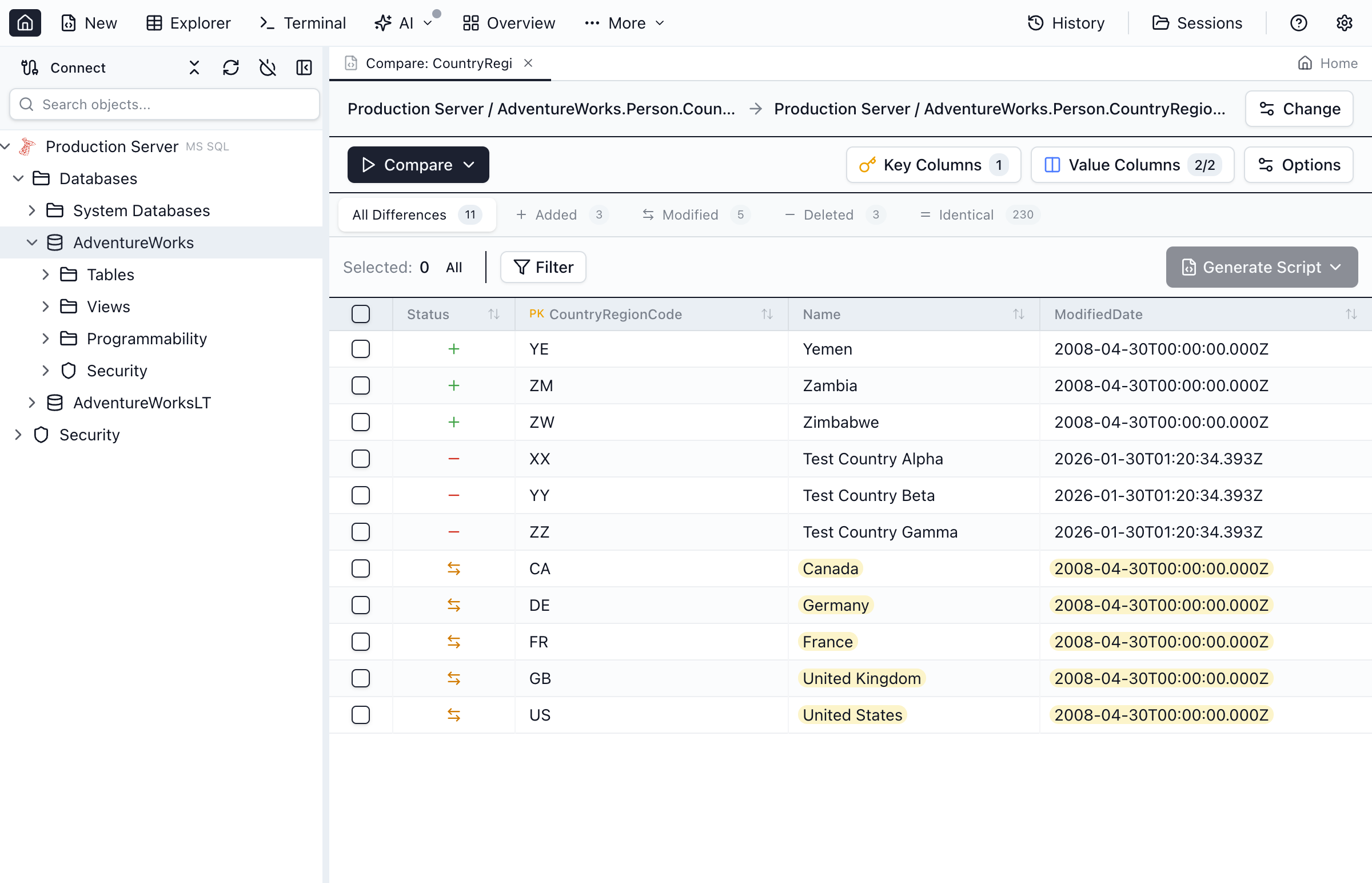
Both tools have schema compare. Only Jam SQL Studio compares table data row by row and generates the INSERT, UPDATE, and DELETE script to sync it, charts a result set as a bar, line, pie, area, or scatter chart, and builds dashboards from live queries. On the free Personal tier, full data compare covers tables of up to 10,000 rows (sampled compares are unlimited) and you get 2 dashboards. Data compare · charts · dashboards.
SQL Server Agent on macOS and Linux
Microsoft keeps SQL Server Agent in SSMS, which runs only on Windows, and closed the request to add Agent support to the MSSQL extension as not planned. Jam SQL Studio's Agent Jobs Manager (beta) lists jobs and their history, runs and stops jobs, and manages operators, alerts, and proxies on all three platforms.
An MCP Server for Any AI Agent
Jam SQL Studio runs a local MCP server on 127.0.0.1 with token authentication. Claude Code, Codex CLI, Cursor, GitHub Copilot, and other MCP clients can run SQL against your saved connections, on any engine. It executes no queries until you allow Read-only, or Confirm mode, where you approve each write in the app. The MSSQL extension's AI features are GitHub Copilot chat and agent mode inside VS Code; its Data API builder can also deploy an MCP endpoint (preview) in a local Docker container that gives agents create, read, update, and delete tools for the tables you select.
Bring Your Connections With You
Already using the VS Code mssql or PostgreSQL extensions? Import your saved connections in one click, the same way as from Azure Data Studio, SSMS, DBeaver, or DataGrip. See how import works →
What the MSSQL Extension Has That Jam SQL Studio Doesn't
As of September 2026, these features are in the MSSQL extension (Microsoft's feature list) and not in Jam SQL Studio:
- Query Profiler — live Extended Events capture with templates, filters, CSV export, and
.xelfile viewing. Jam SQL Studio has no trace capture; its Session Browser, Query Store viewer, Deadlock Analyzer, and Performance Dashboard cover live sessions, plan history, and deadlocks instead. - Local SQL Server containers — create and manage a SQL Server container from VS Code. Jam SQL Studio finds database containers already running in Docker and offers them as ready connections, but doesn't create them.
- .dacpac and SQL Database Projects — deploy and extract
.dacpacfiles and compare against SQL projects. Jam SQL Studio exports and imports BACPAC files only; its Database Blueprint (beta) keeps a schema as a Git-tracked folder of.sqlfiles instead. - Data API builder — generate REST, GraphQL, and MCP endpoints over selected tables.
- Microsoft Fabric and Azure provisioning — browse Fabric workspaces and create SQL databases in Fabric or free-tier Azure SQL databases.
- GitHub Copilot integration — in the editor, the Schema Designer, SQL notebooks, and Data API builder.
- Free commercial use — the extension is free and MIT-licensed. Jam SQL Studio's Personal tier is free for personal, non-commercial use; work use needs Pro ($9.99/month or $99/year).
Which one to pick: the MSSQL extension fits if you work only on SQL Server or Azure SQL, already live in VS Code, and need the profiler, .dacpac projects, or Copilot. Jam SQL Studio fits if you want a standalone database app, work across several engines, or need data compare, charts, SQL Server Agent jobs off Windows, or an MCP server your own agent can use. The two also run side by side.
Frequently Asked Questions
Common questions about choosing between the VS Code MSSQL extension and Jam SQL Studio.
What is the VS Code MSSQL extension?
The MSSQL extension for Visual Studio Code (ms-mssql.mssql) is Microsoft's official extension for SQL Server, Azure SQL, and SQL database in Microsoft Fabric. As of September 2026 (version 1.45.1, released August 26, 2026), it pairs a T-SQL editor with IntelliSense with these generally available features: Object Explorer, the query results grid, the query plan visualizer, Table Designer, Schema Designer, Schema Compare, View and Edit Data, DACPAC and BACPAC, backup and restore, flat-file import, Query Profiler, SQL notebooks, local SQL Server containers, Data API builder, and GitHub Copilot integration. Since Azure Data Studio was retired on February 28, 2026, Microsoft points its users to this extension, and to SQL Server Management Studio for SQL Server Agent and full administration.
Is Jam SQL Studio a good VS Code MSSQL extension alternative?
It depends on what you need beyond SQL Server editing. Jam SQL Studio is a standalone desktop app, so it does not need VS Code, and it connects to PostgreSQL, MySQL, MariaDB, Oracle, SQLite, and Azure Data Explorer as well as SQL Server. As of September 2026 it also has features the extension does not: table data compare with sync scripts, charts and dashboards from query results, a SQL Server Agent jobs manager (beta) on macOS, Windows, and Linux, and a local MCP server that any MCP-compatible AI agent can use. If you work only on SQL Server inside VS Code and rely on the Query Profiler, .dacpac files, or GitHub Copilot, the free extension already covers that.
Do I need VS Code to use Jam SQL Studio?
No. Jam SQL Studio is a standalone desktop application for Mac, Windows, and Linux. You do not need VS Code or any editor extension. It ships its own Monaco-based editor, IntelliSense, object explorer, table designer, and admin tooling. To use the MSSQL extension's key for executing a query (Ctrl+Shift+E, or Cmd+Shift+E on macOS), pick the VS Code mssql extension scheme in Settings → Keyboard Shortcuts.
Can I import my Azure Data Studio connections into Jam SQL Studio?
Yes. Jam SQL Studio reads Azure Data Studio's settings.json directly and imports your saved SQL Server, PostgreSQL, and Azure Data Explorer (Kusto) connections in one click — from the start page, the command palette, or Manage Connections. Your ADS connection groups are preserved as folders. Because Azure Data Studio never stored passwords, you re-enter them inline during import or on first connect. The MSSQL extension has its own Azure Data Studio Migration Toolkit (added in version 1.39.0) that imports SQL Server connections, connection groups, and settings; it skips PostgreSQL and other non-SQL Server connections.
Does the VS Code MSSQL extension have schema compare or data compare?
It has schema compare but not data compare. Schema Compare became generally available in version 1.35.0 (August 2025); it compares databases, .dacpac files, and SQL projects, and can apply the changes or generate a script. As of September 2026, neither Microsoft's feature list nor the extension's changelog includes table data comparison, so syncing rows between two databases still takes another tool. Jam SQL Studio has both: schema compare for SQL Server, PostgreSQL, MySQL, MariaDB, Oracle, and SQLite, and data compare that generates INSERT, UPDATE, and DELETE sync scripts.
What does the MSSQL extension have that Jam SQL Studio doesn't?
As of September 2026: a Query Profiler that captures Extended Events live, local SQL Server container creation, .dacpac deploy and extract plus SQL Database Projects, Data API builder for REST, GraphQL, and MCP endpoints, Microsoft Fabric and Azure SQL database provisioning, and GitHub Copilot integration. It is also free and MIT-licensed for any use, while Jam SQL Studio's free Personal tier is for non-commercial use. Jam SQL Studio handles BACPAC but not .dacpac, and for SQL Server monitoring it offers a Session Browser, Query Store viewer, Deadlock Analyzer, and Performance Dashboard instead of trace capture.
Can I manage SQL Server Agent jobs in VS Code?
Not with the MSSQL extension. The GitHub request for SQL Server Agent support (issue #18635) was closed as not planned, and Microsoft's Azure Data Studio retirement page names SQL Server Management Studio, which runs only on Windows, as the home for SQL Server Agent. Jam SQL Studio includes an Agent Jobs Manager (beta) on macOS, Windows, and Linux for browsing jobs and their history, running and stopping jobs, and managing operators, alerts, and proxies.
Does Jam SQL Studio support databases besides SQL Server?
Yes. Jam SQL Studio connects to SQL Server (including Azure SQL Database and Managed Instance), PostgreSQL, MySQL, MariaDB, Oracle, SQLite, and Azure Data Explorer (Kusto) from a single application. The VS Code MSSQL extension covers SQL Server, Azure SQL, and SQL database in Microsoft Fabric; PostgreSQL in VS Code needs Microsoft's separate PostgreSQL extension, and Microsoft's MySQL replacement is still listed as pending announcement.
Can AI coding assistants use my database through Jam SQL Studio?
Yes. Jam SQL Studio runs a built-in local MCP server (Model Context Protocol) on 127.0.0.1 with token authentication, so Claude Code, Claude Desktop, Codex CLI, Cursor, GitHub Copilot, and other MCP clients can run SQL against your saved connections. It executes no queries by default; read-only or approval-gated writes are opt-in. The VS Code MSSQL extension's AI features are GitHub Copilot chat and agent mode inside VS Code. Its Data API builder can also deploy an MCP endpoint (in preview) as a local Docker container: agents get create, read, update, and delete tools for the tables you select, not a way to run their own SQL.
Is Jam SQL Studio free like the MSSQL extension?
For personal use, yes. The MSSQL extension and VS Code are free for any use. Jam SQL Studio's Personal tier is free for personal, non-commercial use and needs no account; work use requires Pro at $9.99 per month or $99 per year, which also removes the Personal tier's size caps, such as full data compare past 10,000 rows per table.
Does Jam SQL Studio work with Microsoft Entra ID (Azure AD)?
Yes. Jam SQL Studio supports Microsoft Entra ID authentication for Azure SQL Database using interactive browser sign-in, which works with MFA and caches tokens for reconnection. SQL Server authentication and Windows authentication are also supported, and imported ADS connections keep their original auth type.
Try a Full Desktop SQL Server IDE
Download Jam SQL Studio free. A standalone SQL Server IDE for Mac, Windows, and Linux — no VS Code required, and your Azure Data Studio connections import in one click.
Comparing Other SQL Server Tools?
See how Jam SQL Studio compares to the other tools Microsoft points ADS users toward.
Further reading: ADS retirement 2026 status · ADS replacement options compared · Migrate from Azure Data Studio · Export ADS connections