 Jam SQL Studio
 Published: 2026-10-14
Autocommit, COMMIT and ROLLBACK in SQL Server, PostgreSQL, MySQL, Oracle and SQLite
SQL Server, PostgreSQL, MySQL and SQLite commit every statement on its own until you start a transaction. Oracle has no autocommit of its own: the client decides, and SQL*Plus and SQL Developer leave it off. Inside a transaction, Oracle and MySQL commit around DDL, so a CREATE TABLE also commits the INSERT before it, while SQL Server, PostgreSQL and SQLite roll DDL back with everything else. A ROLLBACK with nothing to undo is an error on SQL Server and SQLite, a warning on PostgreSQL, and silent on MySQL and Oracle. When the client disconnected or was killed, every engine rolled the open transaction back, with one exception: SQL*Plus commits on exit. We ran the same tests on all five engines on 14 October 2026; the results are below.
Short answers
- Oracle and SQL Developer autocommit. SQL*Plus reports
autocommit OFF, and SQL Developer’s Autocommit preference is off by default, so changes wait forCOMMIT. The catch is the exit: SQL*Plus hasEXITCOMMIT ON, and anINSERTfollowed byEXIT, or by the end of the script, was committed in our test. - “MySQL rollback not working”. With the default
autocommit = 1, anINSERTfollowed byROLLBACKkept the row, and MySQL answeredQuery OK, 0 rows affectedwith no warning. Start withSTART TRANSACTION— and know that a DDL statement,TRUNCATEor a secondSTART TRANSACTIONcommits it. - DDL implicit commit. Oracle and MySQL committed an earlier
INSERTonCREATE TABLE, even when theCREATE TABLEfailed because the name was taken. On Oracle, aCREATE TABLEwith a syntax error did not commit. - SQL Server implicit transactions. After
SET IMPLICIT_TRANSACTIONS ON, the firstINSERTorSELECTfrom a table set@@TRANCOUNTto 1, and the transaction stayed open untilCOMMITorROLLBACK. - PostgreSQL transactional DDL.
CREATE TABLE,DROP TABLEandTRUNCATEwere all undone byROLLBACK.CREATE DATABASE,VACUUMandCREATE INDEX CONCURRENTLYrefuse to run inside a transaction at all. - DBeaver Smart commit mode. DBeaver runs
SELECTs in auto-commit and switches to manual commit before the first data-modifying statement; its Production connection type defaults to manual commit. Jam SQL Studio’s Smart mode works the same way, per query tab.
The results
Each row is one experiment, run with each engine’s own command-line client against a local Docker container, plus a small Node.js script for the kill and freeze tests. The exact versions and commands are under How we tested. MariaDB 10.2.21 gave the same answers as MySQL 8.0.45 in every row we ran on both.
| Experiment | SQL Server | PostgreSQL | MySQL / MariaDB | Oracle | SQLite |
|---|---|---|---|---|---|
| Default for a new session | Autocommit (IMPLICIT_TRANSACTIONS off) | Autocommit; psql AUTOCOMMIT = on | @@autocommit = 1 | Set by the client; SQL*Plus autocommit OFF | Autocommit |
CREATE TABLE in a transaction, then ROLLBACK | Table gone | Table gone | Table kept | Table kept | Table gone |
INSERT, CREATE TABLE, ROLLBACK | INSERT undone | INSERT undone | INSERT committed | INSERT committed | INSERT undone |
INSERT, a CREATE TABLE that fails (name taken), ROLLBACK | Msg 2714 ended the transaction (@@TRANCOUNT 0); INSERT undone | Transaction aborted; INSERT undone | Error 1050; INSERT committed anyway | ORA-00955; INSERT committed anyway | Error; transaction stayed open, INSERT undone |
TRUNCATE in a transaction, then ROLLBACK | Rows restored | Rows restored | Rows gone | Rows gone | No TRUNCATE; DELETE rolls back |
DROP TABLE in a transaction, then ROLLBACK | Table restored | Table restored | Table gone | Table gone (FLASHBACK TABLE … TO BEFORE DROP brought it back) | Table restored |
ROLLBACK with no open transaction | Error: Msg 3903 | WARNING: there is no transaction in progress | Silent: Query OK, 0 rows affected | Silent: Rollback complete. | Error: cannot rollback - no transaction is active |
COMMIT with no open transaction | Error: Msg 3902 | WARNING: there is no transaction in progress | Silent: Query OK, 0 rows affected | Silent: Commit complete. | Error: cannot commit - no transaction is active |
A second BEGIN while a transaction is open | Nests: @@TRANCOUNT 2; inner COMMIT only counts down, ROLLBACK undoes both | Ignored with WARNING: there is already a transaction in progress | Commits the open transaction, silently | No BEGIN statement | Error: cannot start a transaction within a transaction |
Identity value used by a rolled-back INSERT | Skipped (ids 1, 3) | Skipped (1, 3) | Skipped (1, 3) | Skipped (1, 3) | Reused (1, 2), even with AUTOINCREMENT |
| CLI client exits with a transaction open | sqlcmd: rolled back | psql: rolled back | mysql: rolled back | SQL*Plus: committed, on EXIT and at end of input | sqlite3: rolled back |
Client process killed (kill -9) | Rolled back | Rolled back | Rolled back | Rolled back | Rolled back |
| Client frozen for 30 s, connection still open | Transaction open, lock held | idle in transaction, lock held | Transaction RUNNING, lock held | Transaction ACTIVE, lock held | Not tested |
| Another session needs the uncommitted row | Waits with no limit (@@LOCK_TIMEOUT -1); without read committed snapshot, plain readers wait too | Writers wait with no limit (lock_timeout 0); readers don’t wait | Writers wait 50 s, then error 1205; readers don’t wait | Writers wait with no limit; readers don’t wait | Other writers fail at once in the sqlite3 shell: database is locked; readers don’t wait |
Bold marks work that a ROLLBACK did not take back, and statements that did nothing without saying so.
Autocommit defaults by engine and client
Whether a statement commits on its own is decided in two places: the database session and the client. SQL Server, PostgreSQL, MySQL and SQLite sessions commit each statement unless a transaction was started. Oracle sessions never commit on their own; the client sends the COMMIT. And any client can change the picture, either by turning a server setting off or by issuing BEGIN and COMMIT for you.
| Client | Default | How to change it | Source |
|---|---|---|---|
| sqlcmd, SSMS (SQL Server) | Autocommit | BEGIN TRAN, or SET IMPLICIT_TRANSACTIONS ON (SSMS also has it as a query option, off by default) | sqlcmd tested (go-sqlcmd 1.9.0); SSMS not run by us |
| psql | AUTOCOMMIT = on | BEGIN, or \set AUTOCOMMIT off, after which psql sends BEGIN before your first statement | Tested (psql 16.4) |
| mysql command-line client | @@autocommit = 1 | START TRANSACTION, or SET autocommit = 0 for the session | Tested (8.0.45, MariaDB 10.2.21) |
| SQL*Plus | autocommit OFF, exitcommit ON | SET AUTOCOMMIT ON; SET EXITCOMMIT OFF or EXIT ROLLBACK to discard on exit | Tested (23.26.1) |
| SQL Developer | Autocommit off | Tools → Preferences → Database → Advanced → Autocommit (applies to the SQL Worksheet) | Oracle’s SQL Developer User’s Guide (not run by us) |
| DBeaver | Auto-commit for Development and Test connection types, manual commit for Production | The commit-mode toggle in the toolbar; Smart commit switches to manual before a data-modifying statement | DBeaver documentation, “Auto and Manual Commit Modes” (not run by us) |
| sqlite3 | Autocommit | BEGIN | Tested (3.51.0) |
| JDBC drivers | Auto-commit on | connection.setAutoCommit(false) | java.sql.Connection documentation |
| Python DB-API drivers (psycopg, pyodbc, python-oracledb, mysql-connector) | Auto-commit off: the first statement opens a transaction | connection.commit(), or the driver’s autocommit attribute | PEP 249 requires auto-commit to be initially off |
| node-oracledb | autoCommit false | { autoCommit: true } per execute(), or connection.commit() | Tested (6.10.0, Thin mode) |
| Jam SQL Studio | Auto mode in each new query tab | Manual or Smart mode per tab; on Oracle from 1.5.6 | Below |
Two of those defaults explain most “my changes disappeared” and “my changes were saved when I didn’t want them” reports. Python and node-oracledb code that never calls commit() loses its writes when the connection closes, because the driver opened a transaction nobody ended. And an Oracle user who tests an UPDATE in SQL*Plus and types EXIT has just committed it.
SQL Server: transactional DDL, @@TRANCOUNT and implicit transactions
SQL Server runs DDL inside the transaction. A CREATE TABLE, DROP TABLE or TRUNCATE TABLE between BEGIN TRAN and ROLLBACK was undone in every test. The statements it refuses inside a transaction are few and explicit: CREATE DATABASE failed with Msg 226: CREATE DATABASE statement not allowed within multi-statement transaction.
SET IMPLICIT_TRANSACTIONS ON makes SQL Server behave like Oracle: the first statement that touches data starts a transaction, and nothing is committed until you say so. Here is what @@TRANCOUNT showed at each step:
SET IMPLICIT_TRANSACTIONS ON;
SELECT @@TRANCOUNT;                 -- 0
SELECT COUNT(*) FROM dbo.blog_tx_t;
SELECT @@TRANCOUNT;                 -- 1: a SELECT from a table starts one too
COMMIT;
INSERT INTO dbo.blog_tx_t VALUES (3, 'implicit');
SELECT @@TRANCOUNT;                 -- 1
ROLLBACK;                           -- the INSERT is gone
SELECT @@TRANCOUNT;                 -- 0
That a plain SELECT opens a transaction matters: a session that only read data still has @@TRANCOUNT 1 until it commits, and SSMS asks about uncommitted transactions when you close such a window.
Nested BEGIN TRAN is a counter, not a savepoint. Two BEGIN TRANs set @@TRANCOUNT to 2; the inner COMMIT only lowered it to 1, and the ROLLBACK that followed undid both inserts. To undo part of a transaction, use SAVE TRANSACTION name and ROLLBACK TRANSACTION name.
Msg 266 — Transaction count after EXECUTE indicates a mismatching number of BEGIN and COMMIT statements — appears when a procedure or sp_executesql returns with a different @@TRANCOUNT than it started with. We got it both ways: EXEC sp_executesql N'BEGIN TRAN; INSERT …' (previous count 0, current count 1) and a procedure that runs ROLLBACK inside its caller’s transaction (previous count 1, current count 0, and the caller’s INSERT gone). It is also the transaction error Jam SQL Studio’s telemetry recorded most often, for a reason covered below.
An error can end the whole transaction. With XACT_ABORT off, the default, a primary-key violation (Msg 2627) ended only its own statement: @@TRANCOUNT stayed 1 and the earlier INSERT was still in the transaction. A CREATE TABLE that failed with Msg 2714 (There is already an object named …) behaved differently: afterwards @@TRANCOUNT was 0 and the earlier INSERT had been rolled back. Check @@TRANCOUNT or XACT_STATE() after an error before you assume the transaction is still there; with SET XACT_ABORT ON, any run-time error rolls it back.
Two things a ROLLBACK does not undo on SQL Server: the identity values the rolled-back rows used (the next row got id 3, not 2), and rows in a table variable. A DECLARE @tv TABLE that got a row inside a rolled-back transaction still had that row afterwards.
PostgreSQL: DDL rolls back, and one error aborts the transaction
PostgreSQL is the engine where “transactional DDL” is most complete. CREATE TABLE, DROP TABLE and TRUNCATE inside BEGIN … ROLLBACK were all undone, which makes it safe to try a migration script in a transaction and roll it back. The exceptions are commands that refuse to run in a transaction block at all; each failed with SQLSTATE 25001:
BEGIN; CREATE DATABASE blog_tx_db2;
-- ERROR:  CREATE DATABASE cannot run inside a transaction block
BEGIN; VACUUM blog_tx_ident;
-- ERROR:  VACUUM cannot run inside a transaction block
BEGIN; CREATE INDEX CONCURRENTLY blog_tx_idx ON blog_tx_t (note);
-- ERROR:  CREATE INDEX CONCURRENTLY cannot run inside a transaction block
The behavior that catches people coming from SQL Server or MySQL is what happens after an error. Once any statement fails inside a transaction, PostgreSQL rejects everything else with current transaction is aborted, commands ignored until end of transaction block (SQLSTATE 25P02), and a COMMIT at that point does not commit: psql printed ROLLBACK as the result of our COMMIT, and the INSERT from before the error was gone. To keep going after an expected error, wrap the risky statement in a SAVEPOINT and ROLLBACK TO SAVEPOINT; psql’s \set ON_ERROR_ROLLBACK interactive does that for you at the prompt.
ROLLBACK or COMMIT with no transaction open is not an error in PostgreSQL, only WARNING: there is no transaction in progress, and a second BEGIN is ignored with WARNING: there is already a transaction in progress. Warnings reach the client as notices, so a tool that does not show notices shows nothing at all. Sequence values are not rolled back either: an identity column skipped from 1 to 3.
MySQL and MariaDB: DDL commits, and so does a second START TRANSACTION
MySQL sessions start with autocommit = 1. Every statement outside START TRANSACTION is committed when it finishes, so this sequence keeps the row, and MySQL gives no sign that the ROLLBACK did nothing:
INSERT INTO blog_tx_t VALUES (5, 'autocommit');
-- Query OK, 1 row affected
ROLLBACK;
-- Query OK, 0 rows affected    (no warning; SHOW WARNINGS is empty)
SELECT COUNT(*) FROM blog_tx_t WHERE id = 5;
-- 1
That is the usual answer to “MySQL rollback not working”. The other answers are the statements that commit an open transaction for you. MySQL’s manual lists them under Statements That Cause an Implicit Commit. These are the ones we confirmed on MySQL 8.0.45; the DDL, second START TRANSACTION and temporary-table results were the same on MariaDB 10.2.21:
- DDL.
CREATE TABLEafter anINSERTcommitted theINSERT, and the table survived theROLLBACK. ACREATE TABLEthat failed with error 1050 (Table already exists) committed it just the same: the commit happens before the statement runs. TRUNCATE TABLEandDROP TABLE. Both took effect immediately;ROLLBACKbrought back neither the rows nor the table.- A second
START TRANSACTION. It committed the transaction that was open, with no warning. AROLLBACKafter it undid nothing. - Not
CREATE TEMPORARY TABLE. It left the transaction open, andROLLBACKundid theINSERTbefore it. On MySQL 8.0 thatROLLBACKcame with warning 1751, The creation of some temporary tables could not be rolled back. - Non-transactional tables. An
INSERTinto a MyISAM table inside a transaction stayed afterROLLBACK, with warning 1196, Some non-transactional changed tables couldn’t be rolled back.
SET autocommit = 0 makes MySQL behave like Oracle and SQL Developer: every statement joins an open transaction until COMMIT. DDL still commits implicitly in that mode; our INSERT survived a CREATE TABLE and ROLLBACK with autocommit = 0 as well. AUTO_INCREMENT values used by rolled-back rows are not reused.
Oracle: no BEGIN, and DDL commits before and after
Oracle has no BEGIN TRANSACTION. A transaction starts with the first statement that changes data and ends with COMMIT, ROLLBACK, a DDL statement, or the end of the session. Oracle’s documentation says the database issues an implicit commit before any syntactically valid DDL statement, even if the statement results in an error, and after any DDL statement that completes without one. Our tests matched that wording exactly:
INSERT INTO blog_tx_t VALUES (2, 'before failing ddl');
CREATE TABLE blog_tx_t (id NUMBER);
-- ORA-00955: name is already used by an existing object
ROLLBACK;
-- the INSERT is still there: the failed CREATE TABLE committed it

INSERT INTO blog_tx_t VALUES (3, 'before invalid ddl');
CREATE TABLE blog_tx_bad (id NUMBER,);
-- ORA-00931: missing identifier
ROLLBACK;
-- the INSERT is gone: a syntax error never reaches the commit
TRUNCATE and DROP TABLE are DDL too, so both committed the open transaction and could not be rolled back. A dropped table went to the recycle bin, and FLASHBACK TABLE blog_tx_drop TO BEFORE DROP restored it; that is a separate feature, not a rollback. COMMIT and ROLLBACK with nothing to act on answered Commit complete. and Rollback complete., the same as when they did something.
The exit is where SQL*Plus users lose work, or keep work they meant to discard. SQL*Plus starts with autocommit OFF but exitcommit ON:
INSERTthenEXIT: committed.INSERTthen end of input, with noEXIT(a script piped intosqlplus): committed.SET EXITCOMMIT OFF,INSERT,EXIT: rolled back.INSERTthenEXIT ROLLBACK: rolled back.
A driver behaves the other way. With node-oracledb 6.10.0, an INSERT followed by connection.close() without a commit was rolled back, as was the transaction of a client process we killed.
SQLite: transactional DDL and one writer at a time
SQLite treats DDL like any other change: CREATE TABLE and DROP TABLE inside BEGIN … ROLLBACK were undone, and a CREATE TABLE that failed left the transaction open, so the later ROLLBACK still undid the INSERT before it. It is strict about transaction statements: a COMMIT, ROLLBACK or nested BEGIN that makes no sense is an error, and VACUUM refuses to run inside a transaction (cannot VACUUM from within a transaction).
It is also the one engine where a rolled-back row did not use up its key. In a table with INTEGER PRIMARY KEY AUTOINCREMENT, the row inserted after the rollback got id 2. SQLite keeps the AUTOINCREMENT counter in the sqlite_sequence table, and that change was rolled back with the rest.
The locking model is different from the four servers. A write transaction locks the whole database file for other writers: while one sqlite3 process held an open transaction, an INSERT from a second process failed immediately with database is locked (5), because the sqlite3 shell waits for no lock unless you set .timeout. Readers still saw the last committed data. When we killed the process holding the transaction, the next connection saw the database as it was before BEGIN.
What happens to an open transaction when the client goes away
Every engine rolled back an uncommitted transaction when the client closed its connection, whether the client exited normally (sqlcmd, psql, mysql and sqlite3 reaching the end of their input) or was killed with kill -9. In each kill test a second session first confirmed that the transaction was open and holding a lock, and afterwards that the session was gone and the row was not there. SQL*Plus, as above, is the exception, because it sends a COMMIT before it disconnects.
The case that does damage is a client that stops without closing the connection: a laptop that goes to sleep, a VPN that drops, a GUI that hangs. We imitated it by suspending the client process with SIGSTOP for 30 seconds. On all four servers the transaction was still open afterwards and still held its lock; to the server, a frozen client looks exactly like one that is thinking. The transaction ends only when the server notices the connection is dead, and the defaults are generous:
| Engine | Idle transaction ended after | A blocked writer waits | Find the open transaction |
|---|---|---|---|
| SQL Server | No idle timeout; ends when the connection is detected as dead | Indefinitely (@@LOCK_TIMEOUT -1) | sys.dm_exec_sessions where open_transaction_count > 0, or DBCC OPENTRAN |
| PostgreSQL | idle_in_transaction_session_timeout = 0 (off); TCP keepalive after 7,200 s | Indefinitely (lock_timeout 0) | pg_stat_activity where state = 'idle in transaction' |
| MySQL | wait_timeout = 28,800 s (8 hours) | 50 s (innodb_lock_wait_timeout), then error 1205 | information_schema.innodb_trx |
| Oracle | Profile IDLE_TIME UNLIMITED; max_idle_blocker_time 0 (off) | Indefinitely (we watched one wait on enq: TX - row lock contention until the holder was killed) | v$transaction joined to v$session on taddr |
| SQLite | When the process holding it exits | Not at all in the sqlite3 shell (busy timeout 0) | No system view; a -journal or -wal file next to the database is a hint |
The values are the defaults of the containers we tested; a DBA may have changed them on your server, and the MariaDB container we used had wait_timeout set to 600 s. On SQL Server, whether readers wait too depends on READ_COMMITTED_SNAPSHOT: in a new database, where it is off, a plain SELECT COUNT(*) from another session hit our 3-second LOCK_TIMEOUT with Msg 1222. In a database with it on (AdventureWorks in our container, and Azure SQL Database by default) readers see the last committed version instead. PostgreSQL, MySQL and Oracle readers never waited. In PostgreSQL, an UPDATE from another session simply did not see the uncommitted row (UPDATE 0), while an INSERT of the same key waited.
Whatever the engine, the forgotten transaction is usually in a GUI tab someone left open. The Session Browser in Jam SQL Studio lists sessions, their locks and what they are waiting on for SQL Server, PostgreSQL, MySQL and Oracle, and can kill one.
What a ROLLBACK cannot undo
From the experiments above, besides anything an autocommit already committed:
- DDL,
TRUNCATEandDROPon Oracle and MySQL, and the transaction they committed on the way. - Identity and sequence values on SQL Server, PostgreSQL, MySQL and Oracle. Gaps in an identity column are normal and do not mean rows were deleted. SQLite reused the value.
- Table variables on SQL Server, which kept their rows through a
ROLLBACK. - MyISAM and other non-transactional tables in MySQL, with warning 1196, and the creation of a temporary table (warning 1751).
- Statements that cannot run in a transaction at all:
CREATE DATABASEon SQL Server and PostgreSQL,VACUUMandCREATE INDEX CONCURRENTLYon PostgreSQL,VACUUMon SQLite. - A procedure’s own transaction control. A SQL Server procedure that ran
ROLLBACKinside its caller’s transaction undid the caller’sINSERTtoo, and raised Msg 266.
What Jam SQL Studio does
Every Jam SQL Studio query tab has its own transaction mode, picked from the toolbar:
- Auto (the default): each statement commits as it runs, the same as the command-line clients above.
- Manual: the first statement you run begins a transaction, and it stays open until you click Commit (
Cmd/Ctrl+Shift+C) or Rollback (Cmd/Ctrl+Shift+X). - Smart:
SELECTs run in auto-commit, and the firstINSERT,UPDATEorDELETEbegins a transaction — the same idea as DBeaver’s Smart commit.
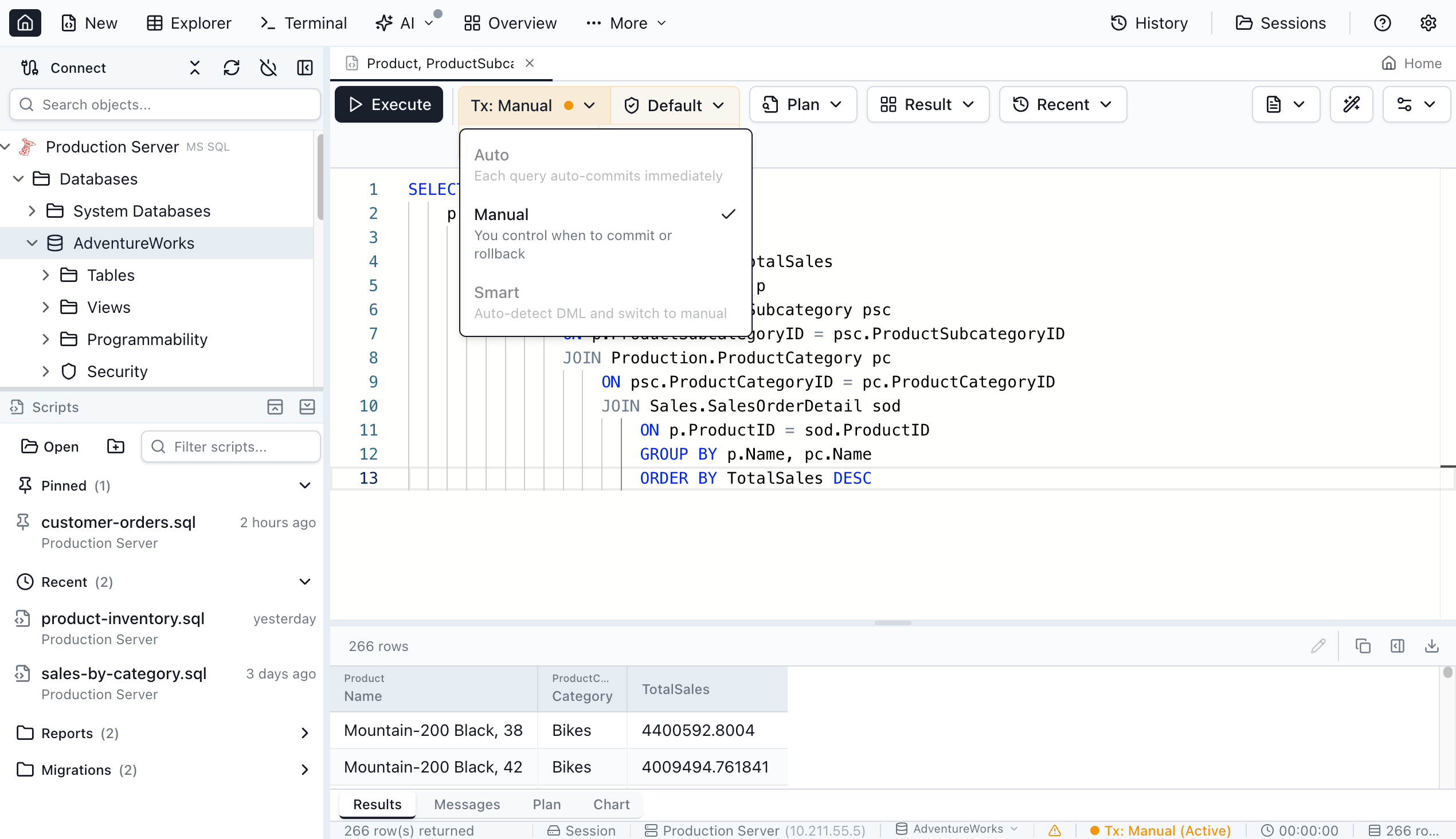
SQL Server, PostgreSQL, MySQL and SQLite tabs have had the three modes since version 1.1.0. Oracle tabs get Manual and Smart mode in version 1.5.6; until then an Oracle tab could only auto-commit. On Oracle the tab keeps one database session from its first statement until you commit or roll back, so other tabs see your changes only after the commit. Smart mode on Oracle begins a transaction for a top-level INSERT, UPDATE, DELETE or MERGE; a PL/SQL block runs in auto-commit there, so use Manual mode to run one inside a transaction. DDL still commits the open transaction, as it does in every Oracle tool. The Oracle transactions section of the docs has the details.
The silent ROLLBACK, flagged. Because MySQL and Oracle report nothing when a COMMIT or ROLLBACK has nothing to act on, version 1.5.6 adds a warning to Messages when an Auto-mode run on either engine contains one, for example Auto mode commits each statement as it runs, so ROLLBACK had nothing to undo. Switch the transaction mode to Manual to commit or roll back yourself. On MySQL the warning stays away when the same run started a transaction with START TRANSACTION or BEGIN, or turned autocommit off. SQL Server, PostgreSQL and SQLite already report it themselves, as the results table shows, so they get no extra message.
A BEGIN you type in Auto mode. When a run ends with a transaction still open (a BEGIN TRAN, BEGIN or START TRANSACTION without its COMMIT), the tab keeps that connection until a later run ends the transaction. The toolbar then shows Transaction open with Commit and Rollback, and the status bar shows Tx: Auto (Open). Other tabs and AI agents use other connections, so they see only committed data.
When the tab, the connection or the app goes away. Closing a tab with an open transaction asks first: Commit and Close, Rollback and Close, or Cancel. Disconnecting rolls the connection’s open transactions back, and so does quitting the app. Jam never commits on your behalf the way SQL*Plus does on exit. An AI agent running SQL over MCP with query_execute cannot leave a transaction open: if its SQL does, the transaction is rolled back and the call fails with a message that says so. The Query Editor docs cover the per-engine details, including SQLite’s separate file handle for a tab that holds a write transaction.
Transaction modes protect against a different mistake than the confirmation prompt for DELETE without WHERE or DROP TABLE, which How to Prevent Running Queries on the Wrong Database covers. A Manual tab lets you look at the result of an UPDATE before anyone else can see it; the prompt stops the statement before it runs.
How often people use manual commit, from app telemetry
Jam SQL Studio records an anonymous event for each successful Query Editor run, with the engine and the tab’s transaction mode. Between 15 August and 13 October 2026, 771 installations ran 73,190 successful queries on the five engines. 1,062 of those runs (1.5%) were in Manual or Smart mode, from 39 installations (5.1%).
| Engine | Runs | In Manual or Smart | Installations | Used Manual or Smart |
|---|---|---|---|---|
| SQL Server | 50,818 | 896 (1.8%) | 393 | 28 (7.1%) |
| MySQL | 15,067 | 160 (1.1%) | 176 | 8 (4.5%) |
| PostgreSQL | 4,472 | 4 (0.1%) | 142 | 2 (1.4%) |
| Oracle | 2,260 | — (Auto only before 1.5.6) | 76 | — |
| SQLite | 573 | 2 (0.3%) | 57 | 2 (3.5%) |
What the numbers say, read plainly:
- Manual commit is a minority habit, strongest on SQL Server. About one SQL Server installation in fourteen ran at least one query in Manual or Smart mode, against one in seventy on PostgreSQL. Use is concentrated: one installation accounts for 79 of MySQL’s 84 Smart-mode runs, and one for 165 of SQL Server’s 375.
- About half of those who switch also switch back. 68 installations switched a tab from Auto to Manual or Smart in the window. 37 of them then ran a query in that mode, and 36 switched a tab back to Auto at some point.
- Oracle had no choice. All 2,260 Oracle runs from 76 installations were in Auto mode, because it was the only mode until 1.5.6. No version with Oracle’s Manual and Smart mode had reached users when we pulled these numbers, so there is no field data on them yet.
The transaction errors people hit. The app also attaches the server’s error number to failed runs, since version 1.4.25. Between 29 August and 13 October 2026, among 349 installations that ran SQL Server queries on those versions, 13 hit Msg 266 (36 times) and 5 hit Msg 3902 or 3903, a COMMIT or ROLLBACK with no BEGIN TRANSACTION (12 times). All 36 Msg 266 errors came from app versions before 1.5.5, and that has a cause in the app: on direct driver connections, those versions sent a SQL Server batch through sp_executesql, which answers a BEGIN TRAN without a COMMIT with exactly this error, as our test showed. Four of the five installations with a 3902 or 3903 had also hit Msg 266, which fits a COMMIT or ROLLBACK in a later run finding no transaction to end. Since 1.5.5 such a batch is sent as a plain batch, the way SSMS sends it, and the transaction stays open in the tab. A stored procedure that leaves a transaction open raises the same Msg 266, and the telemetry cannot tell the two apart. On MySQL, 2 of 165 installations hit lock wait timeout 1205.
The silent cases don’t appear in this data at all. A ROLLBACK that MySQL or Oracle accepted without doing anything is a successful run, so the telemetry cannot count how often it happened, and neither can the user. That is the reason for the 1.5.6 warning. The open-transaction indicator for Auto mode shipped in 1.5.5 on 9 October; in its first five days four installations left a transaction open in an Auto tab, too few to report on.
How we tested
All runs were on 14 October 2026, on an Apple Silicon Mac running Docker 29.1.2, against these containers and clients:
- SQL Server: Azure SQL Edge Developer 15.0.2000.1574 (ARM64), which runs the SQL Server 2019 database engine, in a scratch database created with default options (
READ_COMMITTED_SNAPSHOToff). Client: go-sqlcmd 1.9.0, plus mssql 12.2.0 / tedious 19.1.3 for the kill and freeze tests. - PostgreSQL 16.4, psql 16.4 in the container, pg 8.16.3 for the kill and freeze tests, in a scratch database.
- MySQL 8.0.45 and MariaDB 10.2.21, each with its own
mysqlclient in the container, mysql2 3.16.3 for the kill and freeze tests, InnoDB tables in a scratch database (plus one MyISAM table). - Oracle AI Database 26ai Free 23.26.1.0.0, SQL*Plus 23.26.1.0.0, node-oracledb 6.10.0 in Thin mode.
- SQLite 3.51.0 (the macOS
sqlite3shell) on a scratch file in the default rollback-journal mode.
The kill and freeze tests used a Node.js 22.21.1 script per engine that opened a transaction, inserted one row and then sat idle. From a second session we read the server’s transaction view (sys.dm_exec_sessions, pg_stat_activity, information_schema.innodb_trx, v$transaction) and tried to touch the row with a 3-second lock timeout. Then we sent the script SIGSTOP, waited 30 seconds, checked again, sent SIGKILL, and counted the row from a new session. For SQLite the holder was a sqlite3 process reading from a pipe. All test objects were prefixed blog_tx_ and dropped afterwards.
Telemetry. Jam SQL Studio’s anonymous in-app usage events. The run counts come from the event sent after each successful Query Editor run (engine, transaction mode, app version), 15 August to 13 October 2026 (60 days); mode switches from the event sent when a tab’s mode changes (from, to, engine); error numbers from the event sent after a failed run, 29 August to 13 October. No SQL text, no object or database names, no connection details and no error message text are sent. An installation is one anonymous device identifier, not a person, and installations that turned off usage data in Settings → Privacy are not counted. The privacy policy describes the telemetry.
The client defaults we did not run ourselves (SSMS, SQL Developer, DBeaver, JDBC, the Python drivers) come from their vendors’ documentation, named in the defaults table. The Jam SQL Studio behavior comes from the app’s public docs, its source code and its changelog, not from these scripts.
Quick Answers
Short answers to the common questions about autocommit, implicit commits and rollback.
Q: Does Oracle autocommit?
A: Not by itself. Oracle has no server-side autocommit; the client decides. SQL*Plus starts with AUTOCOMMIT OFF, SQL Developer's Autocommit preference is off by default, node-oracledb and python-oracledb leave it off, and JDBC connections start with it on. Watch the exit: SQL*Plus commits pending changes on EXIT and at the end of a script by default (EXITCOMMIT ON), while a driver that closes the connection without COMMIT rolls them back.
Q: Why does ROLLBACK not work in MySQL?
A: Usually because autocommit is on, which is the default: each INSERT, UPDATE or DELETE was committed as it ran, and the ROLLBACK after it has nothing to undo. MySQL answers it with Query OK, 0 rows affected and no warning. Start the transaction with START TRANSACTION or SET autocommit = 0 first. Even then, a DDL statement, TRUNCATE or a second START TRANSACTION commits the open transaction, and changes to MyISAM tables are never rolled back (warning 1196).
Q: Which statements cause an implicit commit?
A: On Oracle and MySQL, DDL such as CREATE, ALTER, DROP and TRUNCATE commits the open transaction. In our tests both committed an earlier INSERT even when the CREATE TABLE itself failed because the name was taken; on Oracle a CREATE TABLE with a syntax error did not commit. MySQL also commits on START TRANSACTION inside a transaction, but not on CREATE TEMPORARY TABLE. SQL Server, PostgreSQL and SQLite run DDL inside the transaction and roll it back with everything else.
Q: What does SET IMPLICIT_TRANSACTIONS ON do in SQL Server?
A: It makes SQL Server start a transaction automatically at the first statement that touches data, such as an INSERT or a SELECT from a table, and keep it open until you run COMMIT or ROLLBACK. In our test @@TRANCOUNT stayed 0 after SELECT @@TRANCOUNT and became 1 after SELECT COUNT(*) FROM a table and after an INSERT; ROLLBACK then undid the INSERT. It is off by default in SQL Server, sqlcmd and SSMS.
Q: Can you roll back CREATE TABLE in PostgreSQL?
A: Yes. PostgreSQL runs DDL inside the transaction, so CREATE TABLE, DROP TABLE and TRUNCATE between BEGIN and ROLLBACK are all undone; we checked all three on PostgreSQL 16.4. A few commands refuse to run in a transaction block at all, among them CREATE DATABASE, VACUUM and CREATE INDEX CONCURRENTLY, which fail with SQLSTATE 25001.
Q: What happens to an uncommitted transaction when the connection closes?
A: The database rolls it back. We closed sqlcmd, psql, mysql and sqlite3 without a COMMIT and killed a client process with kill -9 on all five engines, and the uncommitted row was gone every time. The exception is SQL*Plus, which commits on exit unless you SET EXITCOMMIT OFF or use EXIT ROLLBACK. A client that freezes, sleeps or loses its network without closing the connection is different: the server keeps the transaction and its locks until it notices the connection is gone.
Q: Does Jam SQL Studio support manual commit on Oracle?
A: Yes, from version 1.5.6. Oracle query tabs get Manual and Smart transaction modes, which SQL Server, PostgreSQL, MySQL and SQLite tabs have had since version 1.1.0. Version 1.5.6 also shows a warning in Messages when a COMMIT or ROLLBACK in an Auto-mode run on Oracle or MySQL had nothing to act on, because neither database reports it.
Summary
Three differences account for most transaction surprises when moving between these engines. Oracle and MySQL commit around DDL, including a TRUNCATE and a CREATE TABLE that fails, while SQL Server, PostgreSQL and SQLite roll DDL back. MySQL and Oracle accept a COMMIT or ROLLBACK that does nothing without a word, while the other three return an error or a warning. And the client sets the default: SQL Developer and SQL*Plus start with autocommit off, SQL*Plus commits on exit, and Python drivers open a transaction that is lost unless the code commits it. A closed or killed connection rolled back on every engine; a frozen one kept its transaction and locks.