 Jam SQL Studio
 Database Version Control in DataGrip, DBeaver, and Navicat
All three SQL clients can get your schema into Git, but they version different things. DataGrip keeps the schema as a DDL data source you store in Git and migrate back to a database. DBeaver puts a project's files — scripts, diagrams, bookmarks — under Git, so the schema is versioned only as the scripts you save. Navicat generates SQL files and leaves the commit to your own Git client. This page compares the three as of September 2026 against Jam SQL Studio's Database Blueprint, which writes the live database as one .sql file per object, keeps it in sync, and can version table rows too.
Database Blueprint is in beta • Free for personal use up to 200 objects • Mac, Windows, Linux
Version Control Compared: DataGrip, DBeaver, Navicat, Jam SQL Studio
What each tool puts in Git, and how changes get back to a database.
| Capability | DataGrip | DBeaver | Navicat | Jam SQL Studio — Database Blueprint |
|---|---|---|---|---|
| What goes into Git | DDL data source SQL files | Project files: scripts, ER diagrams, bookmarks, config | SQL scripts you export | One .sql file per object, plus optional table-data files |
| Git inside the app | ✓ JetBrains Git integration | Enterprise & Ultimate; Community via an extension | ✗ External Git client | ✓ Git panel in the Blueprint tab |
| Write a live database to files | ✓ Update the DDL data source from a database | Generate and save DDL scripts yourself | Dump SQL File (one file) | ✓ Refresh from DB, with a preview of changed files |
| Apply files back to a database | Migration dialog (still under development per JetBrains) | Run the scripts | Run the scripts; Structure Synchronization diffs two databases | ✓ Apply schema opens Schema Compare for review |
| Merge local edits with live changes | — | — | — | ✓ Three-way merge: your edits, last refresh, live database |
| Table rows in version control | ✗ Schema only | ✗ No row capture | ✗ DDL scripts in Navicat's workflow | ✓ Captured rows + row-level sync back |
| One folder for Dev / Stage / Prod | — | — | — | ✓ Multiple linked databases per folder |
| Price for this feature | Free non-commercial; paid subscription otherwise | Enterprise & Ultimate (paid); Community with an extension | Paid Navicat Premium | ✓ Free Personal tier up to 200 objects |
DataGrip: a DDL Data Source Kept in Git
DataGrip treats a folder of DDL files as a database of its own. (JetBrains docs)
- DDL data source. A virtual view of a database structure built from SQL files containing DDL statements. You store those files in Git with DataGrip's Git integration.
- Sharing a change. Change the real data source, update the DDL data source from it, then commit and push.
- Receiving a change. Pull, then migrate the changes from the DDL data source to a real data source. JetBrains' documentation for DataGrip 2026.2 still says the Migration dialog is under development and that you may need to delete unnecessary DDL scripts in it by hand.
- What it doesn't cover. Table rows — a DDL data source is schema only.
- Price. DataGrip has been free for non-commercial use since October 2025; commercial use needs a paid license.
Choose it if you already work in JetBrains IDEs and want the schema to behave like another data source in the same tool. Moving from DataGrip? Jam SQL Studio imports its saved data sources in one click (connection import); see also Jam SQL Studio vs DataGrip.
DBeaver: Git for Project Files
DBeaver's version control is a Git integration for DBeaver projects. (DBeaver docs)
- What it tracks. A project's configuration, SQL scripts, ER diagrams, and bookmarks.
- How you commit. Right-click the project, Team → Commit, stage files in the Git Staging view, then Team → Remote → Push. File → Git → Create Project from Git clones an existing repository into a project. Branching and conflict handling come from Eclipse EGit, which the feature is built on.
- Editions. DBeaver's documentation lists the feature in the Enterprise and Ultimate editions; Community users install the Git extension first, and Team Edition has its own Git feature.
- What it means for the schema. Git sees files, not the database. To version the schema you generate DDL scripts, save them into the project, and regenerate them when the database changes.
Choose it if what you want versioned is the team's working set of queries and diagrams. Moving from DBeaver? Jam SQL Studio imports DBeaver connections across the five relational engines (connection import); see also Jam SQL Studio vs DBeaver.
Jam SQL Studio Database Blueprint
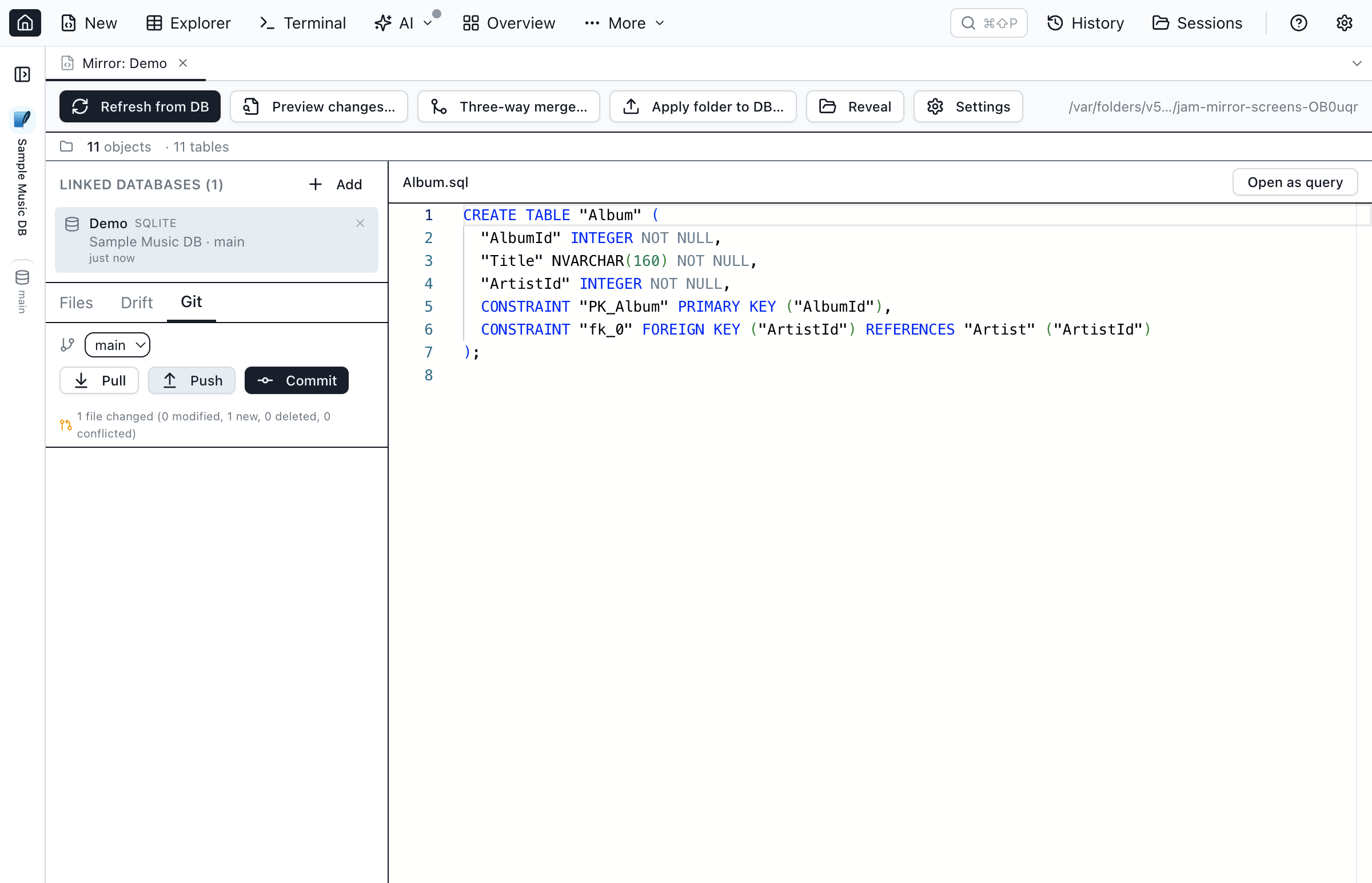
Database Blueprint is a dedicated schema-to-folder workflow rather than a general Git feature. Here is what it does, and what it doesn't:
- Refresh from DB writes one
.sqlfile per table, view, procedure, function, trigger, and schema, and previews the added, modified, and removed files before it writes anything. - Apply schema sends your edits back through Schema Compare, with the folder as the source, so you read the generated DDL before it runs. Column edits in
Tables/*.sqlround-trip on SQL Server, PostgreSQL, MySQL, and Oracle; SQLite supports adding and dropping columns only. - Git panel inside the tab: status with ahead/behind counts, a clickable changed-file list, initialize, commit with a message generated from the changed objects (for example “Refresh from DB: 2 tables, 1 view, 1 proc (Dev)”), branch switch, pull, push, and a merge-conflict dialog. Git only — no Subversion or Perforce.
- Three-way merge between your local edits, the last refresh, and the live database separates clean merges from real conflicts.
- Table data: opt a table in during Refresh from DB and its rows land in
Data/as a.data.sqlupsert script and a.data.jsonsidecar; Sync data folder → DB pushes row-level inserts, updates, and deletes back. Tables need a primary key. - Several databases, one folder: link Dev, Stage, and Prod copies of the same schema and switch which one each action targets.
- Not included: no
.sqlproj/.dacpacbuild and no migration-script history. If your pipeline deploys with SQL Database Projects or Flyway, keep that; SQL Server source control options covers those tools.
Full reference: Database Blueprint documentation.
Frequently Asked Questions
Version control in DataGrip, DBeaver, Navicat, and Jam SQL Studio.
Does DataGrip have version control?
Yes. DataGrip includes JetBrains' Git integration for the files in your project, and a DDL data source for the schema itself: a virtual data source built from SQL files of DDL that you keep in Git, update from a real database, and migrate back to one. As of DataGrip 2026.2, JetBrains notes that the Migration dialog used for that last step is still under development.
Does DBeaver have version control?
DBeaver can put a project — its SQL scripts, ER diagrams, bookmarks, and configuration — under Git, with Team → Commit and Team → Remote → Push on the project menu. The feature is built on Eclipse EGit and ships in DBeaver Enterprise and Ultimate; Community users install an extension first, and Team Edition has its own Git feature. It versions project files, so the schema is versioned only as the DDL scripts you save into the project.
Does Navicat have version control?
Not built in. Navicat's own July 2026 write-up on schema version control uses Navicat to produce SQL files — Dump SQL File for a database's DDL, Structure Synchronization for a diff script between two databases, and Data Modeler's export — and commits them with Git outside Navicat.
How is Jam SQL Studio's Database Blueprint different?
Database Blueprint writes the live database as a folder of .sql files, one per table, view, procedure, function, and schema, and keeps that folder in two-way sync with one or more linked databases. It has a Git panel inside the tab, a preview of what a refresh will change, a three-way merge between your edits, the last refresh, and the live database, and an Apply schema step that opens Schema Compare so you review the DDL before it runs. It is in beta.
Can any of these tools version table data, not just schema?
DataGrip's DDL data source and DBeaver's Git integration version schema and project files, and Navicat's write-up covers DDL scripts. Database Blueprint can also capture a table's rows during Refresh from DB into a tracked Data/ folder (a .data.sql upsert script and a .data.json sidecar with the primary key and column types), and Sync data folder → DB pushes row-level inserts, updates, and deletes back to a linked database. Tables need a primary key for that sync.
Is Database Blueprint free?
Database Blueprint is available in Jam SQL Studio's free Personal mode for databases with up to 200 objects (tables, views, procedures, and functions); larger databases require Pro. For comparison, DataGrip has been free for non-commercial use since October 2025, DBeaver's built-in Git integration is in its paid Enterprise and Ultimate editions, and Navicat Premium is a paid product.
Version-Control Your Schema with Database Blueprint
Download Jam SQL Studio free and keep your database schema — and, if you want, table rows — in Git.
Comparing Database Source Control?
SQL Server-specific tools and Microsoft's SQL project format.
Learn more: Database Blueprint docs · Schema Compare