 Jam SQL Studio
 Published: 2026-10-14
How to Run Oracle Database on a Mac (Apple Silicon) in 2026
Oracle ships no macOS build of Oracle Database, so on a Mac you run it as a Linux container. Since Oracle Database 23.5 Free there is an Arm64 Linux build, and the gvenzl/oracle-free image — Oracle AI Database 26ai Free, release 23.26.3 at the time of writing — runs on Apple Silicon without Rosetta. On an M4 Max it accepted connections a median of 20 seconds after docker run and held about 2.5 GiB of memory. Connect to localhost:1521/FREEPDB1: the service name is where most first connections go wrong. Among new Jam SQL Studio installations over six weeks, 42% of those that tried to reach an Oracle database never connected, against 17% for SQL Server, and “service not registered with the listener” was the most common error. Below: the commands, what we measured, and what each error means.
The short version
docker run -d --name oracle \
  -p 1521:1521 \
  -e ORACLE_PASSWORD=ChangeMe_2026 \
  -e APP_USER=app -e APP_USER_PASSWORD=App_2026 \
  -v oracle-data:/opt/oracle/oradata \
  gvenzl/oracle-free:23.26.3

docker logs -f oracle      # wait for: DATABASE IS READY TO USE!
Then connect any client with these values:
| Field | Value |
|---|---|
| Host / port | localhost / 1521 |
| Service name | FREEPDB1 (not FREE, XE, XEPDB1 or ORCL) |
| Application user | app / App_2026 — created in FREEPDB1 by APP_USER |
| Admin user | system / the ORACLE_PASSWORD value |
| EZConnect string | localhost:1521/FREEPDB1 |
| JDBC URL | jdbc:oracle:thin:@//localhost:1521/FREEPDB1 |
The tag is pinned on purpose. latest pointed at the same image (digest 7ed34d0ade89) when we checked on October 14, 2026, but it moves with every release, and a later docker pull would change the database version under you. The rest of this guide explains each part of that command and what happens when one of them is missing.
Pick a container runtime
The image is an ordinary OCI image, so Docker Desktop, Colima and Podman all run it with the same arguments. Every number in this post comes from Docker Desktop 4.54.0 on an M4 Max; we did not repeat the runs on Colima or Podman. Two things differ between them, and both are about the Linux VM the runtime starts:
- Memory. The container used about 2.5 GiB once the database was open (more on that below), and its startup script prints a warning when it sees less than 2 GB. Colima’s default VM has 2 GiB of memory, per its README, which leaves nothing for anything else — start it with
colima start --memory 4. On Podman, stop the machine and runpodman machine set --memory 4096. In Docker Desktop the limit is under Settings → Resources. - CPU architecture. Leave it alone. All three pick the arm64 variant of a multi-arch image on an M-series Mac. Don’t add
--platform linux/amd64(or create a Colima VM with--arch x86_64) because an old tutorial did — the next section shows what that costs.
What runs on Apple Silicon without emulation
Oracle’s Database Free page says Mac developers “using Arm-based or Intel-based computers” can run Oracle AI Database 26ai Free “using a Docker image”. The gvenzl/oci-oracle-free README dates the change: Oracle has provided Arm ports since Oracle Database 23.5 Free, and the images have been multi-arch since then. Older editions never got an Arm64 build. We read each image’s manifest on October 14, 2026:
| Image | Database | Architectures | On an M-series Mac |
|---|---|---|---|
gvenzl/oracle-free (all tags: regular, -slim, -full, -faststart) | 26ai Free, 23.26.3 | amd64, arm64 | Runs as arm64 |
container-registry.oracle.com/database/free | 26ai Free (Oracle’s own image) | amd64, arm64 | Runs as arm64 |
gvenzl/oracle-xe (11g, 18c, 21c) | Express Edition; last image update October 2024 | amd64 only | x86-64 emulation |
container-registry.oracle.com/database/express | 21c Express Edition | amd64 only | x86-64 emulation |
Oracle’s Enterprise Edition images sit behind a registry sign-in and licence acceptance, so we did not check them. On the Docker Desktop setup above, an amd64 container ran under Rosetta: /proc/cpuinfo inside it reported the vendor VirtualApple.
To see what emulation costs, we ran the amd64-only tag 23.26.3-slim-amd64 with --platform linux/amd64 and compared it with the arm64 23.26.3-slim on the same Mac. We did not run the XE images themselves; the amd64 build of the same Free release is the closest like-for-like comparison. Under Rosetta the database started without errors, ready in 22.1 and 31.1 seconds over two runs, against a 17.0-second median for the arm64 slim tag; with the spread we saw between runs, two runs cannot show whether emulation slows startup. The difference showed once it was running:
| Measurement | arm64 (-slim) | amd64 under Rosetta (-slim-amd64) |
|---|---|---|
| PL/SQL loop, 20 million iterations | 2.59 s | 5.27 s |
| Insert 1 million generated rows | 0.76 s | 1.25 s |
| Container memory while idle | 2.06 GiB | 3.37–3.48 GiB |
| CPU while idle | about 1% | about 2% |
Times are medians of three runs, measured with SQL*Plus SET TIMING ON. Twice the CPU time for PL/SQL and over 1 GiB more memory is tolerable for a quick test, but there is no reason to accept it when an arm64 image exists. There is also a deadline: Apple’s September 1, 2026 developer notice says macOS 27 is the final release to support Rosetta for Intel apps. It does not mention the Rosetta for Linux that Docker Desktop uses here, so treat an emulated Oracle as a stopgap rather than a setup to build on.
Which image flavor to use
The gvenzl image comes in four flavors with the same database inside. We pulled the 23.26.3 tags and timed fresh containers from docker run to the DATABASE IS READY TO USE! line in the log, five runs each:
| Tag | Download | On disk | Ready after: median (range) | Memory at ready |
|---|---|---|---|---|
23.26.3 (regular; also latest) | 1.00 GB | 3.33 GB | 20.1 s (7.3–26.0, 5 runs) | 2.0 GiB |
23.26.3-slim | 714 MB | 2.29 GB | 17.0 s (6.1–23.9, 5 runs) | 2.0 GiB |
23.26.3-faststart | 1.49 GB | 7.11 GB, of which 3.33 GB is shared with the regular tag | 22.3 s (9.5–36.5, 6 runs) | 2.0 GiB |
23.26.3-full | 2.01 GB (Docker Hub) | not pulled | not measured | — |
Existing container, docker stop then docker start | — | — | 10.2 s (1 run; the stop took 2.5 s) | — |
The differences between flavors are smaller than the spread within each one. Almost all of that spread came from one step: the time between the log lines starting up Oracle Database... and ORACLE instance started., which took anywhere from 1.7 to 15 seconds from run to run with no pattern we could find. Unpacking the compressed datafiles, the step the faststart images exist to skip, took 3–5 seconds. Faststart saved neither time nor disk here: in the five faststart runs we logged phase by phase, the step from ORACLE instance started. to Database opened. took 8–22 seconds against about 2 for the other tags, and after one start the container’s writable layer measured 3.29 GB, the same as a regular container’s. That is consistent with the overlay filesystem copying each datafile out of the image layer the first time the database writes to it. On Docker Desktop, use the regular tag, or -slim for a smaller download if you only need relational features.
Per the image’s ImageDetails.md, the regular image already drops Java in the database, SQLcl, OLAP, Workspace Manager and the JDBC drivers; -slim also uninstalls Oracle Text, Spatial and Locator and the Multilingual Engine. We compared DBA_REGISTRY in the two: the regular container lists Oracle Text and Spatial as VALID, while the slim one has neither and shows Oracle XML Database as INVALID. Skip -slim if you use CONTAINS text searches, SDO_GEOMETRY or XML DB. Use -full only when you need a component the others removed. All flavors keep SQL*Plus, Data Pump (expdp/impdp) and SQL*Loader inside the container, which you can run with docker exec instead of installing them on the Mac.
FREE or FREEPDB1: the service name
Oracle Database Free is a container database (CDB) called FREE with one pluggable database (PDB) called FREEPDB1. Your tables belong in the PDB. The CDB root is for administration, and a user created in the PDB does not exist there. Here is what the listener inside a fresh container offers (docker exec oracle lsnrctl status):
Service "5a4ccb1829931092e0634d00010ab936" has 1 instance(s).
Service "FREE" has 1 instance(s).
Service "FREEXDB" has 1 instance(s).
Service "freepdb1" has 1 instance(s).
The long hexadecimal name is the PDB’s internal service and FREEXDB serves XML DB; neither is something you connect to. We then connected with node-oracledb 6.10 in Thin mode — the driver Jam SQL Studio uses — and with SQL*Plus inside the container, trying the names people copy from older tutorials:
| Connect string (port 1521) | Result |
|---|---|
localhost:1521/FREEPDB1 or /freepdb1 | Connects to FREEPDB1; the service name is not case-sensitive |
localhost:1521/FREE | Connects system to CDB$ROOT; your application user gets ORA-01017 |
localhost:1521 (no service) | Also lands in CDB$ROOT, because the listener’s DEFAULT_SERVICE_LISTENER is FREE |
localhost:1521/XEPDB1, /XE, /ORCLPDB1 | NJS-518: cannot connect to Oracle Database. Service "XEPDB1" is not registered with the listener at host 127.0.0.1 port 1521. SQL*Plus reports the same as ORA-12514 |
SID=FREEPDB1 in a descriptor | NJS-519: … SID "FREEPDB1" is not registered with the listener — FREEPDB1 is a service, not a SID |
SID=FREE in a descriptor | Connects, to CDB$ROOT |
XEPDB1 and XE come from Oracle XE 18c/21c guides; ORCLPDB1 and ORCL from Enterprise Edition defaults. If you create your own PDB with the image’s ORACLE_DATABASE variable, its name becomes another service. When you are not sure, lsnrctl status inside the container is the authority. In Jam SQL Studio, the Discover button next to the service-name field asks the listener which of the common names are registered and lists them as pills you can click.
Create a user you can log in with
The APP_USER and APP_USER_PASSWORD variables create the user on first start. The image’s createAppUser script switches to FREEPDB1 and runs, in effect:
ALTER SESSION SET CONTAINER = FREEPDB1;
CREATE USER app IDENTIFIED BY "App_2026" DEFAULT TABLESPACE users QUOTA UNLIMITED ON users;
GRANT DB_DEVELOPER_ROLE TO app;
To add a user later, connect as system to FREEPDB1 and run the last two statements yourself. The grant is the part people get wrong. We created four users with different grants and logged in as each over Thin mode:
| Grants | Login to FREEPDB1 |
|---|---|
| None | ORA-01045: Login denied. User NO_GRANTS does not have CREATE SESSION privilege. |
RESOURCE only | ORA-01045 — RESOURCE holds 15 CREATE privileges for objects, but not CREATE SESSION |
CONNECT only | Logs in. In 26ai CONNECT is exactly CREATE SESSION and SET CONTAINER, so the user can log in but cannot create a table |
DB_DEVELOPER_ROLE | Logs in. The role carries 14 system privileges, including CREATE SESSION and DEBUG CONNECT SESSION, plus the RESOURCE and CTXAPP roles |
So ORA-01045 appears when the user was given object privileges, typically RESOURCE alone, and never CREATE SESSION. GRANT CONNECT, RESOURCE, the pair in many older guides, works; DB_DEVELOPER_ROLE, added in 23ai, is the single grant meant for application developers. The other common surprise is ORA-01017: invalid credential or not authorized; logon denied with the right password: the user lives in FREEPDB1 and the connection went to FREE, or to no service at all.
If you plan to read execution plans, watch sessions or step through PL/SQL, those need further grants such as SELECT ANY DICTIONARY and DEBUG ANY PROCEDURE; the reproducible Oracle workflow lists them against this same container.
Keep your data: volumes and restarts
Without a volume the database lives in the container’s writable layer. It survives docker stop and docker start — the users we had created were still there after a restart — but docker rm deletes it. Mount a named volume at /opt/oracle/oradata, as in the command at the top, and the data outlives the container. We checked the whole cycle:
- A first container on an empty volume took 7.9 seconds to become ready and left 3.1 GB in the volume.
- We added a row, removed the container with
docker rm -f, and started a new one on the same volume with a differentORACLE_PASSWORD. It was ready in 5.1 seconds, and the row was there. - The new password did not apply. The log said so:
Logging in asCONTAINER: database already initialized. CONTAINER: WARNING: $ORACLE_PASSWORD has been specified but the database is already initialized. The password will be ignored.systemwith the new password returnedORA-01017; the old one still worked. - The image’s own script changes it:
docker exec oracle resetPassword NewPassword_2026sets theSYSandSYSTEMpasswords, and the new password worked straight away.
The same rule covers every variable the image reads (ORACLE_PASSWORD, APP_USER, ORACLE_DATABASE): they apply when the database is created, not on later starts. To begin again from scratch, remove the container and the volume (docker volume rm oracle-data).
Init scripts run once, as SYS, in the root container
Files in /container-entrypoint-initdb.d (.sql, .sql.gz, .sql.zip and .sh, in alphabetical order) run after the database is created. Two details trip people up, and we checked both with a volume and a script mounted from the Mac:
- They run only when the database is created. On the first start our script ran; on the second container, reusing the volume, the log went straight from
database already initializedto the startup scripts. Without a volume every new container creates a fresh database, so the scripts run each time. For something that must happen on every start, use/container-entrypoint-startdb.dinstead — our script there ran on both starts. .sqlfiles run asSYSin the root container, not inFREEPDB1. The image runs them withsqlplus / as sysdba. Our script printed its container before and after switching:
Ainit script connected to: CDB$ROOT after ALTER SESSION: FREEPDB1CREATE TABLEwithout the switch lands in the root container, where your application never looks.
So an init script for an application schema starts like this:
-- db/init/01_app_schema.sql
ALTER SESSION SET CONTAINER = FREEPDB1;

CREATE USER app IDENTIFIED BY "App_2026" DEFAULT TABLESPACE users QUOTA UNLIMITED ON users;
GRANT DB_DEVELOPER_ROLE TO app;

CREATE TABLE app.notes (
  id   NUMBER GENERATED ALWAYS AS IDENTITY PRIMARY KEY,
  body VARCHAR2(100)
);
Per the README, a failing sourced .sh script, or an executable one that exits non-zero, stops the container and can leave the database half-initialized. With Docker Compose, the image’s healthcheck.sh lets an application container wait until the database, including your init scripts, is ready:
services:
  oracle:
    image: gvenzl/oracle-free:23.26.3
    ports:
      - "1521:1521"
    environment:
      ORACLE_PASSWORD: ChangeMe_2026
    volumes:
      - oracle-data:/opt/oracle/oradata
      - ./db/init:/container-entrypoint-initdb.d:ro
    healthcheck:
      test: ["CMD", "healthcheck.sh"]
      interval: 5s
      timeout: 5s
      retries: 30
  app:
    build: .
    depends_on:
      oracle:
        condition: service_healthy
volumes:
  oracle-data:
In the 23.26.3 image, healthcheck.sh returns a non-zero status while the container is still initializing or running scripts from either directory, and zero once FREEPDB1 is open read-write. We ran this file on the same Mac with a placeholder app container and the init script above: docker compose up -d --wait returned after 17.3 seconds, and the app container started about 15 seconds after the database container, once the database reported healthy.
Memory, CPU and disk
Oracle’s terms cap Oracle AI Database 26ai Free at 2 CPUs, 2 GB of RAM and 12 GB of user data, per the Database Free page. Inside the container we read the settings that implement it:
cpu_count= 2, which the gvenzl image sets explicitly.- A System Global Area of 1,603,392,144 bytes (about 1.5 GiB, from the startup log) and
pga_aggregate_target= 512 MiB, with a 2 GiBpga_aggregate_limit. docker statsshowed about 2.0 GiB as the database opened and 2.50 GiB a few minutes later, flat for the next three minutes with the database idle and 1–5% CPU.- The datafiles take 3.1 GB under
/opt/oracle/oradataafter the first start, on top of the image itself (3.33 GB on disk for the regular tag).
We would give the runtime’s VM at least 4 GB, so the database’s 2.5 GiB leaves room for the VM itself and an application container next to it. The 12 GB data cap is the limit you are most likely to meet if you load a copy of a production database.
Connect from a client on the Mac
The container is a normal Oracle listener on localhost:1521, so the connection is the same for every tool:
- SQL*Plus in the container:
docker exec -it oracle sqlplus app/App_2026@FREEPDB1. The image’stnsnames.oradefines theFREEandFREEPDB1aliases, so the short form works there. - Drivers on the Mac: EZConnect
localhost:1521/FREEPDB1for node-oracledb and python-oracledb,jdbc:oracle:thin:@//localhost:1521/FREEPDB1for JDBC. The Thin modes of the Node.js and Python drivers need no Oracle Instant Client; Oracle on Apple Silicon without Instant Client covers why that matters on an M-series Mac. - From another container: on a shared Docker network the host is the container name (
oracle:1521/FREEPDB1), notlocalhost.
In Jam SQL Studio, Detect local databases (in the New Connection dialog, the command palette and the Saved Connections dialog) lists running gvenzl/oracle-* and Oracle-registry containers. For a gvenzl/oracle-free container it fills in localhost, the published port and FREEPDB1, and takes the user and password from APP_USER / APP_USER_PASSWORD, or system and ORACLE_PASSWORD when no app user is set. Detection reads /var/run/docker.sock, or DOCKER_HOST when it points at a unix:// socket; with a Colima or Podman socket elsewhere, type the values in by hand. The connections guide has the details.
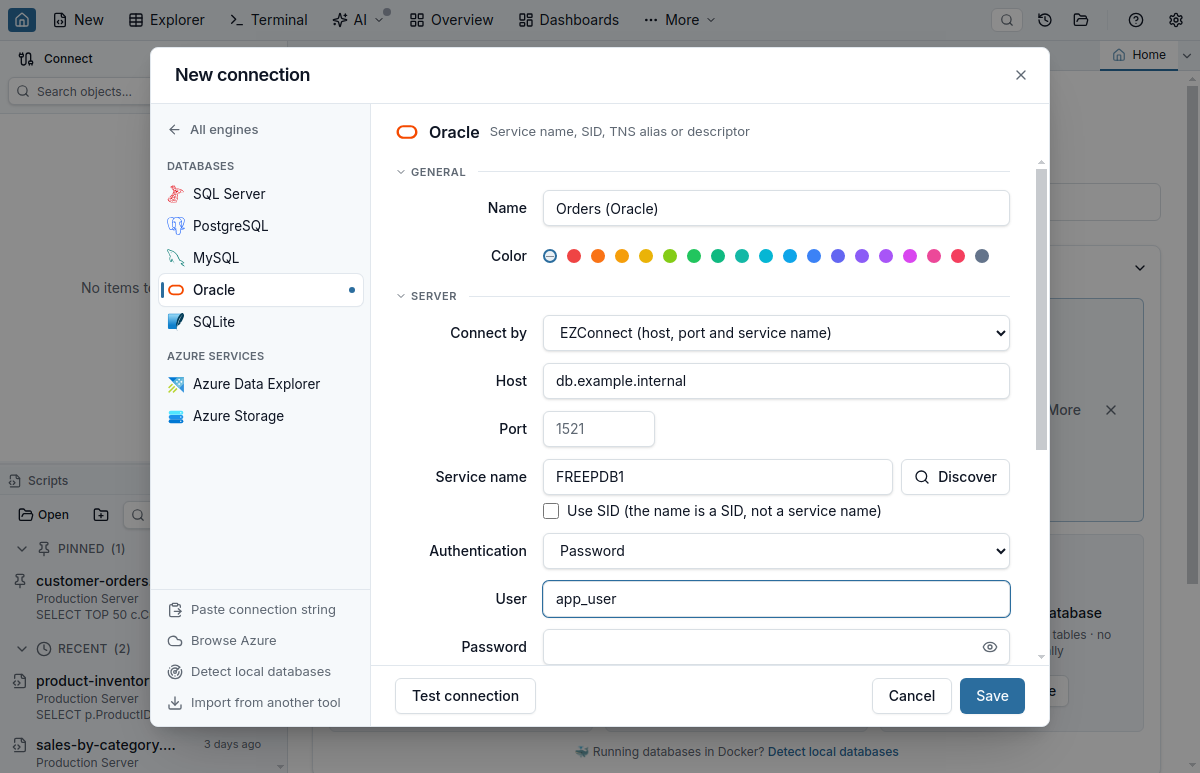
localhost; Discover lists the service names the listener knows.Connection errors and what they mean
Some of these errors are only a matter of timing. We started a container and, at the same moment, began logging in from the Mac with a Thin-mode client every quarter of a second. It got four different errors before the first successful login 8.6 seconds later:
| After | What the client got | What the container was doing |
|---|---|---|
| 0.1 s | NJS-500: connection to Oracle Database was closed or broken | Docker’s published port accepted the connection, but the listener inside had not started |
| 3.9 s | NJS-518: … Service "FREEPDB1" is not registered with the listener | Listener running, database not yet started |
| 6.9 s | ORA-01109: database not open | Instance started, FREEPDB1 not yet open |
| 8.3 s | ORA-01017: invalid credential or not authorized; logon denied | Database open, but the startup script had not yet applied ORACLE_PASSWORD |
| 8.6 s | Connected | The log had just printed DATABASE IS READY TO USE! |
So an NJS-518 or ORA-01017 in the first seconds after docker run says nothing about your settings. Wait for the ready line, then look at the table below.
| Error | Cause with a local container | Fix |
|---|---|---|
NJS-503: connection could not be established | Nothing is published on that port: the container is not running, the -p mapping is different, or the port is wrong | docker ps and check the PORTS column |
NJS-500: connection was closed or broken | The port is published but the listener inside has not started, or the container is restarting | docker logs oracle; wait for the ready line |
ORA-01109: database not open | The database is still starting | Wait for the ready line |
NJS-518 / ORA-12514: service is not registered with the listener | Wrong service name (XEPDB1, ORCL…), or the database is still starting | Use FREEPDB1; wait for DATABASE IS READY TO USE! |
NJS-519 / ORA-12505: SID is not registered | A service name entered as a SID | Untick Use SID, or use SERVICE_NAME= in the descriptor |
ORA-01017: invalid credential or not authorized | Wrong password; a PDB user connecting to FREE; a password changed with ORACLE_PASSWORD on an existing volume; or a login in the second before the startup script sets the password | Connect to FREEPDB1; use resetPassword for system |
ORA-01045: user does not have CREATE SESSION privilege | The user has RESOURCE or object grants only | GRANT DB_DEVELOPER_ROLE (or CREATE SESSION) |
Three more Thin-mode errors showed up in our telemetry, but never against a local Free container, because they come from older or locked-down servers:
NJS-138: “connections to this database server version are not supported by node-oracledb in Thin mode”. The server is older than 12.1, typically 11g. No setting in a Thin-mode client changes that; the server needs an upgrade, or the connection needs a Thick-mode client with Oracle Client libraries.NJS-116: “password verifier type 0x939 is not supported”. Per the node-oracledb troubleshooting guide, the account has only a 10G password verifier and Thin mode needs 11G or later; an administrator has to upgrade the verifier, which means resetting the password. Accounts in the container have11G 12Cverifiers, which we checked inDBA_USERS.PASSWORD_VERSIONS.NJS-533: “Advanced Networking Option service negotiation failed. Native Network Encryption and DataIntegrity only supported in node-oracledb thick mode”. The server requires Oracle Native Network Encryption; Thin-mode clients need TLS instead.
For the full list of Oracle connection fixes Jam SQL Studio offers in the error notice — including Browse services on this listener… for NJS-518 — see Oracle connection issues in the docs.
What the telemetry shows
Jam SQL Studio sends anonymous events when a connection succeeds, when a connection test returns, and when a connection fails — with the engine and the driver’s error code, never the host, user or message. We followed every installation first seen between August 27 and October 7, 2026 until October 14, and counted those that tried an engine but never had a successful connection or connection test with it:
| Engine | New installations that tried it | Never connected | Share |
|---|---|---|---|
| SQL Server | 301 | 51 | 17% |
| MySQL / MariaDB | 175 | 16 | 9% |
| PostgreSQL | 109 | 12 | 11% |
| Oracle | 98 | 41 | 42% |
Oracle is the outlier, and the sample is small: 98 installations, of which 25 were on macOS (15 of those never connected — too few to read much into). These are the Oracle error codes those 98 installations hit; one installation can appear under several codes:
| Code | Meaning | Installations | Of which never connected |
|---|---|---|---|
NJS-518 | Service not registered with the listener | 35 | 14 |
NJS-138 | Server older than 12.1 | 17 | 16 |
NJS-530 | Host name could not be resolved | 12 | 9 |
NJS-116 | 10G-only password verifier | 11 | 10 |
NJS-503 | Connection could not be established | 11 | 9 |
ORA-01017 | Invalid credential | 11 | 0 |
NJS-519 | SID not registered with the listener | 8 | 3 |
NJS-510 / NJS-511 | Connection timed out / refused by the listener | 7 / 6 | 4 / 4 |
NJS-515 / NJS-514 | Error in an Easy Connect string / syntax error in a connection string | 6 / 3 | 3 / 2 |
NJS-516 / NJS-520 | No tnsnames.ora folder set / file not found | 4 / 3 | 4 / 2 |
NJS-533 | Server requires Native Network Encryption | 3 | 3 |
Read plainly:
- The service name is the most common stumble, and often a recoverable one. 35 installations hit
NJS-518; 14 of them never connected, and the rest found the right name. A local container removes the guesswork because the name is fixed:FREEPDB1. - Wrong passwords get fixed. All 11 installations that saw
ORA-01017connected later. - Old servers are dead ends for a Thin-mode client.
NJS-138,NJS-116andNJS-533together reached 31 installations, and 29 of those never connected. None of them can be fixed from the client side.
What the data cannot say is what each failing database was: a container on a laptop, a company server or a cloud instance. The error codes only tell us that the Oracle failures that end a trial are mostly about finding the database, not about the SQL client.
Methodology
- Machine: Apple M4 Max with 128 GB of memory, macOS 26.5.2, Docker Desktop 4.54.0 (Engine 29.1.2, containerd image store) with a 16-CPU, 32 GB Linux VM. About 30 unrelated containers were running throughout, so treat the times as indicative of this machine, not as a benchmark.
- Images:
gvenzl/oracle-freetags23.26.3,23.26.3-slim,23.26.3-faststartand23.26.3-slim-amd64, pulled on October 14, 2026. Sizes are Docker’sCONTENT SIZE(download) andDISK USAGEcolumns. - Start time: wall-clock seconds from issuing
docker run -dto the first log lineDATABASE IS READY TO USE!, polled every 0.5 s; each run used a new container with no volume unless stated, removed afterwards, with a 20-second pause between runs. Memory is thedocker statsfigure. - Connection tests: node-oracledb 6.10.0 in Thin mode from the Mac, and SQL*Plus 23.26.3 inside the container. All test containers, users and the volume were deleted afterwards.
- Telemetry: anonymous Jam SQL Studio events
feature:connect(a successful connection from the app, not from the connection dialog),feature:connection_test_result(success or failure of the dialog’s test),connection:errorandfeature:connection_error_hint(engine and driver error code only). An installation is one anonymous device identifier; “new” means its firstapp:installedevent fell between August 27 and October 7, 2026, and events were counted until October 14. Installations with telemetry turned off are not included. A narrower check — installations from September 30 that pressed Test connection — gave the same picture: 11 of 27 never connected to Oracle, against 6 of 50 for SQL Server.
Quick Answers
Short answers to common questions about running Oracle Database on a Mac.
Q: Can you run Oracle Database on a Mac?
A: Yes, in a Linux container. Oracle ships no macOS build of Oracle Database, but Oracle AI Database 26ai Free has an Arm64 Linux build, so on an Apple Silicon Mac the gvenzl/oracle-free image or Oracle's container-registry.oracle.com/database/free image runs in Docker Desktop or another container runtime without x86 emulation. On an M4 Max the database accepted connections a median of 20 seconds after docker run and used about 2.5 GiB of memory.
Q: Does Oracle Database run natively on Apple Silicon?
A: Oracle Database Free does, inside a Linux container. Oracle has provided Arm64 builds since Oracle Database 23.5 Free, and the gvenzl/oracle-free and container-registry.oracle.com/database/free images are multi-arch, so Docker runs the arm64 variant. Oracle XE images (gvenzl/oracle-xe and container-registry.oracle.com/database/express) are amd64 only and run under x86-64 emulation. In our test the amd64 build of the same Free release did run under Rosetta, but a PL/SQL loop took twice as long and the container used over 1 GiB more memory.
Q: What is the service name for Oracle Database Free in Docker?
A: FREEPDB1, the pluggable database, so the EZConnect string is localhost:1521/FREEPDB1. FREE is the root of the container database and is meant for administration; a user created in FREEPDB1 gets ORA-01017 there. XE, XEPDB1, ORCL and ORCLPDB1 belong to other editions and return NJS-518 or ORA-12514, service not registered with the listener.
Q: Why does a new Oracle user get ORA-01045 when logging in?
A: The user has no CREATE SESSION privilege. In Oracle Database 26ai the RESOURCE role grants privileges to create tables, views and other objects but not CREATE SESSION, so a user given only RESOURCE cannot log in. Grant DB_DEVELOPER_ROLE, which includes CREATE SESSION, or CONNECT, which in 26ai consists of CREATE SESSION and SET CONTAINER.
Q: Why didn't my script in /container-entrypoint-initdb.d run?
A: The gvenzl image runs those scripts only when it creates a new database. If the container reuses a volume that already holds one, the log says database already initialized and skips them. The scripts also run as SYS connected to the root container, CDB$ROOT, so a script that creates application objects must start with ALTER SESSION SET CONTAINER = FREEPDB1. Scripts in /container-entrypoint-startdb.d run on every start instead.
Q: How much memory does Oracle Database Free need on a Mac?
A: Give the container VM at least 4 GB. Oracle AI Database 26ai Free is limited to 2 GB of database memory, and in our measurement the container used about 2.5 GiB once it was open. The image warns at startup when it sees less than 2 GB, and Colima's default VM has 2 GiB, so start Colima with --memory 4 or raise the Podman machine's memory.
Q: Do I need Oracle Instant Client to connect to the container?
A: No. Thin-mode drivers such as node-oracledb and python-oracledb, the JDBC thin driver and Jam SQL Studio connect over TCP without Instant Client. SQL*Plus, Data Pump and SQL*Loader are inside the container and run with docker exec, for example docker exec -it oracle sqlplus app/App_2026@FREEPDB1.
Summary
On an Apple Silicon Mac, Oracle Database means a Linux container, and since 23.5 Free that container runs as arm64: gvenzl/oracle-free or Oracle’s own database/free image, about 20 seconds to a usable database on our M4 Max and about 2.5 GiB of memory. Connect to FREEPDB1, give your user DB_DEVELOPER_ROLE, mount a named volume if the data should outlive the container, and remember that init scripts run once, as SYS, in the root container. If the database you actually need is an older company server, the client side is covered in Oracle Database on Mac and Linux without an Oracle Client; for SQL Server the equivalent of this guide is How to Run SQL Server on a Mac.
An Oracle Client for Apple Silicon
Jam SQL Studio connects to Oracle 12.2 and later through the Thin driver, with no Instant Client: Object Explorer for packages and sequences, execution plans, schema and data compare, and a PL/SQL debugger. Free for personal use.