 Jam SQL Studio
 Published: 2026-03-20 • Updated: 2026-09-26
Manage SQL Server Agent Jobs with T-SQL from Mac or Linux
Everything SQL Server Agent knows lives in the msdb database, and every action SSMS takes on a job is a stored procedure call. That means you can list jobs, read their history, and start, stop, or create them from any SQL client on any operating system — sqlcmd, VS Code, or Jam SQL Studio. The queries below are the reference; most of them are trimmed versions of what Jam SQL Studio's Agent Jobs Manager runs under the hood.
Where SQL Server Agent keeps its state
SQL Server Agent is a service that runs next to the database engine, but its configuration and history are ordinary tables in msdb. The ones you need:
msdb.dbo.sysjobs— one row per job: name,enabled, owner, category.msdb.dbo.sysjobsteps— the steps of each job: subsystem (TSQL,CmdExec,PowerShell, …), command, database.msdb.dbo.sysschedulesandmsdb.dbo.sysjobschedules— schedules and which job uses which, including the next run date and time.msdb.dbo.sysjobhistory— one row per finished step, plus one row withstep_id = 0for each job run's overall outcome.msdb.dbo.sysjobactivityandmsdb.dbo.syssessions— what is running in the current Agent session.
Dates and times in these tables are integers, not datetime: run_date is yyyyMMdd, run_time is HHmmss, and run_duration is also HHmmss — 13005 means 1 hour, 30 minutes, 5 seconds, not 13,005 seconds. The queries below do the conversion.
Is Agent there and running?
Two checks save a lot of confusion. First, the edition — SQL Server Express has no Agent, and Azure SQL Database has no Agent at all (it uses elastic jobs); Azure SQL Managed Instance does have one:
-- 4 = Express (no Agent), 5 = Azure SQL Database (no Agent), 8 = Azure SQL Managed Instance
SELECT SERVERPROPERTY('EngineEdition') AS engine_edition;
Second, whether the service is actually running. The Agent service keeps a session open under a fixed program name, and this is the check Jam SQL Studio uses. It needs the VIEW SERVER STATE permission; without it the query can't see other sessions and reports “not running” even when Agent is up:
SELECT CASE WHEN EXISTS (
         SELECT 1 FROM sys.dm_exec_sessions
         WHERE program_name = N'SQLAgent - Generic Refresher')
       THEN 'running' ELSE 'not running (or not visible)' END AS agent_status,
       HAS_PERMS_BY_NAME(NULL, NULL, 'VIEW SERVER STATE') AS can_see_sessions;
On SQL Server on Linux, Agent ships with the mssql-server package but is disabled by default. Enable it with sudo /opt/mssql/bin/mssql-conf set sqlagent.enabled true and restart the service, or start a container with -e MSSQL_AGENT_ENABLED=true.
List jobs with last outcome and next run
The job list is sysjobs plus the latest step_id = 0 history row and the earliest upcoming schedule. This is a trimmed version of the query behind the Agent Jobs Manager's grid:
SELECT j.name,
       j.enabled,
       CASE lh.run_status WHEN 0 THEN 'Failed'   WHEN 1 THEN 'Succeeded'
                          WHEN 2 THEN 'Retry'    WHEN 3 THEN 'Canceled'
                          WHEN 4 THEN 'In progress' END      AS last_outcome,
       msdb.dbo.agent_datetime(lh.run_date, lh.run_time)     AS last_run_start,
       msdb.dbo.agent_datetime(ns.next_run_date, ns.next_run_time) AS next_run
FROM msdb.dbo.sysjobs AS j
OUTER APPLY (SELECT TOP (1) h.run_status, h.run_date, h.run_time
             FROM msdb.dbo.sysjobhistory AS h
             WHERE h.job_id = j.job_id AND h.step_id = 0
             ORDER BY h.instance_id DESC) AS lh
OUTER APPLY (SELECT TOP (1) s.next_run_date, s.next_run_time
             FROM msdb.dbo.sysjobschedules AS s
             WHERE s.job_id = j.job_id AND s.next_run_date > 0
             ORDER BY s.next_run_date, s.next_run_time) AS ns
ORDER BY j.name;
Two details. msdb.dbo.agent_datetime is an undocumented helper that turns the integer date and time into a datetime; it exists in msdb and Jam SQL Studio's own history filters use it. If you prefer documented functions, DATETIMEFROMPARTS(run_date / 10000, run_date % 10000 / 100, run_date % 100, run_time / 10000, run_time % 10000 / 100, run_time % 100, 0) does the same thing. And sysjobschedules is refreshed every 20 minutes, so a schedule you just changed may show a stale next run for a while.
Read job history
Each run writes one outcome row (step_id = 0) and one row per step. To see the failures of the last 24 hours with their error text:
SELECT j.name,
       h.step_id,
       h.step_name,
       msdb.dbo.agent_datetime(h.run_date, h.run_time) AS started_at,
       (h.run_duration / 10000) * 3600
         + (h.run_duration / 100 % 100) * 60
         + (h.run_duration % 100)                       AS duration_seconds,
       h.message
FROM msdb.dbo.sysjobhistory AS h
JOIN msdb.dbo.sysjobs       AS j ON j.job_id = h.job_id
WHERE h.run_status = 0                                   -- 0 = failed
  AND msdb.dbo.agent_datetime(h.run_date, h.run_time) >= DATEADD(hour, -24, GETDATE())
ORDER BY h.instance_id DESC;
run_status is 0 failed, 1 succeeded, 2 retry, 3 canceled, 4 in progress. For a per-job summary — runs, failures, and average duration over a window — filter on step_id = 0 and aggregate the same duration expression. sysjobhistory usually only gets a row after a step finishes, so a running step won't appear here yet.
What's running right now
sysjobactivity keeps a row per job per Agent session. Restrict it to the newest session, and a job is running when it has a start time and no stop time:
SELECT j.name,
       ja.start_execution_date,
       ja.last_executed_step_id
FROM msdb.dbo.sysjobactivity AS ja
JOIN msdb.dbo.sysjobs        AS j ON j.job_id = ja.job_id
WHERE ja.session_id = (SELECT MAX(session_id) FROM msdb.dbo.syssessions)
  AND ja.start_execution_date IS NOT NULL
  AND ja.stop_execution_date  IS NULL;
Start, stop, enable, and disable a job
EXEC msdb.dbo.sp_start_job  @job_name = N'Nightly index maintenance';
-- start at a specific step instead of step 1
EXEC msdb.dbo.sp_start_job  @job_name = N'Nightly index maintenance',
                            @step_name = N'Update statistics';

EXEC msdb.dbo.sp_stop_job   @job_name = N'Nightly index maintenance';

EXEC msdb.dbo.sp_update_job @job_name = N'Nightly index maintenance', @enabled = 0;  -- disable
EXEC msdb.dbo.sp_update_job @job_name = N'Nightly index maintenance', @enabled = 1;  -- enable
sp_start_job returns as soon as the job is queued; poll the activity query or the history to see how it ended. If you are in SQLAgentOperatorRole rather than sysadmin, pass only the job name (or id) and @enabled to sp_update_job — any other parameter makes the call fail for that role. The Agent Jobs Manager's enable/disable action sends exactly that two-parameter call.
Create a job
A job takes five calls: the job, its steps, a schedule, attaching the schedule, and targeting a server. A daily 02:00 job with one T-SQL step:
USE msdb;

EXEC dbo.sp_add_job
     @job_name = N'Nightly index maintenance';

EXEC dbo.sp_add_jobstep
     @job_name      = N'Nightly index maintenance',
     @step_name     = N'Rebuild fragmented indexes',
     @subsystem     = N'TSQL',
     @database_name = N'Sales',
     @command       = N'EXEC dbo.usp_rebuild_indexes;';

EXEC dbo.sp_add_schedule
     @schedule_name     = N'Daily 02:00',
     @freq_type         = 4,       -- daily
     @freq_interval     = 1,       -- every 1 day
     @active_start_time = 20000;   -- 02:00:00 as HHmmss

EXEC dbo.sp_attach_schedule
     @job_name      = N'Nightly index maintenance',
     @schedule_name = N'Daily 02:00';

EXEC dbo.sp_add_jobserver
     @job_name = N'Nightly index maintenance';   -- defaults to this server
Forgetting sp_add_jobserver is the classic mistake: the job exists but never runs, because it isn't targeted at any server. When you create or edit a job in the Agent Jobs Manager, Preview Script shows the same family of sp_add_job, sp_add_jobstep, sp_add_schedule, sp_attach_schedule, and sp_add_jobserver calls before anything runs, so you can copy it into a deployment script.
Read the Agent error log
When a job doesn't start at all, the answer is usually in the Agent's own log rather than in job history:
-- first argument: 0 = current log, 1, 2, ... = archives
-- second argument: 2 = SQL Server Agent log (1 = SQL Server error log)
EXEC sp_readerrorlog 0, 2;
sp_readerrorlog is another undocumented procedure; the Agent Jobs Manager's Error Logs view calls it the same way and adds search and date filters on top.
SQL Server on Linux: what Agent can't do
This matters if the SQL Server itself runs on Linux or in a Docker container, which is how many Mac developers run it. Microsoft lists these as unsupported for SQL Server Agent on Linux:
- The CmdExec, PowerShell, Queue Reader, SSIS, SSAS, and SSRS subsystems — plan on Transact-SQL job steps.
- Alerts.
- Managed Backup.
If you script a job from a Windows server that has a PowerShell or CmdExec step and replay it on a Linux-hosted instance, that step won't run there. Move the logic into T-SQL or run it from an external scheduler.
Permissions: the three msdb roles
Outside sysadmin, Agent access comes from three fixed roles in msdb, each including the one before it:
| Role | Sees | Can start / stop | Can create / edit |
|---|---|---|---|
SQLAgentUserRole | Jobs it owns | Jobs it owns | Jobs it owns |
SQLAgentReaderRole | All jobs and their history | Jobs it owns | Jobs it owns |
SQLAgentOperatorRole | All jobs, plus alerts, operators, and proxies | All local jobs; can enable or disable any local job | Jobs it owns |
To check your own membership, run SELECT IS_SRVROLEMEMBER('sysadmin'), IS_MEMBER('SQLAgentOperatorRole'), IS_MEMBER('SQLAgentReaderRole'), IS_MEMBER('SQLAgentUserRole'); in msdb. The Agent Jobs Manager runs the same check and hides actions your role can't perform. Details are in Microsoft's fixed database roles reference.
When a GUI is faster
T-SQL is enough for a scripted deployment or a one-off check. For day-to-day monitoring — scanning which jobs failed overnight, drilling into a step's error, editing a schedule — a grid is quicker than rewriting the queries above. On Windows that is SSMS. On macOS and Linux, Microsoft doesn't offer one: its VS Code MSSQL extension has no Agent support, and Microsoft's own retirement notes for Azure Data Studio point Agent users to SSMS.
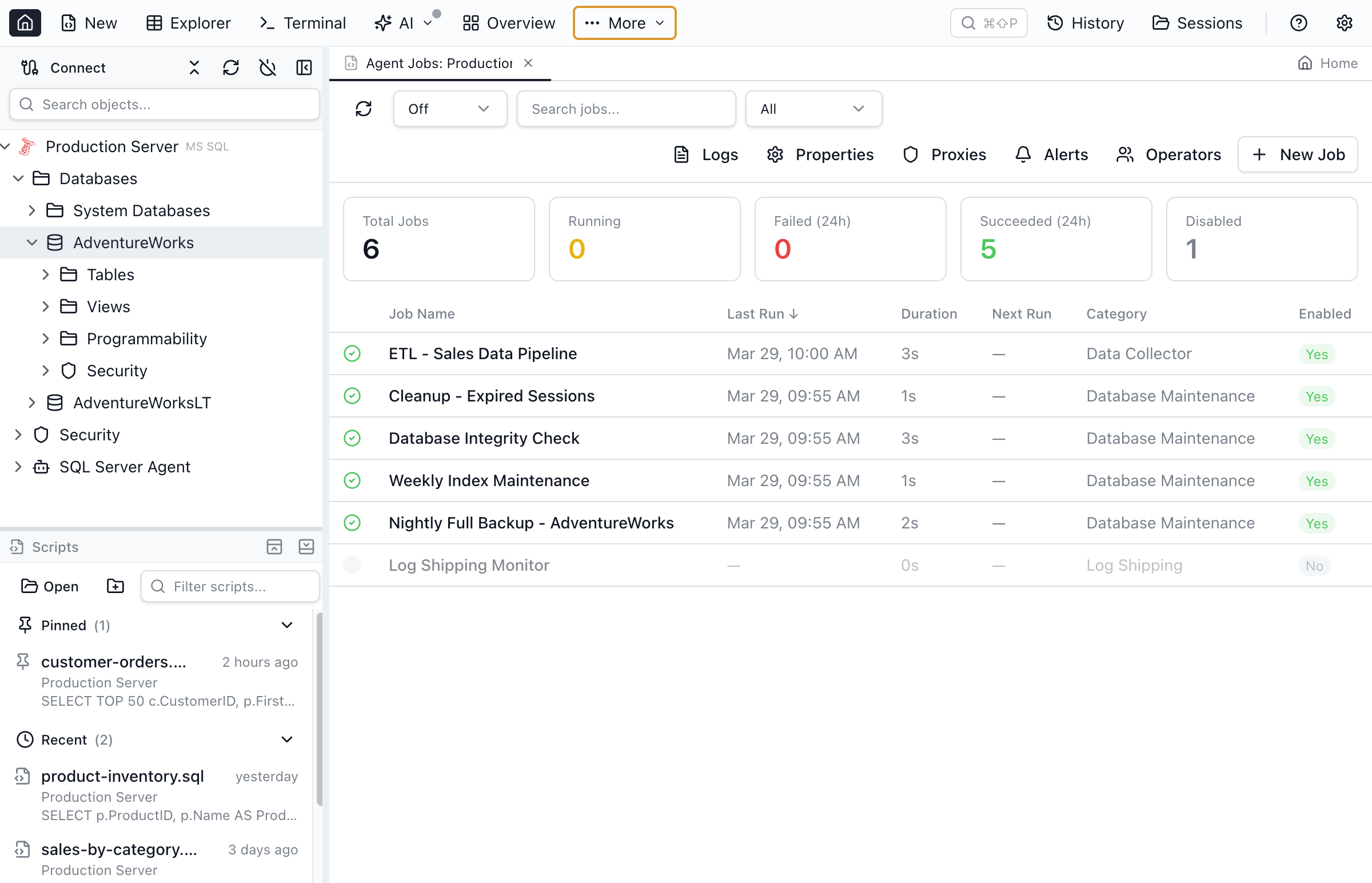
sysjobs / sysjobhistory / sysjobschedules query above.Jam SQL Studio's Agent Jobs Manager (beta) is that grid for macOS, Linux, and Windows: jobs with their last outcome and next run, a history timeline with per-step errors, run/stop/enable/disable from the context menu, a job editor with a script preview, and views for operators, alerts, proxies, and the Agent error log. The Agent Jobs documentation covers each view.
Quick Answers
Q: How do I list SQL Server Agent jobs with T-SQL?
A: Query msdb.dbo.sysjobs for the jobs, join msdb.dbo.sysjobhistory rows with step_id = 0 for each job's last outcome, and msdb.dbo.sysjobschedules for the next run date and time. run_status 0 means failed, 1 succeeded, 2 retry, 3 canceled, 4 in progress.
Q: How do I start or stop a SQL Server Agent job without SSMS?
A: Run EXEC msdb.dbo.sp_start_job @job_name = N'job name'; to start it (add @step_name to start at a specific step) and EXEC msdb.dbo.sp_stop_job @job_name = N'job name'; to stop it. Both work from any client that can connect to SQL Server, including sqlcmd on macOS and Linux.
Q: Why can't I see SQL Server Agent jobs?
A: Check three things: the edition (Express has no SQL Server Agent, and Azure SQL Database has no Agent at all), whether the Agent service is running (on Linux it is disabled by default), and your msdb role. Without sysadmin or one of SQLAgentUserRole, SQLAgentReaderRole, or SQLAgentOperatorRole you can't use Agent; SQLAgentUserRole only sees jobs it owns.
Q: Which job step types work on SQL Server on Linux?
A: Transact-SQL steps. Microsoft lists the CmdExec, PowerShell, Queue Reader, SSIS, SSAS, and SSRS subsystems, alerts, and managed backup as unsupported for SQL Server Agent on Linux.
Q: Can I manage SQL Server Agent jobs from a Mac with a GUI?
A: SSMS runs only on Windows, and Microsoft's VS Code MSSQL extension has no Agent support — Microsoft points Agent users to SSMS. Jam SQL Studio's Agent Jobs Manager (beta) runs on macOS, Linux, and Windows and issues the same msdb queries and procedures shown in this article.
Related
- SQL Server Agent Jobs Manager for Mac and Linux — the product page, with a feature comparison against SSMS and the VS Code MSSQL extension.
- Agent Jobs Manager documentation — every view and dialog.
- How to run SQL Server on a Mac — the Docker setup where the Linux limits above apply.