 Jam SQL Studio
 SQL Server Agent Jobs
on Mac and Linux
Monitor, create, and manage SQL Server Agent jobs without SSMS or a Windows machine. Jam SQL Studio brings Agent Jobs management to macOS and Linux — jobs, operators, alerts, proxies, and error logs.
Agent Jobs Manager is currently in beta: full create/edit/delete for jobs, operators, alerts, and proxies is live, with active polish ongoing.
The Problem: Agent Jobs Are Locked to Windows
SQL Server Agent is critical infrastructure for thousands of organizations. But every tool for managing it requires Windows.
SSMS is Windows-Only
SQL Server Management Studio is Microsoft’s full-featured Agent Jobs GUI, and it only runs on Windows. Microsoft ships no Agent GUI for macOS or Linux.
Azure Data Studio Was Retired
Azure Data Studio was retired on February 28, 2026, and its SQL Server Agent extension with it. Microsoft’s retirement notes name SSMS — Windows-only — as the replacement for that extension; the VS Code MSSQL extension has no Agent support.
T-SQL Works Everywhere, but Slowly
Without a GUI, Mac and Linux DBAs query msdb directly: sp_start_job, sp_add_jobstep, sysjobhistory. It works from any client — our T-SQL reference for Agent jobs lists the queries — but decoding integer dates and durations every time you check a failed job adds up.
Agent Jobs Management on Any OS
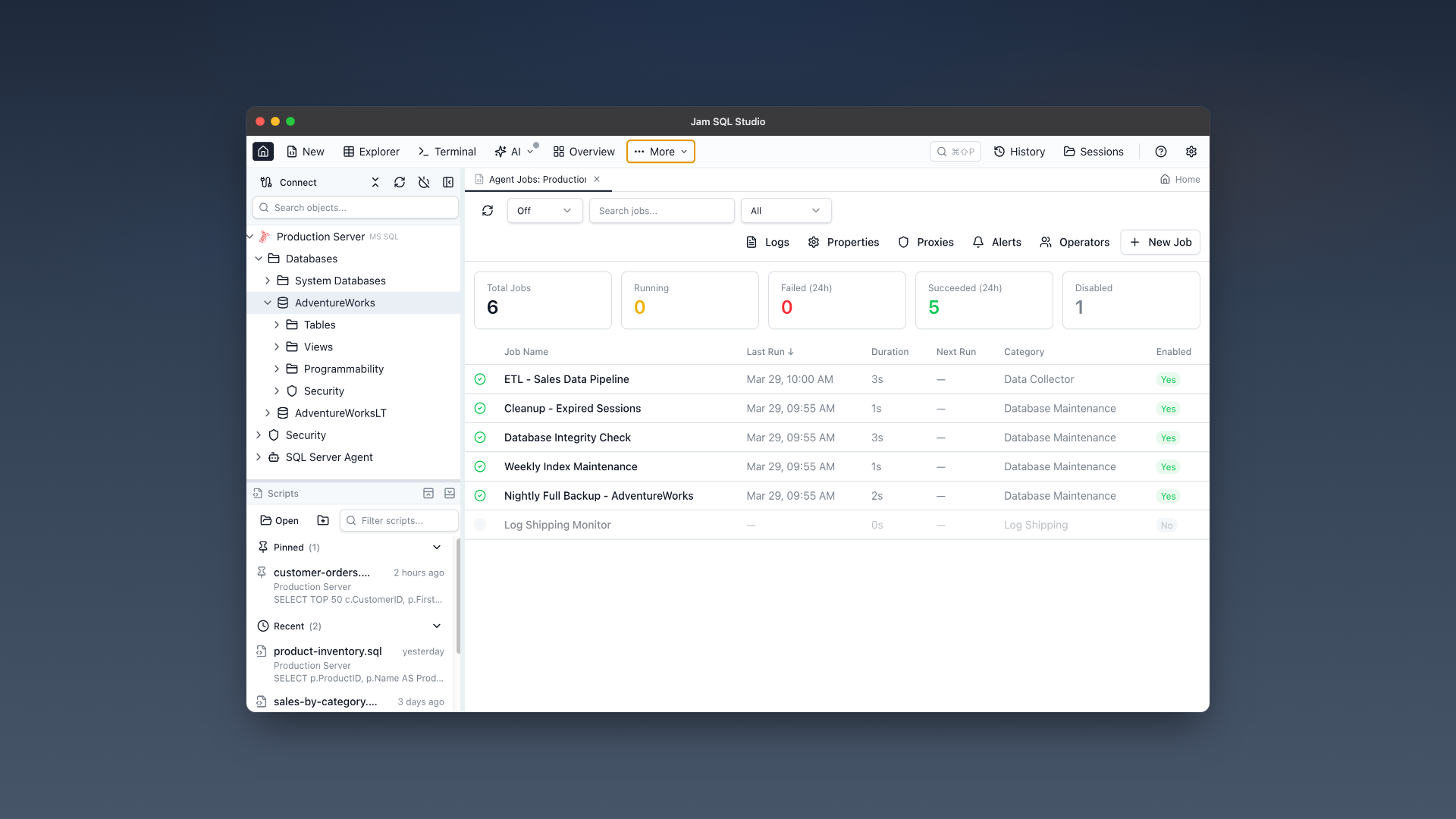
Jobs, schedules, history, operators, alerts, proxies, and error logs — the SQL Server Agent objects SSMS manages, on macOS, Linux, and Windows.
Jobs Dashboard
See all Agent jobs at a glance with status cards, color-coded grid, and real-time running indicators. Filter by status, search by name, sort by any column.
Job History & Timeline
Visual timeline of job executions with success/failure coloring, step-by-step breakdown, duration trends, and success rate statistics.
Run & Stop Jobs
Start jobs immediately with one click, stop running jobs with confirmation, and get toast notifications on completion. Auto-refresh polling while jobs are running.
Create & Edit Jobs
Full job editor with multi-step support (T-SQL, CmdExec, PowerShell, SSIS), schedule configuration, notifications, and DDL script preview before execution.
Operators
Create and manage notification operators with email, pager, and net send contact info. View which jobs and alerts notify each operator.
Alerts
Configure SQL Server event alerts, performance condition alerts, and WMI event alerts. Set response actions, operator notifications, and delay between responses.
Proxies
Manage proxy accounts for non-sysadmin job step execution. Assign credentials and configure subsystem access for each proxy.
Agent Properties & Error Logs
View Agent service status, configuration properties, and browse Agent error logs with search filtering and log file selection.
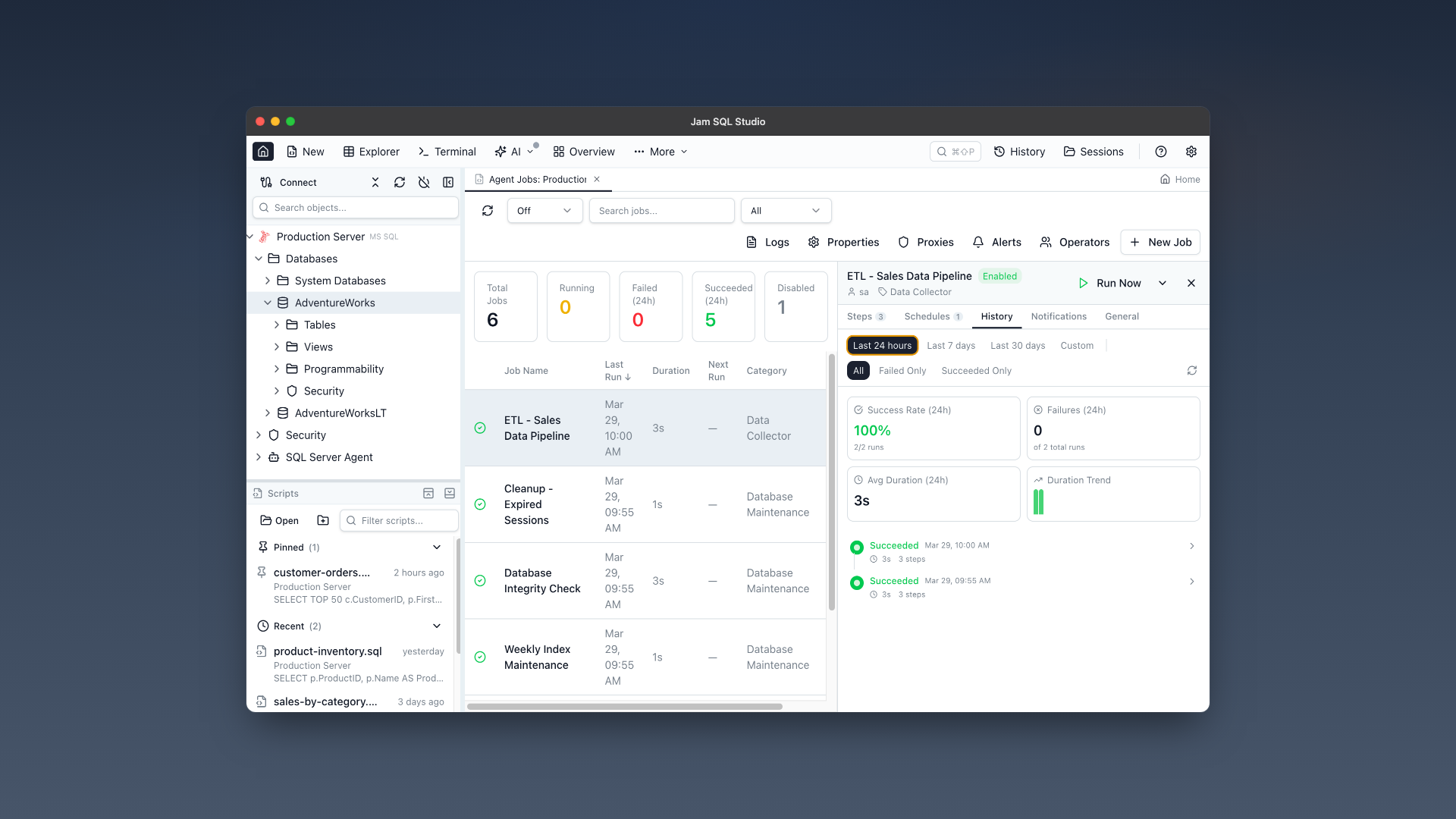
Job history timeline with step-by-step breakdown and success/failure coloring.
Feature Comparison
How Jam SQL Studio’s Agent Jobs Manager compares to Microsoft’s tools as of September 2026.
| Feature | SSMS 22 | VS Code MSSQL extension | Jam SQL Studio |
|---|---|---|---|
| Platform | Windows only | macOS, Windows, Linux | macOS, Linux, Windows |
| View Agent jobs | Yes | No (Microsoft points to SSMS) | Yes (dashboard + grid) |
| Run / stop jobs | Yes | No | Yes (with completion notifications) |
| Create / edit jobs | Yes | No | Yes (multi-step editor) |
| Job history | Log File Viewer grid | No | Visual timeline + stats |
| Operators, alerts, proxies | Yes | No | Yes (all three alert types) |
| Agent properties | Yes | No | Yes (read-only) |
| Agent error logs | Yes | No | Yes (with search) |
| Script before saving | Yes (Script button) | No | Yes (Preview Script) |
Get Started in 3 Steps
Connect to SQL Server
Add your SQL Server connection using the same credentials you use in SSMS. Supports SQL Authentication and Microsoft Entra ID.
Open Agent Jobs Manager
Click the toolbar button or expand "SQL Server Agent" in the Object Explorer. Your jobs, operators, alerts, and proxies are all there.
Built for DBAs on Any Platform
Mac & Linux DBAs
Stop RDP-ing into Windows to check a job. Monitor and manage Agent jobs directly from your Mac or Linux workstation.
Azure Data Studio Users
Azure Data Studio is retired, and Microsoft’s replacement for its Agent extension is SSMS on Windows. Jam SQL Studio keeps Agent jobs on the Mac or Linux machine you already use.
DevOps & SRE Teams
Quick job monitoring during incidents without needing SSMS access. View history, check failures, and restart jobs from any platform.
Frequently Asked Questions
Can I manage SQL Server Agent Jobs on Mac?
Yes. Jam SQL Studio provides a full SQL Server Agent Jobs Manager on macOS (both Apple Silicon and Intel). You can monitor jobs, view history, create and edit jobs, manage operators, alerts, and proxies — the core Agent tasks you would otherwise open SSMS for.
Is there a way to view SQL Server Agent jobs without SSMS?
Yes. Jam SQL Studio is a cross-platform SQL IDE with a full Agent Jobs Manager. It works on Mac, Linux, and Windows. You can view all jobs with status, last run outcome, next scheduled run, and execution history — all without needing SSMS.
How do I run SQL Server Agent jobs from Mac or Linux?
Install Jam SQL Studio, connect to your SQL Server, and open the Agent Jobs Manager from the toolbar. Right-click any job and select "Run Now" to start it. Real-time status updates show when it completes.
Does Azure Data Studio support SQL Server Agent?
Azure Data Studio was retired on February 28, 2026. Microsoft documented its SQL Server Agent extension (a preview) with three key actions: listing jobs, viewing job history, and starting or stopping jobs. Microsoft now names SSMS, which runs only on Windows, as the replacement for that extension; the VS Code MSSQL extension has no Agent support.
What SQL Server editions support Agent Jobs?
SQL Server Agent is available in Standard, Enterprise, and Developer editions and in Azure SQL Managed Instance. Express Edition and Azure SQL Database have no Agent. Jam SQL Studio detects Express Edition and shows a message instead of an empty job list.
Does SQL Server Agent work with SQL Server in Docker on a Mac?
Yes, once it is enabled: SQL Server on Linux, including the Docker image, ships Agent disabled, so start the container with MSSQL_AGENT_ENABLED=true or run mssql-conf set sqlagent.enabled true. On Linux, Microsoft supports Transact-SQL job steps but lists the CmdExec, PowerShell, SSIS, SSAS, and SSRS subsystems and alerts as unsupported.
What permissions do I need to manage Agent Jobs?
You need access to the msdb database. sysadmin gets full access. SQLAgentOperatorRole can start/stop all local jobs. SQLAgentReaderRole can view all jobs. SQLAgentUserRole can only see and start their own jobs. The UI adapts based on your permissions.
Is Jam SQL Studio free?
Yes. The Agent Jobs Manager is included in the free tier. Download Jam SQL Studio for Mac, Linux, or Windows and start managing your Agent jobs today.
Does Jam SQL Studio support creating SQL Server Agent jobs?
Yes. Jam SQL Studio includes a full job editor with support for multi-step jobs (T-SQL, CmdExec, PowerShell, SSIS, and more), schedule configuration (daily, weekly, monthly), notifications, and DDL script preview. You can create, edit, and delete jobs entirely from Mac or Linux.
What SQL Server Agent features does Jam SQL Studio support?
Jam SQL Studio covers the SQL Server Agent objects you work with day to day: Jobs (with multi-step editor, schedules, and history), Operators (notification contacts), Alerts (event, performance condition, and WMI alerts), Proxies (security contexts for job steps), Agent Properties, and Error Logs.
Is Jam SQL Studio a replacement for SSMS on Mac?
Jam SQL Studio is a cross-platform SQL IDE that covers many everyday SSMS workflows, including Agent Jobs management, query editing with IntelliSense, execution plans, schema compare, data compare, table designer, and more. For DBAs who need Agent Jobs on Mac or Linux, it covers Agent Jobs on platforms SSMS does not run on.
Stop RDP-ing Into Windows to Check a Job
Download Jam SQL Studio and manage SQL Server Agent jobs right on your Mac or Linux workstation.