 Jam SQL Studio
 Published: 2026-08-25
How to Import Excel into a SQL Database: 3 Ways (SQL Server, PostgreSQL, MySQL)
There is no single "import Excel" button in SQL. What there is: a converter that turns a sheet into INSERT statements, a desktop client that maps a workbook onto a real table, and each engine's own bulk loader. They are good at genuinely different things, and picking the wrong one is how a fifteen-minute job becomes an afternoon. This guide walks all three — with the Excel-side traps that break imports before any SQL runs.
The short version
| Browser converter | Import wizard | Native bulk loader | |
|---|---|---|---|
| Best for | A one-off sheet, a seed script, a test fixture | Loading into a live table when the mapping is the hard part | Scripted, scheduled, or very large loads |
Reads .xlsx directly | Yes | Yes | Only SQL Server, only on Windows, only with the ACE provider |
| Needs a DB connection | No | Yes | Yes |
| Size ceiling | 5,000 rows per sheet, with a warning | 100 MB workbook; 100,000 rows per run on the free Personal licence | The file and the server |
| Per-column control | Inferred types you edit by hand afterwards | Include / exclude, target column, type, date order, fixed value | Column list, format file, SET expressions |
| Bad rows | Your problem — you run the SQL | Abort and roll back, or skip with an error report | MAXERRORS/ERRORFILE, warnings, or hard abort |
| Repeatable next month | Re-upload, re-copy | Re-run the wizard | It is already a script |
First: what Excel has already done to your data
Most failed spreadsheet imports fail on the Excel side, before a single statement runs. These are the ones that actually show up:
- Leading zeros are gone. A zip code or SKU typed into a numeric cell is stored as a number:
00742became742the moment it was entered. No import tool can recover it. Fix the column format in Excel (or re-source the data) before exporting. - Dates are serial numbers wearing a costume. Excel stores a date as a day count and renders it through the cell's format. Export to CSV and you get the rendering —
3/1/24on a US machine,01/03/2024on a UK one, from the same workbook. Either format the column asyyyy-mm-ddbefore exporting, or import from the.xlsxitself, where the cell still carries a real date value. - Formulas export their last cached result. The file stores the value Excel computed when it was last saved. If a formula last evaluated to
#DIV/0!or#N/A, that error text is what lands in the CSV — and no numeric column will take it. - Long numbers are already rounded. Excel keeps 15 significant digits. A 16-digit payment card number, or a 19-digit snowflake-style id, typed into a numeric cell has had its trailing digits quietly zeroed — and a 16-digit value typically renders as
1.23457E+15on export, which is its own kind of surprise. These belong in text columns from the start. - Merged cells leave holes. The value lives in the top-left cell of the merge; every other cell in the block is empty. A "grouped" report sheet full of merges is not a table, and importing it produces a table full of NULLs.
- The sheet ceiling is 1,048,576 rows × 16,384 columns. If someone handed you a workbook built from a bigger extract, Excel already truncated it. Go back to the source.
- "CSV" is not one format. Excel's plain CSV (Comma delimited) writes the system ANSI code page, which mangles anything outside it; CSV UTF-8 writes UTF-8 with a byte-order mark. And in locales where the list separator is a semicolon, Excel writes semicolons, not commas — while your
FIELDTERMINATOR = ','keeps insisting otherwise.
The last one is the single best argument for skipping the CSV round-trip entirely when you can: an .xlsx cell carries its own type and its own text, with no locale, delimiter, or code page in between.
Way 1 — The free browser converter (one-off, no connection)
The fastest path when you have a sheet and no particular urge to connect a client to a database: drop the workbook into the Excel to SQL converter and copy out either a CREATE TABLE script, the INSERT statements, or both. Concretely, what it does:
- Parses the workbook in the browser with ExcelJS, vendored on the page rather than pulled from a CDN. The file is never uploaded; disconnect after the page loads and it keeps working.
.xlsxand.xlsmonly. The legacy binary.xlsfrom Excel 97–2003 is not supported — open it and re-save as.xlsxfirst.- Multi-sheet workbooks get a sheet picker; switching sheets regenerates the SQL without re-uploading.
- Reads each cell's real type rather than re-guessing from displayed text, then scans every value in a column to pick the narrowest type that fits:
INTpromoted toBIGINTpast the 32-bit range,DECIMAL(p,s)sized from the widest value,DATEvs. the engine's datetime type depending on whether a time component exists, and a text bucket (50 / 100 / 255 / 1000, thenMAX/TEXT/CLOB) sized to the longest value. - Emits for SQL Server, PostgreSQL, MySQL, Oracle, or SQLite, with each engine's identifier quoting — which matters more than it sounds, because spreadsheet headers are full of
First NameandOrder #.
The honest limits. Output is capped at 5,000 data rows per sheet; past that it emits the first 5,000 and says so rather than truncating quietly. INSERT rows are batched 500 per statement — SQL Server hard-caps a single VALUES list at 1,000 row expressions (error 10738), and MySQL statements that big start bumping into max_allowed_packet. Oracle before 23ai has no multi-row VALUES at all, so it gets one INSERT per row. And inference is inference: no primary keys, no foreign keys, no indexes are guessed. Treat the DDL as a first draft.
Use it when the sheet is small, you want a seed script or a test fixture in version control, or you are working somewhere you would rather not point a database client at anything. Skip it when the load repeats, the file is large, or the target table already exists with types you have to honour.
Way 2 — A desktop import wizard (repeatable, into a live table)
When the destination is a real table on a real server, the hard part stops being "turn cells into SQL" and becomes mapping, coercion, and what to do about the eleven rows that will not convert. That is the job of an import wizard. Jam SQL Studio's Data Import is a workspace tab with four steps — Source · Target · Columns · Import — and behaves identically across SQL Server, PostgreSQL, MySQL, Oracle, and SQLite. (It still carries a Beta badge; the numbers and behaviours below are what it does today.)
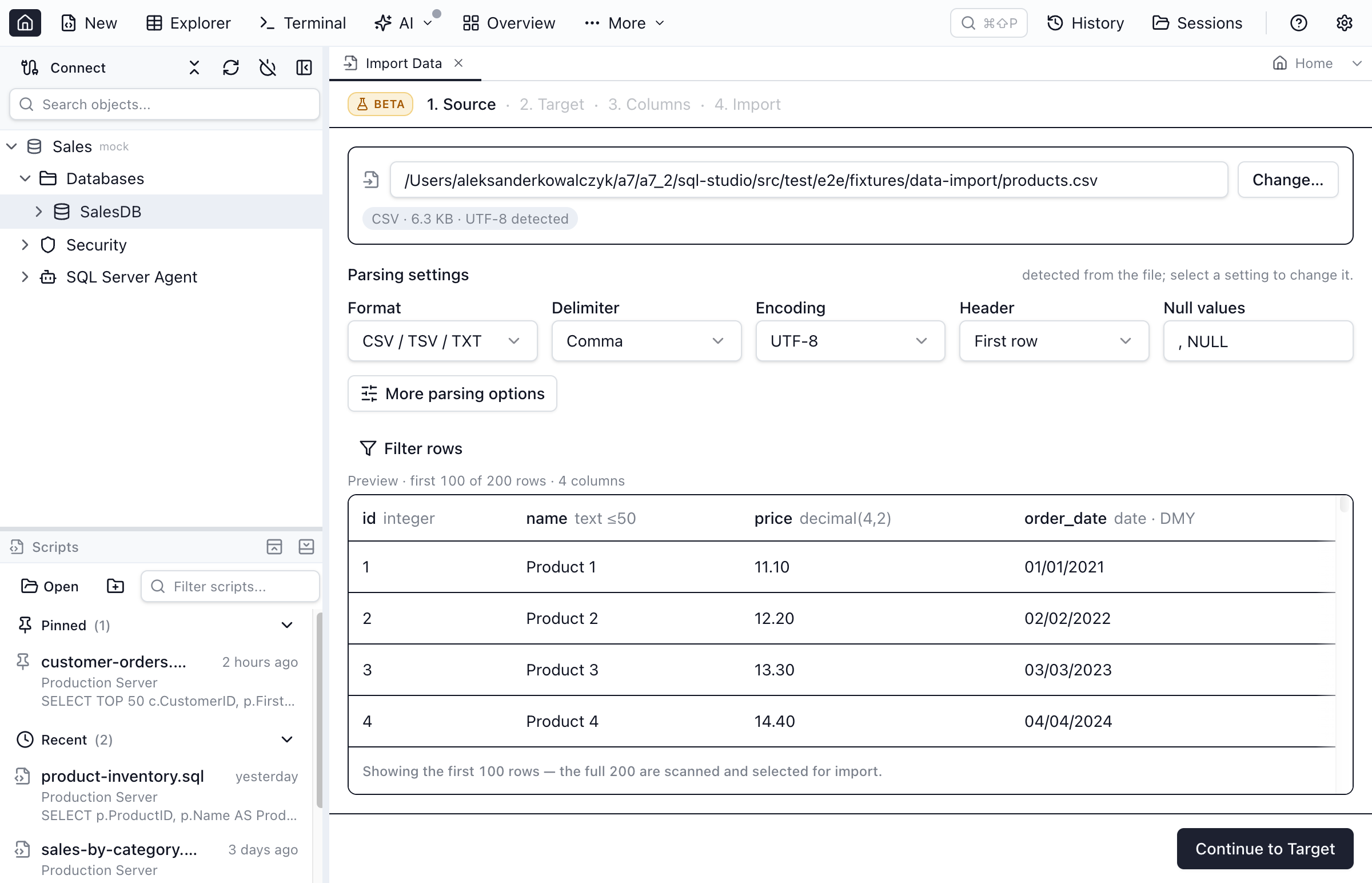
Source — and the three Excel-shaped controls that matter
Pick the workbook and it is parsed immediately. Format reads Excel (XLSX); CSV / TSV / TXT and JSON / NDJSON come through the same step. Three controls exist specifically because spreadsheets are messy:
- Sheet. A picker listing every worksheet; the first is selected by default, and switching re-runs the analysis against the new sheet.
- Header — First row or No header. Delimited files get header auto-detection; Excel assumes a header unless you say otherwise.
- Skip lines before header. The answer to the export nobody asked for: a title row, a blank, a "Generated 2026-08-19" line, then the actual column names. Set it to 3 and the reader skips the first three non-empty rows before reading headers. There is no A1-style range picker — if your data starts at
C7and stops before columnQ, delete the surroundings in Excel first.
The encoding picker (UTF-8, UTF-16 LE/BE, Latin-1, Windows-1250/1252, ISO-8859-2, GBK, Shift-JIS) is offered for delimited text and hidden for xlsx, because an .xlsx is a zip of XML with the encoding declared inside — there is nothing to guess. For CSV, detection is BOM-based plus that manual picker, not universal charset sniffing; a mojibake heuristic suggests you re-pick but never silently reinterprets your data.
The preview grid shows the first 100 rows, sortable, and a Filter rows control narrows the file by condition — with a scope segment reading Preview only or Preview + import, so you can explore without accidentally changing what gets loaded.
Type inference over the whole file, not a sample
This is the part that earns the wizard its keep against OPENROWSET. Every column is evaluated as a streaming lattice of candidate types — boolean, int32, int64, decimal, float64, date and timestamp in ISO / DMY / MDY, timestamptz, time, uuid, json — across every row in the file, keeping a failure count and up to three row-numbered example values per candidate. The narrowest survivor wins. Contrast with the ACE provider's 8-row guess, which quietly NULLs the disagreeing values at row 900.
Better still: a column where both DMY and MDY survive is not silently resolved. 01/03/2024, 05/06/2024, 11/12/2024 are all valid either way, so the wizard refuses to guess and raises a blocking banner until you pick a Date order. That is precisely the Excel trap from the first section, caught before it becomes three months of transposed dates. Because the failure counts are already computed, changing a type or a date order costs zero rescans.
Target
Two modes, and only two: Create new table or Add rows to existing table. New-table mode pre-fills the name from the filename, infers each column's engine-native type, and shows a live schema preview — names, types, generated primary key — before you commit. If the name already exists it says so and offers a one-click switch to appending. Existing-table mode gives a searchable table picker and a read-only view of the schema you are appending to.
The destination cascade is Connection → Database → Schema, with the schema field hidden on SQLite and MySQL and relabelled Schema (user) on Oracle. Azure Data Explorer connections are read-only and never appear.
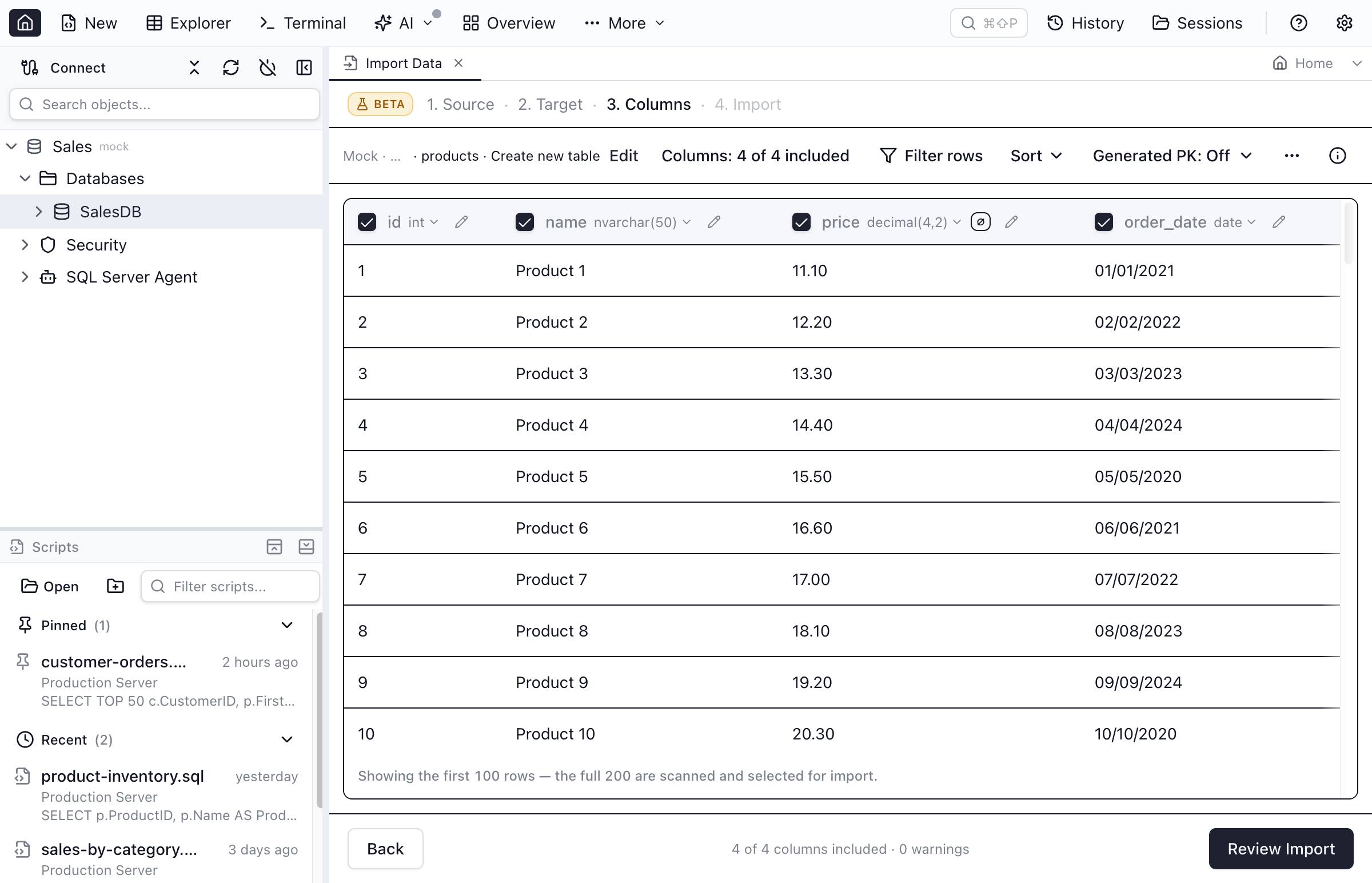
Columns
In new-table mode, clicking a column header opens an editor with the column name, the type (per-engine presets plus free-text for anything exotic), Date order for temporal columns, and checkboxes for Nullable, Primary key, and Include in import. Unchecking include is how you drop a column.
In existing-table mode it becomes a mapping problem. Auto-matching lowercases both names and strips everything that is not a letter or digit, so First Name finds firstname and Order # finds order — which is exactly the shape spreadsheet headers arrive in. Each source column is claimed at most once. A target with no source shows — Not mapped — and can take Use fixed value… instead — a batch id, an import timestamp, a source-system tag — stored as raw text end to end, so a 19-digit id never round-trips through a JavaScript number. A coverage chip in the command bar counts the state out loud: 7 of 9 covered · 2 need a value, then All 9 covered.
Columns the database fills in are marked unavailable with the reason spelled out — Computed by the database, Generated identity — filled by the database, SQLite rowid — filled by the database — rather than failing at row 40,000. So are fixed values that cannot work: A repeated constant would violate the key on a primary or unique column with more than one row.
Import
The If a row fails choice is made before anything runs: Stop at the first error (roll back the transaction and report the failing row — see the SQLite caveat below) or Skip invalid rows (import the good ones; every skipped row lands in a CSV error report with columns row_number, column, value, reason, budgeted at 10,000 rows). If a mapped column is a key, each option gains a line saying what a duplicate key will do.
Under the hood the run holds one dedicated connection on four of the five engines and writes typed, parameterized batches inside a single transaction — SQL Server's new-table path uses real bulk copy; PostgreSQL sizes each batch to stay under the 65,535 bind-parameter cap; MySQL respects both the bind cap and an estimated max_allowed_packet budget; SQLite replays one prepared statement per row. Literal SQL appears in exactly one place: Generate script instead of executing, which hands you DDL plus INSERT statements and writes nothing.
SQLite is the exception to both of those. It has no connection pool — the app owns a single shared handle and an import borrows that rather than opening its own. And when the file happens to be open on the bundled sql.js fallback rather than better-sqlite3, every write rewrites the whole database, so BEGIN/COMMIT buy no atomicity at all: the session reports supportsRollback: false and the runner declines to claim a rollback it cannot perform. Stop at the first error still stops, but rows already written stay written. On better-sqlite3 — the normal case — rollback is real.
Existing-table mode can Empty the table first (TRUNCATE), behind a confirmation naming what it is about to delete — the actual count when the table's row count is already known, otherwise just all existing rows. On MySQL and Oracle only, that confirmation also warns that the truncate cannot be rolled back if the import then fails.
The honest limits
- An
.xlsxis loaded into memory in full, capped at 100 MB. Over that you get a straight refusal telling you to export to CSV. Delimited files are genuinely streamed; workbooks are not, and the cap exists to bound the memory that costs. (The streaming reader was tried and abandoned: on workbooks whose zip stores shared strings and styles after the worksheet — which Excel-adjacent writers routinely produce — it returnednullfor text cells and raw serial numbers for dates, with no error at all. A slower correct parse beats a fast wrong one.) - Formulas are never evaluated — the cached result is used, and a cell with no cached result, or one holding
#N/A/#REF!, becomes NULL. .xlsis not supported. Only OOXML.xlsx. Re-save first.- Existing-table mode is append-only. No upsert, no update-if-exists, no skip-if-key-present — the review card says Append only — do not update existing rows rather than implying otherwise.
- A new table's
CREATEruns outside the row transaction on every engine. Cancel or fail partway and an empty table is left behind; a Delete partial table action cleans it up, but that is cleanup, not rollback. - PostgreSQL and Oracle identity columns are not offered as targets. The schema snapshot cannot tell
GENERATED ALWAYSfromBY DEFAULT, so it under-offers rather than failing at insert. SQL Server is the only engine whereSET IDENTITY_INSERTis issued for you. - The free Personal licence caps a run at 100,000 rows. Bigger loads need Pro — or the native bulk loader below, which has no such limit.
After a successful new-table import — not on an existing-table append, and not on a run that failed — there is one step most tools skip: an optional card offering loose foreign key, JSON, and enum declarations inferred from what just landed. Spreadsheet data is exactly where those show up — a status column with six distinct values, an id column that clearly points at the lookup sheet you imported ten minutes ago — and declaring them costs nothing and changes no schema. Import another file then resets the file while keeping the destination and your column overrides, which is what makes "the same report, every Monday" bearable.
Use it when the load repeats, the target already exists, or you need to see the mapping before anything is written. Skip it when the load belongs in a deployment pipeline — that is what the next section is for.
Way 3 — Native SQL, engine by engine
The fastest and most scriptable option, and the only one that belongs in a scheduled job. The catch: with one Windows-only exception, no SQL engine reads .xlsx. Save the sheet as CSV first — CSV UTF-8, not plain CSV — and re-read the Excel gotchas above, because the CSV round-trip is where they all cash in.
SQL Server: read the workbook directly (Windows only)
SQL Server is the only one of the five that can query an .xlsx without an intermediate file, via the ACE OLE DB provider:
-- One-time, requires sysadmin. Understand the exposure before enabling this.
EXEC sp_configure 'show advanced options', 1;
RECONFIGURE;
EXEC sp_configure 'Ad Hoc Distributed Queries', 1;
RECONFIGURE;

-- The trailing $ on the sheet name is required.
SELECT *
INTO   dbo.sales_import
FROM   OPENROWSET(
         'Microsoft.ACE.OLEDB.12.0',
         'Excel 12.0 Xml;HDR=YES;IMEX=1;Database=C:\data\sales.xlsx',
         'SELECT * FROM [Sheet1$]');
Four things go wrong here, in roughly this order:
- The path is the server's, not yours.
C:\data\sales.xlsxis resolved on the machine running SQL Server, under the service account. Your laptop'sC:\is not involved. - The ACE provider must be installed on that server, at matching bitness — a 64-bit instance needs the 64-bit Access Database Engine redistributable. This is the source of the classic "Cannot create an instance of OLE DB provider 'Microsoft.ACE.OLEDB.12.0'".
- There is no ACE on Linux or Azure SQL Database. If your instance is either, this route does not exist; go to CSV.
IMEX=1is doing real work — but it is a hint, not a guarantee. ACE decides each column's type by sampling the first 8 rows (theTypeGuessRowsregistry value) and hands back NULL for later values that disagree — so a numeric column with a strayN/Aat row 900 silently loses it, with no error.IMEX=1usually gets mixed columns back as text instead, but the actual behaviour also depends on the provider'sTypeGuessRowsandImportMixedTypesregistry settings on the server. Spot-check a suspect column after the load rather than assuming.
SQL Server: BULK INSERT from CSV
CREATE TABLE dbo.sales_import (
    order_id   INT            NOT NULL,
    customer   NVARCHAR(200)  NULL,
    order_date DATE           NULL,
    amount     DECIMAL(12, 2) NULL
);

BULK INSERT dbo.sales_import
FROM 'C:\data\sales.csv'
WITH (
    FORMAT          = 'CSV',     -- SQL Server 2017 (14.x) and later
    FIELDQUOTE      = '"',       -- SQL Server 2017 (14.x) and later
    CODEPAGE        = '65001',   -- UTF-8; pair with Excel's "CSV UTF-8" export
    FIRSTROW        = 2,         -- see the caveat below
    FIELDTERMINATOR = ',',
    ROWTERMINATOR   = '0x0a',    -- LF; omit for Windows-authored CRLF files
    TABLOCK
);
Notes that are easy to lose an hour to:
FORMAT = 'CSV'andFIELDQUOTEarrived in SQL Server 2017. On 2016 and earlier you need a format file, or a CSV with no quoted fields at all.- Microsoft's own documentation is blunt that
FIRSTROWis not a header-skip feature — skipped rows are counted by field terminators, not validated. It works for a simple one-line header; it will not save you from a header that contains an embedded newline. - The default
ROWTERMINATORis'\r\n'. Excel on Windows writes CRLF, so leave it out; a file that has been through a Mac, a Linux box, or Git with line-ending normalization needs'0x0a'. - Permissions are
INSERTplusADMINISTER BULK OPERATIONS. And the file, again, is read by the server.
To load a file that lives on your machine instead, use bcp, which runs client-side:
bcp dbo.sales_import in sales.csv \
  -S localhost -d salesdb -T \
  -c -t "," -F 2 -C 65001
With one real caveat: bcp in character mode has no FIELDQUOTE equivalent. -t "," splits on every comma, including the ones inside quoted cells — so a file with "Acme, Inc." in it, exactly the case the BULK INSERT snippet above handles correctly, will land shifted by a column. If your CSV has quoted fields containing the delimiter, get the file somewhere the server can read it and use BULK INSERT … FORMAT = 'CSV', or load it through a client that parses CSV properly.
PostgreSQL: COPY, and why you probably want \copy
CREATE TABLE sales_import (
    order_id   integer NOT NULL,
    customer   text,
    order_date date,
    amount     numeric(12, 2)
);
From psql, on the client machine, needing no special role:
\copy sales_import FROM 'sales.csv' WITH (FORMAT csv, HEADER match, ENCODING 'UTF8')Server-side, reading a file the server can see:
COPY sales_import
FROM '/var/lib/postgresql/import/sales.csv'
WITH (
    FORMAT     csv,
    HEADER     true,
    ENCODING   'UTF8',
    FORCE_NULL (amount, order_date)
);\copyvsCOPYis the distinction that trips everyone.\copyis a psql meta-command that streams the file over the connection from the client.COPY … FROM 'file'makes the server process open the path, and requires superuser or thepg_read_server_filesrole. If you are importing a spreadsheet from a laptop, you want\copy.HEADER match(PostgreSQL 15+) is worth the upgrade. It verifies that the CSV's header names and count match the table, and errors out if they do not — instead ofHEADER true, which just discards line one and cheerfully loads your columns in the wrong order when someone reorders the spreadsheet.FORCE_NULLis what fixes empty Excel cells. Excel writes an empty cell as an empty field; if the column is quoted, that arrives as"", which CSV mode treats as an empty string and anumericcolumn rejects.FORCE_NULLon those columns turns it into NULL. PostgreSQL 16 also added aDEFAULToption for a sentinel string meaning "use the column default".
MySQL: LOAD DATA
CREATE TABLE sales_import (
    order_id   INT NOT NULL,
    customer   VARCHAR(200),
    order_date DATE,
    amount     DECIMAL(12, 2)
);

LOAD DATA LOCAL INFILE 'sales.csv'
INTO TABLE sales_import
CHARACTER SET utf8mb4
FIELDS TERMINATED BY ',' OPTIONALLY ENCLOSED BY '"'
LINES TERMINATED BY '\r\n'
IGNORE 1 LINES
(order_id, customer, @order_date, @amount)
SET order_date = STR_TO_DATE(NULLIF(@order_date, ''), '%m/%d/%Y'),
    amount     = NULLIF(@amount, '');
The user-variable trick in the column list is the whole reason to reach for LOAD DATA over a client: read the raw field into @order_date, then convert it in SET. That is where you undo Excel's locale-formatted dates and its empty-string-instead-of-NULL habit, without touching the file.
local_infilehas defaulted to OFF since MySQL 8.0.2, and the client library opts in separately. Both sides must agree:SET GLOBAL local_infile = 1;on the server,mysql --local-infile=1on the client. Getting exactly one of them right produces an error that reads like a permissions problem.- Without
LOCALthe statement needs theFILEprivilege and the file must live inside the directory named bysecure_file_priv(and if that variable is NULL,LOAD DATAfrom a file is disabled outright). LOCALdowngrades data errors to warnings and keeps loading. That is convenient right up until it isn't: always runSHOW WARNINGS;afterwards and compare the row count you expected against the row count you got.- Excel's CSV UTF-8 writes a byte-order mark. Because it sits on line one,
IGNORE 1 LINESdisposes of it along with the header. If you are loading a headerless file, strip the BOM first or your first column's first value carries three invisible bytes.
Oracle and SQLite, briefly
- Oracle — SQL*Loader (
sqlldr) with a control file, or an external table over the CSV. Neither reads.xlsx. WatchNLS_DATE_FORMAT: a date literal that works in your session may not work in the job's. - SQLite — in the
sqlite3CLI,.import --csv --skip 1 sales.csv sales_importappends to an existing table. If the table does not exist, drop the--skip 1and.importcreates it using the header row for column names — every column typedTEXT, which is usually not what you want for anything you plan to sort or aggregate.
So which one?
- One sheet, one time, and you want the SQL in a file. Browser converter. Thirty seconds, nothing installed, nothing connected.
- Into a live table, and you need to see the mapping first. Import wizard. The value is not the insert — it is the type preview, the per-column overrides, and knowing in advance what happens to the rows that will not convert.
- It runs again next month without you. Native bulk loader. Write it once, put it in the repo, and accept the CSV round-trip as the price.
A pattern worth naming: do the first load with a wizard and the repeat loads natively. The wizard is where you discover that Order # has an embedded newline on row 812 and that the amount column has three values formatted as text. Once you know, the BULK INSERT or \copy is easy to write — and the wizard's Generate script instead of executing toggle will even hand you the DDL to start from.
Quick Answers
Short answers to the questions that come up most often.
Q: How do I import an Excel file into SQL Server?
A: Three practical routes. For a one-off sheet, convert it to INSERT statements in the browser and run them. For a repeatable load into a live database, use a client with an import wizard that maps columns and validates types. For large or scheduled loads, save the sheet as CSV and use BULK INSERT or bcp — or, if SQL Server runs on Windows and the ACE OLE DB provider is installed there, read the .xlsx directly with OPENROWSET. Azure SQL Database and SQL Server on Linux have no ACE provider, so CSV is the only native path there.
Q: Can PostgreSQL or MySQL read an .xlsx file directly?
A: No. Neither engine can open an Excel workbook. COPY and LOAD DATA read delimited text, so an .xlsx has to become CSV first — either by exporting from Excel, or by having a client tool parse the workbook and send rows over the connection. SQL Server is the only one of the five engines with a native way to query a workbook, and only through the ACE OLE DB provider on Windows.
Q: Why do my leading zeros and dates break when I import from Excel?
A: Because Excel stores a display format, not the text you see. A zip code typed into a numeric cell loses its leading zeros before the file is ever saved. A date is stored as a serial number and exported using whatever format the cell had, so the same workbook produces 3/1/24 on a US machine and 01/03/2024 on a UK one. Format the column as text or as an unambiguous yyyy-mm-dd date before exporting, or import from the .xlsx itself, where each cell still carries a real type.
Q: How many rows can I import from a spreadsheet?
A: An Excel worksheet holds at most 1,048,576 rows and 16,384 columns, so anything larger was already truncated before you got it. The free browser converter on this site caps output at 5,000 data rows per sheet and warns instead of silently cutting. Jam SQL Studio's import wizard reads workbooks up to 100 MB and imports up to 100,000 rows per run on the free Personal licence. A native bulk loader is bounded only by the file and the server.
Q: Should I use BULK INSERT, COPY, or an import wizard?
A: Use the native bulk loader when the load is scripted, scheduled, or measured in millions of rows — it is the fastest path and the only one that belongs in a deployment pipeline. Use an import wizard when the mapping is the hard part: unfamiliar column names, types you want to review before the table exists, rows you expect to fail. Use the browser converter when you just need a seed script and do not want to connect anything to anything.
Q: Why does LOAD DATA LOCAL INFILE fail with an error about local_infile?
A: The local_infile server system variable has defaulted to OFF since MySQL 8.0.2, and the client library has to opt in separately. Both sides must agree: set GLOBAL local_infile = 1 on the server, and start the client with --local-infile=1. Without LOCAL, the statement needs the FILE privilege and the file must sit inside the directory named by secure_file_priv — which is why LOCAL is usually the easier route from a laptop.
The takeaway
"Import Excel into SQL" is three different jobs wearing one sentence. The converter is for getting SQL out of a sheet. The wizard is for getting a sheet into a table you have to live with afterwards. The bulk loader is for doing it again next month without you. Pick by which of those you are actually doing — and spend the first five minutes on the spreadsheet, not the SQL, because that is where the import was going to fail anyway.
Spreadsheet in, Table out
Import .xlsx, CSV, and JSON into SQL Server, PostgreSQL, MySQL, Oracle, or SQLite — column mapping, type preview, error policy, and a generate-script escape hatch. Free for personal use.